https://github.com/stonerl/thaw
Menu bar manager for macOS 26
https://github.com/stonerl/thaw
macos macos-app menu-bar menubar menubar-app status-bar statusbar swift swiftui utility
Last synced: 2 months ago
JSON representation
Menu bar manager for macOS 26
- Host: GitHub
- URL: https://github.com/stonerl/thaw
- Owner: stonerl
- License: gpl-3.0
- Created: 2026-01-29T18:26:51.000Z (6 months ago)
- Default Branch: development
- Last Pushed: 2026-05-26T02:16:50.000Z (3 months ago)
- Last Synced: 2026-05-26T04:14:54.558Z (3 months ago)
- Topics: macos, macos-app, menu-bar, menubar, menubar-app, status-bar, statusbar, swift, swiftui, utility
- Language: Swift
- Homepage:
- Size: 26.8 MB
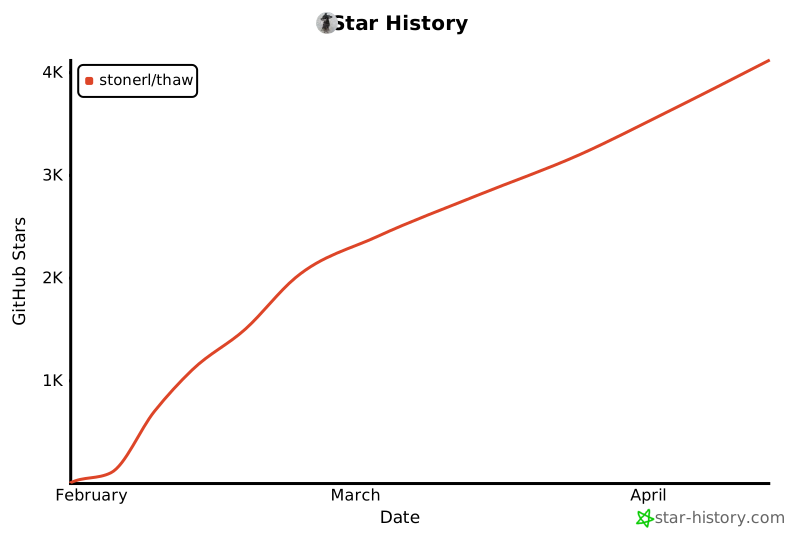
- Stars: 6,197
- Watchers: 18
- Forks: 137
- Open Issues: 30
-
Metadata Files:
- Readme: README.md
- Contributing: .github/CONTRIBUTING.md
- Funding: .github/FUNDING.yml
- License: LICENSE
- Code of conduct: .github/CODE_OF_CONDUCT.md
- Security: .github/SECURITY.md
Awesome Lists containing this project
README

Thaw
Thaw is a powerful menu bar management tool for macOS 26. While its primary function is hiding and showing menu bar items, it aims to cover a wide variety of additional features to make it one of the most versatile menu bar tools available.


[](https://github.com/stonerl/Thaw/releases/latest)
[](https://github.com/stonerl/Thaw/actions/workflows/ci.yml)


[](https://github.com/sponsors/stonerl)
[](https://discord.gg/5cnKkKbMFd)
[](LICENSE)
> [!NOTE]
> **Thaw** is a fork of [Ice](https://github.com/jordanbaird/Ice) by Jordan Baird.
> As the original project appears to be inactive, Thaw aims to keep the project alive fixing bugs, ensuring compatibility with the latest macOS releases, and eventually implementing the remaining roadmap features.
## Install
### Manual Installation
Download the `Thaw_1.x.x.zip` file from the [latest release](https://github.com/stonerl/Thaw/releases/latest) and move the unzipped app into your `Applications` folder.
### Homebrew
Install the latest stable release:
```sh
brew install thaw
```
To get the latest beta (or stable, whichever is newer):
```sh
brew install thaw@beta
```
## Translations
Thaw is currently available in the following languages:
Language
Flag
Translation
Language
Flag
Translation
Bahasa Indonesia
🇮🇩

Čeština
🇨🇿

Deutsch
🇩🇪/🇦🇹

English
🇬🇧/🇺🇸

Español
🇪🇸/🇲🇽

Français
🇫🇷

Italiano
🇮🇹

日本語
🇯🇵

한국어
🇰🇷

Magyar
🇭🇺

Nederlands
🇳🇱/🇧🇪

Português (Brasil)
🇧🇷

Русский
🇷🇺

简体中文
🇨🇳

正體中文
🇹🇼

ภาษาไทย
🇹🇭

Polski
🇵🇱

Türkçe
🇹🇷

Українська(*)
🇺🇦

Tiếng Việt(*)
🇻🇳

_Note: languages marked with (\*) are currently only available in the development branch._
Help translate Thaw via [Crowdin](https://crowdin.com/project/thaw)
If a language you'd like to help to translate is not listed here, let us know and we will add it on Crowdin.
## Features/Roadmap
Click to view the full Features & Roadmap list
### Menu bar item management
- [x] Hide menu bar items
- [x] "Always-hidden" menu bar section
- [x] Show hidden menu bar items when hovering over the menu bar
- [x] Show hidden menu bar items when an empty area in the menu bar is clicked
- [x] Show hidden menu bar items by scrolling or swiping in the menu bar
- [x] Automatically rehide menu bar items
- [x] Hide application menus when they overlap with shown menu bar items
- [x] Drag and drop interface to arrange individual menu bar items
- [x] Display hidden menu bar items in a separate bar (e.g. for MacBooks with the notch)
- [x] Search menu bar items
- [x] Menu bar item spacing (BETA)
- [x] Profiles for menu bar layout
- [ ] Individual spacer items
- [ ] Menu bar item groups
- [ ] Show menu bar items when trigger conditions are met
### Menu bar appearance
- [x] Menu bar tint (solid and gradient)
- [x] Menu bar shadow
- [x] Menu bar border
- [x] Custom menu bar shapes (rounded and/or split)
- [x] Remove background behind menu bar (macOS setting)
- [ ] Rounded screen corners
- [x] Different settings for light/dark mode
### Hotkeys
- [x] Toggle individual menu bar sections
- [x] Show the search panel
- [x] Enable/disable the Thaw Bar
- [x] Show/hide section divider icons
- [x] Toggle application menus
- [ ] Enable/disable auto rehide
- [ ] Temporarily show individual menu bar items
### Other
- [x] Launch at login
- [x] Automatic updates
- [ ] Menu bar widgets
## Gallery
### Item layout

### Show hidden menu bar items below the menu bar

### Drag-and-drop interface to arrange menu bar items

### Customize the menu bar's appearance

### Menu bar item search

## License
Thaw is available under the [GPL-3.0 license](LICENSE).
## Project Stats