https://github.com/stowball/react-native-bem
A tiny, fast, BEM-inspired method to styling React Native components
https://github.com/stowball/react-native-bem
javascript react-native
Last synced: over 1 year ago
JSON representation
A tiny, fast, BEM-inspired method to styling React Native components
- Host: GitHub
- URL: https://github.com/stowball/react-native-bem
- Owner: stowball
- License: mit
- Created: 2017-02-12T02:20:10.000Z (over 9 years ago)
- Default Branch: master
- Last Pushed: 2018-07-06T01:26:39.000Z (about 8 years ago)
- Last Synced: 2025-04-12T04:09:38.366Z (over 1 year ago)
- Topics: javascript, react-native
- Language: JavaScript
- Homepage: https://www.npmjs.com/package/react-native-bem
- Size: 42 KB
- Stars: 10
- Watchers: 3
- Forks: 2
- Open Issues: 0
-
Metadata Files:
- Readme: README.md
- License: LICENSE
Awesome Lists containing this project
README
# react-native-bem
**A tiny, fast, BEM-inspired method to styling React Native components.**
[](https://badge.fury.io/js/react-native-bem)
[](https://travis-ci.org/stowball/react-native-bem)
The [BEM](http://getbem.com) methodology and naming convention allows us to reduce the complexity of styling, and develop with speed and predictability. By following a similar approach to naming, modifiers and states (not to be confused with a component's internal state), we can create self-contained, easily styled components in any situation.
## Table of Contents
- [Installation](#installation)
- [Features](#features)
- [Modifiers](#modifiers)
- [States](#states)
- [Usage](#usage)
- [Creating Components](#creating-components)
- [Component Architecture](#component-architecture)
- [Styling Components](#styling-components)
- [styles.js](#stylesjs)
- [Common Usage](#common-usage)
- [Component Definition](#component-definition)
- [Styles Definition](#styles-definition)
- [Usage within a View](#usage-within-a-view)
- [Advanced Usage](#advanced-usage)
- [Manipulating Children](#manipulating-children)
- [Using a Component's Internal State](#using-a-components-internal-state)
## Installation
`npm install react-native-bem --save`
## Features
react-native-bem allows us to style (the Block and Child) elements of a component based on a kebab-cased name, with optional modifier and state attributes.
It exports three functions:
* `bem()`: exported as the `default` function, which is used to apply styling to components.
Its signature is `bem (selector: string, props: Object, rules: Object)`. `selector` is the kebab-cased name of the component to style, `props` is the component's props and `rules` is the style object (from styles.js).
* `renderBemChild()`: exported as a named function, this can be used in place of rendering `{props.children}` to pass a BEM selector to a specific child.
Its signature is `renderBemChild (props: Object, style: Array, index: number = 0)`. `props` is the component's props, `style` is the result of calling `bem()` with a [BEM Mix](https://csswizardry.com/2017/02/code-smells-in-css-revisited/#bem-mixes) selector, and `index` is the index of the child element to style.
* `renderBemChildren()`: exported as a named function, this can be used in place of rendering `{props.children}` to pass a BEM selector to *all* children.
Its signature is `renderBemChildren (props: Object, style: Array)` and is identical to `renderBemChild()` but without `index`.
*Note: As of v0.2.0, react-native-bem now utilizes `StyleSheet`s instead of plain JavaScript objects for improved performance*.
### Modifiers
As with BEM in CSS, a modifier is a flag on a block or element, which is used to change an element's (or multiple elements') appearance.
react-native-bem supports two types of modifiers with the `M` prefix:
1. Boolean: The prop `MalignCenter={true}` uses the `--align-center` style definition.
2. String: The prop `Malign="right"` uses the `--align-right` style definition.
### States
While not a part of BEM per se, [states](https://csswizardry.com/2015/03/more-transparent-ui-code-with-namespaces/#stateful-namespaces-is-has-) are an elegant addition to signify that the piece of UI in question is currently styled a certain way because of specific condition.
Common stateful namespaces begin with `is` and `has`.
react-native-bem state props uses the `S` prefix, like so `SisDisabled={true}` which uses the `.is-disabled` style definition.
## Usage
### Creating Components
Unless a component requires internal state or life-cycle hooks, a component should use the Stateless Functional Component (SFC) pattern to increase performance. It is trivial to convert an SFC to as class-based component later on where necessary.
#### Component Architecture
Generally:
* Each Component resides in a PascalCase directory under `components` that matches the BlockName.
* `index.js`: contains the component.
* `styles.js`: contains styles (if necessary).
However, if a Block requires multiple child components:
* `BlockName.js`: contains the outermost block component.
* `BlockName__Element.js`: contains a child component.
* `index.js`: imports `BlockName` and all `BlockName__Element`s, and exports them as named exports.
* `styles.js`: contains styles for `BlockName` and all `BlockName__Element`s.
### Styling Components
#### styles.js
This file `export`s a `default` [`StyleSheet`](https://facebook.github.io/react-native/docs/stylesheet.html) object which contains keys and style properties for each component.
A component with child components, modifiers and states may look like this:
```js
import { StyleSheet } from 'react-native';
export default StyleSheet.create({
'component-name': {
KEY: VALUE
},
'component-name--modifier': {
KEY: VALUE_WHEN_MODIFIED
},
'component-name.state': {
KEY: VALUE_WHEN_IN_THIS_STATE
},
'component-name__element': {
KEY: VALUE_OF_ELEMENT
},
'component-name--modifier component-name__element': {
KEY: VALUE_OF_ELEMENT_WHEN_MODIFIED
},
'component-name.state component-name__element': {
KEY: VALUE_OF_ELEMENT_WHEN_IN_THIS_STATE
}
});
```
Similar to using BEM in CSS, component styles are encapsulated within a namespace, and developers can clearly see the styles for all components, children and variations.
#### Common Usage
##### Component Definition
`components/HelloWorld/index.js`
```js
import React from 'react';
import PropTypes from 'prop-types';
import { View, Text } from 'react-native';
import bem from 'react-native-bem';
import styles from './styles';
const HelloWorld = (props) => {
const b = (selector) => bem(selector, props, styles);
return (
Hello, world
);
};
HelloWorld.propTypes = {
MbooleanModifier: PropTypes.bool,
MstringModifier: PropTypes.string,
SaStateName: PropTypes.bool
};
export default HelloWorld;
```
##### Styles Definition
`components/HelloWorld/styles.js`
```js
import { StyleSheet } from 'react-native';
export default StyleSheet.create({
'hello-world': {
backgroundColor: '#000',
marginBottom: 5,
padding: 5
},
'hello-world--boolean-modifier': {
borderColor: '#f00',
borderWidth: 4
},
'hello-world--string-modifier-foo': {
padding: 20
},
'hello-world.a-state-name': {
opacity: 0.5
},
'hello-world__text': {
color: '#fff',
fontSize: 20
},
'hello-world.a-state-name hello-world__text': {
color: '#ff0'
}
});
```
#### Usage within a View
`View.js`
```js
import HelloWorld from './components/HelloWorld';
…
render() {
return (
);
}
```
which results in:
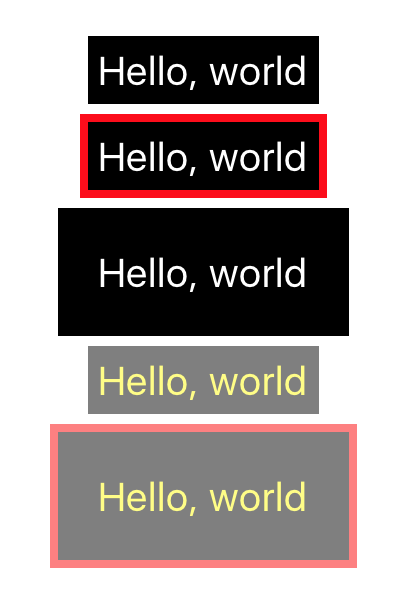
So, you can see that with adding and removing props, either at run-time or by default, you will be able to quickly adapt your components' appearance to reflect the current state of the application.
#### Advanced Usage
##### Manipulating Children
There may be times where you wish to pass in child components from within your view, like so:
```js
render() {
return (
);
}
```
Out of the box, the children wouldn't be affected by parent modifier and state props (meaning the text color would always be white in the above example). however, by changing the `HelloWorld` component to accept children enhanced with BEM like so:
```js
import bem, { renderBemChild } from 'react-native-bem';
const HelloWorld = (props) => {
const b = (selector) => bem(selector, props, styles);
return (
{renderBemChild(props)}
);
};
```
where `HelloWorld__Text` is:
```js
import React from 'react';
import { Text } from 'react-native';
import bem from 'react-native-bem';
import styles from './styles';
const HelloWorld__Text = (props) => {
const b = (selector) => bem(selector, props, styles);
return (
Hello, world
);
};
export default HelloWorld__Text;
```
we get the exact same output as before, just with the added flexibility of being able to control which child components are rendered from within the view.
As mentioned earlier, `renderBemChild()` also accepts a second parameter of a styles object (like those returned from a `bem()` selector) and an `index`.
This allows us to render children with additional styles applied, which can be useful when a component is consumed by another (known as a BEM Mix), and its appearance needs to change to reflect that.
If we update our existing files to this:
`styles.js`
```js
import { StyleSheet } from 'react-native';
export default StyleSheet.create({
… existing styles
'bem-mix__text': {
color: '#0ff'
}
});
```
`HelloWorld.js`
```js
const HelloWorld = (props) => {
const b = (selector) => bem(selector, props, styles);
return (
{renderBemChild(props, b('bem-mix__text'))}
);
};
```
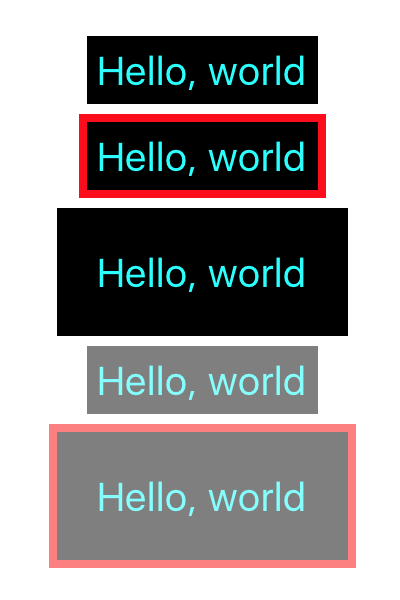
We can see that the additional styles were applied to the `HelloWorld__Text` components, turning them cyan.
###### Using a Component's Internal State
Some components, such as a ``, need to be styled differently based on an internal state, like when it has focus. Instead of cumbersomely alerting parent components to whether it's focused or not and changing a state prop in the view, we can merge in the component's state to `bem()` at `render()` time.
With the following component:
`components/TextBox/index.js`
```js
import React, { Component } from 'react';
import { TextInput } from 'react-native';
import bem from 'react-native-bem';
import styles from './styles';
class TextBox extends Component {
constructor () {
super();
this.state = {
SisFocused: false
};
}
_onBlur = () => {
this.setState({
SisFocused: false
});
}
_onFocus = () => {
this.setState({
SisFocused: true
});
}
b = (selector) => bem(selector, { ...this.props, ...this.state }, styles)
render () {
return (
);
}
}
export default TextBox;
```
and its related `styles.js`
```js
import { StyleSheet } from 'react-native';
export default StyleSheet.create({
'text-box': {
backgroundColor: '#fff',
borderColor: '#000',
borderWidth: 2,
color: '#333',
fontSize: 14,
height: 40,
paddingHorizontal: 10,
paddingVertical: 0
},
'text-box.is-focused': {
borderColor: '#00f'
}
});
```
Because the `TextBox` component's `b()` helper merges the component's props with its internal state (which has a correctly named `SisFocused` property), it apply styles for when the `TextInput` is focused!

---
Copyright (c) 2018 [Matt Stow](http://mattstow.com)
Licensed under the MIT license *(see [LICENSE](https://github.com/stowball/react-native-bem/blob/master/LICENSE) for details)*