https://github.com/streamlit/demo-face-gan
A demonstration of using a live Tensorflow session to create an interactive face-GAN explorer.
https://github.com/streamlit/demo-face-gan
Last synced: about 1 year ago
JSON representation
A demonstration of using a live Tensorflow session to create an interactive face-GAN explorer.
- Host: GitHub
- URL: https://github.com/streamlit/demo-face-gan
- Owner: streamlit
- License: apache-2.0
- Created: 2020-02-03T17:15:17.000Z (over 6 years ago)
- Default Branch: master
- Last Pushed: 2025-01-12T18:14:49.000Z (over 1 year ago)
- Last Synced: 2025-04-08T04:14:14.619Z (about 1 year ago)
- Language: Python
- Size: 38.3 MB
- Stars: 298
- Watchers: 27
- Forks: 170
- Open Issues: 5
-
Metadata Files:
- Readme: README.md
- License: LICENSE
Awesome Lists containing this project
README
[](https://share.streamlit.io/streamlit/demo-face-gan/)
# Streamlit Demo: The Controllable GAN Face Generator
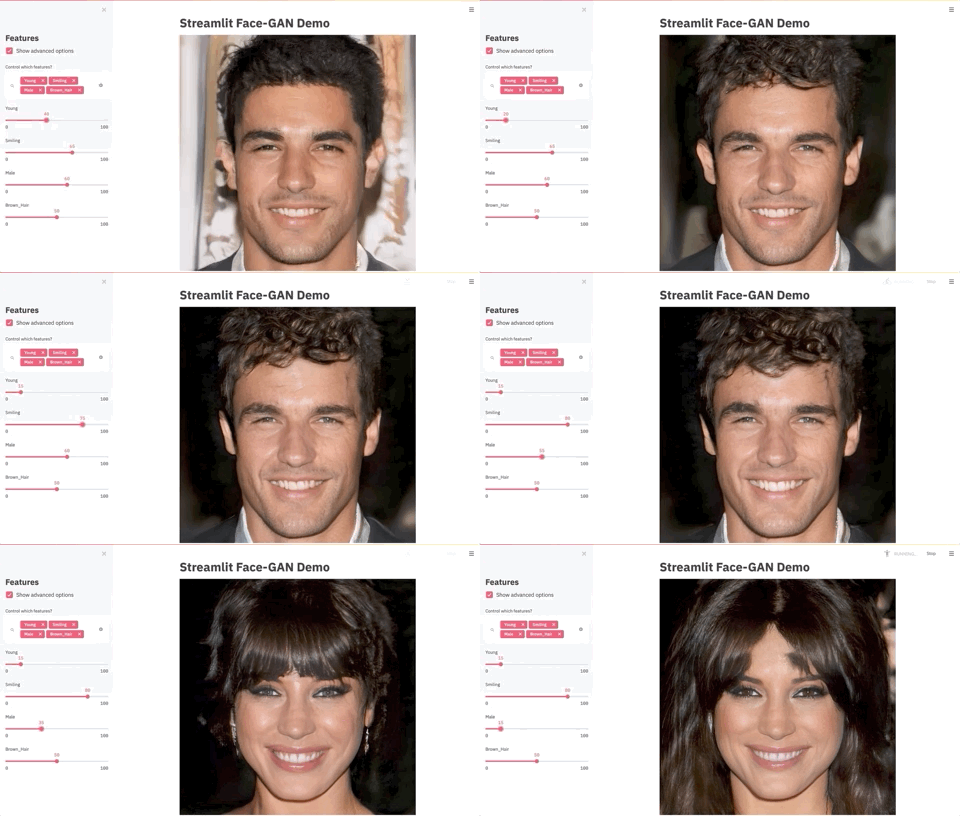
This project highlights Streamlit's new `st.experimental_memo()` and `st.experimental_singleton()` features with an app that calls on TensorFlow to generate photorealistic faces, using Nvidia's [Progressive Growing of GANs](https://research.nvidia.com/publication/2017-10_Progressive-Growing-of) and Shaobo Guan's [Transparent Latent-space GAN](https://blog.insightdatascience.com/generating-custom-photo-realistic-faces-using-ai-d170b1b59255) method for tuning the output face's characteristics. For more information, check out the [tutorial on Towards Data Science](https://towardsdatascience.com/build-an-app-to-synthesize-photorealistic-faces-using-tensorflow-and-streamlit-dd2545828021).
The Streamlit app is [implemented in only 150 lines of Python](https://github.com/streamlit/demo-face-gan/blob/master/app.py) and demonstrates the wide new range of objects that can be used safely and efficiently in Streamlit apps.
## How to run this demo
The demo requires Python 3.6 or 3.7 (The version of TensorFlow we use is not supported in Python 3.8+).
**We suggest creating a new virtual environment**, then running:
```
git clone https://github.com/streamlit/demo-face-gan.git
cd demo-face-gan
poetry install
poetry run streamlit run streamlit_app.py
```
## Model Bias
Playing with the sliders, you _will_ find biases that exist in this model. For example, moving the `Smiling` slider can turn a face from masculine to feminine or from lighter skin to darker. Apps like these that allow you to visually inspect model inputs help you find these biases so you can address them in your model _before_ it's put into production.
## Questions? Comments?
Please ask in the [Streamlit community](https://discuss.streamlit.io) or [check out our article](https://towardsdatascience.com/build-an-app-to-synthesize-photorealistic-faces-using-tensorflow-and-streamlit-dd2545828021).