https://github.com/strider2038/yii2-ajax-debugger
Utility for debugging AJAX or API responses in browser
https://github.com/strider2038/yii2-ajax-debugger
debug developer developer-tools developing extension tool utility yii2
Last synced: 6 months ago
JSON representation
Utility for debugging AJAX or API responses in browser
- Host: GitHub
- URL: https://github.com/strider2038/yii2-ajax-debugger
- Owner: strider2038
- License: mit
- Archived: true
- Created: 2017-02-26T20:43:18.000Z (over 9 years ago)
- Default Branch: master
- Last Pushed: 2017-02-26T20:53:44.000Z (over 9 years ago)
- Last Synced: 2024-11-16T20:28:38.748Z (over 1 year ago)
- Topics: debug, developer, developer-tools, developing, extension, tool, utility, yii2
- Language: PHP
- Size: 70.3 KB
- Stars: 0
- Watchers: 2
- Forks: 0
- Open Issues: 0
-
Metadata Files:
- Readme: README.md
- License: LICENSE
Awesome Lists containing this project
README
# Yii2 Ajax debugger
## Installation
Either run
```
$ php composer.phar require strider2038/yii2-ajax-debugger "*"
```
or add
```
"strider2038/yii2-ajax-debugger": "*"
```
to the ```require``` section of your `composer.json` file.
## About
This tool is based on [JSONBeautifyIt](https://github.com/strider2038/json-beautify-it)
function for formatting JSON/JSONP data. DebugDetector component can intercept JSON or
JSONP responses from server and format them as html document. After rendering JSON
data JSONBeautifyIt function is applied for beautifying rendered data array. Be aware
of using this component in production mode.
To set up this component for work you should add this lines to your web
config file
```php
$config = [
// this is needed to initialize component on app load
'bootstrap' => ['ajaxDebugger', ...],
'components' => [
'ajaxDebugger' => [
'class' => 'strider2038\ajaxdebugger\DebugDetector',
// conditions for enabling debug mode
'enabled' => YII_ENV_DEV && !empty($_GET['_debug']),
],
...
],
...
];
```
After that you can open pages with AJAX or API responses in browser. If you
add GET parameter \_debug=1 you will see parsed JSON data and debug panel as
on other html pages.
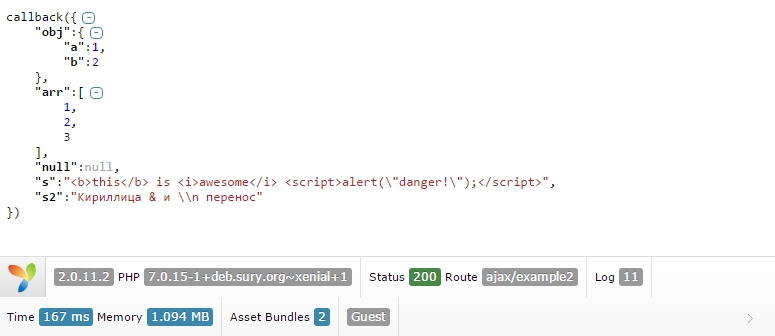
You can see working examples in my Yii2 template -