https://github.com/strmio/storm
A Python framework for building efficient, scalable, and modular applications inspired by NestJS.
https://github.com/strmio/storm
api framework python rest
Last synced: 11 months ago
JSON representation
A Python framework for building efficient, scalable, and modular applications inspired by NestJS.
- Host: GitHub
- URL: https://github.com/strmio/storm
- Owner: strmio
- License: mit
- Created: 2024-08-25T19:46:28.000Z (almost 2 years ago)
- Default Branch: main
- Last Pushed: 2025-05-15T11:46:33.000Z (about 1 year ago)
- Last Synced: 2025-07-13T18:31:36.582Z (12 months ago)
- Topics: api, framework, python, rest
- Language: Python
- Homepage:
- Size: 580 KB
- Stars: 9
- Watchers: 1
- Forks: 1
- Open Issues: 0
-
Metadata Files:
- Readme: README.md
- License: LICENSE
- Codeowners: .github/CODEOWNERS
Awesome Lists containing this project
README

**Storm** is a Python framework inspired by NestJS, designed to build efficient, scalable, and maintainable server-side applications. With a focus on modularity, dependency injection, and an intuitive development experience, Storm empowers developers to create robust backend systems with ease.
## Table of Contents
- [Features](#features)
- [Getting Started](#getting-started)
- [Installation](#installation)
- [Project Setup](#project-setup)
- [Core Concepts](#core-concepts)
- [Modules](#modules)
- [Controllers](#controllers)
- [Services](#services)
- [Dependency Injection](#dependency-injection)
- [Middleware](#middleware)
- [CLI Tool](#cli-tool)
- [Examples](#examples)
- [Documentation](#documentation)
- [Contributing](#contributing)
- [License](#license)
## Features
- **Modular Architecture:** Organize your application into self-contained, reusable modules.
- **Dependency Injection:** Powerful DI container for clean and maintainable code.
- **Decorators:** Use Python decorators to define controllers, routes, services, and more.
- **Asynchronous Support:** Built-in support for async operations, enabling high-performance, non-blocking I/O.
- **Middleware and Guards:** Handle cross-cutting concerns and request validation with ease.
- **CLI Tool:** Quickly scaffold projects, generate modules, controllers, and services with the Storm CLI.
- **ORM Integration:** Seamlessly connect to databases using popular ORMs like SQLAlchemy or Tortoise ORM.
- **Comprehensive Testing:** Built-in utilities for unit and integration testing.
## [](https://repography.com) / Recent activity [](https://repography.com)
[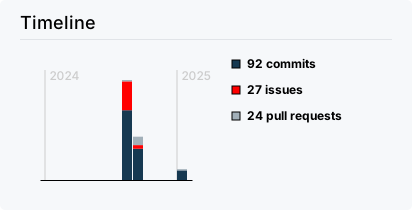](https://github.com/Adi3g/nox-cli/commits)
[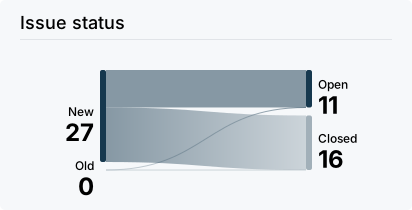](https://github.com/Adi3g/nox-cli/issues)
[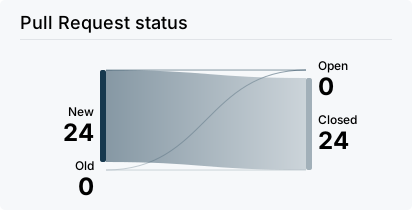](https://github.com/Adi3g/nox-cli/pulls)
[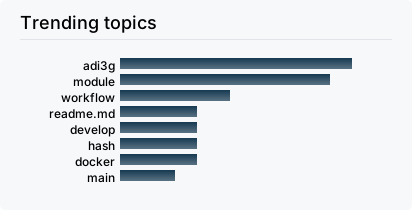](https://github.com/Adi3g/nox-cli/commits)
[](https://github.com/Adi3g/nox-cli/graphs/contributors)
[](https://github.com/Adi3g/nox-cli/commits)
## Getting Started
### Installation
To install Storm, you can use pip:
```bash
pip install storm-framework
```
### Project Setup
Use the Storm CLI to create a new project:
```bash
storm-cli new my-storm-app
cd my-storm-app
```
This will generate a basic project structure with everything you need to get started.
### Running the Application
Once your project is set up, you can run the application:
```bash
python src/main.py
```
## Core Concepts
### Modules
Modules are the building blocks of a Storm application. Each module is a self-contained unit that encapsulates related components such as controllers, services, and models.
Example:
```python
from storm import Module
@Module({
'controllers': [AppController],
'providers': [AppService],
})
class AppModule:
pass
```
### Controllers
Controllers are responsible for handling incoming requests and returning responses to the client. Use decorators to define routes within controllers.
Example:
```python
from storm import Controller, Get
@Controller('/app')
class AppController:
@Get('/')
async def get_app(self):
return {'message': 'Hello from Storm!'}
```
### Services
Services contain your business logic and can be injected into controllers or other services.
Example:
```python
from storm import Injectable
@Injectable()
class AppService:
def get_message(self):
return 'This is a message from the service.'
```
### Dependency Injection
Storm's DI system allows you to easily manage dependencies within your application. Simply annotate classes with `@Injectable` and inject them where needed.
Example:
```python
from storm import Injectable, Inject
@Injectable()
class AppService:
def get_message(self):
return 'Hello from Service!'
@Controller('/app')
class AppController:
def __init__(self, service: AppService):
self.service = service
@Get('/')
async def get_app(self):
return {'message': self.service.get_message()}
```
### Middleware
Middleware functions are executed before reaching the controllers, allowing you to handle tasks like authentication, logging, etc.
Example:
```python
from storm import Middleware, Request, Next
class LoggerMiddleware(Middleware):
async def handle(self, request: Request, next: Next):
print(f'Incoming request: {request.method} {request.path}')
return await next(request)
```
## CLI Tool
Storm comes with a powerful CLI to streamline your development workflow:
- **Create a new project:** `storm new my-storm-app`
- **Generate a module:** `storm generate module my-module`
- **Generate a controller:** `storm generate controller my-controller`
- **Generate a service:** `storm generate service my-service`
## Examples
Check out the [examples](examples/) directory for sample projects demonstrating different features of Storm.
## Contributing
Contributions are welcome! Please see the [CONTRIBUTING.md](CONTRIBUTING.md) file for guidelines.
## License
Storm is [MIT licensed](LICENSE).