https://github.com/strongself/Generamba
This codegenerator is too brilliant to be real!
https://github.com/strongself/Generamba
Last synced: about 1 year ago
JSON representation
This codegenerator is too brilliant to be real!
- Host: GitHub
- URL: https://github.com/strongself/Generamba
- Owner: strongself
- License: mit
- Created: 2015-11-04T11:57:22.000Z (almost 11 years ago)
- Default Branch: develop
- Last Pushed: 2023-05-24T09:33:57.000Z (about 3 years ago)
- Last Synced: 2025-07-14T00:06:15.686Z (about 1 year ago)
- Language: Ruby
- Size: 774 KB
- Stars: 1,817
- Watchers: 84
- Forks: 182
- Open Issues: 35
-
Metadata Files:
- Readme: README.md
- Changelog: CHANGELOG.md
- License: LICENSE.txt
Awesome Lists containing this project
README

[](https://travis-ci.org/rambler-digital-solutions/Generamba)
[](https://badge.fury.io/rb/generamba)
[](https://codeclimate.com/github/rambler-digital-solutions/Generamba)
**Generamba** is a code generator made for working with Xcode. Primarily it is designed to generate VIPER modules but it is quite easy to customize it for generation of any other classes (both in Objective-C and Swift).
*We keep evolving Generamba:*
- [Vision](https://github.com/rambler-digital-solutions/Generamba/blob/develop/VISION.md),
- [Changelog](https://github.com/rambler-digital-solutions/Generamba/blob/develop/CHANGELOG.md),
- [Release notes](https://github.com/rambler-digital-solutions/Generamba/releases).
Besides, we started working on 2.0 version with powerful DSL and plugins. Check the [release roadmap](https://github.com/rambler-digital-solutions/Generamba/blob/develop/docs/2.x/roadmap.md)!
### Key features
- Supports work with *.xcodeproj* files out of the box. All generated class files are automatically placed to specific folders and groups of Xcode project.
- Can generate both code itself and tests adding them to right targets.
- Based on work with [liquid-templates](https://github.com/Shopify/liquid) that have plain and readable syntax in comparison with templates for Xcode.
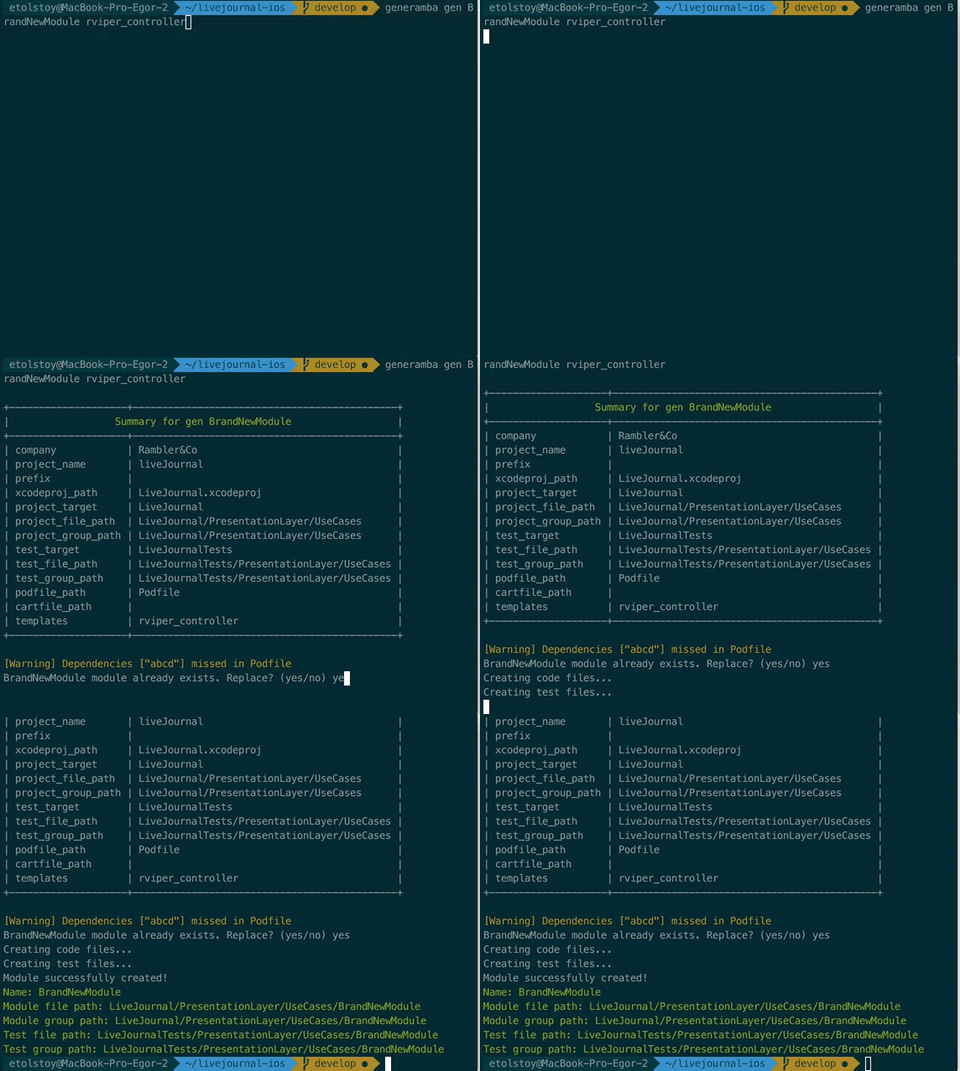
- It is very easy to create a new module: `generamba gen [MODULE_NAME] [TEMPLATE_NAME]`. You do not need to input a bunch of data each time because each project corresponds to only one configuration file that holds standard file system and Xcode-project pathes, names of targets, information about the author.
### Installation
> Ruby 2.2 or later version is required. To check your current Ruby version run this command in terminal:
```bash
$ ruby --version
```
When necessary you can install the required Ruby version with the help of [`rvm`](http://octopress.org/docs/setup/rvm/) or [`rbenv`](http://octopress.org/docs/setup/rbenv/).
Run the command `gem install generamba`.
### Usage
1. Run [`generamba setup`](https://github.com/rambler-digital-solutions/Generamba/wiki/Available-Commands#basic-generamba-configuration) in the project root folder. This command helps to create [Rambafile](https://github.com/rambler-digital-solutions/Generamba/wiki/Rambafile-Structure) that define all configuration needed to generate code. You can modify this file directly in future.
2. Add all templates planned to use in the project to the generated [Rambafile](https://github.com/rambler-digital-solutions/Generamba/wiki/Rambafile-Structure). You can begin with one of the templates from our catalog: `{name: 'rviper_controller'}`.
3. Run [`generamba template install`](https://github.com/rambler-digital-solutions/Generamba/wiki/Available-Commands#template-installation). All the templates will be placed in the '/Templates' folder of your current project.
4. Run [`generamba gen [MODULE_NAME] [TEMPLATE_NAME]`](https://github.com/rambler-digital-solutions/Generamba/wiki/Available-Commands#module-generation) - It creates module with specific name from specific template.
### Additional info
Run `generamba help` to learn more about each of the Generamba features.
**Wiki:**
- [Command list](https://github.com/rambler-digital-solutions/Generamba/wiki/Available-Commands)
- [Understanding the Rambafile](https://github.com/rambler-digital-solutions/Generamba/wiki/Rambafile-Structure)
- [Understanding templates](https://github.com/rambler-digital-solutions/Generamba/wiki/Template-Structure)
**Other materials:**
- [Russian] Rambler.iOS V: Generamba and Code Generation ([Slides](http://www.slideshare.net/Rambler-iOS/viper-56423582) | [Video](http://www.youtube.com/watch?v=NXNiN9FaUnY))
- [Introduction to Generamba](http://etolstoy.com/2016/02/10/generamba/)
### Authors
- Egor Tolstoy, Beniamin Sarkisyan, Andrey Zarembo and the rest of [Rambler.iOS team](https://github.com/orgs/rambler-digital-solutions/teams/ios-team).
### License
MIT