https://github.com/styczynski/labmap-chrome
This project is labmap by @tomasz-miskow redesigned to be fully-featured Chrome extension!
https://github.com/styczynski/labmap-chrome
chrome chrome-extension lab labmap map
Last synced: over 1 year ago
JSON representation
This project is labmap by @tomasz-miskow redesigned to be fully-featured Chrome extension!
- Host: GitHub
- URL: https://github.com/styczynski/labmap-chrome
- Owner: styczynski
- Created: 2018-04-16T20:44:16.000Z (over 8 years ago)
- Default Branch: master
- Last Pushed: 2018-04-20T08:00:35.000Z (over 8 years ago)
- Last Synced: 2025-03-27T05:34:09.542Z (over 1 year ago)
- Topics: chrome, chrome-extension, lab, labmap, map
- Language: JavaScript
- Homepage: https://chrome.google.com/webstore/detail/labmap-chrome/jlckjaecjhjmcfcgphekojamfgdbjioe
- Size: 705 KB
- Stars: 4
- Watchers: 2
- Forks: 1
- Open Issues: 0
-
Metadata Files:
- Readme: README.md
Awesome Lists containing this project
README
# [:)  labmap Chrome Extension](https://chrome.google.com/webstore/detail/labmap-chrome/jlckjaecjhjmcfcgphekojamfgdbjioe)
> [labmap](https://github.com/tomasz-miskow/labmap) ported to Chrome
## :mag: About
This project is [labmap](https://github.com/tomasz-miskow/labmap) by @tomasz-miskow redesigned
to be fully-featured Chrome extension!
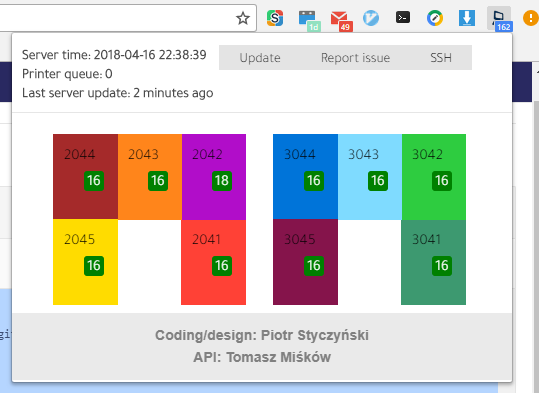
The extension allows you to track computer labs at @MIMUW and more!
It utilizes awesome labmap api hosted by @tomasz-miskow :rocket:
This project is maintained in free time. **Feel free to contribute and open new issues!**
## :trophy: Features
* See what computers and labs are currently free :cat:
* View upcoming courses inside labs :smile:
* Connect to `students.mimuw.edu.pl` machine via SSH with one button (needs external extension) :+1:
* View users currently sitting in labs :tada:
## :package: Installation
Install in Chrome via Chrome store:
> [labmap-chrome in Chrome store](https://chrome.google.com/webstore/detail/labmap-chrome/jlckjaecjhjmcfcgphekojamfgdbjioe)
## :bulb: Development
**To install all dependencies please enter:**
```bash
# clone it
$ git clone https://github.com/styczynski/labmap-chrome.git
# Install dependencies
$ yarn install
```
**To build dev version and start hot reload server please type:**
```bash
# build files to './dev'
# start webpack development server
$ yarn run dev
```
**Now navigate to Settings->Extensions inside Chrome and select "Load unpacked" then specify the /dev folder*
The extension should be now visible inside Chrome.
**Note: You must enable Developer Options to load unpacked extensions**
## :hammer: Build
```bash
# build files to './build'
$ yarn run build
```
## :straight_ruler: Compress
```bash
# compress build folder to {manifest.name}.zip and crx
$ yarn run build
$ yarn run compress -- [options]
```