https://github.com/subins2000/kde-weblate
Weblate instance for KDE
https://github.com/subins2000/kde-weblate
Last synced: 6 months ago
JSON representation
Weblate instance for KDE
- Host: GitHub
- URL: https://github.com/subins2000/kde-weblate
- Owner: subins2000
- License: gpl-3.0
- Created: 2019-03-20T02:06:46.000Z (over 7 years ago)
- Default Branch: master
- Last Pushed: 2022-12-09T05:25:09.000Z (over 3 years ago)
- Last Synced: 2025-05-05T11:45:29.314Z (over 1 year ago)
- Language: Python
- Size: 219 KB
- Stars: 3
- Watchers: 1
- Forks: 1
- Open Issues: 6
-
Metadata Files:
- Readme: README.md
- License: LICENSE
Awesome Lists containing this project
README
# KDE Weblate Translation
## Translation
* [Signup for an account](//kde.smc.org.in)
* Choose a project and a component
* Start translating
**IMPORTANT** : After translation, add your name to `Your names` (`NAME OF TRANSLATORS`) and email to `Your emails`. If there already exist a value, add yours after a comma. Example :
* Your names :
```
ശ്യാം കൃഷ്ണന് സി.ആര്.,സുബിന് സിബി
```
* Your emails :
```
shyam@example.com,subin@example.com
```
## Workflow
There are 3 repos :
* KDE Upstream repo (SVN)
* Intermediary repo (git) : [This repo](https://github.com/FOSSersVAST/kde-pos).
* Weblate local repo (git) : Local copy of the intermediary repo
We need to make the intermediary repo and then setup Weblate.
Weblate will work with the intermediary repo, and we'll have to manually merge the intermediary repo with KDE upstream (not that much of difficulty).
## Setup
If your language team is not using Summit, use it. [Instructions here](https://github.com/subins2000/kde-weblate/blob/master/SETTING-UP-SUMMIT.md).
Using summit helps you to maintain only one branch for both trunk and stable.
### Intermediary repo
We need to create a new git repo which will act as an intermediary between KDE upstream repo (SVN) and Weblate.
Weblate will use this intermediary git repo for syncing.
The intermediary repo after the setup will have this folder structure :
* pos
* ml
* dolphin
* kde-workspace
* ...
* upstream
* summit
* ml
* dolphin
* kde-workspace
* ...
* templates
* README.md
* ...
Make the upstream directory structure :
```
mkdir upstream upstream/summit
cd upstream/summit
svn co svn+ssh://svn@svn.kde.org/home/kde/trunk/l10n-support/ml/summit/messages ml
svn co svn+ssh://svn@svn.kde.org/home/kde/trunk/l10n-support/templates/summit/messages templates
```
Then, make the folder `pos` in the root, and copy files from `upstream/summit` folder with the exact sub-directory structure. For example, if you want to add Dolphin file manager (`dolphin`), then :
```
mkdir pos pos/ml pos/ml/dolphin
cp "upstream/summit/ml/dolphin/*" "pos/ml/dolphin/"
```
#### Adding a new component
Copy file from upstream to corresponding one in `pos` folder.
Then import from git to weblate (the command in the [Importing components to Weblate section](#importing-components-to-weblate)) :
```
weblate import_project ...
```
#### Searching for strings
To search for a particular string, do this in upstream :
```
grep -rnw '.' --include="*.po" -e '"Open Path"'
```
### Weblate
* Clone this repo
* Install :
```
sudo apt install libpq-dev # https://stackoverflow.com/a/12037133/1372424
sudo apt install libacl1-dev
export PIPENV_VENV_IN_PROJECT=1
pipenv install
```
* Make `.env` :
```
cp .env.example .env
```
Edit the new `.env` and set a [Django secret key](https://djecrety.ir/), database credentials and optional other fetures.
* Get into the environment and let Weblate know the settings :
```
pipenv shell
ln -s $(realpath settings.py) .venv/lib/python3.6/site-packages/weblate/settings.py
```
* Setup Redis & Celery :
```
sudo apt install redis-server
.venv/lib/python3.6/site-packages/weblate/examples/celery start
```
* Create admin user :
```
weblate createsuperuser
```
* Set domain in Django Admin -> Sites
* You need to update Weblate's plural form to accomodate with scripty's choice because scripty will change it to `(n != 1)` back everytime and that's a waste of git & svn storage. [Relevant](https://github.com/WeblateOrg/weblate/commit/56ee242b2c73aa1b892693c44d05c715b51832dd#diff-f45fc79cca287d720000daa62524df92)
```
psql
UPDATE lang_plural SET formula='(n != 1)' WHERE formula='n != 1'
```
#### Importing components to Weblate
Each PO file will be a component in Weblate. These components will be under a project in Webalte. `dolphin`, `discover`, `plasma-workspace` will each have their own project.
For example, let's take 'dolphin' :
* Create a project named `dolphin` using Weblate web interface
* [Setup the intermediary repo](#intermediary-repo)
* Configure the project to have a SSH key for pushing to the intermediary git repo. If it's a GitHub repo, you can add the ssh key as a deploy key in GitHub repo with write permission.
* From the server console, tell Weblate to import from the intermediary repo to `dolphin` project :
```
weblate import_project dolphin 'git@github.com:FOSSersVAST/kde-pos.git' master "pos/(?P[^/]*)/dolphin/(?P[^%]*)\.po"
```
* Set license of components & no new languages :
```
psql
UPDATE trans_component SET license='Under the same license as the package', new_lang='none';
```
* We're gonna enable
1. [Suggestions voting](https://docs.weblate.org/en/latest/admin/translating.html#suggestion-voting): Set suggestions for all components & vote count to 3. Users who can suggest can vote on it and get it accepted when vote reaches threshold.
2. Disable translation propagation (because it messess with `Your names` and `Your emails` strings)
```
weblate shell -c 'from weblate.trans.models import Component; Component.objects.all().update(suggestion_voting=True, suggestion_autoaccept=3, allow_translation_propagation=False)'
```
* Restart Weblate
```
.venv/lib/python3.8/site-packages/weblate/examples/celery restart
```
* Then do
```
weblate loadpo dolphin
```
Optional :
* [Enable Reviews](https://docs.weblate.org/en/weblate-4.7.2/workflows.html#reviews): Special reviewer users can be assigned to accept suggestions and mark strings reviewed. This setting is **per project** available in Settings -> Workflow.
* Make project suggestion-review based. Go to Weblate, project page -> Users :
* Project Access Control : Protected
With this, you will have to specifically allow users to submit suggestions. Registered users can't submit suggestions by default.
Or you can just disable public registration and allow specific users only.
#### Social Auth
* [Follow this](https://docs.weblate.org/en/latest/admin/auth.html)
* Get API key & Secret, store in `.env` :
```
SOCIAL_AUTH_GOOGLE_OAUTH2_KEY=''
SOCIAL_AUTH_GOOGLE_OAUTH2_SECRET=''
```
## Intermediary Repo
### Syncing With KDE Upstream
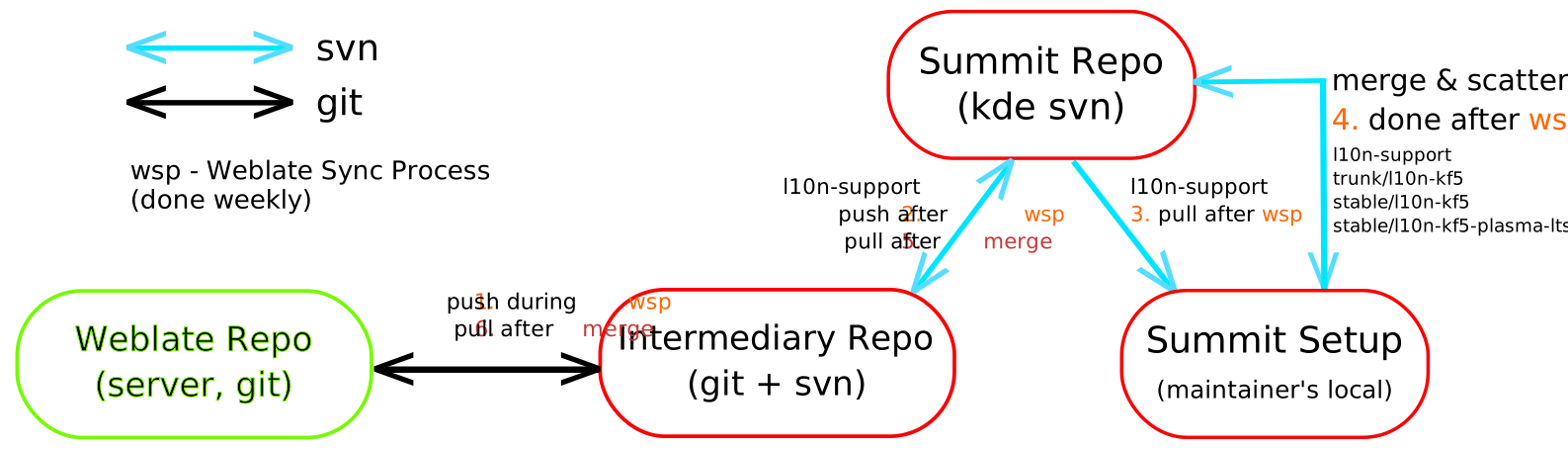
This is done in 2 processes (see the diagram at the end) :
1. "Weblate Sync Process"
2. "Merge Process"
Weblate Sync Process :
* Go to Weblate web interface -> Repository Maintenance. Click `Commit` & `Push` buttons, one after the other.
If there's any merge conflict, fix it in the repo on server. The git folder on repo will be at `data/vcs/`. After fixing it, do a `git pull` to make sure everything's alright. And repeat this step (do Pull changes on Webalte, commit & push).
* Do a `git pull` in the intermediary repo
* Run
```bash
copy-to-upstream.sh
```
This will copy new localized strings from the recently pushed Weblate changes to KDE upstream summit repo. Note that Weblate PO files have line wrapping enabled, but summit POs does not.
* In `upstream/summit/ml` folder, commit :
```bash
svn commit -m 'Updates from Weblate'
```
See [SVN tips](#svn-tips)
Merge Process :
* In **maintainer's local summit setup**, do : ([More details here](https://github.com/subins2000/kde-weblate/blob/master/SETTING-UP-SUMMIT.md#summit-next-steps))
```
export KDEREPO=$(realpath .)
export PATH=$KDEREPO/trunk/l10n-support/pology/bin:$PATH
cd $KDEREPO
svn update
cd $KDEREPO/trunk/l10n-support
posummit scripts/messages.summit ml merge
# Decide whether to scatter now or not. Scatter is usually done before a release
posummit scripts/messages.summit ml scatter
svn commit $KDEREPO/trunk/l10n-support/ml $KDEREPO/branches/stable/ $KDEREPO/trunk/l10n-kf5/ml -m 'Routine Merge & Scatter'
```
* In **intermediary repo**, do (this only need to be done if `posummit merge` was done in the previous step.)
```
cd upstream/summit/templates && svn update && cd -
cd upstream/summit/ml && svn update
```
* Merge strings from files in `upstream/summit` folder to `pos`
```bash
copy-from-upstream.sh
```
The script will only merge strings of files that exists in `upstream/summit` and `pos` folder. Note that Weblate PO files have line wrapping enabled, but summit POs does not.
* Commit & push
```
git commit -a -m "Sync with KDE Upstream"
git push
```
* Go to Weblate web interface -> Repository Maintenance and Pull.
Steps till **Weblate pull changes** can be done periodically to keep Weblate POs up-to-date with upstream.
Better add a [webhook in GitHub to Weblate](https://docs.weblate.org/en/latest/admin/continuous.html#automatically-receiving-changes-from-github) so that Weblate is known of the changes automatically. Do this with the `weblate` branch.
## Notes
* Don't make any change directly in the intermediary repo's `upstream` folder. If doing so, make sure to update the PO file in the `pos` folder too.
## SVN Tips
If you see a `?` next to files when doing `svn status`, then those files are untracked. You can track them all with :
```
# ? means file is new
# You may wanna add new files too (this is the equivalent of git add --all) :
svn status | grep '?' | sed 's/^.* /svn add /' | bash
```
To revert local changes (`git checkout`) :
```
svn revert --recursive path
```
[git vs svn commands table](https://backlog.com/git-tutorial/reference/commands/)