https://github.com/subspace-lab/matlab-mcp-server
Matlab MCP Server in python
https://github.com/subspace-lab/matlab-mcp-server
Last synced: 5 months ago
JSON representation
Matlab MCP Server in python
- Host: GitHub
- URL: https://github.com/subspace-lab/matlab-mcp-server
- Owner: subspace-lab
- License: mit
- Created: 2025-10-26T15:20:19.000Z (8 months ago)
- Default Branch: main
- Last Pushed: 2025-10-26T16:12:08.000Z (8 months ago)
- Last Synced: 2025-10-26T18:20:59.154Z (8 months ago)
- Language: Python
- Size: 99.6 KB
- Stars: 1
- Watchers: 0
- Forks: 0
- Open Issues: 0
-
Metadata Files:
- Readme: README.md
- License: LICENSE
Awesome Lists containing this project
README
# MATLAB MCP Server
[](https://deepwiki.com/subspace-lab/matlab-mcp-server)
A Model Context Protocol (MCP) server that enables seamless integration between MATLAB and MCP-compatible applications like Claude Code. Execute MATLAB code, manage workspace variables, create plots, handle data I/O, and more - all through a token-efficient MCP interface.
## Features
- **Execute MATLAB Code**: Run MATLAB commands and scripts with persistent session
- **Workspace Management**: Get, set, list, and clear workspace variables
- **Figure Operations**: Save, export, and close MATLAB figures (PNG, SVG, PDF, etc.)
- **Data I/O**: Import/export data (CSV, JSON, XLSX) and load/save MAT files
- **Environment Info**: Check MATLAB version and installed toolboxes
- **Documentation Access**: Get MATLAB help, search functions, and find toolbox locations
- **Token-Efficient Design**: Multi-operation tools minimize API calls
- **JSON Resources**: Structured access to workspace, toolboxes, and session info
## Quick Start
**Prerequisites:**
- MATLAB installed on your system
- `uv` package manager installed ([install uv](https://docs.astral.sh/uv/getting-started/installation/))
### Installation
Choose your MCP client below for setup instructions:
Claude Code (CLI)
**Using CLI (Recommended):**
```bash
# macOS (Apple Silicon)
claude mcp add --transport stdio matlab \
--env DYLD_LIBRARY_PATH=/Applications/MATLAB_R2025b.app/bin/maca64 \
-- uvx matlab-mcp-server
# macOS (Intel)
claude mcp add --transport stdio matlab \
--env DYLD_LIBRARY_PATH=/Applications/MATLAB_R2025b.app/bin/maci64 \
-- uvx matlab-mcp-server
# Linux
claude mcp add --transport stdio matlab \
--env LD_LIBRARY_PATH=/usr/local/MATLAB/R2024b/bin/glnxa64 \
-- uvx matlab-mcp-server
```
**Scope options:**
- Default (local): Private to you, only this project
- `--scope project`: Share with team (stores in `.mcp.json`, can be committed to git)
- `--scope user`: Available across all your projects
**Manual configuration (`.mcp.json` in project root):**
```json
{
"mcpServers": {
"matlab": {
"command": "uvx",
"args": ["matlab-mcp-server"],
"env": {
"DYLD_LIBRARY_PATH": "/Applications/MATLAB_R2025b.app/bin/maca64"
}
}
}
}
```
Replace with your MATLAB path. Use `LD_LIBRARY_PATH` for Linux.
**Verify:**
```bash
claude mcp list
claude mcp info matlab
```
Claude Desktop
**Configuration File Location:**
- **macOS**: `~/Library/Application Support/Claude/claude_desktop_config.json`
- **Windows**: `%APPDATA%\Claude\claude_desktop_config.json`
- **Linux**: `~/.config/Claude/claude_desktop_config.json`
**Configuration:**
```json
{
"mcpServers": {
"matlab": {
"command": "uvx",
"args": ["matlab-mcp-server"],
"env": {
"DYLD_LIBRARY_PATH": "/Applications/MATLAB_R2025b.app/bin/maca64"
}
}
}
}
```
**Platform-specific environment variables:**
- **macOS (Apple Silicon)**: `"DYLD_LIBRARY_PATH": "/Applications/MATLAB_R2025b.app/bin/maca64"`
- **macOS (Intel)**: `"DYLD_LIBRARY_PATH": "/Applications/MATLAB_R2025b.app/bin/maci64"`
- **Linux**: `"LD_LIBRARY_PATH": "/usr/local/MATLAB/R2024b/bin/glnxa64"`
- **Windows**: Usually not needed (installer handles library paths)
**Steps:**
1. Create or edit the config file at the location above
2. Add your MCP server configuration with correct MATLAB path
3. **Restart Claude Desktop completely** (quit and reopen)
4. Look for the MCP server icon (🔨) in Claude Desktop interface
Cursor
**UI Configuration:**
Go to `Cursor Settings` → `MCP` → `Add new MCP Server`:
- **Name**: `matlab`
- **Command**: `uvx matlab-mcp-server`
- Click `Edit` to add environment variables
**Configuration File Location:**
- **macOS**: `~/Library/Application Support/Cursor/mcp_config.json`
- **Windows**: `%APPDATA%\Cursor\mcp_config.json`
- **Linux**: `~/.config/Cursor/mcp_config.json`
**Configuration:**
```json
{
"mcpServers": {
"matlab": {
"command": "uvx",
"args": ["matlab-mcp-server"],
"env": {
"DYLD_LIBRARY_PATH": "/Applications/MATLAB_R2025b.app/bin/maca64"
}
}
}
}
```
Replace with your MATLAB path (see Claude Desktop section for platform-specific paths).
**Steps:**
1. Create `mcp_config.json` if it doesn't exist
2. Add MCP server configuration
3. Restart Cursor completely
VS Code (GitHub Copilot)
**VS Code Settings (User or Workspace):**
```json
{
"github.copilot.chat.mcp.servers": {
"matlab": {
"command": "uvx",
"args": ["matlab-mcp-server"],
"env": {
"DYLD_LIBRARY_PATH": "/Applications/MATLAB_R2025b.app/bin/maca64"
}
}
}
}
```
**CLI Installation:**
```bash
# macOS (Apple Silicon)
code --add-mcp '{"name":"matlab","command":"uvx","args":["matlab-mcp-server"],"env":{"DYLD_LIBRARY_PATH":"/Applications/MATLAB_R2025b.app/bin/maca64"}}'
# Linux
code --add-mcp '{"name":"matlab","command":"uvx","args":["matlab-mcp-server"],"env":{"LD_LIBRARY_PATH":"/usr/local/MATLAB/R2024b/bin/glnxa64"}}'
```
Replace with your MATLAB path (see Claude Desktop section for platform-specific paths).
**Resources:**
- [Use MCP servers in VS Code](https://code.visualstudio.com/docs/copilot/chat/mcp-servers)
Codex
**CLI:**
```bash
codex mcp add matlab uvx "matlab-mcp-server"
```
Then manually edit `~/.codex/config.toml` to add environment variables:
**Edit `~/.codex/config.toml`:**
```toml
[mcp_servers.matlab]
command = "uvx"
args = ["matlab-mcp-server"]
[mcp_servers.matlab.env]
DYLD_LIBRARY_PATH = "/Applications/MATLAB_R2025b.app/bin/maca64"
```
**Platform-specific environment variables:**
- **macOS (Apple Silicon)**: `DYLD_LIBRARY_PATH = "/Applications/MATLAB_R2025b.app/bin/maca64"`
- **macOS (Intel)**: `DYLD_LIBRARY_PATH = "/Applications/MATLAB_R2025b.app/bin/maci64"`
- **Linux**: `LD_LIBRARY_PATH = "/usr/local/MATLAB/R2024b/bin/glnxa64"`
**Resources:**
- [Codex MCP Documentation](https://github.com/openai/codex/blob/main/codex-rs/config.md#mcp_servers)
**For 11 additional clients** (Windsurf, Continue, Amp, Cline, Gemini CLI, Goose, Kiro, LM Studio, opencode, Qodo Gen, Warp), see **[Complete Setup Guide →](md-files/MCP_CLIENT_SETUP.md)**
### Finding Your MATLAB Library Path
If you don't know your MATLAB library path, use the configuration helper:
```bash
curl -fsSL https://raw.githubusercontent.com/subspace-lab/matlab-mcp-server/main/install-matlab-mcp.sh | bash
```
The script will:
- Auto-detect your MATLAB installation
- Display the config with the correct paths
- You copy and paste it into your MCP client's config file
That's it! When your MCP client starts, `uvx` will automatically:
- Download `matlab-mcp-server` from PyPI
- Install `matlabengine` and all dependencies
- Start the MATLAB MCP server
### Manual Installation
If you prefer to install manually or the automated installer doesn't work:
#### 1. Install matlabengine
```bash
# Navigate to your MATLAB Python engine directory
cd /Applications/MATLAB_R20XXx.app/extern/engines/python # macOS
# OR
cd /usr/local/MATLAB/R20XXx/extern/engines/python # Linux
# Install using uv
uv pip install .
```
Replace `R20XXx` with your MATLAB version (e.g., R2024a, R2024b, R2025a).
#### 2. Install matlab-mcp-server
```bash
uv pip install matlab-mcp-server
```
#### 3. Configure MCP server
Follow the configuration instructions for your MCP client in the sections above. Use `matlab-mcp` as the command instead of `uvx matlab-mcp-server`.
**Example for Claude Code (`.mcp.json` in project root):**
```json
{
"mcpServers": {
"matlab": {
"command": "matlab-mcp",
"env": {
"DYLD_LIBRARY_PATH": "/Applications/MATLAB_R2025b.app/bin/maca64"
}
}
}
}
```
Replace with your MATLAB path:
- **macOS (Apple Silicon)**: `DYLD_LIBRARY_PATH` → `/Applications/MATLAB_R20XXx.app/bin/maca64`
- **macOS (Intel)**: `DYLD_LIBRARY_PATH` → `/Applications/MATLAB_R20XXx.app/bin/maci64`
- **Linux**: `LD_LIBRARY_PATH` → `/usr/local/MATLAB/R20XXx/bin/glnxa64`
- **Windows**: Usually not needed
For other MCP clients, see configuration sections above or [MCP_CLIENT_SETUP.md](md-files/MCP_CLIENT_SETUP.md)
## Available Tools
The server provides 8 MCP tools for interacting with MATLAB:
- **`execute_matlab`** - Execute MATLAB code and get results
- **`workspace`** - Manage workspace variables (get, set, list, clear)
- **`figure`** - Save, export, and manage MATLAB figures (PNG, SVG, PDF, etc.)
- **`data_io`** - Import/export data in various formats (CSV, JSON, XLSX, MAT files)
- **`env`** - Get MATLAB version and check installed toolboxes
- **`get_help`** - Access MATLAB documentation and search functions
- **`route_intent`** - Suggest appropriate tool mode (meta-tool)
- **`select_mode`** - Enable optional tool groups (meta-tool)
For detailed documentation on each tool, see [TOOLS.md](md-files/TOOLS.md) or [MATLAB_MCP_GUIDE.md](md-files/MATLAB_MCP_GUIDE.md).
## Troubleshooting
### MATLAB Engine Not Found
If you get an error about MATLAB engine not being found:
1. Ensure MATLAB is properly installed
2. Verify MATLAB Engine API for Python is installed
3. Check Python version matches MATLAB compatibility
4. Verify library path is correctly set in config
### Library Path Issues
**Default MATLAB locations:**
- macOS: `/Applications/MATLAB_R20XXx.app`
- Linux: `/usr/local/MATLAB/R20XXx`
- Windows: `C:\Program Files\MATLAB\R20XXx`
If MATLAB is in a non-standard location, update the library path in your config.
## Documentation
- [CONTRIBUTING.md](CONTRIBUTING.md) - Development setup and guidelines
- [PLANNING.md](md-files/PLANNING.md) - Roadmap and architecture
- [MATLAB_MCP_GUIDE.md](md-files/MATLAB_MCP_GUIDE.md) - Detailed usage guide
- [TOOLS.md](md-files/TOOLS.md) - Tool catalog
## License
MIT License
## Contributing
Contributions are welcome! Please see [CONTRIBUTING.md](CONTRIBUTING.md) for development setup and guidelines.
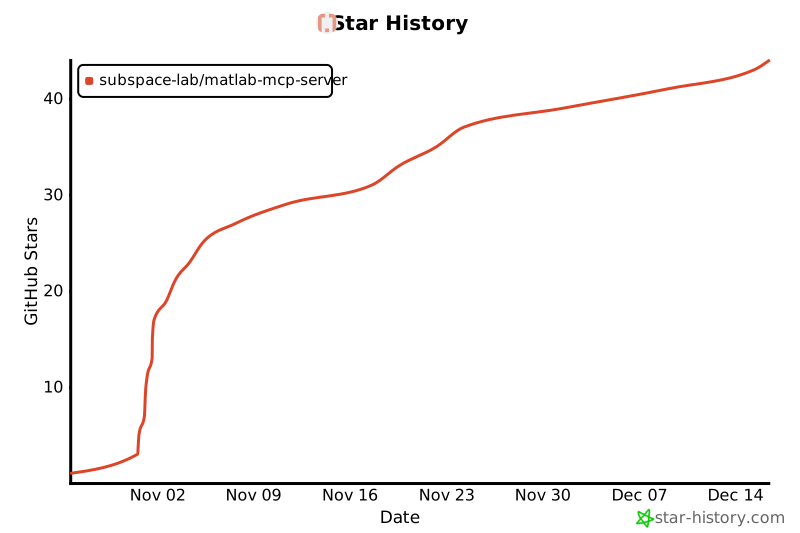
## Star History
[](https://www.star-history.com/#subspace-lab/matlab-mcp-server&type=date&legend=top-left)