https://github.com/sudoaugustin/favicon-pro
Fetch the best quality favicons of website
https://github.com/sudoaugustin/favicon-pro
favicon-downloader favicon-grabber favicons icons javascript npm-package
Last synced: 8 months ago
JSON representation
Fetch the best quality favicons of website
- Host: GitHub
- URL: https://github.com/sudoaugustin/favicon-pro
- Owner: sudoaugustin
- Created: 2021-12-30T14:43:22.000Z (over 4 years ago)
- Default Branch: main
- Last Pushed: 2024-07-03T17:14:30.000Z (almost 2 years ago)
- Last Synced: 2025-09-20T03:28:30.806Z (9 months ago)
- Topics: favicon-downloader, favicon-grabber, favicons, icons, javascript, npm-package
- Language: TypeScript
- Homepage: https://npmjs.com/package/favicon-pro
- Size: 291 KB
- Stars: 6
- Watchers: 1
- Forks: 1
- Open Issues: 1
-
Metadata Files:
- Readme: README.md
Awesome Lists containing this project
README
          # `favicon-pro`

### Fetch the best quality favicons of websites

> Most APIs give old or low quality favicons. Fetch live and high quality favicons of websites using favicon-pro from **node server** or **browser extensions**. This package doesn't work on website's client-side because of [CORS](https://developer.mozilla.org/en-US/docs/Web/HTTP/CORS/Errors). But works on browser extension(add-on).

## 📦 Installation

```bash

npm install favicon-pro

```

## Methods

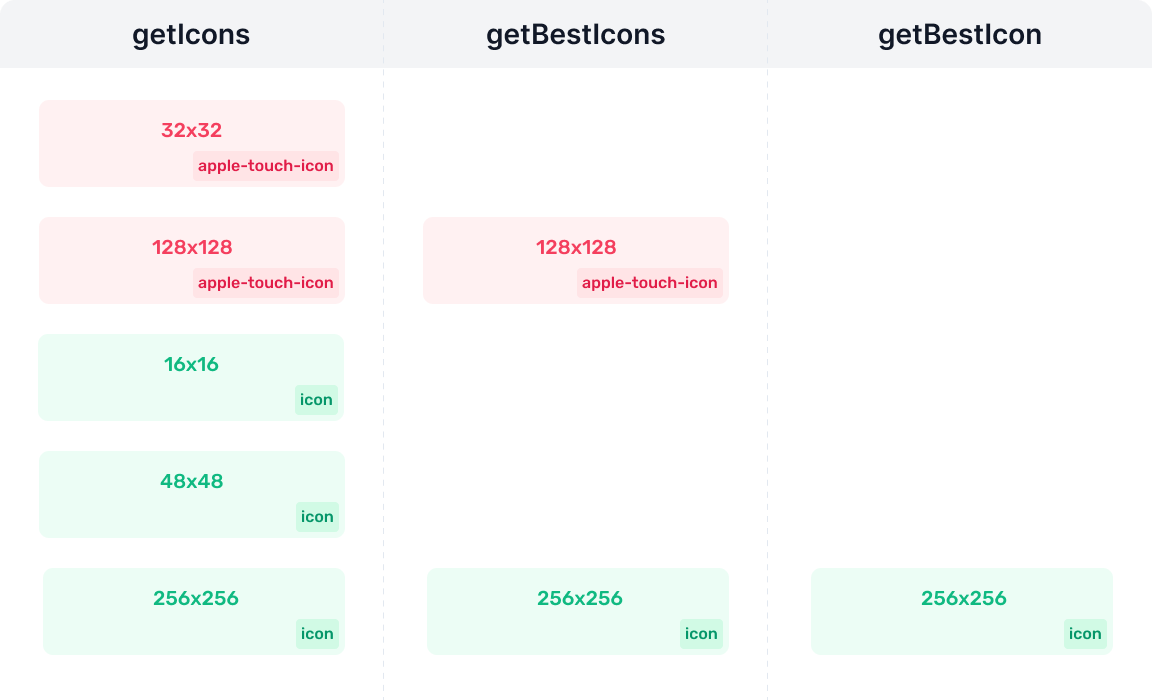
### getIcons

This method fetch all available favicons from given url.

```Cycript

import faviconPro from 'favicon-pro';

// const faviconPro = require('favicon-pro');

faviconPro

  .getIcons('https://npmjs.com')

  .then(icons => console.log(icons));

/*

[

 {

     rel: 'apple-touch-icon',

     src: 'https://static.npmjs.com/58a....4.png',

     size: 120,

 },

 {

     rel: 'apple-touch-icon',

     src: 'https://static.npmjs.com/3dc....c.png',

     size: 180,

 },

 {

     rel: 'icon',

     src: 'https://static.npmjs.com/b0f....2.png',

     size: 32,

 },

 {

     rel: 'icon',

     src: 'https://static.npmjs.com/199....9.png',

     size: 230,

 },

 {

     rel: 'icon',

     src: 'https://static.npmjs.com/da3....2.png',

     size: 16,

 },

]

*/

```

### getBestIcons

This method fetch all available favicons from given url. Then group the fetched icons by **rel** & select the best icon on each group.

```Cycript

import faviconPro from 'favicon-pro';

// const faviconPro = require('favicon-pro');

faviconPro

  .getBestIcons('https://npmjs.com')

  .then(icons => console.log(icons));

/*

[

 {

     rel: 'apple-touch-icon',

     src: 'https://static.npmjs.com/3dc....c.png',

     size: 180,

 },

 {

     rel: 'icon',

     src: 'https://static.npmjs.com/199....9.png',

     size: 230,

 },

]

*/

```

### getBestIcon

This method gives you the best icon (based on **size**).

```Cycript

import faviconPro from 'favicon-pro';

// const faviconPro = require('favicon-pro');

faviconPro

  .getBestIcon('https://npmjs.com')

  .then(icon => console.log(icon));

/*

 {

     rel: 'icon',

     src: 'https://static.npmjs.com/199....9.png',

     size: 230,

 },

*/

```

## getIcons vs getBestIcons vs getBestIcon