https://github.com/sukhcha-in/dart_web_scraper
Powerful, easy-to-use scraper for web pages and APIs. Chain parsers and transforms to extract exactly the data you need.
https://github.com/sukhcha-in/dart_web_scraper
htmlparser jsonparser parser parsing scraper scraping webscraper webscraping
Last synced: 8 months ago
JSON representation
Powerful, easy-to-use scraper for web pages and APIs. Chain parsers and transforms to extract exactly the data you need.
- Host: GitHub
- URL: https://github.com/sukhcha-in/dart_web_scraper
- Owner: sukhcha-in
- License: mit
- Created: 2024-06-17T14:56:09.000Z (about 2 years ago)
- Default Branch: main
- Last Pushed: 2025-09-11T13:43:19.000Z (10 months ago)
- Last Synced: 2025-10-22T22:03:25.219Z (8 months ago)
- Topics: htmlparser, jsonparser, parser, parsing, scraper, scraping, webscraper, webscraping
- Language: Dart
- Homepage: https://pub.dev/packages/dart_web_scraper
- Size: 638 KB
- Stars: 10
- Watchers: 2
- Forks: 2
- Open Issues: 0
-
Metadata Files:
- Readme: README.md
- Changelog: CHANGELOG.md
- License: LICENSE
Awesome Lists containing this project
README
[](https://pub.dev/packages/dart_web_scraper)
[](https://pub.dev/packages/dart_web_scraper)
[](https://pub.dev/packages/dart_web_scraper)
[](https://pub.dev/packages/dart_web_scraper)
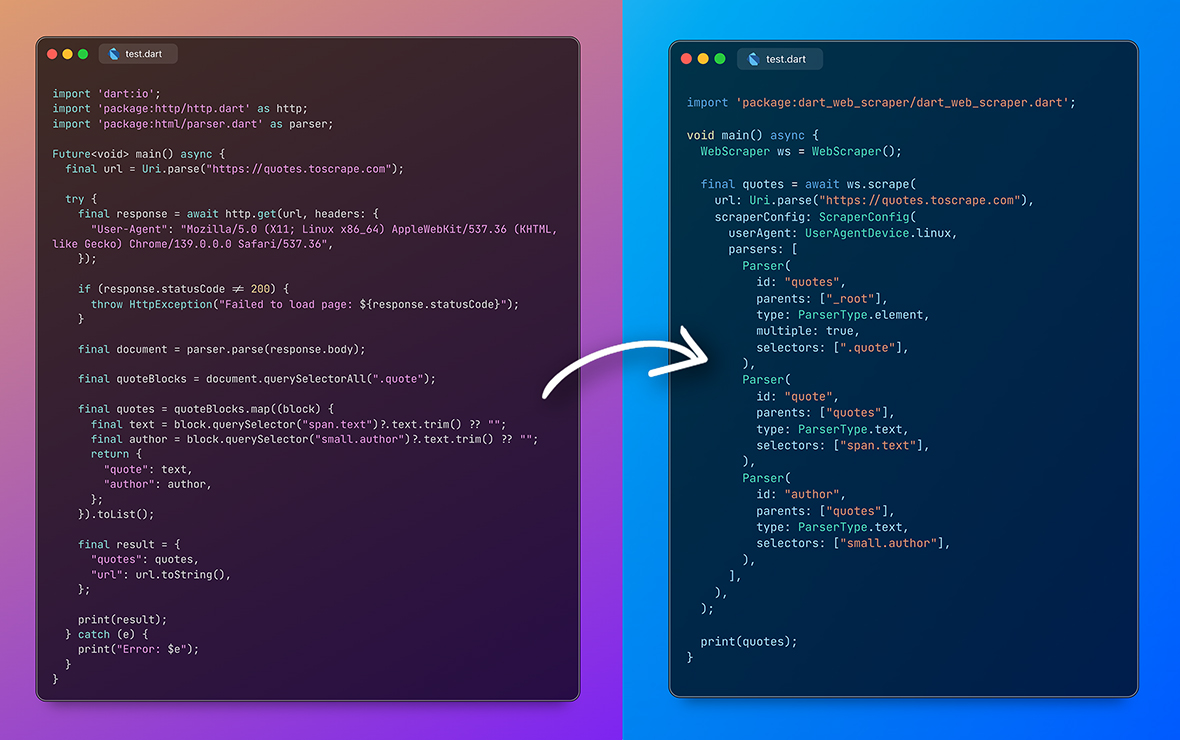
Config-based, reusable web scraper for web and API scraping. Scrape, parse web pages or APIs without writing parsers or scraping logic, using simple key/value based configs.
## Features
- Config-based, reusable web scraper for web and API scraping.
- Scrape, parse web pages or APIs without writing parsers or scraping logic, using simple key/value based configs.
- 15+ Built-in parsers.
- Data cleaning and transformations.
## Getting Started
Install it with a `flutter` command:
```bash
$ flutter pub add dart_web_scraper
```
Install it with a `dart` command:
```bash
$ dart pub add dart_web_scraper
```
## Usage
This is the most basic example of scraping quotes from quotes.toscrape.com
```dart
import 'package:dart_web_scraper/dart_web_scraper.dart';
void main() async {
WebScraper webScraper = WebScraper();
Map result = await webScraper.scrape(
url: Uri.parse("https://quotes.toscrape.com"),
scraperConfig: ScraperConfig(
parsers: [
Parser(
id: "quotes",
parents: ["_root"],
/// _root is default parent
type: ParserType.element,
selectors: [
".quote",
],
multiple: true,
),
Parser(
id: "quote",
parents: ["quotes"],
type: ParserType.text,
selectors: [
"span.text",
],
),
],
),
);
print(result);
}
```
### WebScraper `class`
High-level web scraper that combines HTML fetching and data parsing.
```dart
WebScraper WebScraper()
// Main scraping method
Future> scrape({
// The URL to scrape
required Uri url,
// Scraper configuration for the URL
ScraperConfig? scraperConfig,
// Map of domain names to lists of scraper configurations
ScraperConfigMap? scraperConfigMap,
// Enable debug logging, also dumps scraped file into current path /dump folder
bool debug = false,
// Pre-fetched HTML document (optional, avoids HTTP request if provided)
String? html,
// Custom cookies to include in HTTP requests (Overrides ScraperConfig cookies)
Map? overrideCookies,
// Custom HTTP headers to include in requests (Overrides ScraperConfig headers)
Map? overrideHeaders,
// Overrides proxy config in ScraperConfig and HTTP Parser options
ProxyAPIConfig? overrideProxyAPIConfig,
// Custom user agent string (overrides ScraperConfig userAgent)
String? overrideUserAgent,
})
```
### ScraperConfig `class`
Configuration for targeting and scraping specific types of URLs.
```dart
ScraperConfig ScraperConfig({
// List of URL path patterns that this configuration should handle
List pathPatterns = const [],
// List of parsers that define how to extract data from the page
required List parsers,
// Whether HTML content needs to be fetched from the URL
bool requiresHtml = true,
// URL preprocessing and cleaning configuration
UrlCleaner? urlCleaner,
// Proxy API config
ProxyAPIConfig? proxyAPIConfig;
// Cookies for base request
Map? cookies;
// Headers for base request
Map? headers;
// Whether to force a fresh HTTP request even if HTML is provided
bool forceRefresh = false,
// User agent device type for base request
UserAgentDevice userAgent = UserAgentDevice.mobile,
})
```
#### UrlCleaner `class`
Clean the URL before it's passed to a scraper.
```dart
UrlCleaner UrlCleaner({
// Set whitelisted or blacklisted URL parameters.
List? whitelistParams,
List? blacklistParams,
// Set custom static parameters to a URL.
Map? appendParams,
})
```
---
### Parser `class`
Easy to use and reusable parser class :)
```dart
Parser Parser({
// `id` is used for final result.
// Child parsers can reference to parent parser using `id`.
// You can have multiple parsers with same id and same parent and will execute one by one and stop execution once data is successfully parsed by one parser.
required String id,
// A child can have multiple parents, it will execute once parent parser is successfully executed.
required List parents,
// Set the parser types.
required ParserType type,
// List of selectors will execute one by one and stop execution once data is successfully parsed by one selector.
List selectors = const [],
// Set parser for private usage. Will be not added to final result.
bool isPrivate = false,
// Set multiple to `true` if data is a List.
bool multiple = false,
// Some parsers require additional options to work properly.
// You can pass these options here.
// For example, `ParserType.table` requires `ParserOptions.table`.
ParserOptions? parserOptions;
// Data transformation options to apply after extraction.
TransformationOptions? transformationOptions,
// Custom cleaner function, clean the data and return data.
Object? Function(Data, bool)? cleaner,
// If you plan to create configs from JSON, you can pass cleaner name here.
// This cleaner should be registered in `CleanerRegistry` to be used.
// If you pass cleaner along with cleanerName, cleanerName function will be ignored.
String? cleanerName,
})
```
---
### Parser Types
| Type | Description | Selector | ParserOptions |
| ---------------------------- | ------------------------------------------------------------------------ | ---------------------------------------------------------------------------------------------------------------------------------------------- | ----------------------------- |
| `ParserType.element` | Extracts element nodes from HTML using CSS selectors. | CSS selector required. | `-` |
| `ParserType.attribute` | Extracts attribute value from HTML element using CSS selectors. | Use CSS selector to select an element and **append attribute name with `::`**. Ex: `div#myid::name` where `name` refers to the attribute name. | `-` |
| `ParserType.text` | Extracts text from HTML element using CSS selectors. | CSS selector required. | `-` |
| `ParserType.image` | Extracts image URL from HTML element. | CSS selector required. After selecting an element it tries to find `src` attribute. | `-` |
| `ParserType.url` | Extracts URL from an HTML element | CSS selector required. After selecting an element it tries to find `href` attribute. | `-` |
| `ParserType.urlParam` | From an URL it extracts query parameter. | Add parameter name in selector. | `ParserOptions.urlParam` |
| `ParserType.table` | Extracts data from HTML table. | CSS selector required. Select table using this selector. | `ParserOptions.table` |
| `ParserType.sibling` | Used when target element doesn't have a valid selector but sibling does. | CSS selector is required. | `ParserOptions.sibling` |
| `ParserType.strBetween` | Extracts the string between two strings. | Not required | `ParserOptions.stringBetween` |
| `ParserType.http` | Get data using http request | Not required | `ParserOptions.http` |
| `ParserType.json` | Decode JSON string or extract data. | [json_path](https://pub.dev/packages/json_path) syntax should be used as a selector | `-` |
| `ParserType.jsonld` | Extracts all Ld+Json objects and places them into a list | Not required | `-` |
| `ParserType.jsonTable` | Extracts data from JSON as table. | [json_path](https://pub.dev/packages/json_path) syntax should be used as a selector | `ParserOptions.table` |
| `ParserType.json5decode` | Decodes JSON5 syntax | Not required | `-` |
| `ParserType.staticVal` | Useful if you want to set static values to final result | Not required | `ParserOptions.staticValue` |
| `ParserType.returnUrlParser` | Returns URL which was passed to WebScraper | Not required | `-` |
#### Data injection to `selector`
You can inject previously parsed data using ``. For example:
```dart
selectors: [
// for css selector
"div#id"
// or for json path:
r"$.data.id.value"
]
```
You can also inject data using `slot` into `ParserOptions.http`'s `url` field. For example:
```dart
Parser(
id: "json",
parents: ["product_id"],
type: ParserType.http,
isPrivate: true,
parserOptions: ParserOptions.http(
HttpParserOptions(
url: "https://example.com/productdetails/product_id",
method: HttpMethod.get,
responseType: HttpResponseType.json,
),
),
),
```
---
### ParserOptions `class`
Parser-specific configuration options that control how individual parsers behave during data extraction.
Use the appropriate named constructor for the parser type you're configuring:
```dart
// For HTTP parsers
ParserOptions.http(options: HttpParserOptions(...))
// For table and JSON table parsers
ParserOptions.table(options: TableParserOptions(...))
// For sibling parsers
ParserOptions.sibling(options: SiblingParserOptions(...))
// For static value parsers
ParserOptions.staticValue(options: StaticValueParserOptions(...))
// For string between parsers
ParserOptions.stringBetween(options: StringBetweenParserOptions(...))
// For URL parameter parsers
ParserOptions.urlParam(options: UrlParamParserOptions(...))
```
---
### TransformationOptions `class`
Comprehensive data transformation system that can be applied to extracted data.
```dart
TransformationOptions TransformationOptions({
// Text to add to the beginning
String? prepend,
// Text to add to the end
String? append,
// List of values to check for matches, returns boolean
List? match,
// Index to extract from a list (negative for reverse indexing)
int? nth,
// Delimiter to split data by
String? splitBy,
// Whether to decode URL-encoded strings
bool? urldecode,
// Whether to convert map values to a list
bool? mapToList,
// Regular expression extraction options
RegexTransformationOptions? regexMatch,
// Regular expression replacement options
RegexReplaceTransformationOptions? regexReplace,
// Text replacement options
ReplaceTransformationOptions? replace,
// Text cropping options (start/end)
CropTransformationOptions? crop,
// Extract text between two strings
StringBetweenTransformationOptions? stringBetween,
// Extract sibling elements
SiblingTransformationOptions? sibling,
// Table processing options
TableTransformationOptions? table,
// Return static value options
StaticValueTransformationOptions? staticValue,
// Custom order for applying transformations
List? transformationOrder,
})
```
## Creating configs from JSON
You can now create configs from JSON string using `ScraperConfig.fromJson` method.
## Cleaner Registry for parsers created using JSON
You can register cleaners using `CleanerRegistry.register` method. This is useful when you want to create configs from JSON and want to use custom cleaner for `Parser`.
For example:
```dart
CleanerRegistry.register('formatPrice', (data, extractedData, debug) {
return '\$${data.obj}';
});
```
then pass the cleaner name in `Parser`:
```dart
Parser(
//...
cleanerName: 'formatPrice',
//...
)
```
## Credits
[json_path](https://pub.dev/packages/json_path) - JSON path selector\
[json5](https://pub.dev/packages/json5) - JSON5 syntax decoder
