https://github.com/sunsetquest/outlooksignaturetool
An easy way for organizations to deploy a standardized signature in Outlook.
https://github.com/sunsetquest/outlooksignaturetool
Last synced: 4 months ago
JSON representation
An easy way for organizations to deploy a standardized signature in Outlook.
- Host: GitHub
- URL: https://github.com/sunsetquest/outlooksignaturetool
- Owner: SunsetQuest
- License: mit
- Created: 2018-06-06T05:10:59.000Z (about 8 years ago)
- Default Branch: master
- Last Pushed: 2018-06-10T18:41:44.000Z (almost 8 years ago)
- Last Synced: 2025-06-07T05:06:43.930Z (about 1 year ago)
- Language: HTML
- Homepage:
- Size: 296 KB
- Stars: 0
- Watchers: 1
- Forks: 0
- Open Issues: 0
-
Metadata Files:
- Readme: README.md
- License: License.txt
Awesome Lists containing this project
README
### Hello World, Welcome to the...
# Outlook Signature Tool
An easy way for Organizations to deploy a standardized signature in Outlook.
## How to deploy this tool in your organization
1) Download the Outlook Signature Tool to some shared location.
2) Create a folder named 'Templates'.
3) In Outlook, create a signature. For user fillable fields you want to create, like Full Name and Phone Number, encapsulate these with {* and *}. Example: {*Full Name*}
4) When creating a signature (like above) it will create three files and a folder. Navigate to %AppData%\Microsoft\Signatures and grab these three files and folder and copy them into the 'Templates' folder you created above.
5) Congratulations! You just created your first template.
## How do end users use the tool.
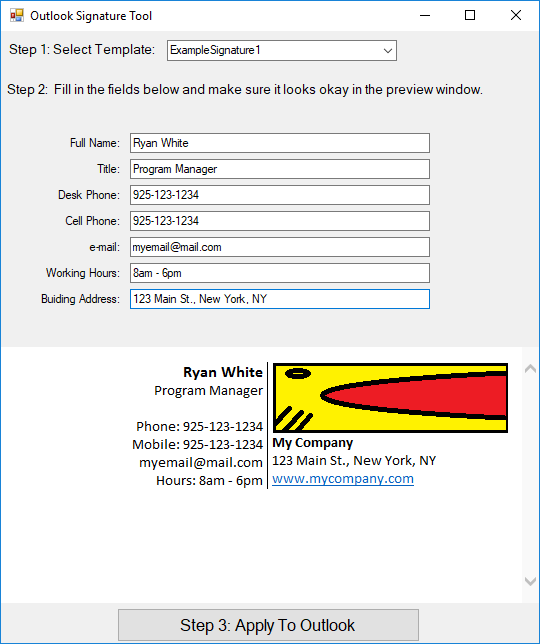
1) End users just need to run the executable - usually from a shared drive or network path.
2) Select the template they want to use. (if there is more than one)
3) Fill-in their information and preview it.
4) Push the "Apply to Outlook" button at the bottom.
## Past issues:
- images do not display in the preview window (resolved 6-7-2018)
- When the user clicks "Apply to Outlook" there is a pause. A "Please Wait..." needs to be added.
## Current issues / To-Do
(none known at this time)
## Screenshots
[](https://github.com/SunsetQuest/OutlookSignatureTool)
# Licensed under the MIT License.