https://github.com/supabase/remco
remco is a lightweight configuration management tool
https://github.com/supabase/remco
Last synced: 10 months ago
JSON representation
remco is a lightweight configuration management tool
- Host: GitHub
- URL: https://github.com/supabase/remco
- Owner: supabase
- License: mit
- Archived: true
- Fork: true (HeavyHorst/remco)
- Created: 2021-08-16T22:48:04.000Z (almost 5 years ago)
- Default Branch: master
- Last Pushed: 2023-02-22T05:08:46.000Z (over 3 years ago)
- Last Synced: 2024-10-29T13:38:54.180Z (almost 2 years ago)
- Homepage: https://heavyhorst.github.io/remco/
- Size: 26.5 MB
- Stars: 4
- Watchers: 2
- Forks: 1
- Open Issues: 4
-
Metadata Files:
- Readme: README.md
- Contributing: CONTRIBUTING
- License: LICENSE
Awesome Lists containing this project
README
[](https://travis-ci.org/HeavyHorst/remco) [](https://goreportcard.com/report/github.com/HeavyHorst/remco) [](https://raw.githubusercontent.com/HeavyHorst/remco/master/LICENSE)
# Remco
remco is a lightweight configuration management tool. It's highly influenced by [confd](https://github.com/kelseyhightower/confd).
Remcos main purposes are (like confd's):
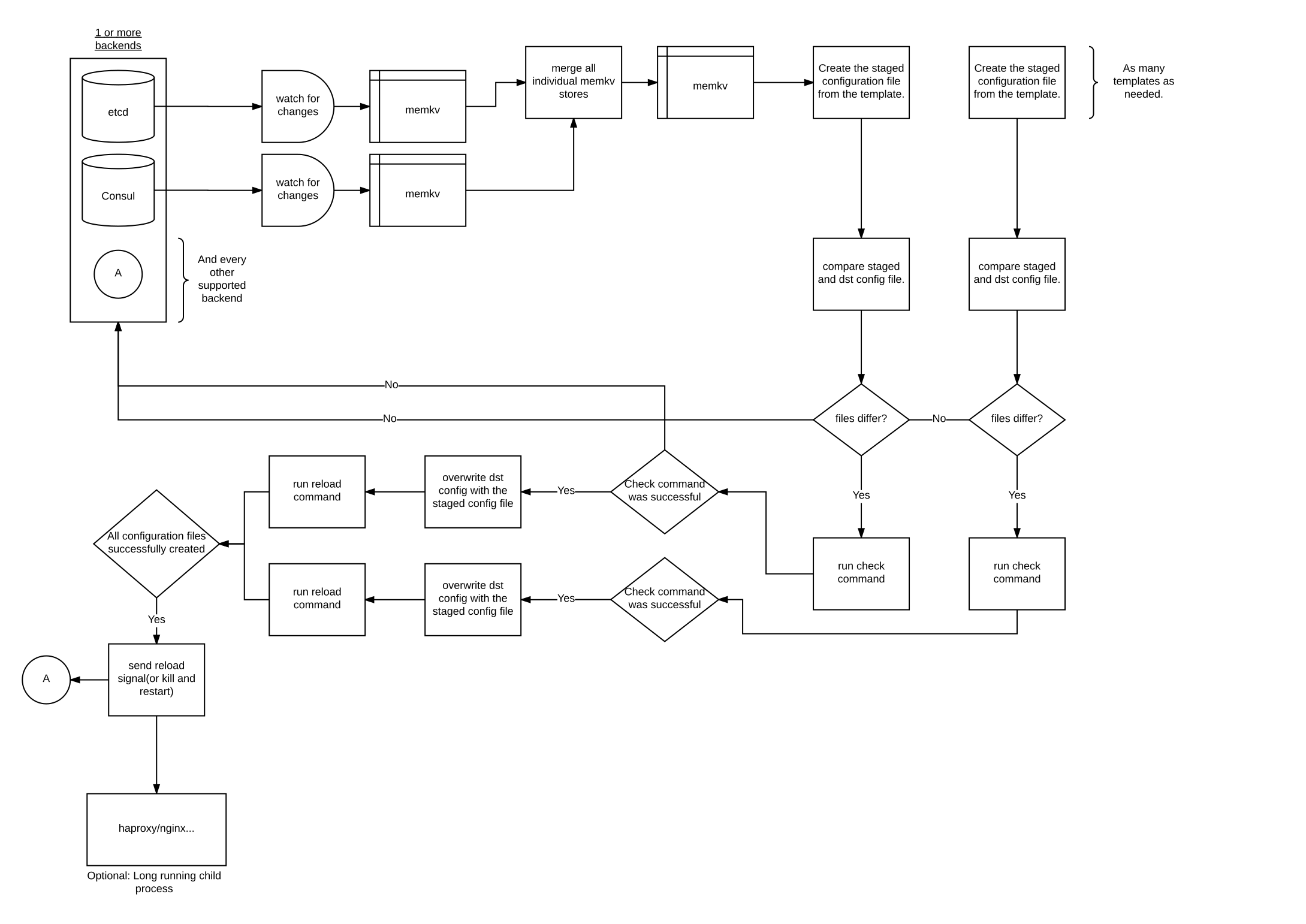
- keeping local configuration files up-to-date using data stored in a key/value store like etcd or consul and processing template resources.
- reloading applications to pick up new config file changes
## Differences between remco and confd
- Multiple source/destination pairs per template resource - useful for programs that need more than one config file
- Multiple backends per template resource - get normal config values from etcd and secrets from vault
- [Pongo2](https://github.com/flosch/pongo2) template engine instead of go's text/template
- Zombie reaping support (if remco runs as pid 1)
- Additional backends can be provided as plugins.
- Create your own custom template filters easily with JavaScript.
- [Exec](https://heavyhorst.github.io/remco/details/exec-mode/) mode similar to consul-template.
## Overview
## Documentation
See: https://heavyhorst.github.io/remco/
## Installation
### Building from source
```shell
$ go get github.com/HeavyHorst/remco/cmd/remco
$ go install github.com/HeavyHorst/remco/cmd/remco
```
You should now have `remco` in your `$GOPATH/bin` directory
### Building from the repository
```shell
$ git clone https://github.com/HeavyHorst/remco
$ cd remco
$ make
$ ls bin/
remco
```
### Building a given release
```shell
$ export VERSION=v0.11.1
$ git checkout ${VERSION}
$ make release -j
$ ls bin/
remco_0.11.1_darwin_amd64.zip remco_0.11.1_linux_amd64.zip remco_0.11.1_windows_amd64.zip remco_darwin remco_linux remco_windows
```
### Using a pre-built release
Download the releases and extract the binary.
```shell
$ REMCO_VER=0.11.1
$ wget https://github.com/HeavyHorst/remco/releases/download/v${REMCO_VER}/remco_${REMCO_VER}_linux_amd64.zip
$ unzip remco_${REMCO_VER}_linux_amd64.zip
```
Optionally move the binary to your PATH
```shell
$ mv remco_linux /usr/local/bin/remco
```
Now you can run the remco command!
## Contributing
See [Contributing](https://github.com/HeavyHorst/remco/blob/master/CONTRIBUTING) for details on submitting patches.