https://github.com/supermonster003/autojs6-typescript-declarations
AutoJs6 声明文件 (d.ts) AutoJs6 TypeScript Declarations
https://github.com/supermonster003/autojs6-typescript-declarations
autojs declarations typescript
Last synced: about 1 year ago
JSON representation
AutoJs6 声明文件 (d.ts) AutoJs6 TypeScript Declarations
- Host: GitHub
- URL: https://github.com/supermonster003/autojs6-typescript-declarations
- Owner: SuperMonster003
- License: mpl-2.0
- Created: 2021-11-02T00:38:32.000Z (over 4 years ago)
- Default Branch: main
- Last Pushed: 2023-12-02T06:04:13.000Z (over 2 years ago)
- Last Synced: 2025-04-25T20:50:26.181Z (about 1 year ago)
- Topics: autojs, declarations, typescript
- Language: TypeScript
- Homepage:
- Size: 8.81 MB
- Stars: 41
- Watchers: 2
- Forks: 24
- Open Issues: 4
-
Metadata Files:
- Readme: README.md
- License: LICENSE
Awesome Lists containing this project
README

AutoJs6 声明文件 (d.ts)
TypeScript Declarations for AutoJs6






******
### 功能简介
******
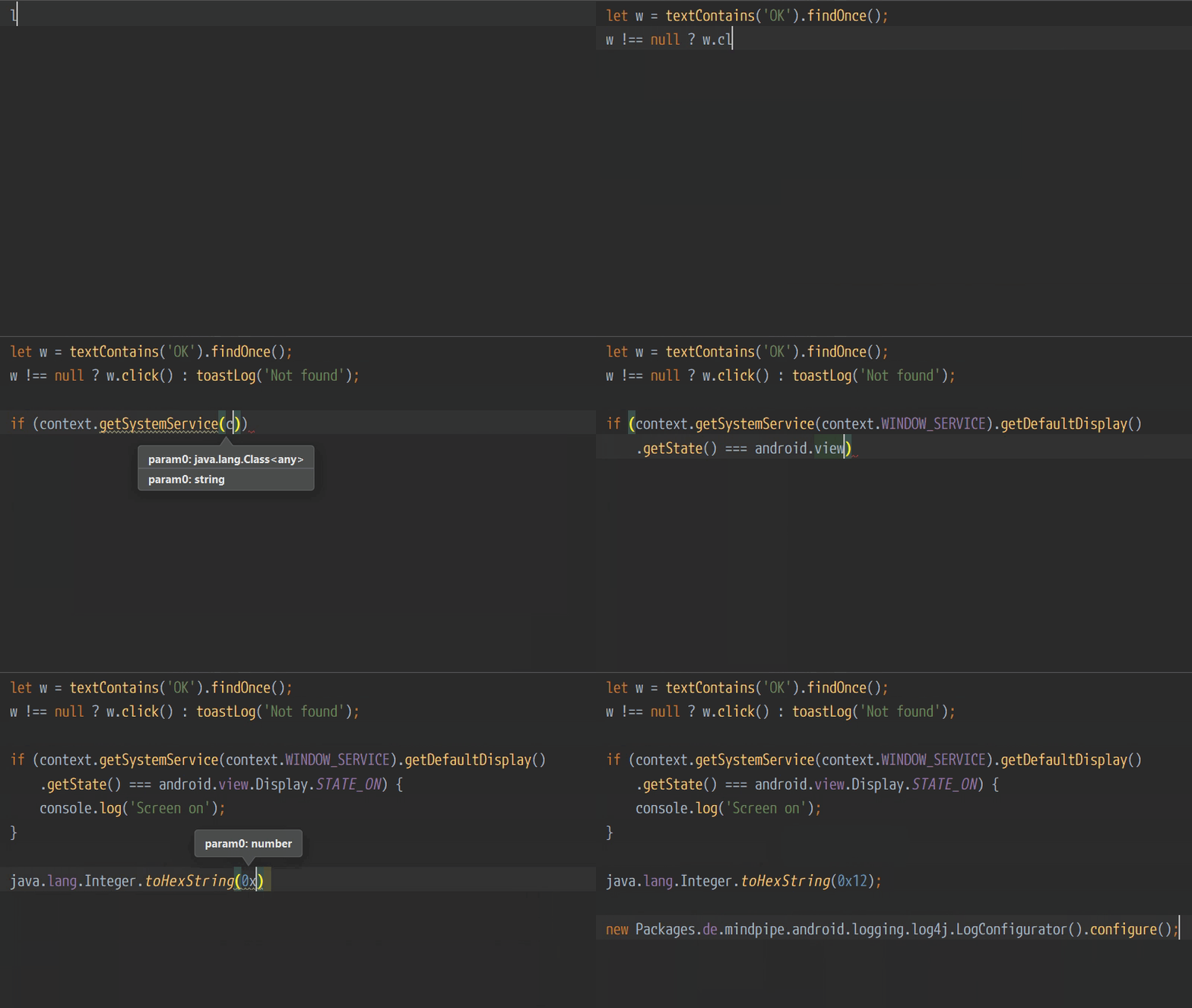
实现或增强开发工具的代码智能补全功能:
* AutoJs6 版本: [不低于 6.3.3](http://download.autojs6.com)
* 支持的开发工具: [VSCode](https://code.visualstudio.com/download) / [WebStorm](https://www.jetbrains.com/webstorm/download/) / [HBuilderX](https://www.dcloud.io/hbuilderx.html) ...
******
### 样例展示
******
点击展开或收起样例展示
******
### 使用说明
******
#### [ 1 ] - 获取声明文件 (d.ts) 的主目录
可以从 NPM 或 GitHub 获取主目录.
##### 从 NPM 获取 (推荐)
```shell
npm i @sm003/autojs6-dts
```
安装后, 定位到 `/node_modules/@sm003/autojs6-dts/declarations`.
##### 从 GitHub 获取
[下载最新项目 zip 数据包](https://github.com/SuperMonster003/AutoJs6-TypeScript-Declarations/archive/main.zip), 解压后得到 `declarations` 文件夹.
#### [ 2 ] - 放置声明文件的主目录
> 如使用 WebStorm, 此步骤可略过.
将主目录放置到项目的任意目录中.
假设用户有一个名为 `hello` 的项目, 项目目录结构如下:
> hello / images / ...
> hello / docs / ...
> hello / main.js
> hello / project.json
> ... ...
则 `declarations` 主目录支持以下方式放置:
> hello / declarations / (推荐)
> hello / images / declarations /
> hello / docs / declarations /
> hello / ... / ... / declarations /
但不能放置在项目的同级或上级目录中.
#### [ 3 ] - 实现或增强代码智能补全
开发工具会自动识别并开始索引所有声明文件.
索引完成后开始编写代码并体验代码智能提示.
> 注: 部分编辑器可能需要重新启动才能开始声明文件的索引.
#### [ 4 ] - VSCode 编辑器的额外配置
VSCode 可能无法像 WebStorm 一样识别任意位置的 declarations 文件夹, 尤其是使用 npm 命令部署后, declarations 文件夹更是难以被 VSCode 默认识别. 因此需要将 [jsconfig.json](https://github.com/SuperMonster003/AutoJs6-TypeScript-Declarations/blob/main/jsconfig.json) 文件复制到项目根目录中, 如:
> hello / mode_modules / @sm003 / autojs6-dts / ...
> hello / jsconfig.json
> hello / main.js
> ... ...
如果项目中本身已存在 jsconfig.json 文件, 只需将下列配置合并到已有文件即可:
```json
{
"compilerOptions": {
"typeRoots": [
"./node_modules/@sm003/autojs6-dts/declarations",
"./declarations"
]
}
}
```
重启 VSCode 后, 示例中的 `hello/main.js` 可实现或增强代码智能补全.
******
### 获取更新
******
从 NPM 直接获取更新:
```shell
npm update @sm003/autojs6-dts
```
如需检查更新, 除直接到 [当前项目主页](http://dts-project.autojs6.com) 查看外, 还可定位到项目根目录的 package.json 文件, 鼠标悬停在 @sm003/autojs6-dts 依赖项的版本值处, 在浮动窗口中可查看是否存在版本更新. 另外 VSCode 也可借助 [Version Lens](https://marketplace.visualstudio.com/items?itemName=pflannery.vscode-versionlens) 插件实现版本更新检查.
通常情况下, [AutoJs6](http://autojs6.com) 发布版本更新后, 声明文件项目也会伴随更新.
******
### 版本历史
******
[comment]: <> (Version history only shows last 3 versions)
# v2.1.3
###### 2023/12/02
* `新增` opencc 模块声明文件
* `优化` 完善 ocr 章节缺失的 detect 及 recognizeText 声明
* `优化` 适配 AutoJs6 6.5.0
* `依赖` 附加 Android OpenCC 声明文件版本 1.2.0
* `依赖` 升级 Android dx 声明版本 1.11 -> 1.14
* `依赖` 降级 Jackson DataBind 声明版本 2.14.3 -> 2.13.3
* `依赖` 降级 Apache Commons IO 声明文件版本 2.14.0 -> 2.8.0
# v2.1.2
###### 2023/10/30
* `新增` shizuku 模块声明文件
* `新增` barcode 模块声明文件
* `新增` qrcode 模块声明文件
* `优化` 适配 AutoJs6 6.4.0
# v2.1.1
###### 2023/07/21
* `优化` 适配 AutoJs6 6.3.3
##### 更多版本历史可参阅
* [CHANGELOG.md](https://github.com/SuperMonster003/AutoJs6-TypeScript-Declarations/blob/main/docs/CHANGELOG.md)
******
### 相关项目
******
[Android d.ts Generator](https://github.com/NativeScript/android-dts-generator) by [NativeScript](https://github.com/NativeScript)
- 由 jar 文件生成 d.ts 声明文件的工具
[AutoJs6-VSCode-Extension](http://vscext-project.autojs6.com) by [SuperMonster003](https://github.com/SuperMonster003)
- AutoJs6 调试器 (VSCode 平台插件)
******
### 打赏 (Tip)
******
查看详情 (Click to show details)
To tip online, scan the QR code below
扫描对应二维码可打赏
I believe I could make it better with your support :)
感谢每一份支持和鼓励

[//]: # (
# -----------------------------------------#
# npm commands #
# -----------------------------------------#
- User initialization
- npm adduser sm003
- Pack [ not necessary for publishing ]
- npm pack
- Publish
- npm publish --access public
)