https://github.com/sushilg96/leetcode
Solutions for problems from Leetcode
https://github.com/sushilg96/leetcode
coding computer-science education learning learning-by-doing programming python3
Last synced: 4 days ago
JSON representation
Solutions for problems from Leetcode
- Host: GitHub
- URL: https://github.com/sushilg96/leetcode
- Owner: SushilG96
- License: gpl-3.0
- Created: 2020-06-14T20:24:46.000Z (about 6 years ago)
- Default Branch: master
- Last Pushed: 2021-07-15T21:24:15.000Z (almost 5 years ago)
- Last Synced: 2025-07-01T15:35:11.075Z (about 1 year ago)
- Topics: coding, computer-science, education, learning, learning-by-doing, programming, python3
- Language: Python
- Homepage:
- Size: 182 KB
- Stars: 0
- Watchers: 1
- Forks: 2
- Open Issues: 1
-
Metadata Files:
- Readme: README.md
- License: LICENSE
Awesome Lists containing this project
README
#
# First Contributions
This project aims to simplify and guide the way beginners make their first contribution. If you are looking to make your first contribution, follow the steps below.
#### If you don't have git on your machine, [install it](https://help.github.com/articles/set-up-git/).
## Fork this repository
Fork this repository by clicking on the fork button on the top of this page.
This will create a copy of this repository in your account.
## Clone the repository
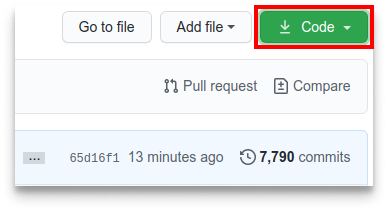
Now clone the forked repository to your machine. Go to your GitHub account, open the forked repository, click on the code button and then click the _copy to clipboard_ icon.
Open a terminal and run the following git command:
```
git clone "url you just copied"
```
where "url you just copied" (without the quotation marks) is the url to this repository (your fork of this project). See the previous steps to obtain the url.
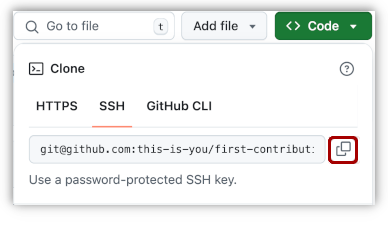
For example:
```
git clone https://github.com/SushilG96/Leetcode.git
```
## Create a branch
Change to the repository directory on your computer (if you are not already there):
```
cd Leetcode
```
Now create a branch using the `git checkout` command:
```
git checkout -b your-new-branch-name
```
## Make necessary changes and commit those changes
If you go to the project directory and execute the command `git status`, you'll see there are changes.
Now commit those changes using the `git commit` command:
```
git commit -m "Add to Contributors list"
```
replacing `` with your name.
## Push changes to GitHub
Push your changes using the command `git push`:
```
git push origin
```
replacing `` with the name of the branch you created earlier.
## Submit your changes for review
If you go to your repository on GitHub, you'll see a `Compare & pull request` button. Click on that button.
Now submit the pull request.
## You have made your first Contributions, Enjoy!!
You will get a notification email once the changes have been merged.
# This repo contains the solutions for the leetcode problems :technologist: .
#
### git clone https://github.com/SushilG96/Leetcode.git
#
1. Insert Delete GetRandom
2. Two Sum
3. Validate IP Address
4. H-Index II
5. Duplicate Zeros
6. Merge Sorted Array
7. Susbset
8. ReverseWords
9. Add Binary
10. Add Digits
11. Repeated Substring Pattern
12. Combination Sum III
13. First Missing Positive
14. Complement of Base 10 Integer
15. Rotate list
16. Linked List
17. Binary search
18. Buddy String
19. Search a 2D Matrix
20. Rotate Array
21. Minimum Absolute Difference
22. Asteroid collision
23. Convert Binary Number in a Linked List to Integer