https://github.com/suterma/replayer-pwa
A cue-based media player, as a PWA
https://github.com/suterma/replayer-pwa
cue media-player music music-player pwa rehearsal track
Last synced: about 1 year ago
JSON representation
A cue-based media player, as a PWA
- Host: GitHub
- URL: https://github.com/suterma/replayer-pwa
- Owner: suterma
- License: agpl-3.0
- Created: 2021-05-14T16:10:34.000Z (about 5 years ago)
- Default Branch: main
- Last Pushed: 2024-10-29T19:07:51.000Z (over 1 year ago)
- Last Synced: 2024-10-29T21:21:48.414Z (over 1 year ago)
- Topics: cue, media-player, music, music-player, pwa, rehearsal, track
- Language: JavaScript
- Homepage: https://replayer.app
- Size: 213 MB
- Stars: 15
- Watchers: 3
- Forks: 1
- Open Issues: 8
-
Metadata Files:
- Readme: README.md
- Changelog: CHANGELOG.md
- License: LICENSE
Awesome Lists containing this project
README




[](https://dev.azure.com/suterma/replayer-pwa/_build/latest?definitionId=1&branchName=main)
[Replayer](https://replayer.app/) is a free, cue-based media player for rehearsals with playback music.
By the click of a button, Replayer starts to play at predefined times in the audio or video file.
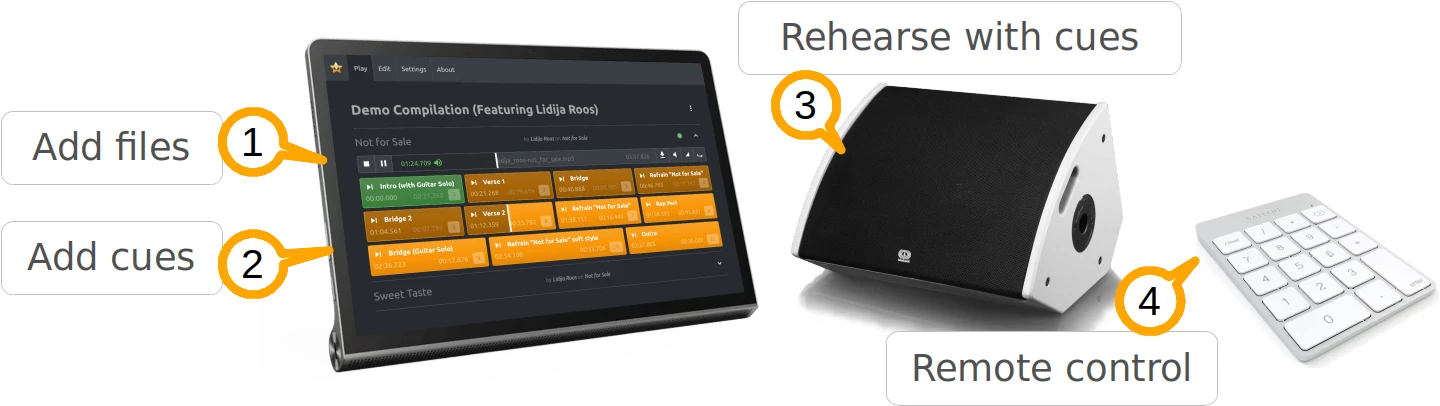
# How it works
1. Add music files (mp3, wav, ...) to create a compilation of tracks.
1. Add cues for specific points in time (e.g. intro, verse, chorus, rehearsal marks,...) in the playback file, with a name and an optional shortcut mnemonic
1. In the session, using Replayer on your portable computer, play any part of your set with the click of a cue button.
1. Additionally, you can use a (bluetooth) numeric keypad, as a remote control
Try the demo in the browser.
# Latest release
- The latest version is available live at https://web.replayer.app (official release)
- Test release at https://web-test.replayer.app
- Development release at https://web-devel.replayer.app
- Source code is availabe at [GitHub](https://github.com/suterma/replayer-pwa)
- Built with [Azure Build Pipeline](https://dev.azure.com/suterma/replayer-pwa/_build?definitionId=1)
- Tested with [Browserstack](https://live.browserstack.com/dashboard?try_live_url=https%3A%2F%2Fweb.replayer.app), though their "Free Testing for Open Source". Thanks for this great service!
# Documentation
- [Overview](https://replayer.app)
- [App documentation](https://replayer.app/documentation)
- [Blog](https://replayer.app/blog)
- [Source code documentation](https://src-doc.replayer.app)
# Tests
## End-to-end (with cypress)
Run the [Cypress End-To-End regression tests](/cypress/e2e/regression)
## Unit tests
Run the vitest unit tests with:
npm run test:unit
# Build
This package currently runs best with node version 16. (node version 18 fails because of some dependencies that are not working with it.)
npm install -g n
n 16
npm install
npm run build
NOTE: For node v18 on Windows, use the Workaround "Number 2" by https://sebhastian.com/error-0308010c-digital-envelope-routines-unsupported/
When using VSCode, in the Terminal (Powershell) do
# Windows PowerShell:
$env:NODE_OPTIONS="--openssl-legacy-provider"
once before building.
## Bundling
Replayer uses [Vite](https://vitejs.dev/), with it's current default use of [Rollup](https://rollupjs.org/) as the [bundler for production](https://vitejs.dev/guide/why#why-bundle-for-production) builds.
This means that optimizations for production buils need to leverage Rollup's options. This [Rollup bundle visualizer plugin](https://github.com/btd/rollup-plugin-visualizer) creates visual build statistics, whenever a production build is made.
See the the latest bundle statistics in [stats.html](https://htmlpreview.github.io/?https://raw.githubusercontent.com/suterma/replayer-pwa/main/stats.html).
# Roadmap
See [Trello](https://trello.com/b/UqdfomQI/replayer-20)