https://github.com/suuhm/wireguard-help
WireGuard helper script for building complex topologies (HUB/SPOKES) and using WireGuard with TCP stack
https://github.com/suuhm/wireguard-help
lan-party p2p shell tcp udp vpn wireguard wireguard-vpn-setup
Last synced: 2 months ago
JSON representation
WireGuard helper script for building complex topologies (HUB/SPOKES) and using WireGuard with TCP stack
- Host: GitHub
- URL: https://github.com/suuhm/wireguard-help
- Owner: suuhm
- License: apache-2.0
- Created: 2023-12-13T16:51:16.000Z (over 2 years ago)
- Default Branch: main
- Last Pushed: 2024-10-17T17:53:20.000Z (over 1 year ago)
- Last Synced: 2025-10-10T08:12:27.324Z (9 months ago)
- Topics: lan-party, p2p, shell, tcp, udp, vpn, wireguard, wireguard-vpn-setup
- Language: Shell
- Homepage:
- Size: 38.1 KB
- Stars: 1
- Watchers: 1
- Forks: 0
- Open Issues: 0
-
Metadata Files:
- Readme: README.md
- License: LICENSE
Awesome Lists containing this project
README

WireGuard helper script for building complex topologies (HUB/SPOKES) and using WireGuard with TCP stack
## Features
- Installing / Deinstalling of wireguard on linux based os
- Adding complex topologies like described in this article [Multi-Hop WireGuard](https://www.procustodibus.com/blog/2022/06/multi-hop-wireguard/#internet-gateway-as-a-spoke)
- Adding simply client P2P configs
- Using wg UDP traffic though TCP thanks to udp2raw tunneling
- Speedup traffic with speederv2
- Using alternative VPN with tinyFECvpn
- Run/Stop scripts
- Windows Client helper batchfiles inkluded.
## How to use
1. Clone the script via
```bash
git clone https://github.com/suuhm/wireguard-help && cd wireguard-help
chmod +x wireguard-help.sh
```
2. Run Script:
```bash
▒▒▒▒▒▒▒▒▒▒▒▒▒▒▒▒▒▒▒▒▒▒▒▒▒▒▒▒▒▒▒▒▒▒▒▒▒▒▒▒▒▒▒▒▒▒▒▒▒▒▒▒▒▒▒▒▒▒▒▒▒
▒▒▒ ▒▒▒
▒▒▒ W I R E G U A R D - H E L P ▒▒▒
▒ =================================================== ▒
▒ Wireguard admin and peer creator v0.2a (c) suuhm 2023 ▒
▒ ▒
▒▒▒▒▒▒▒▒▒▒▒▒▒▒▒▒▒▒▒▒▒▒▒▒▒▒▒▒▒▒▒▒▒▒▒▒▒▒▒▒▒▒▒▒▒▒▒▒▒▒▒▒▒▒▒▒▒▒▒
Error no Input.
Usage: ./wireguard-help.sh [Command] [Options]
Wireguard admin and peer creator v0.2a (c) suuhm 2023
Commands:
server [--add-config] [--udp-tcp-tunnel] [--start-wg]
client [--add-config] [--udp-tcp-tunnel] [--start-wg]
Options:
--run-tinyvpn [--tcp-mode]
--install-wg
--run-wg
--remove-wg
--stop-wg
--version
--help
```
## Examples
Installing wireguard on your system
```bash
./wireguard-help.sh --install-wg
```
Set up your wg hub/server
```bash
./wireguard-help.sh server --add-config
```
Set up first client peer
```bash
./wireguard-help.sh client --add-config
```
Set up UDP2RAW socket for using TCP on server and clientside
```bash
./wireguard-help.sh server --udp-tcp-tunnel
# On client pc
./wireguard-help.sh client --udp-tcp-tunnel
## When using Windows as client:
# Use the wg_help_udp2raw.bat and optional wg_help_speederv2.bat
```
## Creating different toplogies:
### Site Gateway as a Spoke:
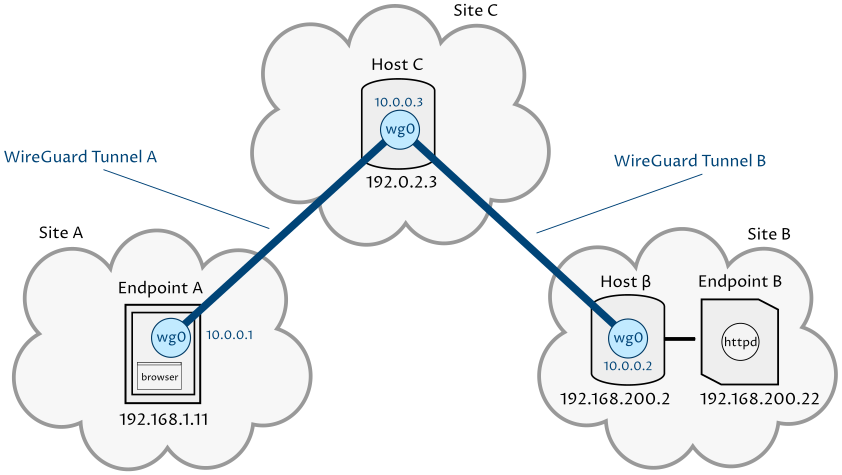
source: procustodibus.com
1. Create Server with `./wireguard-help.sh server --add-config --start-wg `
2. Follow instructions in script... todo
## Connecting wireguard with wg-help-win.bat
> [!NOTE]
> You need to install first the windows WireGuard version and run the batch file as Admin on Windows:

## All rights reserved 2023 (c) suuhm
> [!IMPORTANT]
> Let me know if you find some bugs and feature wishes and post an issue!