https://github.com/svagco/shadow
A macOS-like shadow from a window implemented as an SVG filter.
https://github.com/svagco/shadow
javascript macos mockup svg ui
Last synced: about 2 months ago
JSON representation
A macOS-like shadow from a window implemented as an SVG filter.
- Host: GitHub
- URL: https://github.com/svagco/shadow
- Owner: svagco
- License: mit
- Created: 2018-09-08T00:55:39.000Z (almost 8 years ago)
- Default Branch: master
- Last Pushed: 2018-09-10T22:47:14.000Z (almost 8 years ago)
- Last Synced: 2024-04-30T00:21:45.323Z (about 2 years ago)
- Topics: javascript, macos, mockup, svg, ui
- Language: JavaScript
- Homepage: https://svag.co
- Size: 228 KB
- Stars: 2
- Watchers: 1
- Forks: 0
- Open Issues: 0
-
Metadata Files:
- Readme: README.md
- Changelog: CHANGELOG.md
- License: LICENSE
Awesome Lists containing this project
README
# @svag/shadow
[](https://npmjs.org/package/@svag/shadow)
`@svag/shadow` is a shadow from a window. It is created as a separate element to make sure that when the `svg` image embedded in the `image` tag is resized, the actual content of the window will not be pixelated.
```sh
yarn add -E @svag/shadow
```
## Table Of Contents
- [Table Of Contents](#table-of-contents)
- [API](#api)
* [`shadow(options: ShadowOptions): { translate: string, shadow: string }`](#shadowoptions-shadowoptions--translate-string-shadow-string-)
* [`ShadowOptions`](#shadowoptions)
- [Direct VS Standalone](#direct-vs-standalone)
- [TODO](#todo)
- [Copyright](#copyright)
## API
The package is available by importing its default function:
```js
import Shadow from '@svag/shadow'
```
### `shadow(`
`options: ShadowOptions,`
`): { translate: string, shadow: string }`
Creates a shadow for a window with given width and height. The `translate` string is also returned to add as a `transform` property to the window which drops the shadow, to make sure the shadow is not cropped.
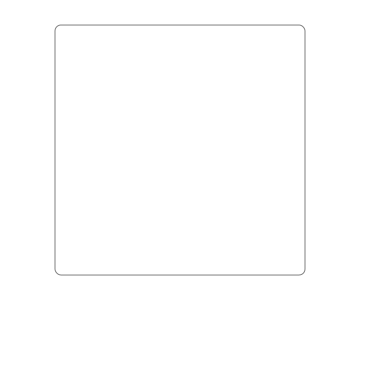
__`ShadowOptions`__: Options to generate macOS like shadow using a blur filter.
| Name | Type | Description | Default |
| ---- | ---- | ----------- | ------- |
| __width*__ | _number_ | The width of the window. | - |
| __height*__ | _number_ | The height of the window. | - |
| rx | _number_ | The `x` corner radius of a window which drops the shadow. | `6` |
| ry | _number_ | The `y` corner radius of a window which drops the shadow. | `6` |
| offsetY | _number_ | The offset from the top of the window. | `25` |
| stdDeviation | _number_ | The standard deviation for the blur. It will spread twice this distance in each direction. | `27.5` |
```js
import { svg, rect } from '@svag/lib'
import Shadow from '@svag/shadow'
// 0. DEFINE width and height of the window and its shadow.
const width = 250
const height = 250
// 1. CREATE a shadow element.
const { translate, shadow } = Shadow({
width,
height,
})
// 2. CREATE a window element to place above the shadow.
const window = rect({
transform: translate,
width,
height,
rx: 6,
ry: 6,
stroke: 'grey',
fill: '#FFFFFF',
})
// 3. CREATE an svg image.
const image = svg({
content: [shadow, window],
height: 375,
width: 375,
stretch: false,
})
```
```svg
```
## Direct VS Standalone
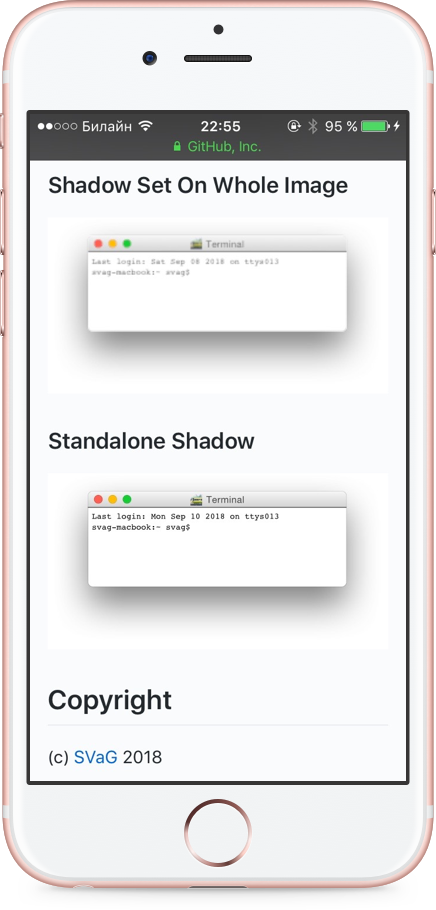
The shadow has to be implemented as a separate element of the svg, and not part of the main window, because when embedded as in an `img` tag and resized, the quality will be lost on Mobile Safari. The image below shows what happens, and how this package is solving the problem.
## TODO
- [ ] Add an `offsetX` property to the shadow.
## Copyright
(c) [SVaG][1] 2018
[1]: https://svag.co