https://github.com/swaechter/angularj-universal
This project provides an experimental server side render for Spring Boot and Angular 5 based on the J2V8 library
https://github.com/swaechter/angularj-universal
Last synced: 6 months ago
JSON representation
This project provides an experimental server side render for Spring Boot and Angular 5 based on the J2V8 library
- Host: GitHub
- URL: https://github.com/swaechter/angularj-universal
- Owner: swaechter
- Archived: true
- Created: 2017-04-19T12:03:17.000Z (about 9 years ago)
- Default Branch: master
- Last Pushed: 2020-04-30T06:11:43.000Z (about 6 years ago)
- Last Synced: 2025-07-07T09:03:55.965Z (about 1 year ago)
- Language: Java
- Homepage:
- Size: 1.95 MB
- Stars: 136
- Watchers: 23
- Forks: 14
- Open Issues: 5
-
Metadata Files:
- Readme: README.md
- Changelog: CHANGELOG.md
Awesome Lists containing this project
- awesome-java - Angular Universal
README
# Angular Universal for Java [](https://travis-ci.org/swaechter/angularj-universal)
## Background
With the introduction of Angular Universal, a solution for dynamically prerendering Angular applications on the server side (SSR) and sending the content directly to the browser as 'already-bootstrapped' application, Angular became more interesting for many developers that were using a Node.js environment. It solved the problems of SEO optimization, empty page previews from Facebooks & others and resource management (For more information see https://scotch.io/tutorials/server-side-rendering-in-angular-2-with-angular-universal).
For traditional web developers in the Java enterprise environment with technologies like Spring Boot or Java EE, these technologies required the use of a separate Node.js runtime in combination with a web framework like Express.js or even worse, inter process communication between two servers.
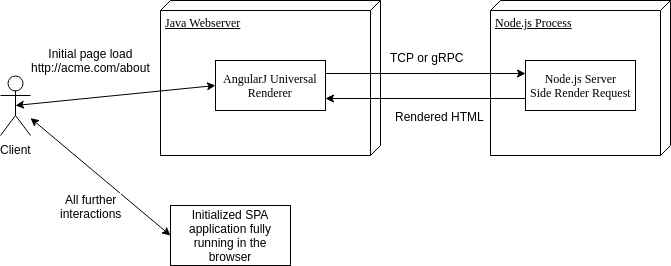
This project provides a Java API to a local running Node.js instance that is responsible for server side rendering the Angular application. For this, a regular TCP connection (gRPC is planned in the future) is used to exchange the render requests and to receive the rendered pages.
After the initial request and response, the browser takes over and the single page application is fully running in the browser (No further server side rendering requests are required until the next F5 page refresh):
[](https://github.com/swaechter/angularj-universal/blob/master/doc/AngularJ_Universal_HighLevelOverview.png?raw=true)
## Overview
This repository is divided into several modules that all share the same Angular application
| Module name | Content and responsibility |
| --------------------------------------------- | ---------------------------------------------------------------------------------------------------------------------------------------------------------------------------------------------------------------------------------------------------------- |
| angularj-universal-application | Contains the main Angular application with several pages |
| angularj-universal-renderer | Contains the main render SDK that provides the core functionality and allows a developer to implement an own render solution |
| angularj-universal-renderer-tcp | Contains a specific render solution that uses a Node.js instance via a TCP connection for rendering requests |
| angularj-universal-renderer-v8 | Contains a specific render solution that uses a Node.js instance via J2V8 language bindings for rendering requests (**Note: This module is obsolete and deprecated - no further development and support!**) |
| angularj-universal-example-spring-boot | Contains a Spring Boot web application that serves the Angular application with the help of a custom written Spring Boot starter (See module bellow) |
| angularj-universal-example-spring-boot-simple | Contains a Spring Boot web application that serves the Angular application without the help of the Spring Boot starter. This leads to a more simple example, but a lot more boiler plated code is required. For simplicity, this module is used as example |
| angularj-universal-example-servlet | TODO: Provide a servlet example |
| angularj-universal-spring-boot-starter | Custom Spring Boot starter that allows are better integration of a server side rendered application into the Spring Boot ecosystem |
## Getting started
### Phase -1: Foreword
It is really hard to cover all possible work flows and frameworks, so we are focusing on Spring Boot in this example, but other examples are provided as source code. Please don't hesitate to open a new issue and ask for help with a new framework. With your help we will be able to provide an example for your framework!
If you want to skip this tutorial, checkout the working example https://github.com/swaechter/angularj-universal/tree/master/angularj-universal-example-spring-boot-simple
### Phase 0: Overview
The whole getting started process can be divided into three phases:
1. Create a new Java application with Spring Boot as framework and Maven as build system
2. Create a new Angular application inside the Java project
3. Integrate the Angular application into the Java project
As mentioned, you can adapt these steps for your framework. If you want to skip the tutorial, just take a look at the example in `angularj-universal-example-spring-boot-simple` and the Angular application `angularj-universal-application`.
### Phase 1: Create a new Java project
Head over to `http://start.spring.io/` and create a new Spring Boot project with Maven. It is important to select `Web` and `DevTools` as dependency:
```bash
http://start.spring.io/
```
Download and import that Maven project in your favorite Java IDE. In addition, add the AngularJ Universal dependencies:
```xml
ch.swaechter
angularj-universal-renderer
0.0.3
ch.swaechter
angularj-universal-renderer-v8
0.0.3
```
Now that we have a project layout and the required Java dependencies, we can continue with phase 2 and create a new Angular application inside the Java project.
### Phase 2: Create a new Angular application
To make the integration with Java as smooth as possible, we will stick to the Maven default layout `https://maven.apache.org/guides/introduction/introduction-to-the-standard-directory-layout.html`. The Angular application will be located in `angularj-universal-example-spring-boot-simple/src/main/angular` and the build output in `angularj-universal-example-spring-boot-simple/src/main/resources`.
Install the Angular CLI and create a new Angular application:
```bash
sudo npm install -g @angular/cli
cd angularj-universal-example-spring-boot-simple/src/main
ng new angular
```
Generate the universal component and add all required third party libraries:
```bash
cd angular
ng generate universal --client-project angular
npm install --save @nguniversal/module-map-ngfactory-loader @nguniversal/socket-engine
npm install --save-dev webpack-cli ts-loader
npm update
```
This will create a traditional single page application (SPA) that needs some adjustment and preparations. To enable lazy modules, change the file `src/app/app.server.module.ts` to this:
```typescript
import {NgModule} from '@angular/core';
import {ServerModule} from '@angular/platform-server';
import {AppModule} from './app.module';
import {AppComponent} from './app.component';
import {ModuleMapLoaderModule} from "@nguniversal/module-map-ngfactory-loader";
@NgModule({
imports: [
AppModule,
ServerModule,
// ModuleMapLoaderModule // Add this line // TODO: Check how to add this line - lazy loading is at the moment not supported!
],
bootstrap: [AppComponent],
})
export class AppServerModule {
}
```
To stick with the traditional Maven layout, change the output path of the application (Property `projects.angular.architect.build.options.outputPath`) in `angular.json`;
```json
"outputPath": "../resources/public"
```
At the moment, the generated server bundle will not be relocatable (The required libraries from `ǹode_modules` are not packaged into the build artifact), hence we have to build a relocatable bundle with webpack. Create the file `webpack.config.js`:
```js
const path = require('path');
const webpack = require('webpack');
const UglifyJsPlugin = require('uglifyjs-webpack-plugin');
module.exports = {
mode: 'development',
entry: {server: './server.ts'},
resolve: {extensions: ['.js', '.ts']},
target: 'node',
externals: [/(node_modules|main\..*\.js)/],
output: {
path: path.join(__dirname, '../resources'),
filename: '[name].js'
},
module: {
rules: [
{test: /\.ts$/, loader: 'ts-loader'}
]
},
plugins: [
// Temporary Fix for issue: https://github.com/angular/angular/issues/11580
// for "WARNING Critical dependency: the request of a dependency is an expression"
new webpack.ContextReplacementPlugin(
/(.+)?angular(\\|\/)core(.+)?/,
path.join(__dirname, 'src'), // location of your src
{} // a map of your routes
),
new webpack.ContextReplacementPlugin(
/(.+)?express(\\|\/)(.+)?/,
path.join(__dirname, 'src'),
{}
),
new UglifyJsPlugin({
uglifyOptions: {
ecma: 6,
compress: false,
mangle: false,
comments: false
}
})
]
};
```
Now we need to create the Node.js script that allows us to establish a TCP connection between the Java webserver and the Node.js rednering process. For this, create a script called `server.ts` that provides the communication mechanism::
```typescript
require('zone.js/dist/zone-node');
const socketEngine = require('@nguniversal/socket-engine');
const {AppServerModuleNgFactory} = require('./dist/angular-server/main');
const port: Number = parseInt(process.env.NODEPORT) || 9090;
console.log('Going to start the server on port: ' + port);
socketEngine.startSocketEngine(AppServerModuleNgFactory, [], 'localhost', port);
```
This script will provide a rendering service on port `9090` which we can use from the Java render engine (**Note: Ensure, that this port is local-link only accessible! Not from another system!**).
Now let's update our Node scripts to all three applications at once (Snipped from `package.json`):
```json
"scripts": {
"start": "npm run build",
"build": "ng build --prod && ng run angular:server && webpack --config webpack.config.js"
},
```
Now run `npm start` or `npm run build` and the traditional client side SPA application will land in `angularj-universal-example-spring-boot-simple/src/main/resources/public`, the publicly accessible part of our web server. In addition, the relocatable server side bundle that will be loaded by the Java JVM can be found in `angularj-universal-example-spring-boot-simple/src/main/resources/server.js`, the not publicly accessible part of our web server (Only the subdirectory `public` is).
We can continue with the third phase and integrate the Angular application into the Java application and automate the NPM build (Because In cause you don't execute it, your application will fail).
### Phase 3: Integrate the Angular application into the Java project
Now we switch back to the Java part and create a web application with a controller and a service that is going to render our application.
Create a new Java class file `angularj-universal-example-spring-boot-simple/src/main/java/ch/swaechter/angularjuniversal/example/springboot/simple/DemoApplication.java` with the following content bellow:
__Note 1:__ In this example we only provide the `/` route, but the example in `angularj-universal-application` has several pages and hence routes (Home, keywords, about etc.). For every Angular route you have to define an own route in Spring Boot
__Note 2:__ To avoid such manual and duplicated routes, check out the Spring Boot starter example in `angularj-universal-example-spring-boot`. In the starter example, you can define all routes via the `application.properties` and don't have to define any `ModelAndView` at all.
```java
package ch.swaechter.angularjuniversal.example.springboot.simple;
import ch.swaechter.angularjuniversal.renderer.Renderer;
import ch.swaechter.angularjuniversal.renderer.configuration.RenderConfiguration;
import ch.swaechter.angularjuniversal.renderer.engine.RenderEngineFactory;
import ch.swaechter.angularjuniversal.renderer.utils.RenderUtils;
import ch.swaechter.angularjuniversal.v8renderer.V8RenderEngineFactory;
import org.springframework.beans.factory.annotation.Autowired;
import org.springframework.boot.SpringApplication;
import org.springframework.boot.autoconfigure.SpringBootApplication;
import org.springframework.stereotype.Service;
import org.springframework.web.bind.annotation.GetMapping;
import org.springframework.web.bind.annotation.ResponseBody;
import org.springframework.web.bind.annotation.RestController;
import java.io.File;
import java.io.IOException;
import java.io.InputStream;
import java.nio.charset.StandardCharsets;
import java.util.concurrent.Future;
@SpringBootApplication
public class WebApplication {
public static void main(String[] args) {
SpringApplication.run(WebApplication.class, args);
}
@RestController
public class ContentController {
private final RenderService renderservice;
@Autowired
public ContentController(RenderService renderservice) {
this.renderservice = renderservice;
}
@ResponseBody
@GetMapping("/")
public String showIndex() throws Exception {
return renderservice.renderPage("/").get();
}
// Note: For every Angular route you have to provide a Java Spring Boot route - or just provide a wildcard route
}
@Service
public class RenderService {
private final Renderer renderer;
public RenderService() throws IOException {
// Load the template and create a temporary server bundle file from the resource (This file will of course never change until manually edited)
InputStream templateInputStream = getClass().getResourceAsStream("/public/index.html");
InputStream serverBundleInputStream = getClass().getResourceAsStream("/server.js");
String templateContent = RenderUtils.getStringFromInputStream(templateInputStream, StandardCharsets.UTF_8);
File serverBundleFile = RenderUtils.createTemporaryFileFromInputStream("serverbundle", "tmp", serverBundleInputStream);
// File serverBundleFile = new File(""); --> Also enable auto reload in the configuration
// Create the configuration. For real live reloading, don't use a temporary file but the real generated on from the file system
// The string "node" is the path or executable name of the Node.js process and has to match/be found
RenderConfiguration renderConfiguration = new RenderConfiguration.RenderConfigurationBuilder("node", 9090, serverBundleFile, templateContent).liveReload(false).build();
// Create the TCP render engine factory for spawning render engines
RenderEngineFactory renderEngineFactory = new TcpRenderEngineFactory();
// Create and start the renderer
this.renderer = new Renderer(renderConfiguration, renderEngineFactory);
this.renderer.startRenderer();
}
Future renderPage(String uri) {
// Render a request and return a resolvable future
return renderer.addRenderRequest(uri);
}
}
}
```
Now start the Spring Boot application and head to the URL:
```bash
http://localhost:8080
```
You can test if the server side rendering is working if:
* You see the page in general
* You disable JavaScript temporary, reload and still see the page
* You inspect the source code of the current page and see the rendered page (Not only the content of the index.html file)
### Final notes
Be aware of these information:
* You have to build the Angular application with `npm run build`, otherwise the AngularJ Universal won't find the index template and relocatable server bundle and will fail. In case you want to integrate this into your regular Maven build, take a look at the Maven NPM/Node plugin `eirslett/frontend-maven-plugin` or just take a look at the usage in `angularj-universal-application/pom.xml`
* If you rebuild your Angular application you have to restart/reload the web application by default. You can avoid this problem if you use the the server bundle from the file system in the `RenderConfiguration` and enable the reload flag
* All examples use the Angular application in `angularj-universal-application` to avoid duplication of Angular applications. Just be aware of these fact in case you are reading the source code and asking yourself where the application is. In case you want to use the examples for your own project, just copy away the example and integrate the `angularj-universal-application` content and adjust the `pom.xml`
## Issues and Questions
If you encounter a problem/bug or something isn't documented well enough, feel free to create an issue in the issue tracker (https://github.com/swaechter/angularj-universal/issues) or send me a mail (waechter.simon@gmail.com)
## Credits
This project was heavily influenced by many other projects (A huge thank you to the authors):
* https://github.com/bennylut/hello-angular2-universal-j2v8 for providing an Angular 2 example that shows how the J2V8 library and Node.js can be used to render pages
* https://github.com/blacksonic/angular2-aot-cli-webpack-plugin for providing an example of a relocatable webpack bundle