https://github.com/swaggo/http-swagger
Default net/http wrapper to automatically generate RESTful API documentation with Swagger 2.0.
https://github.com/swaggo/http-swagger
golang middleware swagger2
Last synced: about 1 year ago
JSON representation
Default net/http wrapper to automatically generate RESTful API documentation with Swagger 2.0.
- Host: GitHub
- URL: https://github.com/swaggo/http-swagger
- Owner: swaggo
- License: mit
- Created: 2018-02-26T03:22:40.000Z (over 8 years ago)
- Default Branch: master
- Last Pushed: 2024-08-15T06:43:34.000Z (almost 2 years ago)
- Last Synced: 2025-04-11T19:56:21.149Z (about 1 year ago)
- Topics: golang, middleware, swagger2
- Language: Go
- Homepage:
- Size: 90.8 KB
- Stars: 493
- Watchers: 9
- Forks: 79
- Open Issues: 36
-
Metadata Files:
- Readme: README.md
- License: LICENSE
Awesome Lists containing this project
README
# http-swagger
Default net/http wrapper to automatically generate RESTful API documentation with Swagger 2.0.
[](https://github.com/features/actions)
[](https://codecov.io/gh/swaggo/http-swagger)
[](https://goreportcard.com/report/github.com/swaggo/http-swagger)
[](https://godoc.org/github.com/swaggo/http-swagger)
[](https://github.com/swaggo/http-swagger/releases)
## Usage
V2 require go 1.16 or higher due to the use of `embed` package.
### Start using it
1. Add comments to your API source code, [See Declarative Comments Format](https://github.com/swaggo/swag#declarative-comments-format).
2. Download [Swag](https://github.com/swaggo/swag) for Go by using:
```sh
go install github.com/swaggo/swag/cmd/swag@latest
```
To build from source you need [Go](https://golang.org/dl/) (1.17 or newer).
Or download a pre-compiled binary from the [release page](https://github.com/swaggo/swag/releases).
3. Run the [Swag](https://github.com/swaggo/swag) in your Go project root folder which contains `main.go` file, [Swag](https://github.com/swaggo/swag) will parse comments and generate required files(`docs` folder and `docs/doc.go`).
```sh
swag init
```
4. Download [http-swagger](https://github.com/swaggo/http-swagger) by using:
```sh
go get -u github.com/swaggo/http-swagger
```
And import following in your code:
```go
import "github.com/swaggo/http-swagger" // http-swagger middleware
```
### Canonical example:
```go
package main
import (
"net/http"
"github.com/go-chi/chi"
"github.com/swaggo/http-swagger/v2"
_ "github.com/swaggo/http-swagger/example/go-chi/docs" // docs is generated by Swag CLI, you have to import it.
)
// @title Swagger Example API
// @version 1.0
// @description This is a sample server Petstore server.
// @termsOfService http://swagger.io/terms/
// @contact.name API Support
// @contact.url http://www.swagger.io/support
// @contact.email support@swagger.io
// @license.name Apache 2.0
// @license.url http://www.apache.org/licenses/LICENSE-2.0.html
// @host petstore.swagger.io
// @BasePath /v2
func main() {
r := chi.NewRouter()
r.Get("/swagger/*", httpSwagger.Handler(
httpSwagger.URL("http://localhost:1323/swagger/doc.json"), //The url pointing to API definition
))
http.ListenAndServe(":1323", r)
}
```
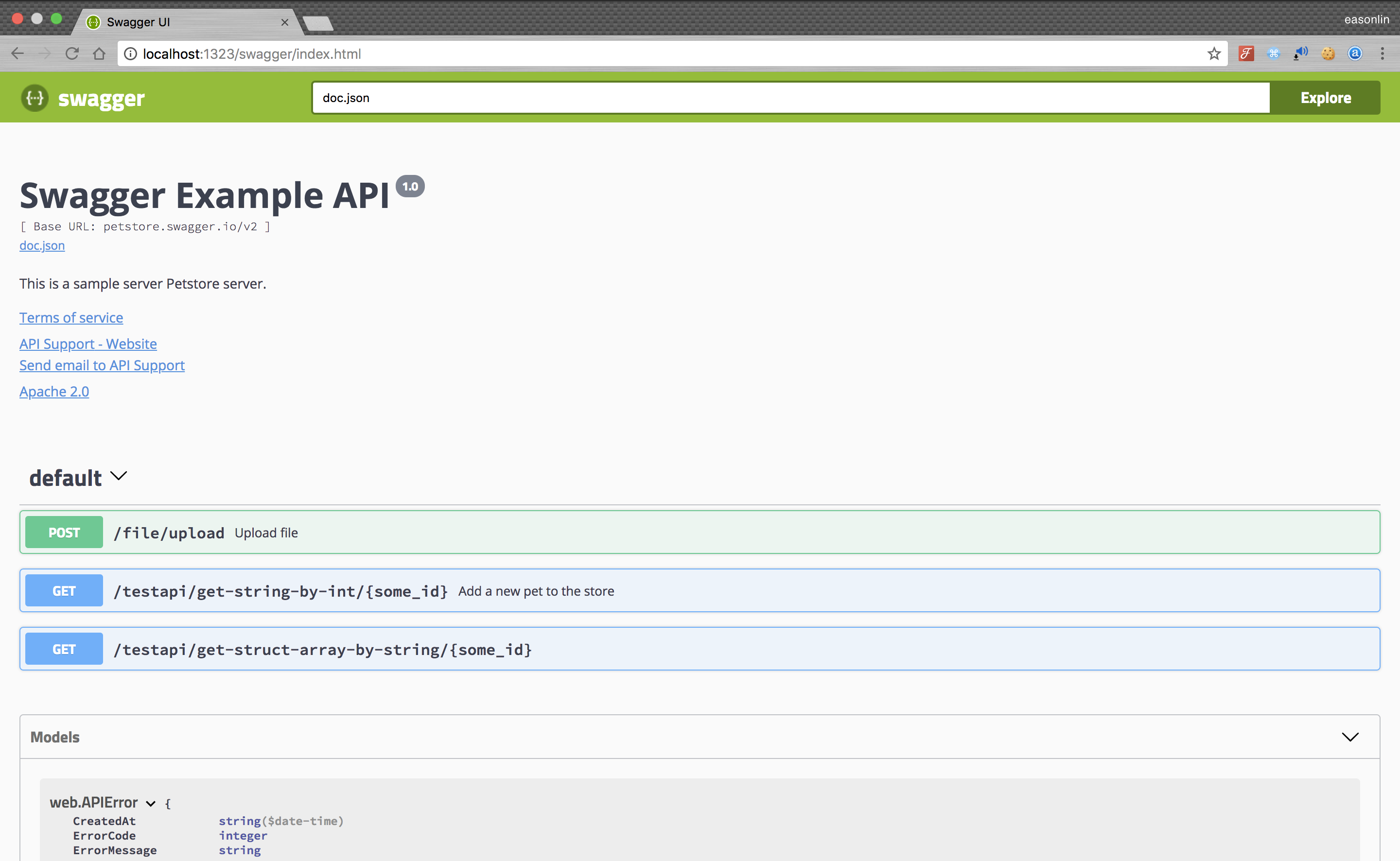
5. Run it, and browser to http://localhost:1323/swagger/index.html, you can see Swagger 2.0 Api documents.
### Optional configuration
As documented [here](https://swagger.io/docs/open-source-tools/swagger-ui/usage/configuration/), you can customize `SwaggerUI` with options and plugins. This package supports that customization with the `Plugins` and `UIConfig` options. These may be set to generate plugin lines and configuration parameters in the generated `SwaggerUI` JavaScript.
In addition, `BeforeScript` and `AfterScript` options may be used to generate JavaScript before and after `SwaggerUIBundle` creation, respectively. `BeforeScript` may be used to declare a plugin, for example, and `AfterScript` may be used to run a block of JavaScript on page load.
#### A trivial example
To illustrate these options, take the following code:
```go
package main
import (
"net/http"
"github.com/go-chi/chi"
"github.com/swaggo/http-swagger/v2"
_ "github.com/swaggo/http-swagger/example/go-chi/docs"
)
// @title Swagger Example API
// @version 1.0
// @description This is a sample server Petstore server.
// @termsOfService http://swagger.io/terms/
// @contact.name API Support
// @contact.url http://www.swagger.io/support
// @contact.email support@swagger.io
// @license.name Apache 2.0
// @license.url http://www.apache.org/licenses/LICENSE-2.0.html
// @host petstore.swagger.io
// @BasePath /v2
func main() {
r := chi.NewRouter()
r.Get("/swagger/*", httpSwagger.Handler(
httpSwagger.URL("http://localhost:1323/swagger/doc.json"),
httpSwagger.BeforeScript(`const SomePlugin = (system) => ({
// Some plugin
});
`),
httpSwagger.AfterScript(`const someOtherCode = function(){
// Do something
};
someOtherCode();`),
httpSwagger.Plugins([]string{
"SomePlugin",
"AnotherPlugin",
}),
httpSwagger.UIConfig(map[string]string{
"showExtensions": "true",
"onComplete": `() => { window.ui.setBasePath('v3'); }`,
"defaultModelRendering": `"model"`,
}),
))
http.ListenAndServe(":1323", r)
}
```
When you then open Swagger UI and inspect the source JavaScript, you would see the following:
```javascript
window.onload = function() {
const SomePlugin = (system) => ({
// Some plugin
});
const ui = SwaggerUIBundle({
url: "swagger.json",
deepLinking: false ,
docExpansion: "none",
dom_id: "swagger-ui-id",
validatorUrl: null,
persistAuthorization: false,
presets: [
SwaggerUIBundle.presets.apis,
SwaggerUIStandalonePreset
],
plugins: [
SwaggerUIBundle.plugins.DownloadUrl,
SomePlugin,
AnotherPlugin
],
defaultModelRendering: "model",
onComplete: () => { window.ui.setBasePath('v3'); },
showExtensions: true,
layout: "StandaloneLayout"
})
window.ui = ui
const someOtherCode = function(){
// Do something
};
someOtherCode();
}
```
#### A practical example
To illustrate a real use case, these options make it possible to dynamically set the API base path in the Swagger doc. The Swagger UI project has an [open issue on how to achieve this with a plugin](https://github.com/swagger-api/swagger-ui/issues/5981). That may be done as follows:
```go
package main
import (
"fmt"
"net/http"
"net/url"
"github.com/go-chi/chi"
"github.com/swaggo/http-swagger/v2"
_ "github.com/swaggo/http-swagger/example/go-chi/docs"
)
// @title Swagger Example API
// @version 1.0
// @description This is a sample server Petstore server.
// @termsOfService http://swagger.io/terms/
// @contact.name API Support
// @contact.url http://www.swagger.io/support
// @contact.email support@swagger.io
// @license.name Apache 2.0
// @license.url http://www.apache.org/licenses/LICENSE-2.0.html
// @host petstore.swagger.io
// @BasePath /v2
func main() {
r := chi.NewRouter()
uri, err := url.Parse("http://localhost:1323/api/v3")
if err != nil {
panic(err)
}
r.Get("/swagger/*", httpSwagger.Handler(
httpSwagger.URL("http://localhost:1323/swagger/doc.json"),
httpSwagger.BeforeScript(`const UrlMutatorPlugin = (system) => ({
rootInjects: {
setScheme: (scheme) => {
const jsonSpec = system.getState().toJSON().spec.json;
const schemes = Array.isArray(scheme) ? scheme : [scheme];
const newJsonSpec = Object.assign({}, jsonSpec, { schemes });
return system.specActions.updateJsonSpec(newJsonSpec);
},
setHost: (host) => {
const jsonSpec = system.getState().toJSON().spec.json;
const newJsonSpec = Object.assign({}, jsonSpec, { host });
return system.specActions.updateJsonSpec(newJsonSpec);
},
setBasePath: (basePath) => {
const jsonSpec = system.getState().toJSON().spec.json;
const newJsonSpec = Object.assign({}, jsonSpec, { basePath });
return system.specActions.updateJsonSpec(newJsonSpec);
}
}
});`),
httpSwagger.Plugins([]string{"UrlMutatorPlugin"}),
httpSwagger.UIConfig(map[string]string{
"onComplete": fmt.Sprintf(`() => {
window.ui.setScheme('%s');
window.ui.setHost('%s');
window.ui.setBasePath('%s');
}`, uri.Scheme, uri.Host, uri.Path),
}),
))
http.ListenAndServe(":1323", r)
}
```