https://github.com/swiftcrew/react-native-smart-capture
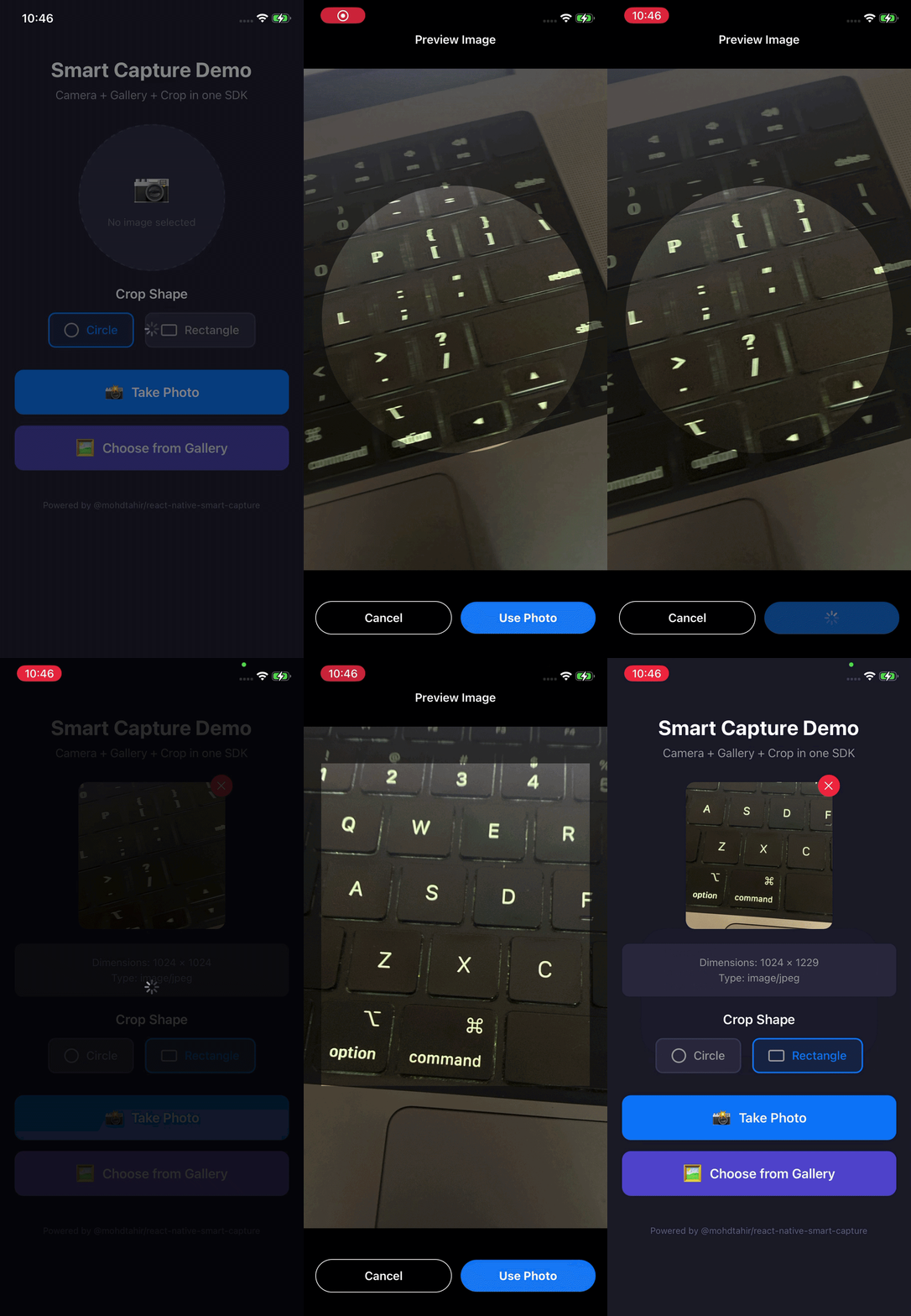
A complete React Native solution for capturing and selecting profile images. Features front/back camera with zoom, gallery picker, interactive pan/pinch crop preview with circle or rectangle shapes, and public permission APIs. Parent app controls the entire permission and source selection UX. Works on iOS and Android.
https://github.com/swiftcrew/react-native-smart-capture
Last synced: 27 days ago
JSON representation
A complete React Native solution for capturing and selecting profile images. Features front/back camera with zoom, gallery picker, interactive pan/pinch crop preview with circle or rectangle shapes, and public permission APIs. Parent app controls the entire permission and source selection UX. Works on iOS and Android.
- Host: GitHub
- URL: https://github.com/swiftcrew/react-native-smart-capture
- Owner: SwiftCrew
- License: mit
- Created: 2026-05-07T14:22:20.000Z (about 2 months ago)
- Default Branch: main
- Last Pushed: 2026-05-07T15:19:30.000Z (about 2 months ago)
- Last Synced: 2026-05-07T15:33:38.779Z (about 2 months ago)
- Language: TypeScript
- Size: 267 KB
- Stars: 0
- Watchers: 0
- Forks: 0
- Open Issues: 0
-
Metadata Files:
- Readme: README.md
- Changelog: CHANGELOG.md
- Contributing: CONTRIBUTING.md
- License: LICENSE
Awesome Lists containing this project
README
# react-native-smart-capture
[](https://www.npmjs.com/package/react-native-smart-capture)
[](https://github.com/SwiftCrew/react-native-smart-capture/blob/main/LICENSE)
[](https://reactnative.dev/)
[](https://github.com/SwiftCrew/react-native-smart-capture/actions/workflows/ci.yml)
> **Camera + Gallery + Crop — one SDK, zero hassle.**
A production-ready React Native SDK for capturing and selecting profile images with interactive crop preview and built-in permission helpers.
---
## Why Use This SDK?
Building a profile image picker from scratch requires handling:
- Camera permissions (iOS + Android differences)
- Photo library permissions (iOS limited access, Android scoped storage)
- Camera integration with front/back switching and zoom
- Gallery image selection
- Image cropping with gesture support
- Memory management and cleanup
- Modal presentation issues on iOS
**This SDK handles all of that** with a clean, customizable API.
---
## Features
| Feature | Description |
|---------|-------------|
| **Camera Capture** | Front/back camera with 1x / 2x zoom toggle |
| **Gallery Selection** | Native picker with iOS limited-access support |
| **Interactive Crop** | Pan & pinch gestures, circle or rectangle shapes |
| **Permission Helpers** | Check, request, and deep-link to settings |
| **Customizable UI** | Override strings, colors, and fonts |
| **Cross-Platform** | iOS and Android support |
| **Memory Safe** | Proper cleanup and mounted refs |
| **TypeScript** | Full type definitions included |
---
## Installation
```bash
# Using yarn
yarn add react-native-smart-capture
# Using npm
npm install react-native-smart-capture
```
### Peer Dependencies
Install the required peer dependencies:
```bash
yarn add react-native-vision-camera \
react-native-image-picker \
react-native-permissions \
react-native-reanimated \
react-native-gesture-handler \
react-native-svg \
@react-native-community/image-editor
```
> **Note:** `react-native-vision-camera` and `react-native-svg` are optional if you only use gallery selection.
#### Compatible peer-dependency versions
This SDK targets stable APIs of its peers. Please install versions in these ranges:
| Peer | Compatible range | Notes |
|---|---|---|
| `react-native-vision-camera` | `>=3.0.0 <5.0.0` | **VisionCamera 5.x** rewrote the photo-capture API and is **not yet supported**. Use `react-native-vision-camera@^4`. |
| `react-native-image-picker` | `>=7.0.0 <9.0.0` | Tested up to v8. |
| `@react-native-community/image-editor` | `>=4.0.0 <5.0.0` | |
| `react-native-permissions` | `>=3.0.0 <6.0.0` | Tested up to v5. |
| `react-native-reanimated` | `>=3.0.0` | If on **Reanimated 4+**, also install `react-native-worklets` (see below). |
| `react-native-gesture-handler` | `>=2.0.0` | |
| `react-native-svg` | `>=13.0.0` | Optional. |
#### If you use Reanimated 4
Reanimated 4 split out its worklets runtime into a separate package. You **must** install it:
```bash
yarn add react-native-worklets
cd ios && pod install
```
If you skip this you'll see `Unable to find a specification for 'RNWorklets'` during `pod install`.
---
## Permissions (camera & photo library)
This SDK uses **`react-native-permissions`** for runtime checks and requests (`ensureAllPermissions`, etc.).
You still need to declare permissions in **native config** so the OS can show prompts and App Store / Play review can validate them.
### Runtime (JavaScript)
Call `ensureAllPermissions()` (or the individual `check*` / `request*` helpers) **before** opening the camera or gallery flow.
If the user denies or blocks access, use `openSettings()` to deep-link them to the system Settings app.
### iOS — `Info.plist`
Add usage descriptions — these strings are shown in the system permission dialog:
| Capability | Key | When you need it |
|---|---|---|
| **Camera** | `NSCameraUsageDescription` | **Take Photo** / `openProfileImageCapture` |
| **Photo library (read)** | `NSPhotoLibraryUsageDescription` | **Choose from gallery** / `openProfileImageGallery` |
| **Save to library (optional)** | `NSPhotoLibraryAddUsageDescription` | Only if you save/export to the camera roll |
| **Microphone** | `NSMicrophoneUsageDescription` | Often required by the camera framework even if you only capture still photos |
Example:
```xml
NSCameraUsageDescription
We need camera access to capture your profile photo.
NSPhotoLibraryUsageDescription
We need photo library access to choose your profile photo.
NSPhotoLibraryAddUsageDescription
We need permission to save your profile photo.
NSMicrophoneUsageDescription
Required by the camera framework for photo capture.
```
### iOS — `Podfile`
Register the permission pods you use (camera + photo library). At the **top** of `ios/Podfile`:
```ruby
def node_require(script)
require Pod::Executable.execute_command('node', ['-p',
"require.resolve('#{script}', {paths: [process.argv[1]]})",
__dir__
]).strip
end
node_require('react-native-permissions/scripts/setup.rb')
setup_permissions([
'Camera',
'PhotoLibrary',
'PhotoLibraryAddOnly',
])
```
Then:
```bash
cd ios && pod install
```
> **Limited photo library (iOS):** if the user chooses "Select Photos…", the SDK treats limited access as **granted** for the gallery flow, consistent with `react-native-permissions`.
### Android — `AndroidManifest.xml`
| Permission | When |
|---|---|
| `android.permission.CAMERA` | Camera capture |
| `android.permission.READ_MEDIA_IMAGES` | **Android 13+ (API 33+)** — read images from the gallery |
| `android.permission.READ_EXTERNAL_STORAGE` with `android:maxSdkVersion="32"` | **Android 12 and below** — read images from the gallery |
Example:
```xml
```
On **Android 6+**, dangerous permissions are requested at **runtime** — `ensureAllPermissions()` handles that via `react-native-permissions`.
### Minimal checklist before shipping
- [ ] iOS: all required `NS*UsageDescription` keys present with real copy (not empty strings).
- [ ] iOS: `setup_permissions([...])` in `Podfile` includes **Camera** + **PhotoLibrary** (and **PhotoLibraryAddOnly** if you save to the library).
- [ ] Android: `CAMERA` + gallery read permissions for both API 33+ and API ≤ 32 as shown above.
- [ ] JS: call `ensureAllPermissions()` before `openProfileImageCapture` / `openProfileImageGallery`.
### Gallery-only apps (optional)
If your product **never** opens the in-app camera, you may omit `NSCameraUsageDescription` and `CAMERA` from the manifest — but you still need **photo library** entries for `openProfileImageGallery`.
---
## Setup
### 1. Babel Configuration
Add the Reanimated plugin (must be last):
```js
// babel.config.js
module.exports = {
presets: ['module:@react-native/babel-preset'],
plugins: ['react-native-reanimated/plugin'],
};
```
### 2. App Root Setup
Wrap your app with `GestureHandlerRootView`:
```tsx
import { GestureHandlerRootView } from 'react-native-gesture-handler';
export default function App() {
return (
);
}
```
For best results, also import `react-native-gesture-handler` at the very top of your entry file (`index.js`):
```js
import 'react-native-gesture-handler';
import { AppRegistry } from 'react-native';
// ...
```
### 3. iOS native setup
See **[Permissions → iOS — Info.plist](#ios--infoplist)** and **[Permissions → iOS — Podfile](#ios--podfile)** above.
### 4. Android native setup
See **[Permissions → Android — AndroidManifest.xml](#android--androidmanifestxml)** above.
---
## Quick Start
### 1. Mount the Host Component
Add `ProfileImagePickerHost` once near your app root:
```tsx
import { ProfileImagePickerHost } from 'react-native-smart-capture';
function AppRoot() {
return (
<>
>
);
}
```
### 2. Open the Picker
```tsx
import {
ensureAllPermissions,
openProfileImageCapture,
openProfileImageGallery,
} from 'react-native-smart-capture';
const handleCapturePhoto = async () => {
const { allGranted } = await ensureAllPermissions();
if (!allGranted) {
Alert.alert('Permission Required', 'Please grant camera and photo permissions.');
return;
}
openProfileImageCapture({
onSuccess: (image) => {
console.log('Captured image:', image.uri);
},
onCancel: () => {
console.log('User cancelled');
},
onError: (error) => {
console.error('Error:', error);
},
options: {
cropShape: 'circle', // or 'rectangle'
enableBase64: false,
compression: 0.85,
maxOutputSize: 1024,
},
});
};
const handleSelectFromGallery = async () => {
const { allGranted } = await ensureAllPermissions();
if (!allGranted) return;
openProfileImageGallery({
onSuccess: (image) => console.log(image.uri),
options: { cropShape: 'rectangle' },
});
};
```
---
## API Reference
### Permission Helpers
```tsx
import {
checkCameraPermission,
requestCameraPermission,
checkGalleryPermission,
requestGalleryPermission,
ensureAllPermissions,
openSettings,
} from 'react-native-smart-capture';
```
| Function | Returns | Description |
|----------|---------|-------------|
| `checkCameraPermission()` | `Promise` | Check camera permission without prompting |
| `requestCameraPermission()` | `Promise` | Request camera permission |
| `checkGalleryPermission()` | `Promise` | Check gallery permission without prompting |
| `requestGalleryPermission()` | `Promise` | Request gallery permission |
| `ensureAllPermissions()` | `Promise` | Check & request both permissions |
| `openSettings()` | `Promise` | Open app settings for manual permission grant |
**PermissionStatus:** `'granted' | 'denied' | 'blocked' | 'unavailable'`
**PermissionResult:**
```ts
{
camera: PermissionStatus;
gallery: PermissionStatus;
allGranted: boolean;
}
```
---
### Imperative API
#### `openProfileImageCapture(args)`
Opens the camera for photo capture.
```ts
openProfileImageCapture({
onSuccess: (image: ProfileImageResult) => void,
onCancel?: () => void,
onError?: (error: Error) => void,
options?: ProfileImagePickerOptions,
});
```
#### `openProfileImageGallery(args)`
Opens the gallery for image selection.
```ts
openProfileImageGallery({
onSuccess: (image: ProfileImageResult) => void,
onCancel?: () => void,
onError?: (error: Error) => void,
options?: ProfileImagePickerOptions,
});
```
#### `openProfileImagePicker(args)`
Alias for `openProfileImageCapture` (backward compatibility).
---
### Component API
```tsx
import { ProfileImagePicker } from 'react-native-smart-capture';
setIsVisible(false)}
onImageSelected={(image) => handleImage(image)}
onError={(error) => console.error(error)}
options={{
cropShape: 'circle',
compression: 0.85,
}}
/>
```
---
### Options
| Option | Type | Default | Description |
|--------|------|---------|-------------|
| `cropShape` | `'circle' \| 'rectangle'` | `'circle'` | Shape of the crop overlay |
| `enableBase64` | `boolean` | `false` | Include base64 in result |
| `compression` | `number` | `0.85` | JPEG quality (0–1) |
| `maxOutputSize` | `number` | `1024` | Max output dimension in pixels |
| `ui` | `SmartCaptureUIConfig` | – | Customize strings, colors, fonts |
---
### Result Type
```ts
type ProfileImageResult = {
uri: string; // Local file URI
base64?: string; // Base64 string (if enableBase64: true)
fileName?: string; // Derived filename
type?: string; // Always 'image/jpeg'
width?: number; // Output width in pixels
height?: number; // Output height in pixels
};
```
---
### UI Customization
```ts
openProfileImageCapture({
onSuccess: handleSuccess,
options: {
ui: {
strings: {
previewTitle: 'Crop Your Photo',
previewCancel: 'Back',
previewUsePhoto: 'Save',
cameraPreparing: 'Loading camera...',
cameraCancel: 'Close',
cameraFlip: 'Switch',
},
colors: {
primary: '#007AFF',
background: '#000000',
overlay: 'rgba(0,0,0,0.6)',
},
fonts: {
regular: 'System',
medium: 'System',
bold: 'System',
},
},
},
});
```
**Available String Keys:**
| Key | Default | Description |
|-----|---------|-------------|
| `cameraPreparing` | "Preparing camera..." | Camera loading state |
| `cameraCancel` | "Cancel" | Camera cancel button |
| `cameraFlip` | "Flip" | Camera flip button |
| `previewTitle` | "Preview Image" | Preview screen title |
| `previewCancel` | "Cancel" | Preview cancel button |
| `previewUsePhoto` | "Use Photo" | Preview confirm button |
| `previewLoading` | "Loading image..." | Image loading state |
| `previewTryAgain` | "Try again" | Error retry button |
---
## Example App
A complete example app is included in the `example/` directory.
```bash
# Clone the repo
git clone https://github.com/SwiftCrew/react-native-smart-capture.git
cd react-native-smart-capture
# Install dependencies
yarn install
cd example && yarn install
# iOS
cd ios && pod install && cd ..
yarn ios
# Android
yarn android
```
---
## Use Cases
- User profile photo upload
- Avatar selection in social apps
- KYC / identity verification
- Document photo capture
- Product image upload
---
## Troubleshooting
**`TypeError: undefined is not an object (evaluating 'photo.path')` when capturing**
You probably have `react-native-vision-camera@5.x` installed, which changed its photo-capture API. Pin to v4:
```bash
yarn add react-native-vision-camera@^4
cd ios && pod install
```
**`Unable to find a specification for 'RNWorklets' depended upon by 'RNReanimated'`**
You're on Reanimated 4 without its companion package. Install `react-native-worklets`:
```bash
yarn add react-native-worklets
cd ios && pod install
```
**iOS — `pod install` fails with `Unicode Normalization not appropriate for ASCII-8BIT`**
Set UTF-8 in your shell before running pod install:
```bash
export LANG=en_US.UTF-8
export LC_ALL=en_US.UTF-8
cd ios && pod install
```
**Permission dialog never appears on iOS**
Make sure the corresponding `NS*UsageDescription` key is present in `Info.plist` **and** the matching pod is registered in `setup_permissions([...])` in your `Podfile`. Run `pod install` after editing.
**Permission dialog never appears on Android**
Make sure `CAMERA` / `READ_MEDIA_IMAGES` / `READ_EXTERNAL_STORAGE` (with `maxSdkVersion="32"`) are declared in `AndroidManifest.xml`, and that you call `ensureAllPermissions()` (or `requestCameraPermission()` / `requestGalleryPermission()`) at runtime.
---
## Contributing
Contributions are welcome. Please read [CONTRIBUTING.md](CONTRIBUTING.md) before submitting a PR.
1. Fork the repository
2. Create your feature branch (`git checkout -b feature/amazing-feature`)
3. Commit your changes (`git commit -m 'Add amazing feature'`)
4. Push to the branch (`git push origin feature/amazing-feature`)
5. Open a Pull Request
---
## Changelog
See [CHANGELOG.md](CHANGELOG.md) for a list of changes.
---
## License
MIT © [SwiftCrew](https://github.com/SwiftCrew)
---
## Support
- [Report a bug](https://github.com/SwiftCrew/react-native-smart-capture/issues)
- [Request a feature](https://github.com/SwiftCrew/react-native-smart-capture/issues)
- Star the repo if you find it useful!