https://github.com/syncfusion/winui-controls-localization-resource-files
This repository includes the resource(.resw) files with default strings that are used for localization of Syncfusion WinUI libraries
https://github.com/syncfusion/winui-controls-localization-resource-files
Last synced: 4 months ago
JSON representation
This repository includes the resource(.resw) files with default strings that are used for localization of Syncfusion WinUI libraries
- Host: GitHub
- URL: https://github.com/syncfusion/winui-controls-localization-resource-files
- Owner: syncfusion
- Created: 2020-10-13T07:02:57.000Z (over 5 years ago)
- Default Branch: master
- Last Pushed: 2025-12-16T15:50:25.000Z (6 months ago)
- Last Synced: 2026-01-31T21:50:07.660Z (5 months ago)
- Size: 103 KB
- Stars: 2
- Watchers: 4
- Forks: 1
- Open Issues: 2
-
Metadata Files:
- Readme: README.md
Awesome Lists containing this project
README
# Localization of Syncfusion® WinUI controls using .resw files
This respository contains the default resources file (.resw) of Syncfusion WinUI libraries. You can use this resource files to localize the strings for any selected language.
## Localization of Syncfusion WinUI controls
Localization is the process of making application multilingual by formatting the content according to the cultures. This involves configuring the application for a specific language. Culture is the combination of language and location. For example, en-US is the culture for English spoken in United States; en-GB is the culture for English spoken in Great Britain.. Syncfusion WinUI controls can be localized by adding resource file for each language.
### Changing application culture
We can change the application culture by assigning the `CultureInfo.CurrentUICulture` to the desired language in the constructor of the Main page. When you are changing the application culture, then you can localize the application based on application culture by creating .resw file.
{% tabs %}
{% highlight c# %}
public sealed partial class MainPage
{
public MainPage()
{
CultureInfo.CurrentUICulture = new CultureInfo("de");
this.InitializeComponent();
}
}
{% endhighlight %}
{% endtabs %}
### Creating .resw files
You can create .resw files for any language by following the steps below,
1) Right click your project and add new folder named Resources.
2) Add another folder and name the folder name as culture name. For example, you have to give name as de for German culture. Find the supported culture codes from [here](https://docs.microsoft.com/en-us/windows/uwp/app-resources/how-rms-matches-lang-tags)
3) Add default resource files in the following structure.
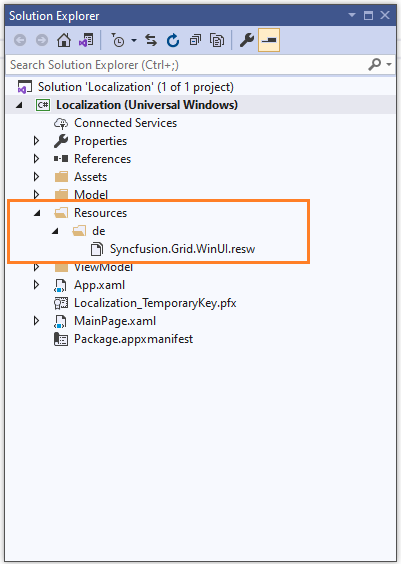
N> Consider you are using `SfDataGrid` control in your application. Then you need to copy and include `Syncfusion.Grid.WinUI.resw` (SfDataGrid present in Syncfusion.Grid.WinUI library) file in your application under Resources folder. So, now you can know the key names and values of default strings used in Syncfusion.Grid.WinUI library.
4) Now, you can define the key names from default resource files and assign value based on the culture.
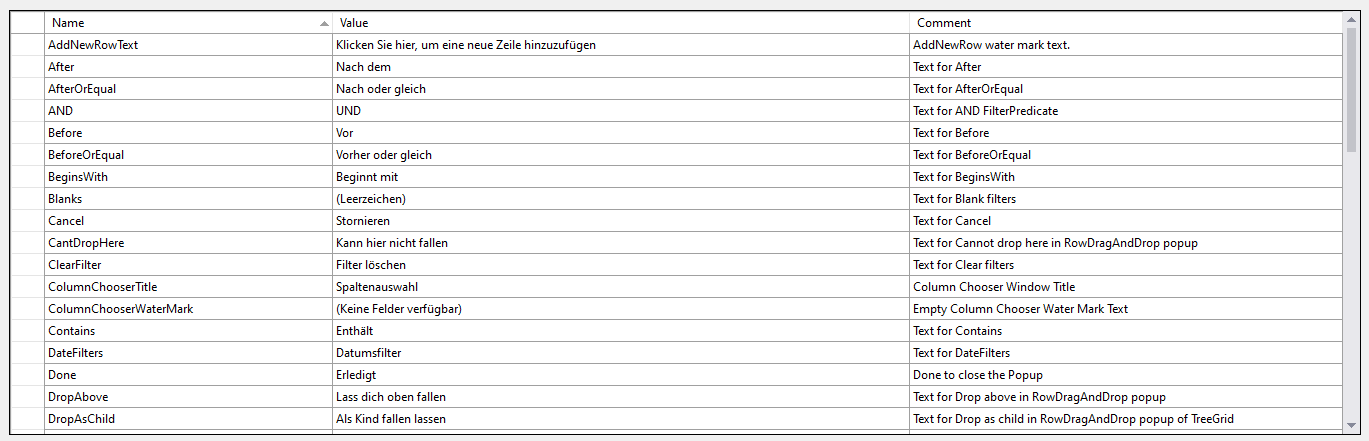
> [Download demo from GitHub](https://github.com/SyncfusionExamples/winui-datagrid-localization)
### Editing default culture strings
You can change the default string of any control by adding the default .resw files to Resources folder of your application. Syncfusion WinUI controls reads the default string from the .resw files of application if its added.