https://github.com/syniol/serverless-graphql-api-golang
GraphQL API with Graph Database using AWS Neptune, Step Functions and CDK for deployment
https://github.com/syniol/serverless-graphql-api-golang
aws aws-cdk aws-lambda cdk-constructs cdk-examples golang graphql neptune restful-api
Last synced: 2 months ago
JSON representation
GraphQL API with Graph Database using AWS Neptune, Step Functions and CDK for deployment
- Host: GitHub
- URL: https://github.com/syniol/serverless-graphql-api-golang
- Owner: syniol
- License: other
- Created: 2022-08-10T17:45:28.000Z (almost 4 years ago)
- Default Branch: main
- Last Pushed: 2022-08-15T12:56:41.000Z (almost 4 years ago)
- Last Synced: 2025-03-13T20:13:12.717Z (over 1 year ago)
- Topics: aws, aws-cdk, aws-lambda, cdk-constructs, cdk-examples, golang, graphql, neptune, restful-api
- Language: Go
- Homepage: http://syniol.com
- Size: 10.1 MB
- Stars: 1
- Watchers: 1
- Forks: 0
- Open Issues: 0
-
Metadata Files:
- Readme: README.md
- License: LICENSE
Awesome Lists containing this project
README
# REST~~ful~~ in Peace and Graph Up your API __(Golang Edition)__
In this presentation I will demonstrate how you could create
a simple scalable GraphQL API using AWS Lambda and GraphQL
library with Neptune Graph database. I will also take you
through deployment process using AWS CDK to deploy our lambda
function. In order to trigger the lambda we will also need to
create an AWS API Gateway to trigger the deployed lambda.
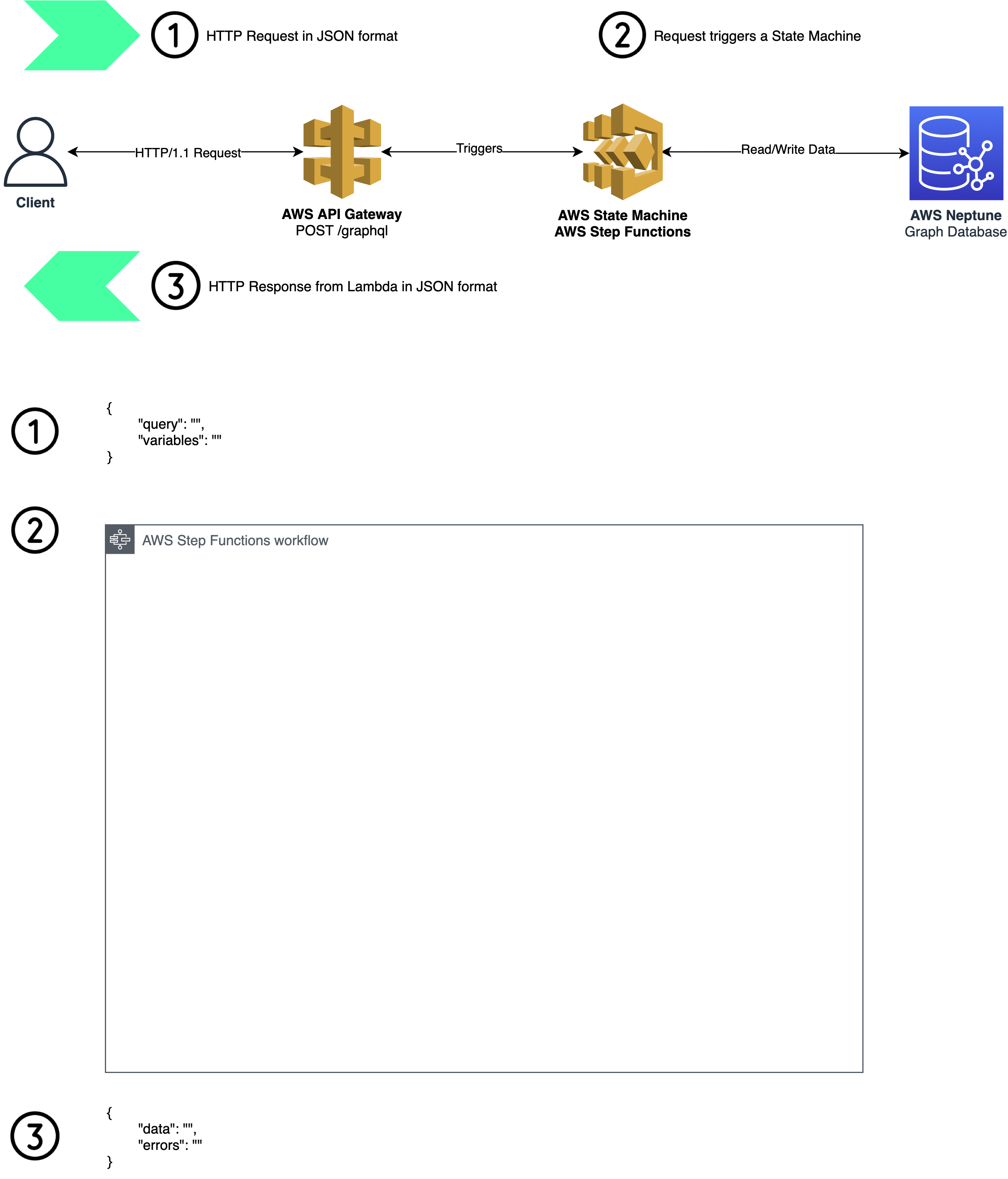
## Architecture
## AWS Lambda & API Gateway
When client sends an HTTP(s) request to public endpoint of AWS API Gateway;
it will trigger an AWS State Machine which has a definition of Lambda execution.
We could have Authorizer Lambda to be triggered when initial lambda in triggered.
Please look at Architecture Diagram for Step Functions Workflow.
## AWS CDK
Please follow steps below to deploy this project on AWS. Two main
prerequisites to deploy this application are:
* to have an AWS account with Administrator Privileges
* to have a Docker Desktop installed and running on your machine
### Step I - Build Args _(Docker Image Pipeline to Deploy with CDK)_
Please ensure you have the following environment variables set before
running a command described in Step II.
* `AWS_KEY` Your AWS Public Key, could be obtained from [_Security Credentials_](https://us-east-1.console.aws.amazon.com/iam/home?region=eu-west-2#/security_credentials) page
* `AWS_SECRET` This will be your AWS Secret key, could be obtained from [_Security Credentials_](https://us-east-1.console.aws.amazon.com/iam/home?region=eu-west-2#/security_credentials) page
* `CDK_DEFAULT_ACCOUNT` Your AWS Account Number
* `CDK_DEFAULT_REGION` Preferred region to deploy resources
### Step II - Build Docker Image _(Local Pipeline)_
There is `Makefile` located at the root of this repository; please use a command
below to build a docker image which acts as a pipeline to deploy AWS resources
using Environment variables set in Step I.
make deploy
#### Credits
Copyright © 2022 Syniol Limited. All Rights Reserved.