https://github.com/synle/sqlui-native
https://github.com/synle/sqlui-native
azure azure-storage cassandra cockroachdb cosmosdb mongodb mssql mysql postgresql redis sql sqlite sqlui-native sqluinative
Last synced: 2 months ago
JSON representation
- Host: GitHub
- URL: https://github.com/synle/sqlui-native
- Owner: synle
- License: mit
- Created: 2026-04-14T18:16:22.000Z (3 months ago)
- Default Branch: main
- Last Pushed: 2026-04-20T03:21:37.000Z (3 months ago)
- Last Synced: 2026-04-20T04:49:06.496Z (3 months ago)
- Language: TypeScript
- Size: 16.5 MB
- Stars: 0
- Watchers: 0
- Forks: 0
- Open Issues: 0
-
Metadata Files:
- Readme: README.md
- Contributing: CONTRIBUTING.md
- Funding: .github/FUNDING.yml
- License: LICENSE.md
Awesome Lists containing this project
README
[](https://github.com/synle/sqlui-native/actions/workflows/build-main.yml)
# [sqlui-native](https://github.com/synle/sqlui-native)

`sqlui-native` is a cross-platform desktop SQL/NoSQL database client and REST API client built with Tauri v2 and a Node.js sidecar. It supports MySQL, MariaDB, Microsoft SQL Server, PostgreSQL, SQLite, Cassandra, MongoDB, Redis, Azure CosmosDB, Azure Table Storage, Salesforce (SFDC), and REST APIs (curl/fetch).
It supports multiple windows, so you can run different sets of queries and connections side by side. Connections and queries are stored locally and persist across sessions.
## Downloads
[Sqlui Native Homepage](https://synle.github.io/sqlui-native)
## Supported Platforms
- [Windows 10/11 (x64 Installer)](https://synle.github.io/sqlui-native/installation#windows)
- [macOS (Apple Silicon M1–M4)](https://synle.github.io/sqlui-native/installation#mac) — see [quarantine troubleshooting](#mac-apple-silicon-m-series---app-is-damaged-error)
- [macOS (Intel x64)](https://synle.github.io/sqlui-native/installation#mac)
- [Ubuntu / Debian / Linux Mint (.deb)](https://synle.github.io/sqlui-native/installation#ubuntu--debian)
- [Linux Other Distros (AppImage)](https://synle.github.io/sqlui-native/installation#linux-other-distro-appimage)
## Portal Mode (Web)
Run sqlui-native as a self-contained **web portal** — phpMyAdmin / sqlite-web style — no desktop install needed. One Node script, one port, every supported dialect.
Requires **Node.js 22+** on the host.
### Quick start (download from a release)
**One tarball, two flows.** The release ships a single `sqlui-portal.tar.gz` whose contents work for both `curl | tar` and `npx`. Pick whichever you prefer — same file, same result:
#### Option A — `npx` (auto-cached, single command, Windows-friendly)
```bash
npx https://github.com/synle/sqlui-native/releases/latest/download/sqlui-portal.tar.gz ./mydata.sqlite
```
`npx` downloads the tarball, caches it under `~/.npm/_npx/`, and runs in one step. Subsequent invocations are instant. npm/pacote strips the top-level `portal/` directory and finds the `package.json` at the root, so `.tar.gz` works just like `.tgz` would.
#### Option B — `curl | tar` (no npm involved)
```bash
curl -fsSL https://github.com/synle/sqlui-native/releases/latest/download/sqlui-portal.tar.gz \
| tar -xz \
&& ./portal/sqlui-portal ./mydata.sqlite
```
#### Pin a specific version
The `latest/download/sqlui-portal.tar.gz` URL is a versionless alias that always resolves to the current release. To pin to a specific tag, put the tag in the URL — the filename stays the same:
```bash
VERSION=3.1.6
# Either flow:
npx "https://github.com/synle/sqlui-native/releases/download/v${VERSION}/sqlui-portal.tar.gz" ./mydata.sqlite
curl -fsSL "https://github.com/synle/sqlui-native/releases/download/v${VERSION}/sqlui-portal.tar.gz" | tar -xz \
&& ./portal/sqlui-portal ./mydata.sqlite
```
### Build from source
```bash
git clone https://github.com/synle/sqlui-native
cd sqlui-native
npm install
npm run build:portal
```
This produces three files under `dist/portal/`:
- `sqlui-portal.js` — the bundled server (~6.6 MB, all deps inlined)
- `sqlui-portal-assets.json` — embedded React frontend (~22 MB, decoded at runtime)
- `sqlui-portal` — bash launcher (locates Node and execs the bundle)
Copy the whole `dist/portal/` directory anywhere; it has no other dependencies besides a system Node.js 22+.
### Run
```bash
# Open a SQLite file (auto-opens browser at http://127.0.0.1:19378)
./portal/sqlui-portal ./mydata.sqlite
# Multiple connections, any dialect, in one shot
./portal/sqlui-portal \
./work.sqlite \
postgres://user:pass@db.example.com:5432/mydb \
mongodb://localhost:27017 \
redis://localhost:6379
```
On boot, the portal:
1. Adds each input as a connection (deduped by canonical connection string — running twice is a no-op)
2. Prints the URL it's running on (e.g. `http://127.0.0.1:19378`)
3. Opens your default browser
### Options
| Flag | Default | Description |
| -------------------------- | ----------------- | ------------------------------------------------------------------------------------------------------------------------ |
| `--port ` | `19378` | Listen port. Falls back to a random port if the requested one is busy. `0` = random. |
| `--host ` | `127.0.0.1` | Bind host. Use `0.0.0.0` to expose on the LAN. |
| `--home-dir ` | `~/.sqlui-portal` | Storage directory override. Highest priority. |
| `--config-path ` | — | Alias for `--home-dir`. |
| `--use-desktop-storage` | — | Share storage with the desktop app (`~/.sqlui-native`). Connections show up in the desktop app under a "Portal" session. |
| `--no-open` | — | Don't auto-open the browser. |
| `-h`, `--help`, `-?`, `/?` | — | Show full usage with examples and exit. |
### Dialect support
Portal mode supports every dialect the desktop app does — SQLite, PostgreSQL, MySQL, MariaDB, Microsoft SQL Server, Cassandra, MongoDB, Redis, Azure CosmosDB, Azure Table Storage, Salesforce (SFDC), REST, and GraphQL. Pass connection strings in their native format (`postgres://…`, `mongodb://…`, `aztable://DefaultEndpointsProtocol=…`, etc.).
A bare path like `./mydata.sqlite` is auto-resolved to `sqlite:///`.
### Storage
Portal mode keeps its data in **`~/.sqlui-portal/`** so it never touches the desktop app's `~/.sqlui-native/` — true regardless of how it's launched (npx, curl-tar, raw `node sqlui-portal.js`).
Override priority (highest first):
1. `--home-dir ` (or `--config-path `) CLI flag
2. `--use-desktop-storage` (sugar for `--home-dir ~/.sqlui-native`)
3. `SQLUI_HOME_DIR` environment variable
4. `~/.sqlui-portal` (default)
```bash
# Per-invocation, throwaway session
./portal/sqlui-portal --home-dir /tmp/work-session ./mydata.sqlite
# Share with the desktop app — connections appear in your .app under a "Portal" session
./portal/sqlui-portal --use-desktop-storage ./mydata.sqlite
# Or via env var (handy for shell aliases)
SQLUI_HOME_DIR=/tmp/work-session ./portal/sqlui-portal ./mydata.sqlite
# Or fully isolated, never persists
./portal/sqlui-portal --home-dir "$(mktemp -d)" ./mydata.sqlite
```
Run `sqlui-portal --help` for the full list of flags, examples, and dialect-specific connection-string formats.
### When to use portal vs desktop
- **Desktop app** — full multi-window experience, native menus, OS integration. Best for daily use.
- **Portal** — quick "open this DB in a browser tab" workflow, server/cloud machines without a GUI, sharing a UI on a LAN with `--host 0.0.0.0`, ephemeral throwaway sessions.
## Supported Database Adapters
Refer to the [query guides](https://synle.github.io/sqlui-native/guides) for dialect-specific syntax and examples.
- [MySQL](https://synle.github.io/sqlui-native/guides#mysql)
- [MariaDB](https://synle.github.io/sqlui-native/guides#mariadb)
- [Microsoft SQL Server](https://synle.github.io/sqlui-native/guides#mssql)
- [PostgreSQL](https://synle.github.io/sqlui-native/guides#postgres)
- [CockroachDB](https://github.com/synle/sqlui-native#cockroachdb-limitations) (limited support via PostgreSQL driver)
- [SQLite](https://synle.github.io/sqlui-native/guides#sqlite)
- [Cassandra](https://synle.github.io/sqlui-native/guides#cassandra) (limited support)
- [MongoDB](https://synle.github.io/sqlui-native/guides#mongodb) (limited support)
- [Redis](https://synle.github.io/sqlui-native/guides#redis) (limited support)
- [Azure CosmosDB](https://synle.github.io/sqlui-native/guides#cosmosdb) (limited support)
- [Azure Table Storage](https://synle.github.io/sqlui-native/guides#aztable) (limited support)
- [Salesforce (SFDC)](https://synle.github.io/sqlui-native/guides#sfdc) (limited support)
- REST API (curl / fetch) — Postman-like API client with `{{variable}}` interpolation
## Features
### Overall Demo

### Import and Export
Import and Export can be used to share connections across different machines and users. Below is a sample import config.
```
[
{
"_type": "connection",
"id": "connection.1643485516220.4798705129674932",
"connection": "postgres://postgres:password@localhost:5432",
"name": "sy postgres"
},
{
"_type": "query",
"id": "query.1643561715854.5278536054107370",
"name": "Employee Query on Postgres",
"sql": "SELECT\n *\nFROM\n employees\nLIMIT\n 10",
"connectionId": "connection.1643485516220.4798705129674932",
"databaseId": "music_store"
}
]
```
You can also drag and drop the file directly into sqlui-native application. At the moment, we only support drag and drop for a single file.

### Session Management
The app supports multiple windows and instances. Each session persists its own connections and queries locally, so you can pick up where you left off.

### Dark Mode
Dark mode will be turned on automatically with respect to your OS Preference. You can update settings to prefer Dark Mode or Light Mode if desired.

### Query Tabs
#### Query Tab Orientation
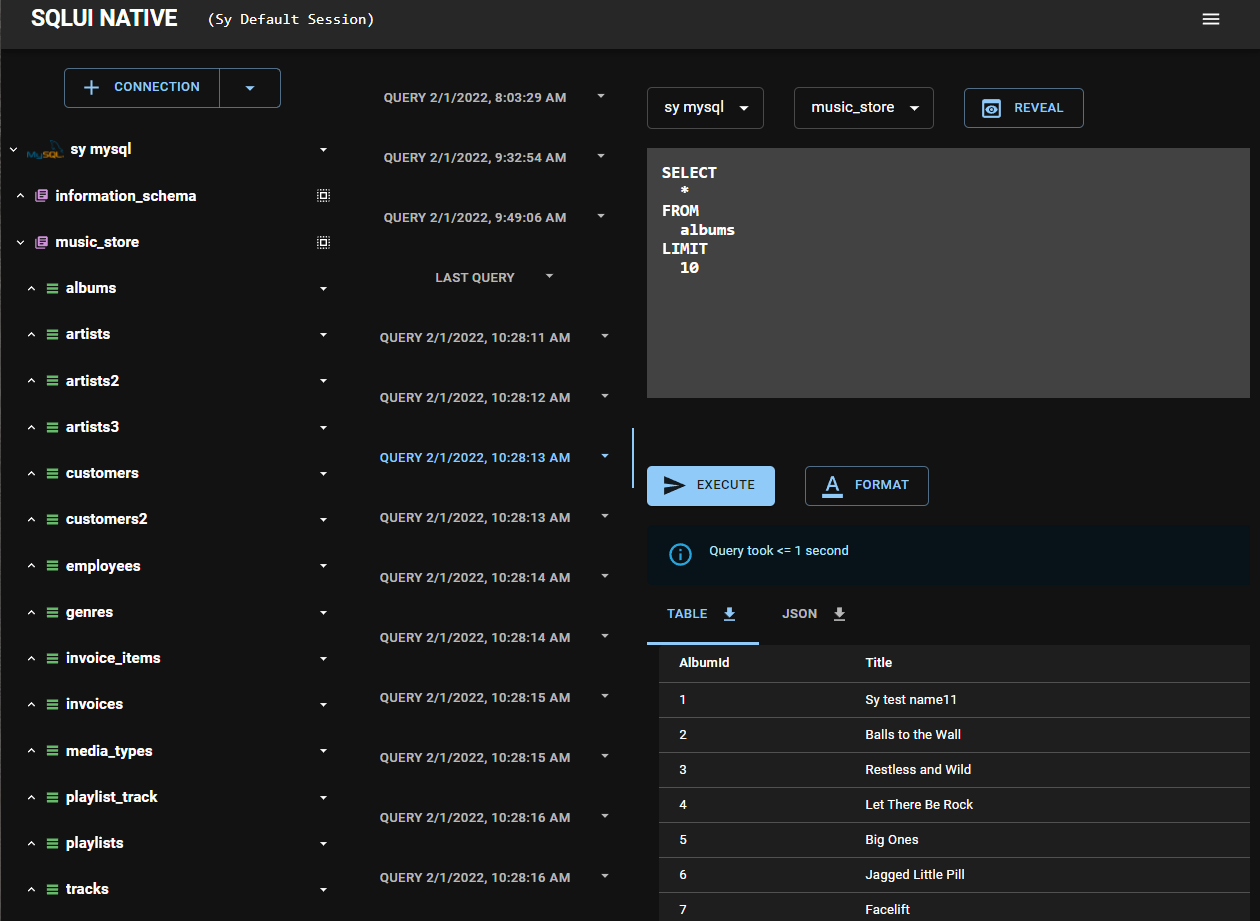
When there are more than 20 tabs, the query tabs wrap vertically.
#### Reordering Query Tabs
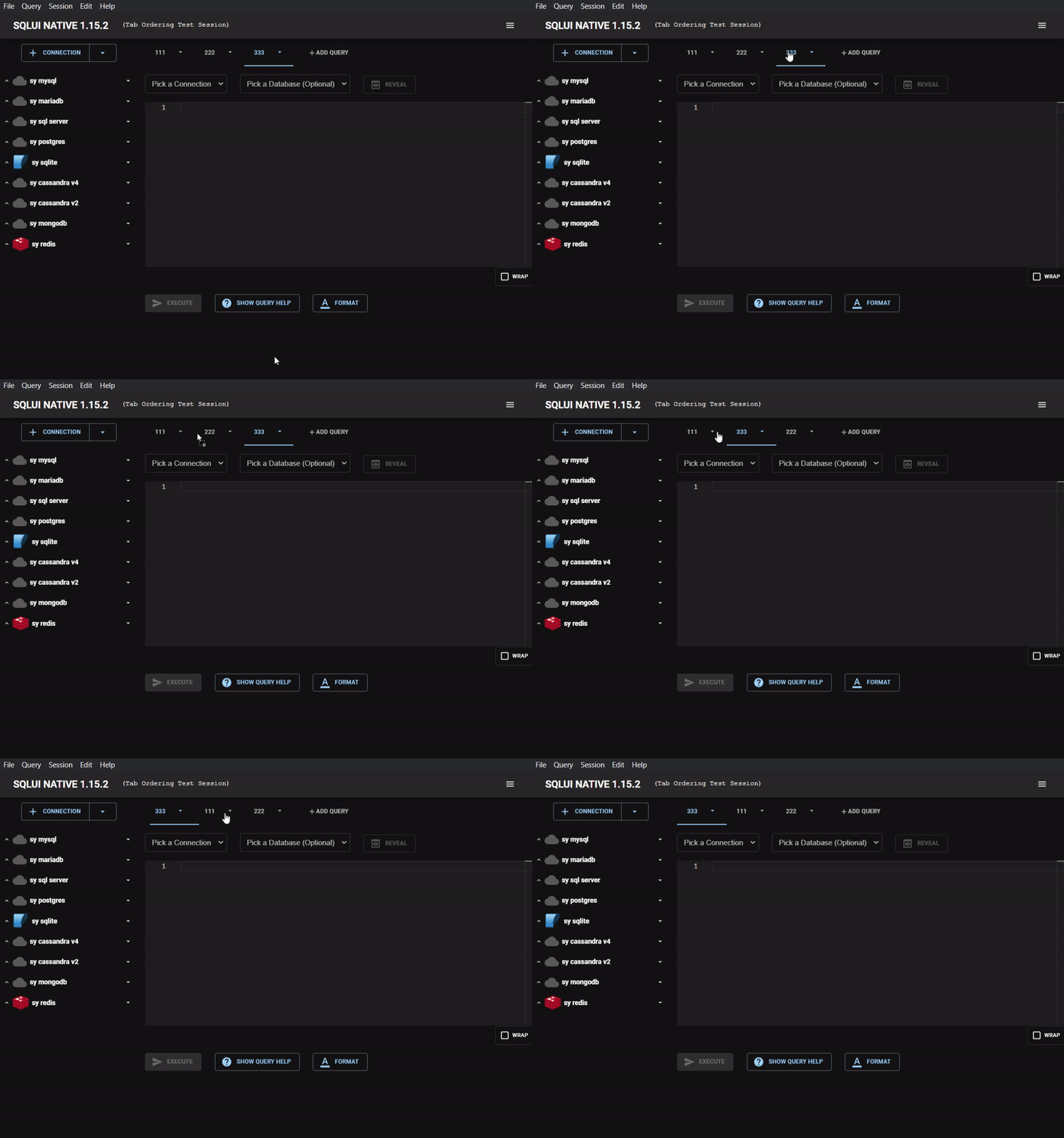
Drag and drop query tabs to reorder them.
#### Resizing the Sidebar
Drag the divider between the sidebar and the query editor to resize the sidebar.

### Command Palette
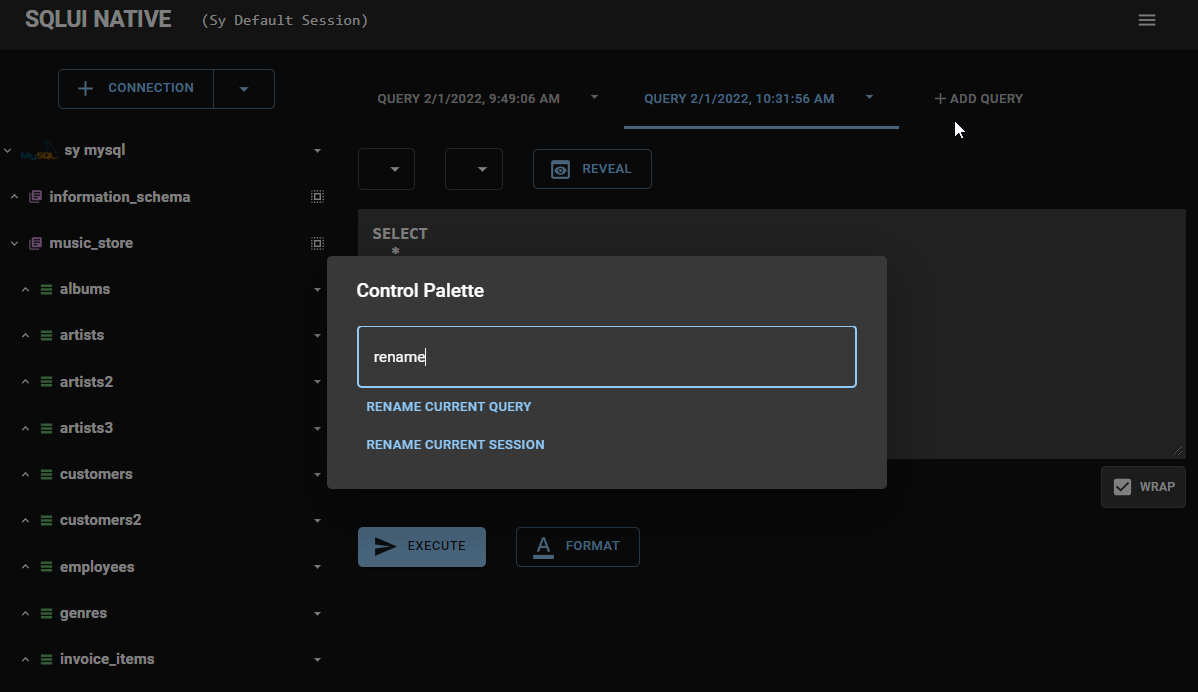
Open the command palette with `Cmd+P` (Mac) or `Ctrl+P` (Windows/Linux) to quickly access commands.
### Connection Hints
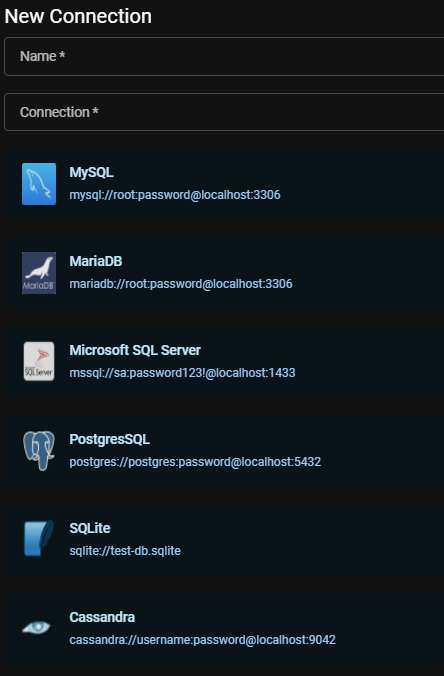
Click `Show Connection Hints` on the New/Edit Connection page to see sample URI connection strings. Click any sample to use it as a starting point.
### Settings
Access settings via the menu icon in the top right corner to configure editor preferences, color theme, and more.


### SQLite-based Storage
Application data (connections, queries, sessions, settings, caches) is stored in a single SQLite database file (`sqlui-native-storage.db`) in the app data directory. This makes import/export simpler compared to the previous approach of many individual JSON files.
On first launch after upgrading, existing JSON storage files are automatically migrated into the SQLite database. The original JSON files are moved to a `backup/` subdirectory (not deleted) so you can restore them if needed by moving them back to the parent directory.
### Data Migration
Use `Data Migration` to move data between database engines. Access it from the top right hamburger menu. You can migrate from:
- An existing connection (queries the source and generates scripts for the target engine)
- Raw JSON data


#### Migration of Real Existing Connection
Use this data migration option to move data from an existing connection

#### Migration of Raw JSON Data
Use this data migration option to move raw JSON data

### Bookmarks
The system allows you to bookmark connections and queries. Bookmarked items can be applied to any workspace.
#### Adding a Bookmark
Right-click a connection name or query tab and choose `Add to Bookmark`. Enter a name and click Save.


#### Opening a Bookmark
Open the hamburger menu (top right) > `Bookmarks`, then click a bookmark name to apply it.


#### Recycle Bin
Deleted connections and closed queries are moved to the recycle bin. Access it via the hamburger menu (top right) > `Recycle Bin`.
- **Restore** — recover individual items
- **Delete** — permanently remove individual items
- **Empty Trash** — permanently remove all items


##### Hard Delete
To bypass the recycle bin and permanently delete items immediately, set `Delete Mode` to hard delete in Settings.

### Relationship Chart (FK Visualization)
Visualize foreign key relationships for relational databases (MySQL, MariaDB, MSSQL, PostgreSQL, SQLite). Right-click a table name and choose `Show Relationships`.
- **Diagram view** — interactive chart with tables as nodes and FK edges (zoom, pan, drag)
- **Table view** — sortable FK list
- Toggle horizontal/vertical layout, expand/collapse edge labels, export as PNG
### Code Snippets
Generate ready-to-use connection code snippets for your database in **Java**, **JavaScript**, and **Python**. Access code snippets from the query script dropdown for any connection.
### Record Pages
#### New Record Page
1. Click `New Record` below the query editor
2. Select the Connection, Database, and Table
3. Fill in the form fields
4. Click `Generate Script` to generate the INSERT query


#### Record Details / Edit Record Page
Click any row in the query results to open the Record Detail page. Toggle edit mode to modify fields, then click `Generate Script` to generate the UPDATE query.
## Contributing
- [Repo](https://github.com/synle/sqlui-native)
### Dev Notes
See [CONTRIBUTING.md](https://github.com/synle/sqlui-native/blob/main/CONTRIBUTING.md) for how to run the app locally and contribute.
### Adding a New Database Adapter
Want to add support for a new database engine? The project uses an adapter pattern where each database engine implements a standard interface (`IDataAdapter`). A starter template is provided at [`src/common/adapters/_SampleDataAdapter_/`](https://github.com/synle/sqlui-native/tree/main/src/common/adapters/_SampleDataAdapter_).
The high-level steps are:
1. Add a new dialect to `typings/index.ts`
2. Copy the sample adapter template and implement the adapter class (`index.ts`) and script generator (`scripts.ts`)
3. Register your adapter in `DataAdapterFactory.ts` and `DataScriptFactory.ts`
4. Add a dialect icon PNG in your adapter directory and import it in `scripts.ts`
5. Add snapshot tests in `DataScriptFactory.spec.ts`
For the full step-by-step guide with code examples, see the [Adding new adapters](https://github.com/synle/sqlui-native/blob/main/CONTRIBUTING.md#adding-new-adapters) section in CONTRIBUTING.md.
## Roadmap
- [ ] Query autocomplete
- [ ] Auto-update
- [ ] Microsoft Store distribution
- [ ] AWS Redshift adapter
## Troubleshooting
### Mac Apple Silicon (M-Series) - "App is damaged" Error
On macOS 26+ with Apple Silicon (M1/M2/M3/M4), you may see the following error when attempting to open the app:
> "sqlui-native.app" is damaged and can't be opened. You should move it to the Trash.
> 
This is caused by macOS quarantine attributes applied to unsigned apps. To fix this, open Terminal and run:
```
xattr -cr /Applications/sqlui-native.app
```
After running the command, you should be able to open sqlui-native normally.
## Limitations
### SQLite Limitations
SQLite does not support multiple statements in a single query. Use bulk insert syntax instead:
```sql
INSERT INTO
art (Name)
VALUES
('Queen'),
('Kiss'),
('Spyro Gyra')
```
### CockroachDB Limitations
CockroachDB connects via the PostgreSQL driver. Replace `?sslmode=require` with `?sslmode=no-verify` in the connection string:
```
postgres://demo:demo26472@127.0.0.1:26257/movr?sslmode=no-verify
```
### Cassandra Limitations
Cassandra keyspaces map to sqlui-native databases, and column families map to tables.
#### CosmosDB with Cassandra API Connection String
Go to `Connection String` in the Azure CosmosDB Cassandra resource:

##### Sample Connection String
```
cassandra://USERNAME:PRIMARY PASSWORD@CONTACT POINT:PORT
```
### MongoDB Limitations
MongoDB collections map to sqlui-native tables. The schema is inferred by scanning the first 5 documents.
#### Create a New MongoDB Database
```js
db.createDatabase("new-database-name");
```
### Redis Limitations
Not all keys are displayed due to potentially large key sets. For SSL connections, use the `rediss://` scheme.
#### Azure Redis Cache Connection String
Go to `Access Keys` in the Azure Redis Cache resource:

Format: `rediss://:@:`
The username field must be a non-empty string (any value works):
```
rediss://azure:Primary_Or_Secondary_Access_Key@syredis1.redis.cache.windows.net:6380
```
### Azure CosmosDB Limitations
CosmosDB databases map to sqlui-native databases, and containers map to tables. The schema is inferred by scanning the first 5 items. Tested with CosmosDB Core SQL API.
#### CosmosDB Core SQL API Connection String
Open your CosmosDB resource > `Keys`, then copy the `PRIMARY CONNECTION STRING` or `SECONDARY CONNECTION STRING`:


##### Sample Connection String
```
cosmosdb://
```
### Salesforce (SFDC) Limitations
Salesforce SObjects are mapped to sqlui-native Tables, and Salesforce Fields are mapped to sqlui-native Columns. Each connection represents a single Salesforce Org (mapped as a single database).
The adapter supports three query modes:
- **SOQL** (read-only) -- Queries starting with `SELECT` are executed as SOQL
- **SOSL** (read-only search) -- Queries starting with `FIND` are executed as SOSL
- **JS API** (mutations) -- Queries containing `conn.` are executed as JavaScript for create, update, delete, and upsert operations
#### Setting up connection string
1. Sign up for a free Developer Org at [developer.salesforce.com/signup](https://developer.salesforce.com/signup)
2. Get your Security Token: **Avatar > Settings > My Personal Information > Reset My Security Token**
3. Use JSON format for the connection string:
```
sfdc://{"username":"you@yourcompany.dev","password":"your_password","securityToken":"your_token","loginUrl":"login.salesforce.com"}
```
- `loginUrl` defaults to `login.salesforce.com` if omitted. Use `test.salesforce.com` for sandbox orgs.
- `securityToken` can be omitted if your IP is whitelisted.
#### OAuth2 Client Credentials Flow
For orgs using Connected Apps, you can authenticate without a username/password by providing `clientId` and `clientSecret`:
```
sfdc://{"clientId":"your_connected_app_client_id","clientSecret":"your_connected_app_client_secret","loginUrl":"your-org.my.salesforce.com"}
```
Sessions are automatically refreshed when they expire — no manual reconnection needed.
#### Sample queries
```sql
-- SOQL: Select accounts
SELECT Id, Name, Industry FROM Account LIMIT 10
-- SOSL: Search across objects
FIND {keyword} IN ALL FIELDS RETURNING Account(Id, Name), Contact(Id, Name) LIMIT 20
```
```js
// JS API: Insert a record
conn.sobject("Account").create({ Name: "New Account", Industry: "Technology" });
// JS API: Update a record
conn.sobject("Account").update({ Id: "001xxx", Name: "Updated Name" });
// JS API: Delete a record
conn.sobject("Account").destroy("001xxx");
```
### Azure Table Storage Limitations
Azure Table Storage tables map to sqlui-native tables. The schema is inferred by scanning the first 5 items.
#### Setting Up Connection String


```
aztable://
```
### REST API Features
- Dual syntax: auto-detects `curl` and `fetch()` input (paste from Chrome DevTools).
- `{{VAR}}` variable interpolation with 4-layer priority (folder > collection > global), plus dynamic variables (`{{$timestamp}}`, `{{$randomUUID}}`).
- Warns on unresolved `{{VAR}}` placeholders after variable resolution.
- Supports proxy (`-x`/`--proxy`), timeouts (`--max-time`, `--connect-timeout`), basic auth (`-u`), SSL bypass (`-k`), redirects (`-L`), and file uploads (`-F`).
- Code snippet generation for JavaScript (fetch), Python (requests), and Java (HttpClient).
- Import from HAR files and Postman Collection v2.1; export as Postman Collection.
- Response viewer with tabs for Body, Headers, Cookies, Timing, and Raw JSON download.
### REST API Limitations
- Requires `curl` installed on the system (pre-installed on macOS and most Linux distributions).
- Uses curl/fetch syntax in the editor — not a visual form builder like Postman.
- No persistent connection — each request is a standalone `curl` subprocess.
- `{{VAR}}` variable interpolation is case-sensitive.
- Connection string format: `rest://{"HOST":"https://httpbin.org"}` (also accepts legacy `restapi://`).
- Folder nesting is limited to 2 levels (Connection → Folder → Request), matching the database/table model.
## Feedback
[File a bug or suggestion](https://github.com/synle/sqlui-native/issues/new)