https://github.com/sysdiglabs/terraform-google-secure-for-cloud
Terraform module that deploys the Sysdig Secure For Cloud stack in Google Cloud Platform
https://github.com/sysdiglabs/terraform-google-secure-for-cloud
gcp sysdig-secure terraform terraform-modules
Last synced: 12 months ago
JSON representation
Terraform module that deploys the Sysdig Secure For Cloud stack in Google Cloud Platform
- Host: GitHub
- URL: https://github.com/sysdiglabs/terraform-google-secure-for-cloud
- Owner: sysdiglabs
- License: apache-2.0
- Created: 2021-05-04T15:27:30.000Z (about 5 years ago)
- Default Branch: master
- Last Pushed: 2024-11-12T22:26:29.000Z (over 1 year ago)
- Last Synced: 2024-11-12T23:25:30.805Z (over 1 year ago)
- Topics: gcp, sysdig-secure, terraform, terraform-modules
- Language: HCL
- Homepage: https://registry.terraform.io/modules/sysdiglabs/secure-for-cloud/google/latest
- Size: 3.13 MB
- Stars: 2
- Watchers: 11
- Forks: 11
- Open Issues: 5
-
Metadata Files:
- Readme: README.md
- License: LICENSE
- Codeowners: CODEOWNERS
Awesome Lists containing this project
README
# Sunset Notice
> [!CAUTION]
> Sysdig released a new onboarding experience for GCP in November 2024. We recommend connecting your cloud accounts by [following these instructions](https://docs.sysdig.com/en/docs/sysdig-secure/connect-cloud-accounts/).
>
> This repository should be used solely in cases where Agentless Threat Detection cannot be used.
## Usage
There are several ways to deploy Secure for Cloud in you GCP infrastructure,
- [Single Project](https://github.com/sysdiglabs/terraform-google-secure-for-cloud/tree/master/examples/single-project/)
- [Single Project with a pre-existing Kubernetes Cluster](https://github.com/sysdiglabs/terraform-google-secure-for-cloud/tree/master/examples/single-project-k8s/README.md)
- [Organizational](https://github.com/sysdiglabs/terraform-google-secure-for-cloud/tree/master/examples/organization/README.md)
If you're unsure about how to use this module, please contact your Sysdig representative. Our experts will guide you through the process and assist you in setting up your account securely and correctly.
## Prerequisites
Your user **must** have following **roles** in your GCP credentials
* _Owner_
* _Organization Admin_ (organizational usage only)
- [required](https://github.com/search?l=HCL&q=repo%3Asysdiglabs%2Fterraform-google-secure-for-cloud+%22google_organization%22+language%3AHCL&type=code) for org-wide roles both for image scanning and compliance. also some queries are performed to dig into the org domain, folders and projects.
### Google Cloud CLI Authentication
To authorize the cloud CLI to be used by Terraform check the following [Terraform Google Provider docs](https://registry.terraform.io/providers/hashicorp/google/latest/docs/guides/getting_started#configuring-the-provider)
#### Use a Service Account
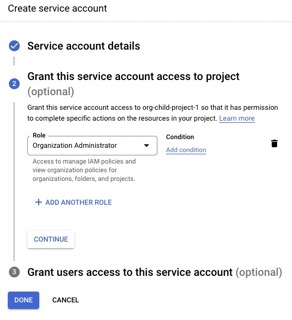
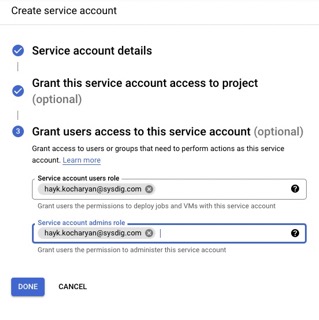
Instead of using a user, you can also deploy the module using a Service Account (SA). In order to create a SA for the organization, you need to go
to one of your organization projects and create a SA.
This SA must have been granted with _Organization Admin_ role. Additionally, you should allow your user to be able to use this SA.
| SA role | SA user permissions |
|--------------|-----------|
|  |  |
### APIs
Besides, the following GCP **APIs must be enabled** ([how do I check it?](#q-how-can-i-check-enabled-api-services)) depending on the desired feature:
##### Cloud Connector
* [Cloud Pub/Sub API](https://console.cloud.google.com/marketplace/product/google/pubsub.googleapis.com)
* [Cloud Run API](https://console.cloud.google.com/marketplace/product/google/run.googleapis.com)
* [Eventarc API](https://console.cloud.google.com/marketplace/product/google/eventarc.googleapis.com)
##### Cloud Scanning
* [Cloud Pub/Sub API](https://console.cloud.google.com/marketplace/product/google/pubsub.googleapis.com)
* [Cloud Run API](https://console.cloud.google.com/marketplace/product/google/run.googleapis.com)
* [Eventarc API](https://console.cloud.google.com/marketplace/product/google/eventarc.googleapis.com)
* [Secret Manager API](https://console.cloud.google.com/marketplace/product/google/secretmanager.googleapis.com)
* [Cloud Build API](https://console.cloud.google.com/marketplace/product/google/cloudbuild.googleapis.com)
* [Identity and access management API](https://console.cloud.google.com/marketplace/product/google/iam.googleapis.com)
## Confirm the Services are Working
Check official documentation on [Secure for cloud - GCP, Confirm the Services are working](https://docs.sysdig.com/en/docs/installation/sysdig-secure-for-cloud/deploy-sysdig-secure-for-cloud-on-gcp/#confirm-the-services-are-working)
### Forcing Events - Threat Detection
Choose one of the rules contained in an activated Runtime Policies for GCP, such as `Sysdig GCP Activity Logs` policy and execute it in your GCP account.
ex.: Create an alert (Monitoring > Alerting > Create policy). Delete it to prompt the event.
Remember that in case you add new rules to the policy you need to give it time to propagate the changes.
In the `cloud-connector` logs you should see similar logs to these
> An alert has been deleted (requesting user=..., requesting IP=..., resource name=projects/test/alertPolicies/3771445340801051512)
In `Secure > Events` you should see the event coming through, but beware you may need to activate specific levels such as `Info` depending on the rule you're firing.
Alternatively, use Terraform example module to trigger **GCP Update, Disable or Delete Sink** event can be found on [examples/trigger-events ](https://github.com/sysdiglabs/terraform-google-secure-for-cloud/blob/master/examples/trigger-events)
### Forcing Events - Image Scanning
- For Repository image scanning, upload an image to a new Repository in a Artifact Registry. Follow repository `Setup Instructions` provided by GCP
```bash
$ docker tag IMAGE:VERSION REPO_REGION-docker.pkg.dev/PROJECT-ID/REPOSITORY/IMAGE:latest
$ docker push REPO_REGION-docker.pkg.dev/PROJECT-ID/REPOSITORY/IMAGE:latest
````
- For CloudRun image scanning, deploy a runner.
It may take some time, but you should see logs detecting the new image in the `cloud-connector` logs, similar to these
> An image has been pushed to GCR registry (project=..., tag=europe-west2-docker.pregionkg.dev/test-repo/alpine/alpine:latest, digest=europe-west2-docker.pkg.dev/test-repo/alpine/alpine@sha256:be9bdc0ef8e96dbc428dc189b31e2e3b05523d96d12ed627c37aa2936653258c)
> Starting GCR scanning for 'europe-west2-docker.pkg.dev/test-repo/alpine/alpine:latest
And a CloudBuild being launched successfully.
## Troubleshooting
### Q: Module does not find project ID
A: Verify you're ussing project ID, and not name or number. https://cloud.google.com/resource-manager/docs/creating-managing-projects#before_you_begin
### Q: How can I check enabled API Services?
A: On your Google Cloud account, search for "APIs & Services > Enabled APIs & Services" or run following command
```bash
$ gcloud services list --enabled
```
### Q: Getting "googleapi: 403 ***"
A: This may happen because permissions are not enough, API services were not correctly enabled, or you're not correctly authenticated for terraform google prolvider.
S: Verify [permissions](#prerequisites), [api-services](#apis), and that the [Terraform Google Provider](https://registry.terraform.io/providers/hashicorp/google/latest/docs/guides/getting_started#configuring-the-provider) authentication has been correctly setup.
You can also launch the following terraform manifest to check whether you're authenticated with what you expect
```
data "google_client_openid_userinfo" "me" {
}
output "me" {
value = data.google_client_openid_userinfo.me.*
}
```
### Q: Getting "Error creating Service: googleapi: got HTTP response code 404" "The requested URL /serving.knative.dev/v1/namespaces/***/services was not found on this server"
```
"module.secure-for-cloud_example_organization.module.cloud_connector.goo
gle_cloud_run_service.cloud_connector" error: Error creating Service: googleapi: got HTTP response code 404 with
…
404. That’s an error.
The requested URL /apis/serving.knative.dev/v1/namespaces/****/services was not found on this server. That’s all we know.
```
A: This error is given by the Terraform GCP provider when an invalid region is used.
S: Use one of the available [GCP regions](https://cloud.google.com/compute/docs/regions-zones/#available). Do not confuse required `region` with GCP location or zone. [Identifying a region or zone](https://cloud.google.com/compute/docs/regions-zones/#identifying_a_region_or_zone)
### Q: Error because it cannot resolve the address below, "https://-run.googleapis.com/apis/serving.knative.dev"
A: GCP region was not provided in the provider block
### Q: Getting "Error creating Topic: googleapi: Error 409: Resource already exists in the project (resource=gcr)"
```text
│ Error: Error creating Topic: googleapi: Error 409: Resource already exists in the project (resource=gcr).
│
│ with module.sfc_example_single_project.module.pubsub_http_subscription.google_pubsub_topic.topic[0],
│ on ../../../modules/infrastructure/pubsub_push_http_subscription/main.tf line 10, in resource "google_pubsub_topic" "topic":
│ 10: resource "google_pubsub_topic" "topic" {
```
A: This error happens due to a GCP limitation where only a single topic named `gcr` can exist. This name is [gcp hardcoded](https://cloud.google.com/container-registry/docs/configuring-notifications#create_a_topic) and is the one we used to detect images pushed to the registry.
S: If the topic already exists, you can import it in your terraform state, BUT BEWARE that once you call destroy it will be removed.
```terraform
$ terraform import 'module.sfc_example_single_project.module.pubsub_http_subscription.google_pubsub_topic.topic[0]' gcr
```
Contact us to develop a workaround for this, where the topic name is to be reused.
Note: if you're using terragrunt, run `terragrunt import`
### Q: Getting "Cloud Run error: Container failed to start. Failed to start and then listen on the port defined by the PORT environment variable."
A: If cloud-connector cloud run module cannot start it will give this error. The error is given by the health-check system, it's not specific to its PORT per-se
S: Verify possible logs before the deployment crashes. Could be limitations due to Sysdig license (expired trial subscription or free-tier usage where cloud-account limit has been surpassed)
### Q: Getting "message: Cloud Run error: Container failed to start. Failed to start and then listen on the port defined by the PORT environment variable"
A: Contrary to AWS, Terraform Google deployment requires just-started workload to start in a healthy status. If this does not happen it will fail.
S: Check your workload services (cloud run) logs to see what really failed. One common cause is a wrong Sysdig Secure API Token
### Q: Scanning, I get an error saying:
```
error starting scan runner for image ****: rpc error: code = PermissionDenied desc = Cloud Build API has not been used in project *** before or it is disabled.
Enable it by visiting https://console.developers.google.com/apis/api/cloudbuild.googleapis.com/overview?project=*** then retry.
If you enabled this API recently, wait a few minutes for the action to propagate to our systems and retry
```
A: Do as the error says and activate CloudBuild API. Check the list of all the required APIs that need to be activated per feature module.
### Q-Scanning: Scanning does not seem to work
A: Verify that `gcr` topic exists. If `create_gcr_topic` is set to false and `gcr` topic is not found, the GCR scanning is omitted and won't be deployed. For more info see GCR PubSub topic.
## Upgrading
1. Uninstall previous deployment resources before upgrading
```
$ terraform destroy
```
2. Upgrade the full terraform example with
```
$ terraform init -upgrade
$ terraform plan
$ terraform apply
```
- If the event-source is created throuh SFC, some events may get lost while upgrading with this approach. however, if the cloudtrail is re-used (normal production setup) events will be recovered once the ingestion resumes.
- If required, you can upgrade cloud-connector component by restarting the task (stop task). Because it's not pinned to an specific version, it will download the `latest` one.
## Authors
Module is maintained and supported by [Sysdig](https://sysdig.com).
## License
Apache 2 Licensed. See LICENSE for full details.