https://github.com/systangotechnologies/koach-sql
A fork of the original KOACH with support for SQL database.
https://github.com/systangotechnologies/koach-sql
Last synced: about 1 year ago
JSON representation
A fork of the original KOACH with support for SQL database.
- Host: GitHub
- URL: https://github.com/systangotechnologies/koach-sql
- Owner: SystangoTechnologies
- License: mit
- Created: 2018-02-23T07:31:34.000Z (over 8 years ago)
- Default Branch: master
- Last Pushed: 2022-12-30T17:53:00.000Z (over 3 years ago)
- Last Synced: 2025-04-23T04:04:54.558Z (over 1 year ago)
- Language: JavaScript
- Size: 1.84 MB
- Stars: 14
- Watchers: 6
- Forks: 0
- Open Issues: 13
-
Metadata Files:
- Readme: README.md
- License: LICENSE
Awesome Lists containing this project
README

## KOACH
Production ready boilerplate for building APIs with [koa2](https://github.com/koajs/koa/), sequelize and http/2 as the communication protocol.
## Description
This project covers basic necessities of most APIs.
* Authentication (passport & jwt)
* Database (SQL)
* Testing (mocha)
* http/2 support for websites and apis
* Doc generation with apidoc
* linting using standard
* Contains two versions of API
Please note, if you are planning to use this boilerplate for creating a web application then the 'https' protocol should be used to access its pages.
Visit `https://localhost:3000/` to access the root page.
## Requirements
* node = v10.15.3
* SQL Database
## Installation
```bash
git clone https://github.com/SystangoTechnologies/Koach-SQL.git
```
## Features
* [koa2](https://github.com/koajs/koa)
* [koa-router](https://github.com/alexmingoia/koa-router)
* [koa-bodyparser](https://github.com/koajs/bodyparser)
* [koa-generic-session](https://github.com/koajs/generic-session)
* [koa-logger](https://github.com/koajs/logger)
* [koa-helmet](https://github.com/venables/koa-helmet)
* [koa-convert](https://github.com/koajs/convert)
* [Sequelize](https://github.com/sequelize/sequelize)
* [http/2](https://github.com/molnarg/node-http2)
* [Passport](http://passportjs.org/)
* [Nodemon](http://nodemon.io/)
* [Mocha](https://mochajs.org/)
* [apidoc](http://apidocjs.com/)
* [Babel](https://github.com/babel/babel)
* [ESLint](http://eslint.org/)
* [PM2](https://github.com/Unitech/pm2/)
* [Swagger](https://github.com/SystangoTechnologies/swagger-generator-koa/blob/master/README.md)
## Structure
```
├── bin
│ └── server.js # Bootstrapping and entry point
├── cert
│ ├── server.cert # SSL certificate
│ └── server.key # SSL certificate key
├── config # Server configuration settings
│ ├── env # Environment specific config
│ │ ├── common.js
│ │ ├── development.js
│ │ ├── production.js
│ │ └── test.js
│ ├── index.js # Config entrypoint
│ └── passport.js # Passportjs config of strategies
├── src # Source code
│ ├── modules # Module-specific controllers
│ │ ├── common # Contains common modules
│ │ │ ├─── home
│ │ │ └─ index.js
│ │ ├── v1 # Version 1 of APIs
│ │ │ ├─ Auth
│ │ │ ├─ User
│ │ │ └─ index.js
│ │ └─── v2 # Version 2 of APIs
│ │ ├─ Auth
│ │ ├─ User
│ │ └─ index.js
│ ├── models # Sequelize models
│ │ ├── index.js # Creates connection from database and load model
│ │ └── user.js # User model
├── requestModel
| | ├── v1
| | | ├── auth.js
| | | └── users.js
| | └── v2
| | ├── auth.js
| | └── users.js
| ├── responseModel
| | ├── v1
| | | ├── auth.js
| | | └── users.js
| | └── v2
| | ├── auth.js
| | └── users.js
│ └── middleware # Custom middleware
│ └── validators # Validation middleware
└── test # Unit tests
└── pm2.config.js # PM2 configuration file
└── Dockerfile # Docker file
└── docker-compose.yml # Docker Compose file
```
## Usage
* `npm start` Start server on development mode with Nodemon
* `npm run prod` Start server on production mode with PM2
* `npm run docs` Generate API documentation
* `npm test` Run mocha tests
## Running the server in Docker Container
Prerequisite For Docker Configuration : Docker and docker compose must be installed on the system.
Steps to run app in docker container :
1. CD to project dir
2. Create build using cmd: $ docker-compose build
3. Start the server in daemon thread using cmd: $ docker-compose up -d
4. Stop the server using cmd : $ docker-compose down
## Database
##### And one of the following databases with Sequelize:
* npm install --save pg pg-hstore
* npm install --save mysql2
* npm install --save sqlite3
* npm install --save tedious
## Environment Variables
* NODE_ENV
* PORT
* SESSION
* TOKEN
* DATABASE
* DB_USERNAME
* DB_PASSWORD
* DB_HOST
* DB_DBPORT
* DB_DIALECT
## Documentation
API documentation is written inline and generated by [apidoc](http://apidocjs.com/).
Visit [https://localhost:3000/docs/](https://localhost:3000/docs/) to view docs
To view swagger API documentation
Visit [https://localhost:3000/swagger](https://localhost:3000/swagger) to view Swagger UI.
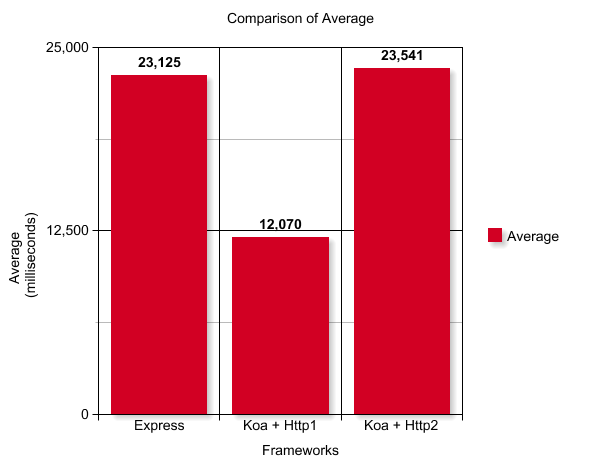
## Performance Comparison
The environment for the test caes are following-
* Node Version: **8.9.4**
* Number of Users: **1500**
* Ramp-up Period: **300 seconds**
* Loop Count: **100**

## Contributors
[Arpit Khandelwal](https://github.com/arpit-systango)
[Anurag Vikram Singh](https://www.linkedin.com/in/anuragvikramsingh/)
[Vikas Patidar](https://www.linkedin.com/in/vikas-patidar-0106/)
## License
MIT.