https://github.com/t-pro/circularrevealkit
Circular reveal animations made easy
https://github.com/t-pro/circularrevealkit
cocoapods material-design swift5 uinavigationcontroller
Last synced: 4 months ago
JSON representation
Circular reveal animations made easy
- Host: GitHub
- URL: https://github.com/t-pro/circularrevealkit
- Owner: T-Pro
- License: mit
- Created: 2017-04-14T12:18:07.000Z (about 9 years ago)
- Default Branch: master
- Last Pushed: 2026-02-08T01:50:58.000Z (5 months ago)
- Last Synced: 2026-02-08T09:43:09.081Z (5 months ago)
- Topics: cocoapods, material-design, swift5, uinavigationcontroller
- Language: Swift
- Homepage:
- Size: 6.35 MB
- Stars: 25
- Watchers: 4
- Forks: 7
- Open Issues: 0
-
Metadata Files:
- Readme: README.md
- License: LICENSE
Awesome Lists containing this project
README
# [](#)
[](https://github.com/T-Pro/CircularRevealKit/actions/workflows/tests.yml)
[](http://cocoapods.org/pods/CircularRevealKit)
[](http://cocoapods.org/pods/CircularRevealKit)
[](http://cocoapods.org/pods/CircularRevealKit)
[](https://swift.org/package-manager/)

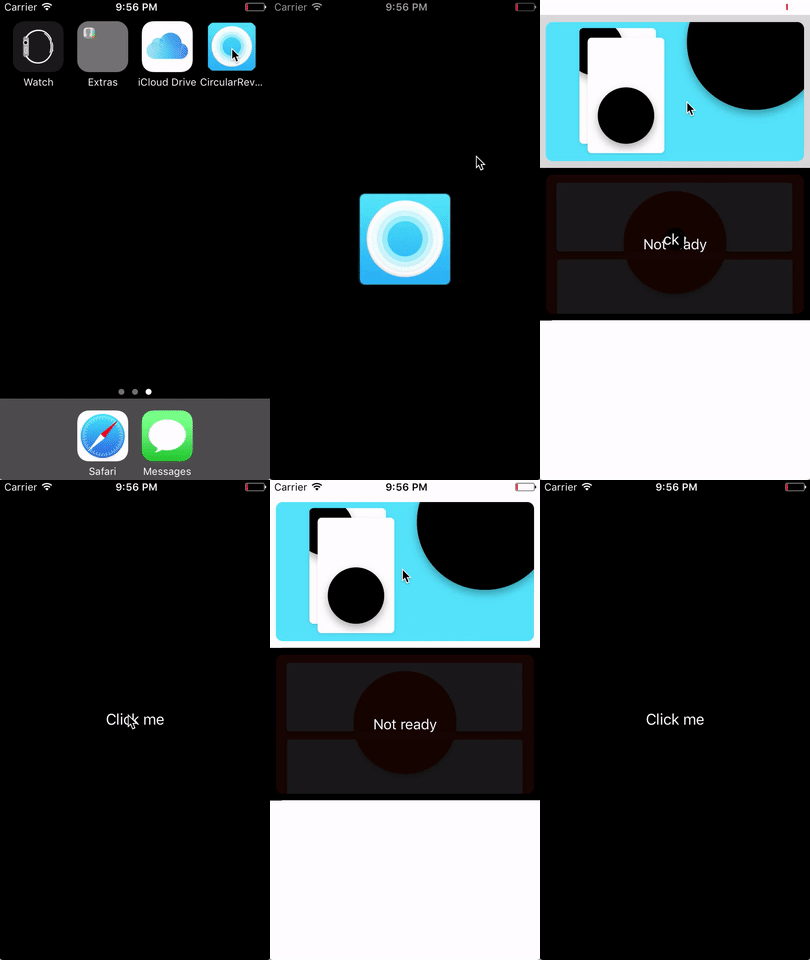
A lightweight library that brings Material Design's circular reveal effect to iOS. Present and dismiss view controllers or animate individual views with an expanding or contracting circular mask — written entirely in Swift 5.
## Preview
## Features
- Circular reveal and unreveal transitions for `UIViewController`
- Works with both **navigation controller** (push/pop) and **modal** (present/dismiss) flows
- Circular mask animation on any `UIView`
- **SwiftUI** support — view modifier, custom transition, and animatable `Shape`
- Optional fade color overlay between transitions
- Configurable duration, start frame, and delay
- **async/await** support alongside closure-based API
- **ProMotion** support — 120fps animations on capable devices (iOS 15+)
- Dark Mode compatible (`UIColor.systemBackground`)
- Zero third-party dependencies
## Requirements
- iOS 13.0+
- Swift 5.0+
- Xcode 14+
## Installation
### Swift Package Manager (recommended)
Add CircularRevealKit to your project via **File > Add Package Dependencies** in Xcode, using the repository URL:
```
https://github.com/T-Pro/CircularRevealKit.git
```
Or add it to your `Package.swift`:
```swift
dependencies: [
.package(url: "https://github.com/T-Pro/CircularRevealKit.git", from: "1.0.0")
]
```
### CocoaPods
Add the following to your `Podfile`:
```ruby
platform :ios, '13.0'
use_frameworks!
target '' do
pod 'CircularRevealKit', '~> 1.0.0'
end
```
Then run:
```bash
pod install
```
## Usage
Import the library:
```swift
import CircularRevealKit
```
### Present a View Controller
```swift
let detailVC = DetailViewController()
radialPresent(viewController: detailVC)
```
With options:
```swift
radialPresent(
viewController: detailVC,
duration: 0.5,
startFrame: buttonFrame,
fadeColor: .blue,
delay: 0.1
) {
print("Transition complete")
}
```
### Dismiss a View Controller
```swift
radialDismiss()
```
With options:
```swift
radialDismiss(fadeColor: .blue, delay: 0.5) {
print("Dismissed")
}
```
### Animate a View Directly
Apply a circular mask animation to any `UIView`:
```swift
view.drawAnimatedCircularMask(
startFrame: originRect,
duration: 0.4,
revealType: .reveal
) {
print("Animation finished")
}
```
### async/await
All public methods are also available as async alternatives:
```swift
func showDetail() async {
let detailVC = DetailViewController()
detailVC.modalPresentationStyle = .overCurrentContext
// Present with circular reveal — suspends until animation finishes
await radialPresent(viewController: detailVC, fadeColor: .blue)
print("Presentation complete")
}
func closeDetail() async {
// Dismiss with circular unreveal — suspends until animation finishes
await radialDismiss(fadeColor: .blue, delay: 0.3)
print("Dismissal complete")
}
```
You can call these from a `Task` inside any UIKit callback:
```swift
@objc func buttonTapped() {
Task {
await showDetail()
// This runs only after the animation completes
}
}
```
### SwiftUI
Use the `.circularReveal` view modifier for state-driven animations:
```swift
import SwiftUI
import CircularRevealKit
struct ContentView: View {
@State private var showOverlay = false
@State private var tapOrigin: CGPoint = .zero
var body: some View {
ZStack {
// Your main content
Color.blue.ignoresSafeArea()
Button("Reveal") {
showOverlay.toggle()
}
.font(.title2.bold())
.foregroundColor(.white)
.background(
GeometryReader { geometry in
Color.clear.onAppear {
let frame = geometry.frame(in: .global)
tapOrigin = CGPoint(x: frame.midX, y: frame.midY)
}
}
)
// Overlay revealed with circular mask
ZStack {
Color.orange
Text("Revealed!")
.font(.largeTitle.bold())
.foregroundColor(.white)
}
.ignoresSafeArea()
.mask(
CircularRevealShape(progress: showOverlay ? 1 : 0, origin: tapOrigin)
.fill(Color.white)
.edgesIgnoringSafeArea(.all)
)
.allowsHitTesting(showOverlay)
.onTapGesture { showOverlay = false }
}
.animation(.easeInOut(duration: 0.5), value: showOverlay)
}
}
```
You can also use the convenience modifier for simpler cases:
```swift
Image("photo")
.circularReveal(isRevealed: isShowing, origin: center)
```
Or the transition API for conditional views:
```swift
if showDetail {
DetailView()
.transition(.circularReveal(from: buttonCenter))
}
```
> **Note:** For full-screen reveals that cover the status bar, use `.mask()` with
> `.edgesIgnoringSafeArea(.all)` on the shape fill as shown above. The convenience
> modifier and transition handle this automatically.
### ProMotion (120fps)
CircularRevealKit automatically requests high frame rates on ProMotion displays (iOS 15+). To enable 120fps in your app, add this key to your `Info.plist`:
```xml
CADisableMinimumFrameDurationOnPhone
```
> **Note:** This key is required on iPhone. iPad Pro enables 120fps by default.
## Example
To run the example project, clone the repo and run `pod install` from the `Example` directory:
```bash
git clone https://github.com/T-Pro/CircularRevealKit.git
cd CircularRevealKit/Example
pod install
open CircularRevealKit.xcworkspace
```
## Author
Pedro Paulo de Amorim
## Acknowledgments
Based on [RadialTransition_swift](https://github.com/apadalko/RadialTransition_swift) by apadalko.
## License
CircularRevealKit is available under the MIT license. See the [LICENSE](LICENSE) file for details.