https://github.com/t3x-dev/t3x-core
Version control for structured state.
https://github.com/t3x-dev/t3x-core
ai structured-data version-control yaml yops
Last synced: 13 days ago
JSON representation
Version control for structured state.
- Host: GitHub
- URL: https://github.com/t3x-dev/t3x-core
- Owner: t3x-dev
- License: apache-2.0
- Created: 2025-11-28T11:30:16.000Z (7 months ago)
- Default Branch: main
- Last Pushed: 2026-06-11T03:41:05.000Z (13 days ago)
- Last Synced: 2026-06-11T04:11:37.601Z (13 days ago)
- Topics: ai, structured-data, version-control, yaml, yops
- Language: TypeScript
- Homepage: https://t3x.dev
- Size: 89.8 MB
- Stars: 4
- Watchers: 0
- Forks: 0
- Open Issues: 13
-
Metadata Files:
- Readme: README.md
- Contributing: CONTRIBUTING.md
- License: LICENSE
- Codeowners: .github/CODEOWNERS
- Security: SECURITY.md
- Agents: AGENTS.md
Awesome Lists containing this project
README

T3X
Version control for structured state.



Structured YAML is easy to change and hard to govern. Decisions, requirements,
infrastructure, and plans drift across chats, docs, specs, and prompt runs.
T3X records schema-backed YAML changes as deterministic YOps patches, then
versions the result with commits, diffs, merges, provenance, and generated
outputs.
## Quickstart
### Develop from source
Use this path if you want to inspect and change the repository itself.
```bash
git clone https://github.com/t3x-dev/t3x-core.git && cd t3x-core
pnpm install
pnpm dev:api # API at localhost:8000
pnpm dev:webui # WebUI preview at localhost:3000
```
Requires Node.js 20+ and pnpm 10+.
Source development opens straight into the app by default; set
`AUTH_DISABLED=false` before starting both processes if you want to exercise
the login flow.
### Try the local package
Use this path to run the packaged local T3X experience:
```bash
npx -p @t3x-dev/local t3x-local start
```
Use this for the packaged local T3X experience, including the preview WebUI.
Package and runtime release assets are public alpha artifacts; see
[Availability](#availability).
### Use YOps as a library
Use this path when you want the deterministic YAML operation engine inside your
own app:
```bash
npm install @t3x-dev/yops
```
The package is part of the public alpha npm release surface.
### Validate the self-hosted stack evaluation
```bash
cp .env.example .env
docker compose up -d --build
```
> **WebUI** → [localhost:3000](http://localhost:3000) | **API** → [localhost:8000](http://localhost:8000)
Docker Compose starts WebUI, API, and Postgres for self-hosted evaluation.
Review the [deployment guide](docs/deployment.md) before exposing it beyond
localhost. Docker and self-hosted runs keep auth on by default, so the first
WebUI visit goes through the built-in username/password login at `/login`.
## WebUI preview
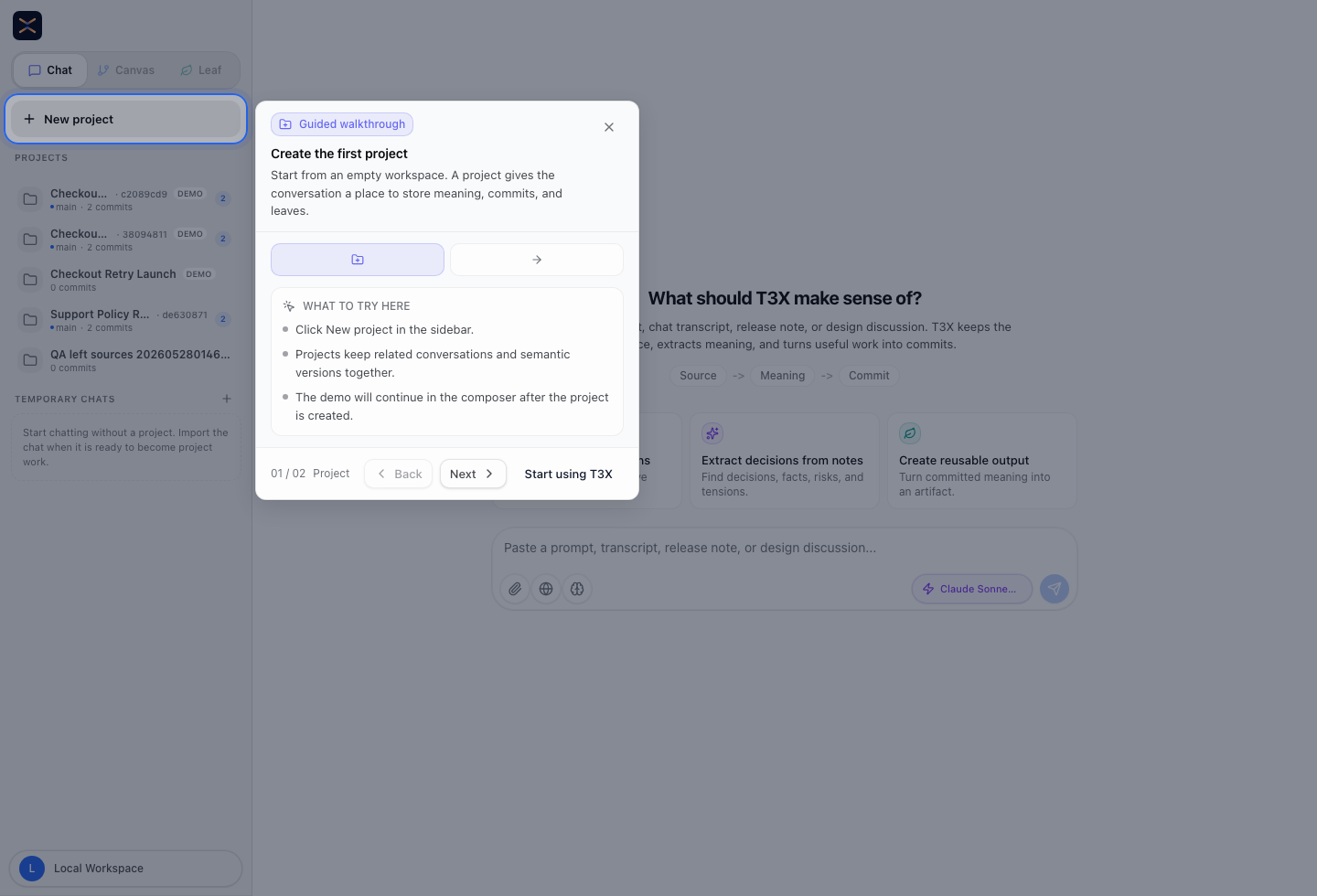
The `/chat` view shows the `Source -> YOps -> Commit` workflow before the
first extraction run. Screenshot assets live in the docs site so the core
repository does not need to carry generated image files.
When the source-dev WebUI is running, open the
[intro demo preview](http://localhost:3000/chat?introDemo=1) to load the guided
intro demo. The `introDemo` flag is development-only.
## How it works
T3X follows a `Source -> YOps -> Commit` loop. Source evidence proposes a
structured change; YOps applies that change to YAML state; commits preserve the
result with parents, operation logs, and provenance.
Source
YOps
Commit
Chat, doc, spec, prompt run
Review and apply deterministic YAML operations
Version the new state with parents and provenance
source evidence
old YAML + YOps -> new YAML
commit / diff / merge
> Extraction and generation can use LLMs. YOps Apply, validation, commit
> hashing, diff, and merge are deterministic.
Diff and merge compare committed structured states. Fixes, extraction edits, and
merge resolutions are applied back through YOps before a new commit is written.
### Small example
```yaml
source:
text: Move launch region from US to EU and add security review before release.
state_before:
launch:
region: us
gates:
- qa
yops:
- set:
path: launch/region
value: eu
- append:
path: launch/gates
value: security_review
state_after:
launch:
region: eu
gates:
- qa
- security_review
commit:
parents:
- sha256:...
provenance:
source: launch-note
```
## The Y-Family
T3X uses three spec-driven tools for structured YAML state. Together they form a
validate-and-fix loop: detect issues, emit fix operations, apply them, confirm.
YOps
YSchema WIP
YLint
How to mutate
What is valid
Is it clean
Atomic YAML operations
Spec-driven, deterministic
Sequential, fail-fast
User-defined domain schemas
Slot types, enums, ranges
Cross-node rules
Built-in structural rules
Runs without a schema
Auto-fix via YOps
yops.yaml
yschema.yaml
Built into @t3x-dev/core
Two functions cover the core loop:
```typescript
applyYOps(doc, ops) // mutate: apply operations to a YAML tree
validateTree(content, { schema }) // validate: check structure + domain, get fixes
```
`validateTree` runs ylint and yschema internally, collects warnings, and returns
a ready-to-apply fix plan. Auto-fixable issues resolve through `applyYOps()`.
Everything else is surfaced for review.
### YOps — Declarative YAML Operations
```yaml
yops:
- define:
path: user/preferences
- populate:
path: user/preferences
values: { theme: dark, language: en }
- sort:
path: user/tags
- assert:
path: user/preferences/theme
equals: dark
```
CategoryOpsPurpose
DDLdefine drop renameCreate, remove, rename keys
DMLset unset populate appendSet values, add to sequences
DTLmove clone nest split fold merge sort unique pick omitReshape the tree
DCLassertValidate conditions (read-only)
The full spec — including a decision guide, type contracts, composition recipes, and error reference — lives in [`yops.yaml`](packages/yops/yops.yaml). Any language can implement a conformant engine from this single file.
### Validation
YSchema defines domain-specific shape: required nodes, slot types, enums, ranges,
and cross-node rules. YLint checks structural hygiene: key naming, value quality,
list hygiene, and tree depth. Both can emit YOps fixes.
Specs: [`yschema.yaml`](packages/yschema/yschema.yaml), YLint in
[`@t3x-dev/core`](packages/core/).
## Configuration
```
~/.t3x/config.json # API keys, default server URL
/.t3x/config.json # Project-specific settings
```
For one-machine local product use, CLI (`t3x auth/config`) and MCP read the
machine-level `~/.t3x/config.json`, and WebUI (`/settings/access`) manages that
same file through the standalone API. Effective lookup order is:
```text
T3X_API_URL / T3X_API_KEY (environment)
-> ~/.t3x/config.json
-> built-in defaults
```
Environment variables always win over the shared file.
After changing local access settings, use `t3x auth check` or the WebUI
`Test Access` action in `/settings/access` to verify the effective API URL, and
whether the current deployment requires or accepts the configured key.
Copy `.env.example` to `.env` to add provider keys for source development or to make auth settings explicit for Docker and other self-hosted deployments.
The core engine works without any API key. To use extraction or chat, add an Anthropic, OpenAI, or Google AI Studio key.
First-run auth defaults:
- Source development (`pnpm dev:api`, `pnpm dev:webui`) opens directly into the app by default.
- To exercise the login flow in source development, set `AUTH_DISABLED=false` in the shell before starting both dev processes.
- Docker and self-host keep auth on by default and use the built-in username/password login.
## Architecture
Product
WebUI (Next.js) · API (Hono) · CLI (preview) · MCP (preview)
Storage
PostgreSQL (Drizzle ORM) · Embedded PG (dev)
Core
Hash chains · Diff engine · Merge · YLint · Extract
Y-Family
YOps (mutate) · YSchema (validate, WIP) · YLint (hygiene)
**Design principles:**
- **Deterministic core** — Same inputs, same outputs. No LLM in the critical path.
- **Append-only** — Hash chains are immutable.
- **Evidence-backed** — Every finding traces to source text with character offsets.
- **Pluggable** — LLMs are optional plugins for extraction, never required.
### Project structure
```
packages/yops # YOps — Declarative YAML operations
packages/yschema # YSchema — WIP validation candidate with auto-fix
packages/core # T3X engine — diff, merge, hash chains, extraction, ylint
packages/storage # PostgreSQL persistence (Drizzle ORM)
packages/api-client # TypeScript API client
apps/web # WebUI (Next.js 16 + App Router)
apps/api # Hono API server with OpenAPI
apps/cli # Command-line interface (preview)
apps/mcp # MCP server (preview)
apps/runner # Grey-box agent evaluation engine
```
### Build
```bash
pnpm build # Build all packages
pnpm test # Run all tests
pnpm check # Lint + format (Biome)
```
→ [Contributing guide](./CONTRIBUTING.md)
## Availability
The current npm release surface is intentionally narrow and declared in
[`RELEASE.md`](RELEASE.md) and [`release/surface.yaml`](release/surface.yaml).
| Package | Status | Description |
|:--------|:----|:------------|
| [`@t3x-dev/local`](apps/local/) | public alpha | Local installer and no-key demo entrypoint |
| [`@t3x-dev/yops`](packages/yops/) | public alpha | Declarative YAML operations |
Other packages remain internal or preview until they are promoted into the
release surface.
## Documentation
[t3x-docs.vercel.app](https://t3x-docs.vercel.app) — Quickstart, YOps
reference, WebUI guide, and release notes.
Policies: [Security](SECURITY.md) · [Alpha limitations](docs/limitations.md) ·
[Deployment](docs/deployment.md) · [Stability](docs/stability.md)
## License
[Apache License 2.0](./LICENSE)