https://github.com/tadeugr/dugaire
Build Docker images with custom packages for local development, testing and daily tasks.
https://github.com/tadeugr/dugaire
ansible azurecli containers docker docker-images dockerfile kubernetes pip python
Last synced: 11 months ago
JSON representation
Build Docker images with custom packages for local development, testing and daily tasks.
- Host: GitHub
- URL: https://github.com/tadeugr/dugaire
- Owner: tadeugr
- License: gpl-3.0
- Created: 2020-11-16T22:10:58.000Z (over 5 years ago)
- Default Branch: master
- Last Pushed: 2022-10-12T20:15:35.000Z (almost 4 years ago)
- Last Synced: 2025-07-30T08:04:09.173Z (12 months ago)
- Topics: ansible, azurecli, containers, docker, docker-images, dockerfile, kubernetes, pip, python
- Language: Python
- Homepage: https://pypi.org/project/dugaire/
- Size: 364 KB
- Stars: 5
- Watchers: 1
- Forks: 2
- Open Issues: 6
-
Metadata Files:
- Readme: README.md
- Changelog: CHANGELOG.txt
- License: LICENSE
Awesome Lists containing this project
README
Quickly build custom Docker images for local development without having to write Dockerfiles.
[](https://pypi.org/project/dugaire/)
[](https://pypi.org/project/dugaire/)
[](https://github.com/psf/black)
[](https://github.com/tadeugr/dugaire/actions?query=workflow%3Atest)
[](https://github.com/tadeugr/dugaire/actions?query=workflow%3Apublish)
[](https://codecov.io/gh/tadeugr/dugaire)
[](https://dugaire.readthedocs.io/en/latest/?badge=latest)
[](https://app.fossa.com/projects/git%2Bgithub.com%2Ftadeugr%2Fdugaire?ref=badge_shield)
# Examples
```bash
# Build an image with vim and curl using apt-get
docker run -it --rm $(dugaire build --apt=vim,curl)
# Build an image with wget, and nano using apt-get and install latest azure-cli version using pip3.
docker run -it --rm $(dugaire build --apt=wget,nano --pip3=azure-cli)
# Build an image with latest kubectl version
docker run -it --rm $(dugaire build --with-kubectl=latest)
# Build an image with kubectl 1.15.0
docker run -it --rm $(dugaire build --with-kubectl=1.15.0)
```
# Install (on Linux)
## Using pip (recommended)
```bash
pip install dugaire
```
## From source
Clone this repository.
```bash
git clone https://github.com/tadeugr/dugaire.git
```
`cd` to its directory.
```bash
cd dugaire
```
Install it (requires `pip`).
```bash
make install
```
You should have the command available.
```bash
dugaire build --help
```
# Usage
```bash
Usage: dugaire [OPTIONS] COMMAND [ARGS]...
CLI tool to build and manage custom Docker images.
Options:
--version Show the version and exit.
--help Show this message and exit.
Commands:
build Build Docker images with custom packages.
list List images built with dugaire.
rmi Remove images built with dugaire.
version Show the version and exit.
```
## dugaire build
```bash
Usage: dugaire build [OPTIONS]
Build Docker images with custom packages.
Examples:
Build an image and install vim and curl using apt-get.
$ dugaire build --apt=vim,curl
Build an image and install python3 using apt-get and ansible using pip3.
$ dugaire build --apt=python3-pip --pip3=ansible
Build an image and install the latest version of kubectl.
$ dugaire build --with-kubectl=latest
Options:
--from Base image (used in Dockerfile FROM).
Example: --from=ubuntu:20.04 [default:
ubuntu:20.04; required]
--name Image name. Example: --name="myimage:0.0.1"
[default: random]
--apt Comma separeted list of packages (no blank
space) to install using apt-get install.
Requires a base image with apt-get. Example:
-apt=curl,vim
--pip3 Comma separeted list of packages (no blank
space) to install using pip3 install.
WARNING: requires -apt=python3-pip. Example:
-apt=python3-pip -pip3=ansible,jinja2
--with-kubectl
Install kubectl. Examples: --with-
kubectl=latest / --with-kubectl=1.17.0
--with-terraform
Install terrafom. Examples: --with-
terraform=latest / --with-terraform=0.15.5
--with-velero
Install velero. Examples: --with-
velero=latest / --with-velero=1.5.2
--force Ignore Docker cache and build from scratch.
--dry-run Do not build image.
-o, --output [image.id|image.id.short|image.name|dockerfile]
Command output options. [default:
image.id.short]
--help Show this message and exit.
```
# Enable autocomplete
To enable autocomplete for your current terminal session, run:
```bash
eval "$(_DUGAIRE_COMPLETE=source dugaire)"
```
Follow the instructions bellow to permanently enable autocomplete.
## bash
```bash
echo 'eval "$(_DUGAIRE_COMPLETE=source dugaire)"' >> ~/.bashrc
```
## zsh
```bash
echo 'eval "$(_DUGAIRE_COMPLETE=source dugaire)"' >> ~/.zshrc
```
# Supported features
## Base images
Tested with:
- `ubuntu:20.04`
> You may use base images that were built from the tested images.
## Package/Dependency managers
### apt-get
You can install any package using `apt`
Use a comma separated list (no blank space) of packages you want to install.
Example:
```bash
dugaire build --apt=wget,iputils-ping
```
### pip3
You can install any package using `pip3`
Use a comma separated list (no blank space) of packages you want to install.
Use `==` to install specific versions.
Example:
```bash
dugaire build --pip3=jinja2,azure-cli==2.39.0
```
## Applications
### kubectl
#### Options
`--with-kubectl=latest` to install the latest version.
`--with-kubectl=1.17.0` *(example)* to install specific versions.
See all versions available [here](https://github.com/kubernetes/kubectl/releases).
#### Covered by automated tests
> You may install any version available. The commands bellow only describes versions included in the automated tests.
```bash
dugaire build --from=ubuntu:20.04 --with-kubectl=latest
dugaire build --from=ubuntu:20.04 --with-kubectl=1.18.0
dugaire build --from=ubuntu:20.04 --with-kubectl=1.17.0
dugaire build --from=ubuntu:18.04 --with-kubectl=1.16.0
dugaire build --from=ubuntu:18.04 --with-kubectl=1.15.0
```
### terraform
#### Options
`--with-terraform=latest` to install the latest version.
`--with-terraform=0.15.05` *(example)* to install specific versions.
See all versions available [here](https://releases.hashicorp.com/terraform/).
#### Covered by automated tests
> You may install any version available. The commands bellow only describes versions included in the automated tests.
```bash
dugaire build --from=ubuntu:20.04 --with-terraform=latest
dugaire build --from=ubuntu:20.04 --with-terraform=0.15.05
```
### velero
#### Options
`--with-velero=latest` to install the latest version.
`--with-velero=1.5.2` *(example)* to install specific versions.
See all versions available [here](https://github.com/vmware-tanzu/velero/releases).
#### Covered by automated tests
>You may install any version available. The commands bellow only describes versions included in the automated tests.
```bash
dugaire build --from=ubuntu:20.04 --with-kubectl=latest --with-velero=latest
dugaire build --from=ubuntu:20.04 --with-kubectl=1.17.0 --with-velero=1.5.2
```
# License
## Product license
Apache License Version 2.0, January 2004. [Read more.](https://github.com/tadeugr/dugaire/blob/master/LICENSE)
## FOSSA scan overview
[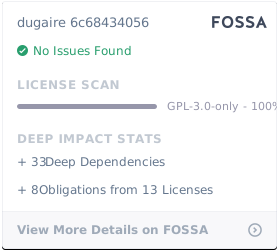](https://app.fossa.com/projects/git%2Bgithub.com%2Ftadeugr%2Fdugaire?ref=badge_large)
## FOSSA Live Project report
The report is available [here](https://app.fossa.com/reports/826e35e3-c1be-4f82-a260-da5b362aa83b)