https://github.com/taesoopark-pts/latticeai
Self-hosted AI workspace for local MLX and cloud LLMs, with web chat, VS Code, Telegram, MCP, and Graph RAG
https://github.com/taesoopark-pts/latticeai
ai-agent developer-tools fastapi knowledge-graph llm local-ai mcp mlx ollama openai-compatible privacy-first rag self-hosted telegram-bot vscode vscode-extension
Last synced: 10 days ago
JSON representation
Self-hosted AI workspace for local MLX and cloud LLMs, with web chat, VS Code, Telegram, MCP, and Graph RAG
- Host: GitHub
- URL: https://github.com/taesoopark-pts/latticeai
- Owner: TaeSooPark-PTS
- License: mit
- Created: 2026-05-13T21:58:23.000Z (about 1 month ago)
- Default Branch: main
- Last Pushed: 2026-06-07T16:24:13.000Z (16 days ago)
- Last Synced: 2026-06-07T17:25:11.883Z (16 days ago)
- Topics: ai-agent, developer-tools, fastapi, knowledge-graph, llm, local-ai, mcp, mlx, ollama, openai-compatible, privacy-first, rag, self-hosted, telegram-bot, vscode, vscode-extension
- Language: Python
- Homepage: https://github.com/TaeSooPark-PTS/LatticeAI#readme
- Size: 34 MB
- Stars: 2
- Watchers: 0
- Forks: 0
- Open Issues: 0
-
Metadata Files:
- Readme: README.md
- Changelog: CHANGELOG.md
- Contributing: CONTRIBUTING.md
- License: LICENSE
- Code of conduct: CODE_OF_CONDUCT.md
- Codeowners: .github/CODEOWNERS
- Security: SECURITY.md
- Agents: AGENTS.md
Awesome Lists containing this project
README

AI Workspace OS for local-first graph, memory, agents, workflows, skills, and timelines.
[](https://pypi.org/project/ltcai/)
[](https://pypi.org/project/ltcai/)
[](https://www.npmjs.com/package/ltcai)
[](https://marketplace.visualstudio.com/items?itemName=parktaesoo.ltcai)
[](https://open-vsx.org/extension/parktaesoo/ltcai)
[](https://github.com/TaeSooPark-PTS/LatticeAI/actions/workflows/ci.yml)
[](./LICENSE)
[](https://www.python.org/)
---
## What is Lattice AI?
Most AI tools answer one chat at a time. They do not remember your folders, your project history, your previous decisions, or how your files relate to each other.
**Lattice AI turns your local workspace into an AI Workspace OS.**
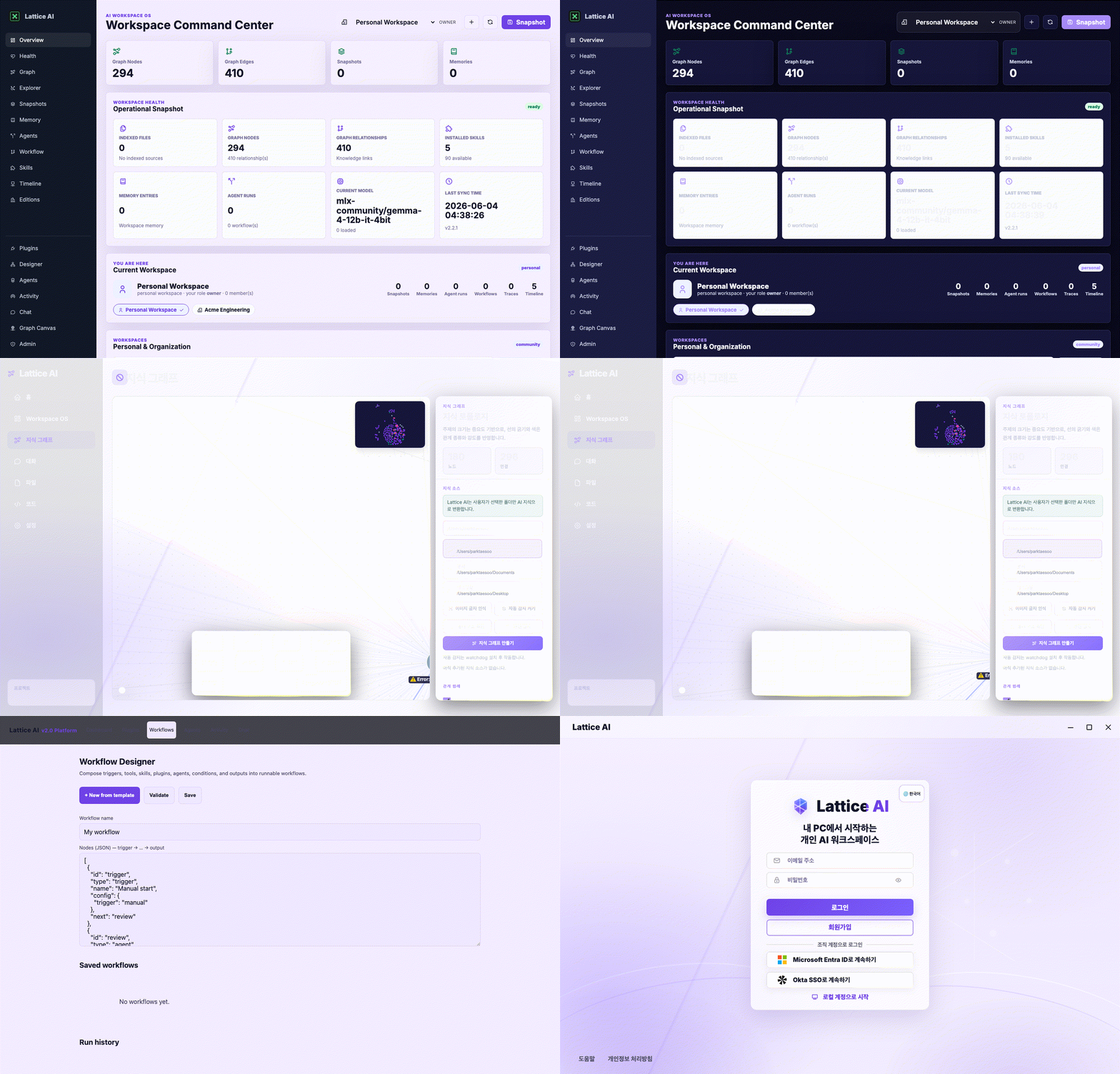
It reads approved local folders, indexes chats and documents, builds a searchable knowledge graph, and connects the graph to snapshots, personal memory, agent runs, workflow history, skills, and an auditable timeline.
```text
Local files + chats + folders
↓
Automatic knowledge graph
↓
Graph-aware chat, snapshots, memory, agents, workflows, skills, and timeline
```
### New in 1.4.0: Server App Final Decomposition
- **server_app.py final decomposition** — the app shell is now FastAPI assembly,
lifespan, middleware, static mounting, and router wiring only
(~5,381 → 1,303 lines)
- **Chat / model / tools extraction** — chat/history/agent, model runtime and
provider helpers, tools, local files, computer-use, permissions, upload,
garden/setup/static UI, MCP, and KG glue now live in API routers and services
- **AppContext and dependency cleanup** — routers receive explicit dependencies
and do not import the FastAPI app; service modules own runtime and dispatch
business logic
- **Safety validation suite** — route compatibility, import/startup, streaming,
model endpoint, tools/local/CU, release-artifact, and documentation stale
checks guard the split
- **Compatibility preserved** — all public API paths, request/response schemas,
`server:app`, CLI, UI, Knowledge Graph, Admin/Security, Workspace OS, and
VS Code expectations remain unchanged
### New in 1.2.0: Server App Modularization
- **server_app.py modularized** — Workspace/Organization and health/engine
endpoints extracted into dedicated routers (`latticeai/api/*`) backed by a
service layer (`latticeai/services/*`); `server_app` is now app assembly +
router include (~6,585 → ~5,948 lines)
- **Routers / services split** — `create_workspace_router`,
`create_health_router`, `WorkspaceService`, `ModelService`, `ChatService`
- **Workspace API service layer** — scope resolution and role/permission checks
centralized in `WorkspaceService`
- **Workspace / org guardrails** — non-members can't read/write org data,
viewers can't write, owners/admins manage members; no-auth local owner
fallback preserved
- **Health / model / chat modularization** — `/health`, `/mode`,
`/runtime_features`, `/engines` via the health router; chat trace recording
via the chat service (streaming behavior unchanged)
- **Compatibility preserved** — `server:app` import path, all API routes, CLI,
Knowledge Graph / Admin / Security routers, and VS Code integration unchanged
### New in 1.1.0: Organization Workspace Foundation
- **Organization Workspace** alongside Personal Workspace — create shared org
workspaces, list/switch between them, and archive (non-destructively)
- **Workspace roles & permissions** — `owner`, `admin`, `member`, `viewer`
mapped to read / write / manage-members / manage-workspace
- **Workspace-scoped data** — snapshots, memory, agent runs, workflows, traces,
and timeline carry a `workspace_id`; reads scope via the `X-Workspace-Id` header
- **CI / release hardening** — Node.js 24 ready workflow, version-scoped
artifact upload (never `dist/*`), and a release artifact validator
- **Enterprise extension foundation (open-core)** — a stable seam for a future
Enterprise plugin; Community ships everything it has today, unrestricted
(see [docs/ENTERPRISE.md](docs/ENTERPRISE.md) and
[docs/EDITION_STRATEGY.md](docs/EDITION_STRATEGY.md))
### New in 1.0.0: AI Workspace OS
- Workspace OS command center at `/workspace`
- First-run onboarding state API and UI
- Graph RAG answer traces with sources, nodes, edges, confidence, and jump links
- Local indexing dashboard with watcher state, success/failure counts, pause/resume/remove
- Workspace snapshots, Time Machine views, export, and Knowledge Diff
- Personal memory CRUD/search linked back to the graph
- Multi-agent graph entities and agent run history
- Relationship Explorer for inbound, outbound, related entities, and shortest path
- Local Computer Memory remains OFF by default and requires explicit approval
- Skill Marketplace registry with install, uninstall, update, enable, disable, and version state
- Workflow Graph for upload -> summarize -> generate -> export style work histories
- VS Code commands for Explain Selection, Refactor Selection, Generate Tests, Send To Lattice, and Ask About Current File
### Built for people who want
- a private AI workspace that runs from their own machine
- local model setup without hunting through many tools
- folder indexing that becomes useful AI memory
- a visual knowledge graph instead of disconnected files and chats
- optional team/admin controls for audit, permissions, and sensitive-data monitoring
---
## Quick Start
### Python / PyPI
```bash
pip install ltcai
LTCAI
# open http://localhost:4825
```
### Apple Silicon local models
```bash
pip install "ltcai[local]"
LTCAI
```
### Node / npm
```bash
npm install -g ltcai
LTCAI
```
### VS Code / Cursor
1. Install **Lattice AI** from the [VS Code Marketplace](https://marketplace.visualstudio.com/items?itemName=parktaesoo.ltcai) or [Open VSX](https://open-vsx.org/extension/parktaesoo/ltcai)
2. Start the local server with `LTCAI`
3. Press `Cmd+Shift+A` to open the chat panel
**First run:** create an account -> the first account becomes admin -> open `/workspace` -> complete onboarding -> choose a model -> connect folders -> start asking questions.
---
## The 3-minute workflow
```text
1. Install
pip install ltcai && LTCAI
2. Detect hardware
CPU, GPU, RAM are detected and a suitable local model is recommended.
3. Connect folders
Pick the local folders you want Lattice AI to index.
4. Build knowledge
Files and chats become nodes and edges in a local knowledge graph.
5. Ask questions
“What did I decide about the auth migration last week?”
6. Keep working
Use the same local knowledge from the web UI, VS Code, Telegram, or MCP clients.
```
---
## Product Preview
Workspace Chat
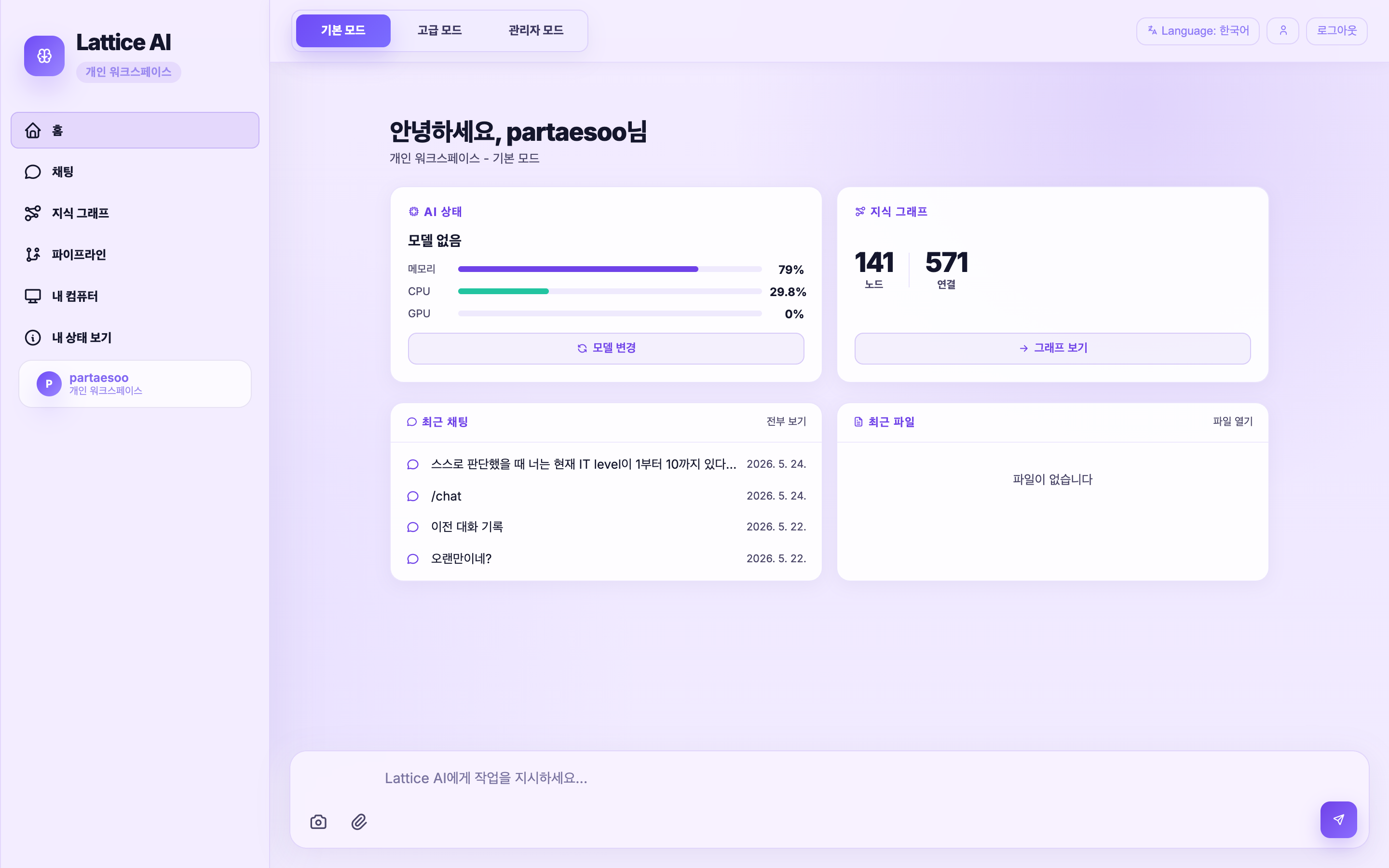
Chat with local/cloud models, upload files, and control pipelines.
Knowledge Graph
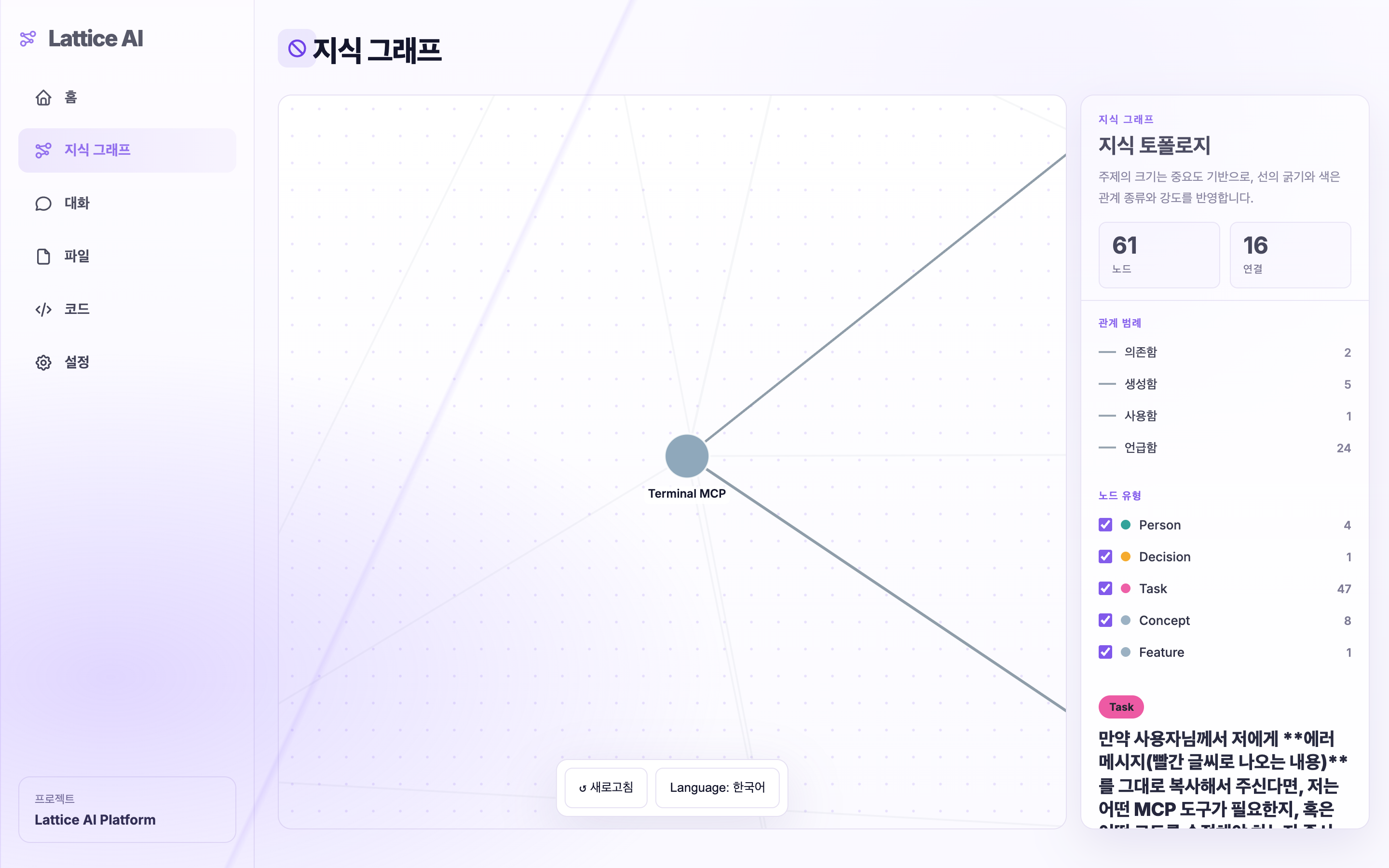
Automatically built from chats, files, folders, and project context.
Admin Dashboard
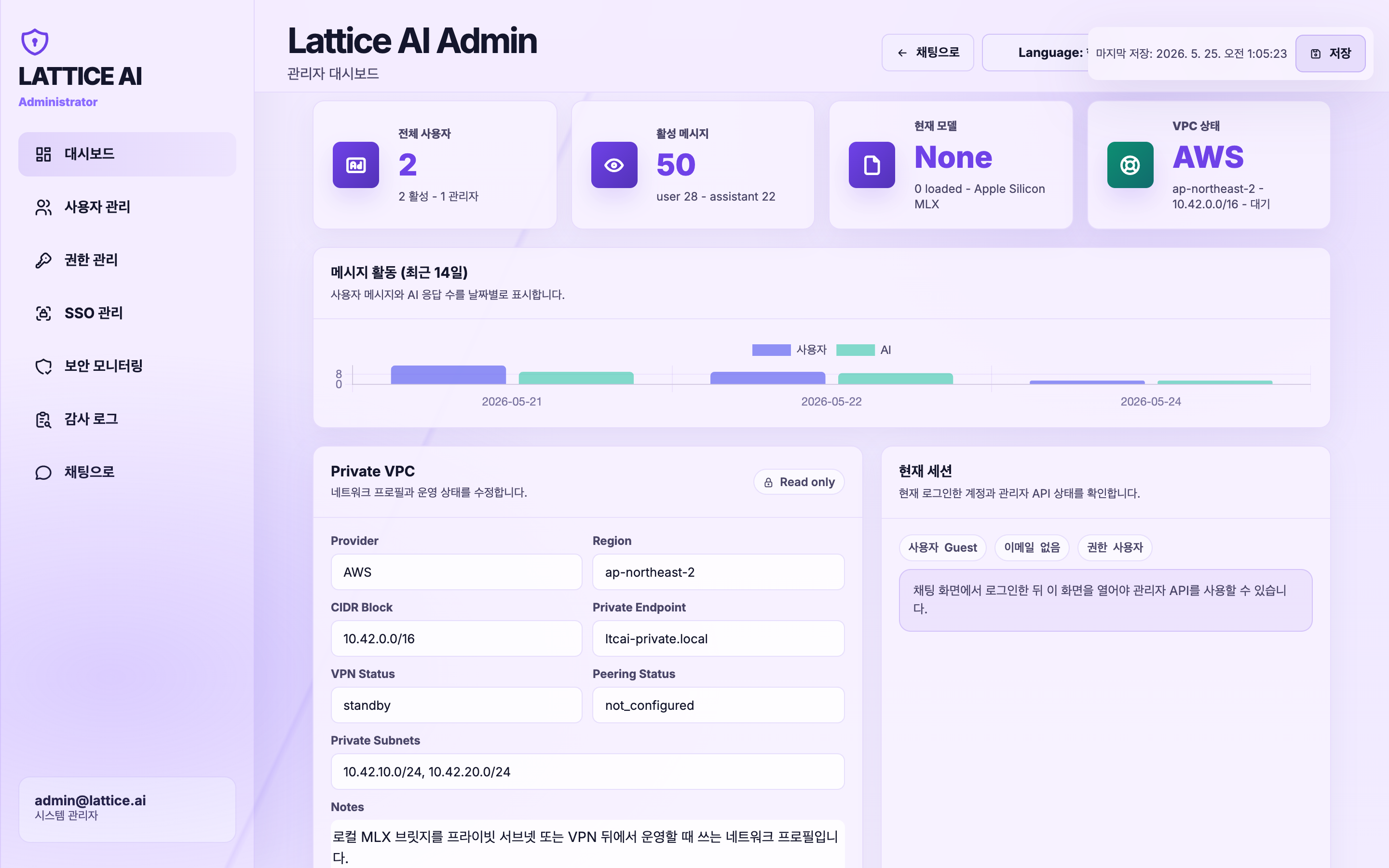
User management, audit logs, permissions, and security monitoring.
---
## Why it is different
| Problem | Lattice AI approach |
|---|---|
| AI forgets every conversation | Chats and files are indexed into persistent local memory |
| Files are scattered across folders | Approved folders become searchable graph context |
| Local model setup is confusing | Hardware detection recommends and loads a suitable model |
| Graph tools require manual node editing | Nodes and edges are created automatically from real work |
| Cloud AI may expose private data | Local models keep data on your machine; cloud is opt-in |
| Teams need visibility | Admin dashboard, audit logs, role controls, and sensitive-data monitoring |
---
## Core Features
### Local-first AI workspace
- Web UI running from a local server
- Local SQLite storage under `~/.ltcai/`
- Local folder indexing with explicit approval
- File upload, chat history, graph search, and document generation
- Optional cloud providers when you choose to use them
### Automatic knowledge graph
Lattice AI turns your work into structure automatically.
**Nodes** can represent:
| Node type | Examples |
|---|---|
| Document | PDF, DOCX, PPTX, XLSX, Markdown, code files |
| Concept | technologies, project names, ideas, architecture topics |
| Person | you, teammates, mentioned people |
| Chat | previous conversations and sessions |
| Task | TODOs, action items, follow-ups |
| Decision | choices made during discussions |
**Edges** describe relationships such as:
`mentions` · `contains` · `depends on` · `explains` · `uses` · `replaces` · `supports` · `related to`
The graph is curated automatically: noisy tokens, file extensions, generic words, and hard secrets are filtered before promotion.
### Model loading that users can trust
Lattice AI keeps model identity consistent across recommendation, download, load, backend router state, and frontend display.
- unified model resolution
- local model smoke test after load
- `ok` / `degraded` / `failed` compatibility status
- per-family compatibility profiles for GPT-OSS, Gemma, Qwen, Llama, Mistral, Phi, Deepseek, and more
- fast post-processing path during normal chat
- recovery path only when output looks broken
### Admin and security command center
For team or organization usage, Lattice AI includes admin-facing controls:
- user management and roles
- permission approvals for local file access
- audit event timeline
- sensitive chat/file detection
- risk overview by user
- raw data explorer with hard-secret redaction
- export to JSON, CSV, XLSX, TXT, or PDF
Hard secrets such as API keys, tokens, passwords, private keys, and common cloud credentials are redacted from security responses.
---
## Supported Models
### Local on Apple Silicon MLX
| Model | Best for | Approx. size | Suggested RAM |
|---|---|---:|---:|
| Qwen3-VL 4B | Multimodal / low spec | ~2.7 GB | 8 GB |
| Qwen3-VL 8B | Multimodal / balanced | ~4.8 GB | 16 GB |
| GPT-OSS 20B | Reasoning / open-weight | ~12.1 GB | 32 GB |
| Gemma 4 26B | Multimodal / large | ~15.6 GB | 32 GB |
| Gemma 4 31B | Multimodal / latest Gemma 4 | ~18.4 GB | 48 GB |
| Qwen3-VL 30B A3B | Multimodal / top local | ~18 GB | 48 GB |
| GPT-OSS 120B | Large reasoning model | ~62.3 GB | 128 GB |
| Phi 4 Mini | Fast coding/general chat | ~2.2 GB | 8 GB |
| Llama 3.1 8B | General chat | ~4.7 GB | 8 GB |
| Mistral 7B v0.3 | General / Apache | ~4.1 GB | 8 GB |
### Cross-platform engines
Lattice AI can also work with models served by:
- Ollama
- LM Studio
- llama.cpp
- vLLM
- OpenAI-compatible local or remote endpoints
### Cloud providers
Cloud models are optional. When enabled, prompts are sent to the selected provider.
Supported routes include OpenAI-compatible APIs, OpenRouter, Groq, Together, xAI, and other compatible endpoints.
---
## Privacy and data storage
| Area | Default behavior |
|---|---|
| Storage | Data is stored locally under `~/.ltcai/` |
| Default binding | `127.0.0.1:4825` local server |
| Telemetry | No built-in product telemetry by default |
| Folder access | Explicit approval per folder/action scope |
| Sensitive files | `.env`, credentials, keys, certificates, and similar files are auto-excluded |
| Cloud models | Off unless configured; cloud prompts go to the selected provider |
| Delete controls | Remove chats, graph nodes, indexed folders, and local data |
---
## Comparison
| Capability | Lattice AI | Open WebUI | Continue.dev | GitHub Copilot |
|---|:---:|:---:|:---:|:---:|
| Local model workflow | Yes | Yes | Yes | No |
| Local folder indexing | Yes | Limited | Workspace-focused | Limited |
| Automatic knowledge graph | Yes | No | No | No |
| Chat + file memory | Yes | Partial | Partial | Partial |
| VS Code / Cursor extension | Yes | No | Yes | Yes |
| Admin dashboard | Yes | Yes | No | No |
| Security audit exports | Yes | Limited | No | No |
| Optional cloud models | Yes | Yes | Yes | Yes |
| Local-first by default | Yes | Self-hosted | Local/dev focused | No |
---
## Current release
**1.4.0** completes the Server App Final Decomposition release:
- `server.py` remains the thin compatibility entrypoint and
`latticeai/server_app.py` is now a compact app assembly shell
- chat/history/agent, model runtime/provider helpers, tools/local/CU/
permissions/upload, garden/setup/static pages, MCP, and KG router wiring are
extracted into `latticeai/api/*` and `latticeai/services/*`
- route compatibility, streaming, model endpoint, tools/local/CU,
import/startup, build, packaging, and documentation stale-reference checks
are part of the release validation
- Python package, npm package, VS Code extension, FastAPI app, and `/health`
version metadata are aligned at `1.4.0`
See the full [changelog](docs/CHANGELOG.md).
---
All Features
### Core experience
| Feature | Description |
|---|---|
| Web UI | Chat, file upload, model picker, graph view, admin pages |
| Auto setup wizard | Detect hardware, recommend model, install dependencies, verify load |
| Graph RAG | Retrieve context from indexed chats, files, and graph relationships |
| Local folder indexing | Browse, audit, approve, index, and optionally watch folders |
| Document generation | Use graph context to generate reports, summaries, and structured drafts |
### Developer tools
| Feature | Description |
|---|---|
| VS Code / Cursor | Chat panel, edit selection, explain code, generate code |
| Multi-step agent | File edit/create, grep, todo, and terminal workflow with human-in-the-loop |
| Multi-LLM pipeline | Plan, execute, and review with different models |
| MCP server | Expose Lattice tools to MCP-compatible clients |
| MCP registry | Install MCP servers from supported registries |
| Skills browser | Browse and install optional skills |
| Plugin browser | Browse compatible open-source plugins |
### Access and communication
| Feature | Description |
|---|---|
| Telegram bot | Chat, upload files, and manage models remotely |
| PWA | Install the web UI on mobile/tablet home screens |
| Public tunnel | `LTCAI --tunnel` for a temporary Cloudflare HTTPS URL |
### Administration
| Feature | Description |
|---|---|
| User management | Roles, permissions, account enable/disable |
| SSO | Entra ID / Okta OIDC configuration |
| Audit dashboard | AI usage, sensitive-data events, file access, exports |
| Security monitoring | Rate limits, approval logs, raw explorer, redaction |
Security
| Property | Detail |
|---|---|
| Binding | Default `127.0.0.1:4825` local only |
| Auth | Session required when network-exposed or public mode |
| Cookies | `HttpOnly + SameSite=Lax`; no localStorage token |
| Local file access | Approval-token gated by path, user, and action scope |
| Package install | Admin-only with audit trail for MCP, skills, pip, npm |
| CORS | Localhost only by default; configurable via `LATTICEAI_CORS_ALLOWED_ORIGINS` |
| File upload | Magic-number signature checks for extension spoofing defense |
| Rate limits | `/chat` 30/min · `/agent` 6/min · `/upload` 12/min per user |
| Telemetry | No built-in product telemetry by default |
Report vulnerabilities in [SECURITY.md](SECURITY.md).
Setup & Configuration
### VS Code shortcuts
| Shortcut | Action |
|---|---|
| `Cmd+Shift+A` | Open chat |
| `Cmd+Shift+E` | Edit selected code |
| `Cmd+Shift+M` | Load or switch model |
| Right-click | Explain / Save to Knowledge Garden |
### Telegram bot
```bash
LATTICEAI_TELEGRAM_BOT_TOKEN=your-token LTCAI
```
### Public server
```bash
LATTICEAI_MODE=public \
LATTICEAI_PUBLIC_MODEL=openai:gpt-4o-mini \
OPENAI_API_KEY=sk-... \
LATTICEAI_INVITE_CODE=my-secret \
LTCAI
```
### Public tunnel
```bash
LTCAI --tunnel
# → https://xxxx.trycloudflare.com
```
### Auto-start on macOS
```bash
cat > ~/Library/LaunchAgents/com.ltcai.plist << 'EOF'
Labelcom.ltcai
ProgramArguments/usr/local/bin/LTCAI
RunAtLoad
KeepAlive
StandardOutPath/tmp/ltcai.log
StandardErrorPath/tmp/ltcai.err
EOF
launchctl load ~/Library/LaunchAgents/com.ltcai.plist
```
API Reference
| Method | Path | Description |
|---|---|---|
| GET | `/health` | Server status and current model |
| GET | `/models` | Model list and load state |
| POST | `/models/load` | Load a model |
| POST | `/chat` | Chat with streaming or non-streaming output |
| POST | `/agent` | Multi-step file agent |
| GET | `/knowledge-graph/stats` | Graph statistics |
| GET | `/knowledge-graph/search?q=` | Search the knowledge graph |
| GET | `/knowledge-graph/local/roots` | Discover local drives and folders |
| POST | `/knowledge-graph/local/audit` | Audit a folder before indexing |
| POST | `/knowledge-graph/local/index` | Index a folder into Graph RAG |
| GET | `/mcp/installed` | Installed MCP servers |
| POST | `/mcp/install` | Install MCP server as admin |
| GET | `/skills/marketplace` | Skills marketplace |
| POST | `/skills/install` | Install a skill as admin |
| GET | `/admin/audit` | Audit report |
| GET | `/permissions/pending` | Pending file-access approvals |
Full reference: [docs/mcp-tools.md](docs/mcp-tools.md)
Troubleshooting
| Symptom | Fix |
|---|---|
| Port 4825 is already in use | `lsof -i :4825` then `kill `, or run `LTCAI --port 4826` |
| `ModuleNotFoundError: mlx` | Install local extras with `pip install "ltcai[local]"` on Apple Silicon |
| Python version is too old | Use Python 3.11 or newer |
| No API key warning | Set a provider key or use a local model |
| Cannot reach from iPad | Use `LATTICEAI_HOST=0.0.0.0 LTCAI` or `LTCAI --tunnel` |
| Model loads but chat looks broken | Check compatibility status; try another engine or model family |
---
## Platform Support
| Feature | macOS Apple Silicon | macOS Intel / Windows / Linux |
|---|:---:|:---:|
| Web UI + cloud models | Yes | Yes |
| VS Code / Cursor extension | Yes | Yes |
| Telegram bot | Yes | Yes |
| MLX local models | Yes | No |
| Ollama / LM Studio / vLLM / llama.cpp | Yes | Yes |
---
## Distribution
| Channel | Link |
|---|---|
| PyPI | [pypi.org/project/ltcai](https://pypi.org/project/ltcai/) |
| npm | [npmjs.com/package/ltcai](https://www.npmjs.com/package/ltcai) |
| VS Code Marketplace | [marketplace.visualstudio.com](https://marketplace.visualstudio.com/items?itemName=parktaesoo.ltcai) |
| Open VSX | [open-vsx.org](https://open-vsx.org/extension/parktaesoo/ltcai) |
---
## Contributing
See [CONTRIBUTING.md](CONTRIBUTING.md). Issues and pull requests are welcome.
## License
MIT — [TaeSoo Park](https://github.com/TaeSooPark-PTS)
---
한국어 안내 (Korean)
## Lattice AI
**내 PC의 파일, 대화, 폴더를 기억하고 연결하는 로컬 우선 AI 워크스페이스**
대부분의 AI 도구는 대화가 끝나면 맥락을 잊습니다. Lattice AI는 승인한 로컬 폴더와 대화를 인덱싱하고, 사람·프로젝트·개념·문서를 자동으로 지식 그래프로 연결합니다.
```text
로컬 파일 + 대화 + 폴더
↓
자동 지식 그래프
↓
그래프 기반 AI 검색, 채팅, 문서 생성, 관리자 감사
```
### 설치
```bash
pip install ltcai
LTCAI
# http://localhost:4825
```
Apple Silicon에서 로컬 모델까지 쓰려면:
```bash
pip install "ltcai[local]"
LTCAI
```
### 사용 흐름
```text
1. 설치한다.
2. CPU, GPU, RAM을 감지해서 적합한 로컬 모델을 추천받는다.
3. 연결할 로컬 폴더를 선택한다.
4. 파일과 대화가 자동으로 지식 그래프가 된다.
5. “지난주 인증 마이그레이션에서 결정한 게 뭐였지?”처럼 질문한다.
6. 같은 지식을 웹 UI, VS Code, Telegram, MCP에서 사용한다.
```
### 핵심 차별점
- **내 데이터가 AI의 기억이 됨** — 채팅과 파일을 자동으로 구조화
- **로컬 우선** — 기본 데이터는 `~/.ltcai/`에 저장
- **자동 그래프** — 사용자가 노드와 엣지를 직접 만들 필요 없음
- **모델 추천/로드 흐름** — 하드웨어 감지 후 적합한 모델 추천
- **선택형 클라우드** — 클라우드 모델은 사용자가 설정한 경우에만 사용
- **관리자/보안 기능** — 권한, 감사 로그, 민감정보 감지, export 지원
자세한 내용은 [docs/CHANGELOG.md](docs/CHANGELOG.md), [SECURITY.md](SECURITY.md), [CONTRIBUTING.md](CONTRIBUTING.md)를 참고하세요.