https://github.com/tagdots/setup-badge-action
Run setup-badge to create shields.io endpoint badges to showcase on your README
https://github.com/tagdots/setup-badge-action
action automation badge devops github-actions python readme setup-badge shields utilities
Last synced: 3 months ago
JSON representation
Run setup-badge to create shields.io endpoint badges to showcase on your README
- Host: GitHub
- URL: https://github.com/tagdots/setup-badge-action
- Owner: tagdots
- License: mit
- Created: 2025-07-08T22:03:33.000Z (about 1 year ago)
- Default Branch: main
- Last Pushed: 2026-03-15T05:16:12.000Z (4 months ago)
- Last Synced: 2026-03-15T17:26:37.551Z (4 months ago)
- Topics: action, automation, badge, devops, github-actions, python, readme, setup-badge, shields, utilities
- Homepage:
- Size: 147 KB
- Stars: 1
- Watchers: 1
- Forks: 0
- Open Issues: 2
-
Metadata Files:
- Readme: README.md
- Changelog: CHANGELOG.md
- License: LICENSE
- Codeowners: .github/CODEOWNERS
- Security: SECURITY.md
Awesome Lists containing this project
README
# setup-badge-action
[](https://www.bestpractices.dev/projects/10951)
[](https://github.com/tagdots/setup-badge/actions/workflows/ci.yaml)
[](https://github.com/marketplace/actions/setup-badge-action)
[](https://github.com/tagdots/setup-badge/actions/workflows/cron-tasks.yaml)
This action runs [setup-badge](https://github.com/tagdots/setup-badge) to generate badges to showcase on your README.
## ⭐ How setup-badge-action works
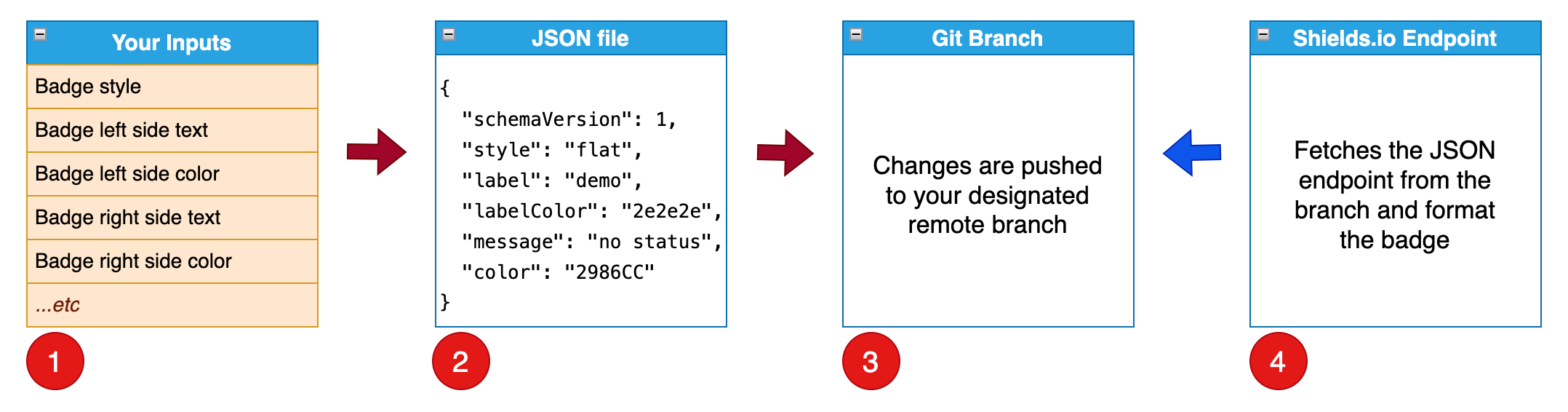
**setup-badge-action** runs **setup-badge** workflow below.
1. **setup-badge** runs with [command line options](https://github.com/tagdots/setup-badge-action?tab=readme-ov-file#-setup-badge-command-line-options).
1. **setup-badge** adds/updates a json file from your options.
1. **setup-badge** pushes a commit to the remote branch.
1. **endpoint badge** is created with `shields.io endpoint` and `your json file`.
Afterwards, you can put `endpoint badge` into your README file.
## 😎 GitHub Action workflow examples
Use the example workflows below to create your own workflow inside `.github/workflows/`.
### Example 1️⃣ - summary
**setup-badge-action**:
* runs `on demand`
* creates two static badges: `language` and `license`
* language badge does not have a badge url
* license badge has a badge url that links to the project's LICENSE file
### Example 1️⃣ - create multiple static badges
```
name: setup-badge-action
on:
workflow_dispatch:
permissions:
contents: read
jobs:
language-badge:
runs-on: ubuntu-latest
permissions:
contents: write
steps:
- id: language-badge
uses: tagdots/setup-badge-action@663d7a5382b8300caa4492de16e85aa7e4667ef0 # 1.0.3
with:
badge-name: language
label: Language
message: Python
message-color: FFA500
license-badge:
runs-on: ubuntu-latest
permissions:
contents: write
steps:
- id: license-badge
uses: tagdots/setup-badge-action@663d7a5382b8300caa4492de16e85aa7e4667ef0 # 1.0.3
with:
badge-name: license
badge-url: https://raw.githubusercontent.com/tagdots/setup-badge/refs/heads/main/LICENSE
label: License
message: MIT
message-color: FFA500
```
### Example 2️⃣ - summary
**setup-badge-action**:
* runs `on schedule at 5:30 pm UTC` or `on demand`
* runs a coverage test and get the coverage percentage from the test result
* creates a dynamic `Code Coverage` badge with the coverage % that changes over time
### Example 2️⃣ - create a dynamic badge
```
name: setup-badge-action
on:
schedule:
- cron: '30 17 * * *'
workflow_dispatch:
permissions:
contents: read
jobs:
coverage-badge:
runs-on: ubuntu-latest
permissions:
contents: write
outputs:
COV_PER: ${{ steps.get-coverage-results.outputs.COV_PER }}
steps:
- id: coverage-run
run: coverage run
- id: get-coverage-results
run: |
echo "COV_PER=$(...coverage run results...)" >> "$GITHUB_OUTPUT"
- id: coverage-badge
uses: tagdots/setup-badge-action@663d7a5382b8300caa4492de16e85aa7e4667ef0 # 1.0.3
with:
badge-name: coverage
label: "Code Coverage"
message: "${{ steps.get-coverage-results.outputs.COV_PER }}"
```
## 🔧 setup-badge command line options
| Input | Description | Default | Notes |
|-------|-------------|----------|----------|
| `badge-name` | JSON endpoint filename | `badge` | JSON endpoint filename |
| `branch-name` | Branch to hold JSON endpoint | `badges` | a single branch can hold multiple JSON endpoint files |
| `badge-style` | Badge style | `flat` | other options: `flat-square`, `plastic`, `for-the-badge`, `social` |
| `badge-url` | Badge URL | `''` | no default value (enter a url if necessary) |
| `label` | Left side text | `demo` | - |
| `label-color` | Left side background color | `2e2e2e` | hex color |
| `message` | Right side text | `no status` | place dynamic/static data here |
| `message-color` | Right side background color | `2986CC` | hex color |
| `remote-name` | Git remote source branch | `origin` | leave it as-is in general |
| `gitconfig-name` | Git config user name | `Mona Lisa` | need this option for CI or GitHub action |
| `gitconfig-email` | Git config user email | `mona.lisa@github.com` | need this option for CI or GitHub action |
## 😕 Troubleshooting
We are here to help - open an [issue](https://github.com/tagdots/setup-badge-action/issues)
## 🙌 Appreciation
If you find this project helpful, please ⭐ star it. **Thank you**.
## 📖 License
[MIT License](https://github.com/tagdots/setup-badge-action/blob/main/LICENSE).