https://github.com/tailrecursion/boot
A Clojure build tool
https://github.com/tailrecursion/boot
Last synced: 9 months ago
JSON representation
A Clojure build tool
- Host: GitHub
- URL: https://github.com/tailrecursion/boot
- Owner: tailrecursion
- License: epl-1.0
- Created: 2013-06-22T17:01:23.000Z (about 13 years ago)
- Default Branch: master
- Last Pushed: 2014-12-31T22:46:37.000Z (over 11 years ago)
- Last Synced: 2025-10-22T01:35:56.636Z (9 months ago)
- Language: Clojure
- Homepage:
- Size: 2.83 MB
- Stars: 110
- Watchers: 11
- Forks: 18
- Open Issues: 5
-
Metadata Files:
- Readme: README.md
- Changelog: CHANGES.md
- License: LICENSE
Awesome Lists containing this project
README
[](https://waffle.io/tailrecursion/boot)
![arhimedes lever][1]
# Boot
> Boot is moving to [boot-clj/boot](https://github.com/boot-clj/boot) starting
> with version 2.0.0. Version 1.x.x will remain in maintenance mode here.
Boot is a shell interpreter for scripts written in Clojure. It is designed to be
used with the “shebang” style of shell scripts to provide a simple means to have
single file, self-contained scripts in Clojure that can include dependencies and
so forth but don't need to be part of a project or uberjar. Also, boot is a
Clojure build tool.
## Dependency
Artifacts are published on Clojars.
[![latest version][2]][3]
## Overview
Boot consists of two parts: the boot **loader** (this project), and the boot
**core**.
* **The boot loader is a Clojure program in executable uberjar format.** The
purpose of the loader is to add the boot core dependency to the classpath
(fetching it from Clojars if necessary) and then hand off execution to the
`-main` function defined there. The loader is designed to be as small, simple,
and stable as possible, because updating to a new version is relatively
awkward and it's important that scripts be runnable even if they were written
for an older version of the API.
* **The boot core is a Maven dependency containing all of the actual boot
logic.** Since it's loaded into the loader dynamically it can be updated
easily, without requiring changes to the loader. The core version is specified
in the script file to provide repeatability–scripts pull in everything they
need to run, including the boot core itself. In addition to the machinery for
interpreting Clojure scripts, the core also contains a number of features
specific to boot's other role as a build tool for Clojure projects.
### Clojure Scripts
Boot scripts have three parts: the **shebang**, the **core version declaration**,
and a number of (optional) **top level forms**.
The shebang tells your shell to use the boot loader to interpret the script:
```clojure
#!/usr/bin/env boot
```
The core version declaration tells the boot loader which version of the boot
core to use:
```clojure
#tailrecursion.boot.core/version "2.5.0"
```
Any remaining forms in the script file are evaluated in the boot environment:
```clojure
(set-env! :dependencies '[[riddley "0.3.4"]])
(require '[clojure.string :refer [join]])
(defn -main [& args]
(println (join " " ["hello," "world!"]))
(System/exit 0))
```
## Getting Started
The easiest way to get started is to download the prebuilt Jar file. It's built
to be executable in a Unix environment. In Windows you'll have to use it via
`java -jar ...` unless you have Cygwin installed (I think).
### Windows
* [Download the boot Jar file.][8]
* Use boot by doing `java -jar boot-1.1.1.jar ...`.
### Unix
```
$ wget https://clojars.org/repo/tailrecursion/boot/1.1.1/boot-1.1.1.jar
$ mv boot-1.1.1.jar boot
$ chmod a+x boot
$ mv boot ~/bin/boot # or anywhere else in your $PATH
```
### Build From Source
To build boot from source you will need:
* Java 1.6+
* [Leiningen][4] 2
* GNU Make
Build and install boot:
```
$ git clone https://github.com/tailrecursion/boot.git
$ cd boot
$ make boot
$ mv ./boot ~/bin/boot # or anywhere else in your $PATH
```
### Hello World
A simple example to get started:
```clojure
#!/usr/bin/env boot
#tailrecursion.boot.core/version "2.5.0"
(defn -main [& args]
(println "hello, world!")
(System/exit 0))
```
Write that to a file, say `build.boot`, set execute permissions on the file, and
run it in the terminal to enjoy a friendly greeting.
> Note: scripts interpreted by boot must have the `.boot` file extension.
### Script Dependencies
Scripts can add Maven repositories and/or dependencies at runtime using
`set-env!`:
```clojure
#!/usr/bin/env boot
#tailrecursion.boot.core/version "2.5.0"
(set-env!
:repositories #{"http://me.com/maven-repo"}
:dependencies '[[com.hello/foo "0.1.0"]])
(require '[com.hello.foo :as foo])
(defn -main [& args]
(println (foo/do-stuff args))
(System/exit 0))
```
## Boot Build Tool
In addition to interpreting scripts, boot also provides some facilities to help
build Clojure projects. Omitting the `-main` function definition puts boot into
build tool mode.
### A Minimal Build Script
Create a minimal `build.boot` file containing only the shebang and core version:
```
$ boot :strap > build.boot
```
The resulting file should contain something like this:
```clojure
#!/usr/bin/env boot
#tailrecursion.boot.core/version "2.5.0"
```
Then run it. You should see version and usage info and a list of available
tasks:
```
$ boot
tailrecursion/boot 1.0.0: http://github.com/tailrecursion/boot
Usage: boot OPTS task ...
boot OPTS [task arg arg] ...
boot OPTS [help task]
OPTS: :v Verbose exceptions (full cause trace).
[:v n] Cause trace limited to `n` elements each.
Tasks: debug Print the value of a boot environment key.
help Print help and usage info for a task.
lein Run a leiningen task with a generated `project.clj`.
repl Launch nrepl in the project.
syncdir Copy/sync files between directories.
watch Watch `:src-paths` and call its continuation when files change.
Create a minimal boot script: `boot :strap > build.boot`
```
The tasks listed in the output are defined in the [core tasks namespace][5],
which is referred into the script namespace automatically. Any tasks defined or
referred into the script namespace will be displayed in the list of available
tasks printed by the default `help` task.
> Notice that when the boot script file is named `build.boot` and located is in
> the current directory you can call `boot` directly instead of executing the
> boot script file itself. This is more familiar to users of Leiningen or GNU
> Make, for example, and reinforces build repeatability by standardizing the
> build script filename and location in the project directory.
### A Simple Task
Let's create a task to print a friendly greeting to the terminal. Modify the
`build.boot` file to contain the following:
```clojure
#!/usr/bin/env boot
#tailrecursion.boot.core/version "2.5.0"
(deftask hello
"Print a friendly greeting."
[& [name]]
(fn [continue]
(fn [event]
(printf "hello, %s!\n" (or name "world"))
(continue event))))
```
Run it again to see the new task listed among the other available tasks:
```
$ boot
tailrecursion/boot 1.0.0: http://github.com/tailrecursion/boot
Usage: boot OPTS task ...
boot OPTS [task arg arg] ...
boot OPTS [help task]
OPTS: :v Verbose exceptions (full cause trace).
[:v n] Cause trace limited to `n` elements each.
Tasks: debug Print the value of a boot environment key.
hello Print a friendly greeting.
help Print help and usage info for a task.
lein Run a leiningen task with a generated `project.clj`.
repl Launch nrepl in the project.
syncdir Copy/sync files between directories.
watch Watch `:src-paths` and call its continuation when files change.
Create a minimal boot script: `boot :strap > build.boot`
```
Now we can run the `hello` task:
```
$ boot hello
hello, world!
```
### Command Line Arguments To Tasks
An argument can be passed to the `hello` task like this:
```
$ boot \(hello :foo\)
hello, :foo!
```
The command line is read as Clojure forms, but task expressions can be enclosed
in square brackets (optionally) to avoid having to escape parens in the shell,
like this:
```
$ boot [hello :foo]
hello, :foo!
```
### Command Line Composition Of Tasks
Tasks can be composed on the command line by specifying them one after the other,
like this:
```
$ boot [hello :foo] [hello :bar]
hello, :foo!
hello, :bar!
```
Because tasks return middleware functions they can be composed uniformly, and
the product of the composition of two task middleware functions is itself a
task middleware function. The two instances of the `hello` task above are being
combined by boot something like this:
```clojure
;; [& args] command line argument list
("[hello" ":foo]" "[hello" ":bar]")
;; string/join with " " and read-string
=> ([hello :foo] [hello :bar])
;; convert top-level vectors to lists
=> ((hello :foo) (hello :bar))
;; compose with comp when more than one
=> (comp (hello :foo) (hello :bar))
```
This yields a middleware function that is called by boot to actually perform
the build process. The composition of middleware sets up the pipeline of tasks
that will participate in the build. The actual handler at the bottom of the
middleware stack is provided by boot–it syncs artifacts between temporary
staging directories (more on these later) and output/target directories.
### Create New Task By Composition
Here we create a new named task in the project boot script by composing other
tasks. This is a quick way to fix options and simplify documenting the build
procedures. Tasks are functions that return middleware, and middleware are
functions that can be composed uniformly, so a task can compose other tasks the
same way as on the command line: with the `comp` function.
Modify the `build.boot` file such that it contains the following:
```clojure
#!/usr/bin/env boot
#tailrecursion.boot.core/version "2.5.0"
(deftask hello
"Print a friendly greeting."
[& [name]]
(fn [continue]
(fn [event]
(printf "hello, %s!\n" (or name "world"))
(continue event))))
(deftask hellos
"Print two friendly greetings."
[]
(comp (hello :foo) (hello :bar)))
```
Now run the new `hellos` task, which composes two instances of the `hello` task
with different arguments to the constructor:
```
$ boot hellos
hello, :foo!
hello, :bar!
```
### The Build Environment
The global build environment contains the project metadata. This includes things
like the project group and artifact ID, version string, dependencies, etc. The
environment is accessible throughout the build process via the `get-env` and
`set-env!` functions.
For example:
```clojure
#!/usr/bin/env boot
#tailrecursion.boot.core/version "2.5.0"
(set-env!
:project 'com.me/my-project
:version "0.1.0-SNAPSHOT"
:description "My Clojure project."
:url "http://me.com/projects/my-project"
:license {:name "Eclipse Public License"
:url "http://www.eclipse.org/legal/epl-v10.html"}
:dependencies '[[tailrecursion/boot.task "2.0.0"]
[tailrecursion/hoplon "5.0.0"]]
:src-paths #{"src"})
(deftask env-value
"Print the value associated with `key` in the build environment."
[key]
(fn [continue]
(fn [event]
(prn (get-env key))
(continue event))))
```
In the example above the environment is configured using `set-env!` and a task
is defined to print the environment value associated with a given key using
`get-env`. (This task is similar to the core `debug` task that is included in
boot already.) We can run the task like this:
```
$ boot [env-value :src-paths]
#{"src"}
```
### Tasks That Modify The Environment
Tasks defined in the `build.boot` script can dynamically modify the build
environment at runtime. That is, they can use `set-env!` to add dependencies or
directories to the classpath or otherwise update values in the build
environment. This makes it possible to define "profile" tasks that can be used
to modify the behavior of other tasks. These profile-type tasks can either
create a middleware function or simply return Clojure's `identity` to pass
control directly to the next task.
For example:
```clojure
#!/usr/bin/env boot
#tailrecursion.boot.core/version "2.5.0"
(set-env!
:project 'com.me/my-project
:version "0.1.0-SNAPSHOT"
:description "My Clojure project."
:url "http://me.com/projects/my-project"
:license {:name "Eclipse Public License"
:url "http://www.eclipse.org/legal/epl-v10.html"}
:dependencies '[[tailrecursion/boot.task "2.0.0"]
[tailrecursion/hoplon "5.0.0"]]
:src-paths #{"src"})
(deftask env-mod
"Example profile-type task."
[]
(set-env! :description "My TEST Clojure project.")
identity)
(deftask env-value
"Print the value associated with `key` in the build environment."
[key]
(fn [continue]
(fn [event]
(prn (get-env key))
(continue event))))
```
Now, running this `build.boot` script produces the following:
```
$ boot [env-value :description]
"My Clojure project."
$ boot env-mod [env-value :description]
"My TEST Clojure project."
```
In the build script the `deftask` macro defines a function whose body is
compiled lazily at runtime when the function is called. This means that inside
a `deftask` you can add dependencies and require namespaces which will then
be available for use in the build script.
For example:
```clojure
#!/usr/bin/env boot
#tailrecursion.boot.core/version "2.5.0"
(set-env!
:project 'com.me/my-project
:version "0.1.0-SNAPSHOT"
:description "My Clojure project."
:url "http://me.com/projects/my-project"
:license {:name "Eclipse Public License"
:url "http://www.eclipse.org/legal/epl-v10.html"}
:src-paths #{"src"})
(deftask load-hoplon
"Example profile-type task."
[]
(set-env!
:dependencies '[[tailrecursion/boot.task "2.0.0"]
[tailrecursion/hoplon "5.0.0"]])
(require '[tailrecursion.hoplon.boot :as h])
identity)
```
The `load-hoplon` task adds the dependencies needed for building a Hoplon
application and requires the hoplon boot task namespace, aliasing it to `h`
locally. To see the effect run the `build.boot` script with and without this
task and see how the list of available tasks changes.
First without the `load-hoplon` profile:
```
$ boot help
tailrecursion/boot 1.0.0: http://github.com/tailrecursion/boot
Usage: boot OPTS task ...
boot OPTS [task arg arg] ...
boot OPTS [help task]
OPTS: :v Verbose exceptions (full cause trace).
[:v n] Cause trace limited to `n` elements each.
Tasks: debug Print the value of a boot environment key.
help Print help and usage info for a task.
lein Run a leiningen task with a generated `project.clj`.
load-hoplon Example profile-type task.
repl Launch nrepl in the project.
syncdir Copy/sync files between directories.
watch Watch `:src-paths` and call its continuation when files change.
Create a minimal boot script: `boot :strap > build.boot`
```
Then with the `load-hoplon` profile:
```
$ boot load-hoplon help
tailrecursion/boot 1.0.0: http://github.com/tailrecursion/boot
Usage: boot OPTS task ...
boot OPTS [task arg arg] ...
boot OPTS [help task]
OPTS: :v Verbose exceptions (full cause trace).
[:v n] Cause trace limited to `n` elements each.
Tasks: debug Print the value of a boot environment key.
help Print help and usage info for a task.
lein Run a leiningen task with a generated `project.clj`.
load-hoplon Example profile-type task.
repl Launch nrepl in the project.
syncdir Copy/sync files between directories.
watch Watch `:src-paths` and call its continuation when files change.
h/hoplon Build Hoplon web application.
h/html2cljs Convert file from html syntax to cljs syntax.
Create a minimal boot script: `boot :strap > build.boot`
```
Notice how the second list includes `h/hoplon` and `h/html2cljs`, the two tasks
defined using `deftask` in the [Hoplon boot task namespace][6]. You could run
the `hoplon` task, for example, by doing
```
$ boot load-hoplon h/hoplon
```
### Staging Directories And Temporary Files
The Java/Clojure build process is pretty much wedded to files in the filesystem.
This adds incidental complexity to the build process and causes undesired
coupling between tasks and between tasks and the project environment. Boot
provides facilities to mitigate the issues with managing the files created
during the build process. This allows tasks to be more general and easily
composed, and eliminates configuration boilerplate in the project environment.
* Tasks produce files which may be further processed by other tasks or emitted
into the final output directory as artifacts. Using boot's file management
facilities eliminates the need for the task itself to know which is the case
during a particular build.
* Boot's file management facilities eliminate the coupling between tasks and the
filesystem, improving the ability to compose these tasks.
* Boot manages these files in such a way as to never accumulate stale or garbage
files, so there is no need for a "clean" task. This greatly simplifies the
state model for the build process, making it easier to understand what's going
on during the build and the interactions between tasks.
The boot build process deals with six types of directories–two of which are
specified in the project's boot environment (in the `build.boot` file) and the
other four are created by tasks during the build process and managed by boot.
#### Project Directories
These directories contain files that are part of the project itself and are
read-only as far as boot tasks are concerned.
* **Project source directories.** These are specified in the `:src-paths` key
of the boot environment for the project, and boot adds them to the project's
class path automatically.
* **Resource directories.** These are specified using the `add-sync!` function
in the `build.boot` file. The contents of these directories are overlayed on
some other directory (usually the `:out-path` dir, but it could be any
directory) after each build cycle. These directories contain things like CSS
stylesheets, image files, etc. Boot does not automatically add resource
directories to the project's class path.
#### Boot Managed Directories
These directories contain intermediate files created by boot tasks and are
managed by boot. Boot deletes managed directories created by previous builds
each time it starts.
* **Project output directory.** This is specified in the `:out-path` key of
the project boot environment. This is where the final artifacts produced by
the entire build process are placed. This directory is kept up to date and
free of stale artifacts by boot, automatically. Tasks should not add files
directly to this directory or manipulate the files it contains. Instead,
tasks emit artifacts to staging directories (see below) and boot takes care
of syncing them to the output directory at the end of each build cycle.
* **Generated source directories.** These directories are created by tasks
via the `mksrcdir!` function. Generated source dirs are similar to the project
source dirs, except that tasks can write to them and they're managed by boot.
Tasks can use these directories as a place to put intermediate source files
that are generated from sources in JAR dependencies (i.e. once created these
files won't change from one build cycle to the next).
* **Temporary directories.** Temp directories are created by tasks via the
`mktmp!` function. Tasks can use these directories for storing intermediate
files that will not be used as input for other tasks or as final compiled
artifacts (intermediate JavaScript namespaces created by the Google Closure
compiler, for instance). These directories are not automatically added to the
project's class path.
* **Staging directories.** These directories are created by tasks via the
`mkoutdir!` function. Tasks emit artifacts into these staging directories
which are cleaned automatically by boot at the start of each build cycle.
Staging directories are automatically added to the project's class path so
the files emitted there can be used as input for other tasks (or not) as
required. Files in staging directories at the end of the build cycle which
have not been consumed by another task (see below) will be synced to the
output directory after all tasks in the cycle have been run.
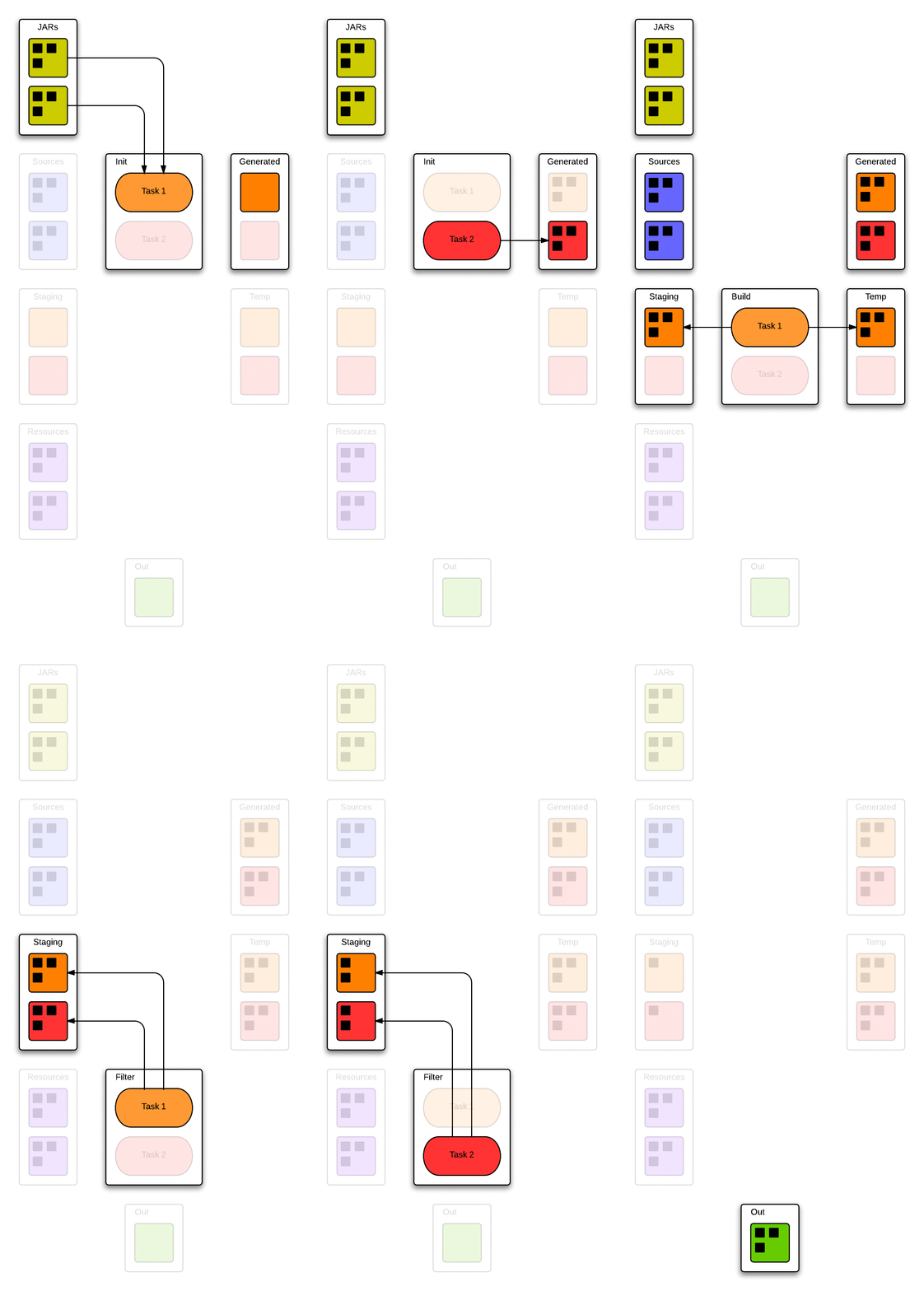
The image above illustrates the flow of files through the boot build process.
On the left and right sides of the image are the various directories involved
in the build process. The build process depicted consists of two tasks, "Task 1"
and "Task 2", colored orange and red, respectively, displayed in the center of
the image.
Tasks participate in the three phases of the build cycle: init, build, and
filter. The initialization phase occurs once per boot invocation for each task,
when the tasks are constructed. Tasks return middleware functions which handle
the build phase of the process. Tasks may "consume" source files (see the next
section). These files are removed from the staging directories of all tasks by
boot during the filter phase of the build cycle.
After the final phase of the build cycle stale artifacts are removed from the
project output directory and any artifacts that remain in staging directories
are synced over to it.
### Source Files Consumed By Tasks
FIXME
## License
Copyright © 2013 Alan Dipert and Micha Niskin
Distributed under the Eclipse Public License, the same as Clojure.
[1]: https://raw.github.com/tailrecursion/boot/master/img/archimedes-lever.gif
[2]: https://clojars.org/tailrecursion/boot/latest-version.svg?cachebuster=002
[3]: https://clojars.org/tailrecursion/boot
[4]: https://github.com/technomancy/leiningen
[5]: https://github.com/tailrecursion/boot.core/blob/master/src/tailrecursion/boot/core/task.clj
[6]: https://github.com/tailrecursion/hoplon/blob/master/src/tailrecursion/hoplon/boot.clj
[7]: https://raw.github.com/tailrecursion/boot/master/img/files.gif
[8]: https://clojars.org/repo/tailrecursion/boot/1.1.1/boot-1.1.1.jar
[10]: https://github.com/mmcgrana/ring
[20]: https://github.com/tailrecursion/boot.task
[30]: https://github.com/technomancy/leiningen/blob/master/doc/PROFILES.md
[50]: https://github.com/tailrecursion/boot/blob/master/boot.edn