https://github.com/takanuva15/intellij-redux-devtools
A simple plugin to integrate Redux Devtools into IntelliJ IDEs
https://github.com/takanuva15/intellij-redux-devtools
intellij intellij-plugin redux redux-devtools
Last synced: 11 months ago
JSON representation
A simple plugin to integrate Redux Devtools into IntelliJ IDEs
- Host: GitHub
- URL: https://github.com/takanuva15/intellij-redux-devtools
- Owner: takanuva15
- License: gpl-3.0
- Created: 2024-10-29T22:53:35.000Z (over 1 year ago)
- Default Branch: main
- Last Pushed: 2024-11-20T02:48:08.000Z (over 1 year ago)
- Last Synced: 2025-05-30T13:46:29.857Z (about 1 year ago)
- Topics: intellij, intellij-plugin, redux, redux-devtools
- Language: Kotlin
- Homepage: https://plugins.jetbrains.com/plugin/25743-redux-devtools
- Size: 2.48 MB
- Stars: 1
- Watchers: 1
- Forks: 0
- Open Issues: 0
-
Metadata Files:
- Readme: README.md
- Changelog: CHANGELOG.md
- Funding: .github/FUNDING.yml
- License: LICENSE
Awesome Lists containing this project
README

[](https://plugins.jetbrains.com/plugin/25743-redux-devtools)
[](https://plugins.jetbrains.com/plugin/25743-redux-devtools)
[](https://codecov.io/gh/takanuva15/intellij-redux-devtools)
IntelliJ Redux DevTools


## About
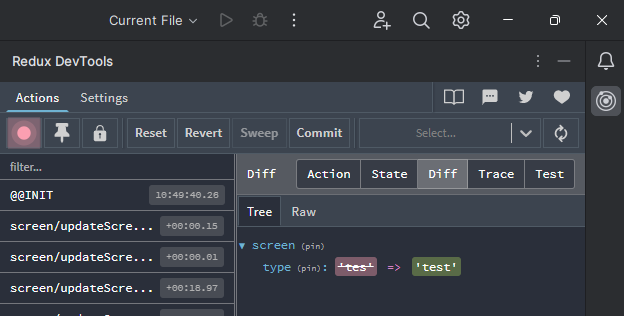
A simple plugin to integrate Redux Devtools into IntelliJ IDEs.
### Usage
Unlike the [Redux DevTools chrome extension](https://chromewebstore.google.com/detail/redux-devtools/lmhkpmbekcpmknklioeibfkpmmfibljd), this plugin will not have access to inspect the Redux Store running in your app by default.
To enable access, you need to run a remote devtools server that the plugin can use to connect to the store via middleware:
1. Install the official redux devtools cli and remote server: `npm i -D @redux-devtools/cli @redux-devtools/remote`
2. Add an npm script for running the remote server: `"start-redux-devtools": "redux-devtools --hostname=localhost --port=8001"`
3. Modify your store to add a middleware that the remote server can connect to:
```ts
import { devToolsEnhancer } from "@redux-devtools/remote";
export const store = configureStore({
...,
enhancers: (getDefaultEnhancers) => getDefaultEnhancers().concat(devToolsEnhancer({ realtime: true, hostname: "localhost", port: 8001 }))
});
```
4. Run your app server and the remote server in separate terminals: `npm start`/`npm run start-redux-devtools`
5. Open the Redux DevTools tool window within IntelliJ, click the "Settings" tab at the top, and set the port to match the remote server ("8001" for this example). Click "Connect".
6. Trigger some actions from your app server and you should see it update within the tool window.
Notes:
- See this [SO question](https://stackoverflow.com/q/51003226/6854489) for more general configuration details.
- See this [article](https://medium.com/@jonnyburger/how-to-get-redux-devtools-working-on-a-physical-device-in-react-native-bf5692a1e9a5) for more details regarding React Native.
- You can change the DevTools UI theme from the "Settings" tab.
- Certain DevTools functionality is not possible from the IDE, such as "Export to file". In such cases, add the `--open` flag to the `redux-devtools` script above and rerun it to launch the official remote client instead to achieve your task.
## Installation
- Using the IDE built-in plugin system:
Settings/Preferences > Plugins > Marketplace > Search for "intellij-redux-devtools" >
Install
- Using JetBrains Marketplace:
Go to [JetBrains Marketplace](https://plugins.jetbrains.com/plugin/25743-redux-devtools) and install it by clicking the Install to ... button in case your IDE is running.
You can also download the [latest release](https://plugins.jetbrains.com/plugin/25743-redux-devtools/versions) from JetBrains Marketplace and install it manually using
Settings/Preferences > Plugins > ⚙️ > Install plugin from disk...
- Manually:
Download the [latest release](https://github.com/takanuva15/intellij-redux-devtools/releases/latest) and install it manually using
Settings/Preferences > Plugins > ⚙️ > Install plugin from disk...
## Development
### Prerequisites
* IntelliJ IDEA 2023.* or newer (Community Edition is fine)
Required plugins (for development only):
- [Kotest](https://plugins.jetbrains.com/plugin/14080-kotest)
- [Ktlint](https://plugins.jetbrains.com/plugin/15057-ktlint-unofficial-)
- [Plugin DevKit](https://plugins.jetbrains.com/plugin/22851-plugin-devkit)
* Java 17
### Running Locally
1. Clone the repo and open in IntelliJ
2. Run the Gradle run configuration "Run Plugin". This will start up a sandbox IDE with the plugin installed.
### Updating the Redux DevTools js files
The `index.html` and other js files within the `/resources/redux-devtools` folder were obtained directly from the official Redux DevTools remote client.
1. Run the aforementioned `redux-devtools --hostname=localhost --port=8001 --open` command to open the official remote client (note the extra `--open` flag).
2. Click "View"->"Toggle Developer Tools" and then click the "Sources" tab.
3. Within the main directory, you should find an index.html file. Copy that and use it as a reference for the other js/css files you will need to update within this plugin.
## Contributing
Contributions are appreciated, but please raise an issue first regarding what you want to implement.
## License
Distributed under the GPL-3.0 License. See `LICENSE` for more information.
## Credits
- [vscode-redux-devtools][vscode-redux-devtools] for inspiring this plugin
- [IntelliJ+Webview article][intellij-webview-article] for providing a detailed tutorial for implementing JCEF in IntelliJ
- [xm-online-idea-plugin][xm-online-idea-plugin] and [this SO answer][jcef-intellij-so] for sharing IntelliJ JCEF implementation code
---
Plugin based on the [IntelliJ Platform Plugin Template][template].
[template]: https://github.com/JetBrains/intellij-platform-plugin-template
[docs:plugin-description]: https://plugins.jetbrains.com/docs/intellij/plugin-user-experience.html#plugin-description-and-presentation
[vscode-redux-devtools]: https://github.com/jkzing/vscode-redux-devtools
[intellij-webview-article]: https://medium.com/virtuslab/creating-intellij-plugin-with-webview-3b27c3f87aea
[jcef-intellij-so]: https://stackoverflow.com/a/65548274/6854489
[xm-online-idea-plugin]: https://github.com/xm-online/xm-online-idea-plugin/blob/master/src/main/kotlin/com/icthh/xm/actions/WebDialog.kt#L245