https://github.com/takapi327/nextbeat_terrafrom
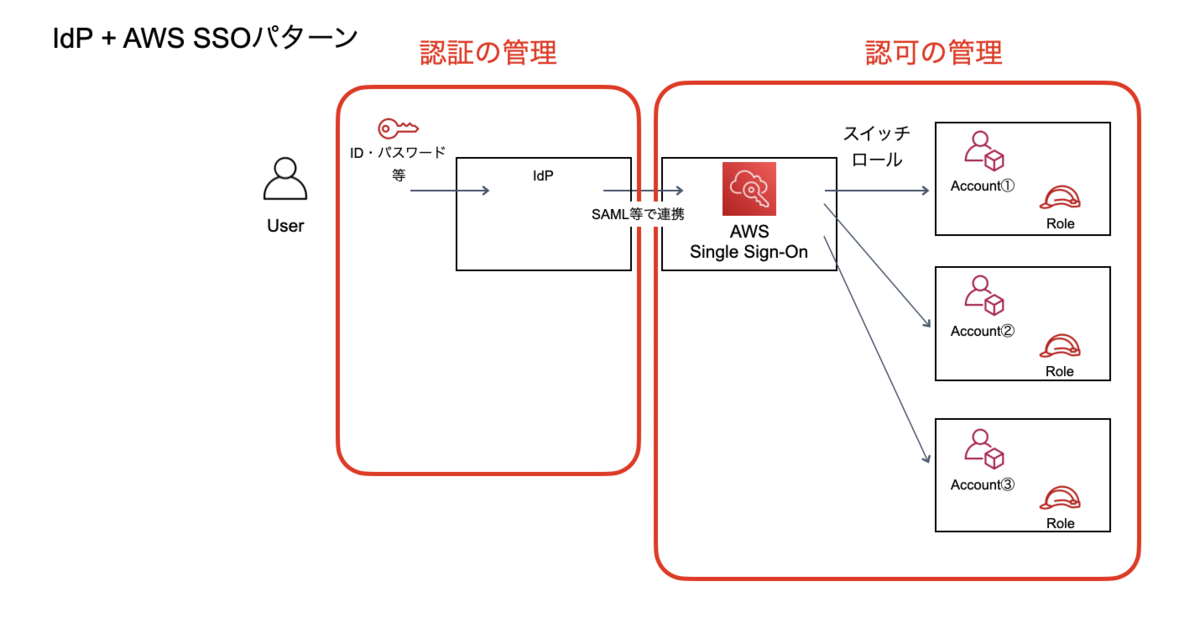
AWS OrganizationsとAWS SSO、Azure ADを連携してアカウント・プロジェクト・環境ごとに管理、運用を行う
https://github.com/takapi327/nextbeat_terrafrom
Last synced: 4 months ago
JSON representation
AWS OrganizationsとAWS SSO、Azure ADを連携してアカウント・プロジェクト・環境ごとに管理、運用を行う
- Host: GitHub
- URL: https://github.com/takapi327/nextbeat_terrafrom
- Owner: takapi327
- Created: 2023-05-12T05:12:03.000Z (about 3 years ago)
- Default Branch: master
- Last Pushed: 2025-07-23T09:16:20.000Z (11 months ago)
- Last Synced: 2025-07-23T11:25:33.962Z (11 months ago)
- Language: HCL
- Homepage:
- Size: 104 KB
- Stars: 0
- Watchers: 2
- Forks: 0
- Open Issues: 0
-
Metadata Files:
- Readme: README.md
Awesome Lists containing this project
README
# AWS Organizations for takapi327
## 目次
- [環境構築](https://github.com/takapi327/nextbeat_terrafrom#%E7%92%B0%E5%A2%83%E6%A7%8B%E7%AF%89)
- [tfenvのインストール](https://github.com/takapi327/nextbeat_terrafrom#tfenv%E3%81%AE%E3%82%A4%E3%83%B3%E3%82%B9%E3%83%88%E3%83%BC%E3%83%AB)
- [Terraformのインストール](https://github.com/takapi327/nextbeat_terrafrom#terraform%E3%81%AE%E3%82%A4%E3%83%B3%E3%82%B9%E3%83%88%E3%83%BC%E3%83%AB)
- [AWS Organizations構成環境](https://github.com/takapi327/nextbeat_terrafrom#aws-organizations%E6%A7%8B%E6%88%90%E7%92%B0%E5%A2%83)
- [構築手順](https://github.com/takapi327/nextbeat_terrafrom#%E6%A7%8B%E7%AF%89%E6%89%8B%E9%A0%86)
- [Terraform Cloud](https://github.com/takapi327/nextbeat_terrafrom#terraform-cloud)
- [デプロイ手順](https://github.com/takapi327/nextbeat_terrafrom#%E3%83%87%E3%83%97%E3%83%AD%E3%82%A4%E6%89%8B%E9%A0%86)
## 環境構築
### tfenvのインストール
tfenvは複数バージョンのTerraformを利用する場合に役立つコマンドです。
また、利用バージョンを切り替えることなく、ルートディレクトリの.terraform-versionファイルに記載されているバージョンを優先して利用してくれる。
brewでインストールを行う
```
$ brew install tfenv
```
### Terraformのインストール
tfenvがインストールされていることが前提です。
バージョンを指定してインストールを行う。
```
$ tfenv install
```
## AWS Organizations構成環境
AWS OrganizationsとAWS SSO、Azure ADを連携してアカウント・プロジェクト・環境ごとに管理、運用を行う。
### 構築手順
[Azure AD と AWS SSOの連携](https://fu3ak1.hatenablog.com/entry/2020/12/20/000622)
## Terraform Cloud
TerraformのStateファイルはTerraform Cloudで管理しています。
## デプロイ手順
SSOの認証情報を用いてTerraformを実行する
1. Single Sign-Onページにアクセス
2. Azure AD認証(ログイン済みの場合はなし)
3. 任意のアカウント・プロジェクト・環境を選択
4. 任意の権限で、「Command line or programmatic access」を選択し、「Option 1: Set AWS environment variables」から環境変数をコピー
5. 実行したいTerraformのプロジェクト直下のコンソールで、コピーした環境変数を設定(ペースト)
6. terraform init実行(初回のみ)
7. terraform plan or apply 実行