https://github.com/tamedevelopers/validator
PHP Form Validator is a small no-dependency library for php form validation.
https://github.com/tamedevelopers/validator
composer form-validator laravel php php-form-validotor php-library phpform
Last synced: 5 months ago
JSON representation
PHP Form Validator is a small no-dependency library for php form validation.
- Host: GitHub
- URL: https://github.com/tamedevelopers/validator
- Owner: tamedevelopers
- License: mit
- Created: 2022-06-27T02:17:03.000Z (almost 4 years ago)
- Default Branch: main
- Last Pushed: 2025-09-18T08:32:47.000Z (9 months ago)
- Last Synced: 2025-09-18T10:26:56.394Z (9 months ago)
- Topics: composer, form-validator, laravel, php, php-form-validotor, php-library, phpform
- Language: PHP
- Homepage:
- Size: 667 KB
- Stars: 4
- Watchers: 1
- Forks: 1
- Open Issues: 0
-
Metadata Files:
- Readme: README.md
- License: LICENSE
Awesome Lists containing this project
README
# PHP Form Validator - PFV
[](https://packagist.org/packages/tamedevelopers/validator)
[](https://packagist.org/packages/tamedevelopers/validator)
[](https://packagist.org/packages/tamedevelopers/validator)
[](https://codecov.io/github/tamedevelopers/validator)
## Documentation
* [Requirements](#requirements)
* [Installation](#installation)
* [Instantiate](#instantiate)
* [Laravel Support](#laravel-support)
* [Methods That Should Always Come First](#methods-that-should-always-come-first)
* [Global Configuration](#methods-that-should-always-come-first)
* [Csrf](#csrf)
* [Csrf Form Input](#csrf-form-input)
* [Csrf Token](#csrf-token)
* [Usage](#usage)
* [Error Type](#error-type)
* [Token](#token)
* [POST](#post)
* [GET](#get)
* [ALL](#all)
* [ANY](#any)
* [Rules](#rules)
* [Validate](#validate)
* [Save](#save)
* [Data Types](#data-types)
* [Operators](#operators)
* [noInterface](#nointerface)
* [Before](#before)
* [After](#after)
* [Has Error](#has-error)
* [Is Validated](#is-validated)
* [Reset Error](#reset-error)
* [Only](#only)
* [Except](#except)
* [Has](#has)
* [Old](#old)
* [Merge](#merge)
* [Only Data](#only-data)
* [Except Data](#except-data)
* [GetForm](#getForm)
* [Get Message and Class](#get-message-and-class)
* [Collection](#collection)
* [Collection Methods](#collection-methods)
* [toObject](#toobject)
* [toArray](#toarray)
* [toJson](#tojson)
* [Helpers](#helpers)
* [Useful links](#useful-links)
## Requirements
- `>= php 8.0+`
## Installation
Prior to installing `validator package` get the [Composer](https://getcomposer.org) dependency manager for PHP because it'll simplify installation.
```txt
composer require tamedevelopers/validator
```
## Instantiate — `Instantiate class using`
- It's helper class can be called, using -- `form()`
```php
require_once __DIR__ . '/vendor/autoload.php';
use \Tamedevelopers\Validator\Validator;
$form = new Validator();
```
## Laravel Support
- Now supports Laravel and with same Functionalities no different
- `use Tamedevelopers\Validator\Validator;`
```php
public function save(Request $request){
$form = new Validator();
or
$form = form();
}
```
## Methods That Should Always Come First
- All are Optional `method`
- These methods are only mandatory on usage and should always come first before others.
| Methods | Description |
|---------------|---------------------------------------------------------------------------|
| ->errorType() | `bool` to format error's on display: `single or multiple` |
| ->token() | `bool` to Enable or Disable `csrf_token` for each request |
| ->post() | Convert Form request to `POST` only |
| ->get() | Convert Form request to `GET` only |
| ->all() | Convert Form request to `any` |
```php
$form->post()->rules([
//
]);
```
## Global Configuration
- It's helper class can be called, using -- `config_form()`
| Keys | Description |
|-------------|-----------------------------------------|
| request | String `POST\|GET\|ALL` Default `POST` |
| error_type | Boolean `true\|false` Default `false` |
| csrf_token | Boolean `true\|false` Default `true` |
| class | Assoc Array `error\|success` error class type to be returned on both success and failure |
```php
config_form(
request : 'POST',
error_type : true,
csrf_token : true,
class : [
'error' => 'alert alert-danger',
'success' => 'alert alert-success'
]
);
```
## Csrf
- Implementing `Csrf` (Cross-Site Request Forgery)
- By default the form requires all request to have a token attached.
- You can disable the usage with the `config_form()` Helper
### Csrf Form Input
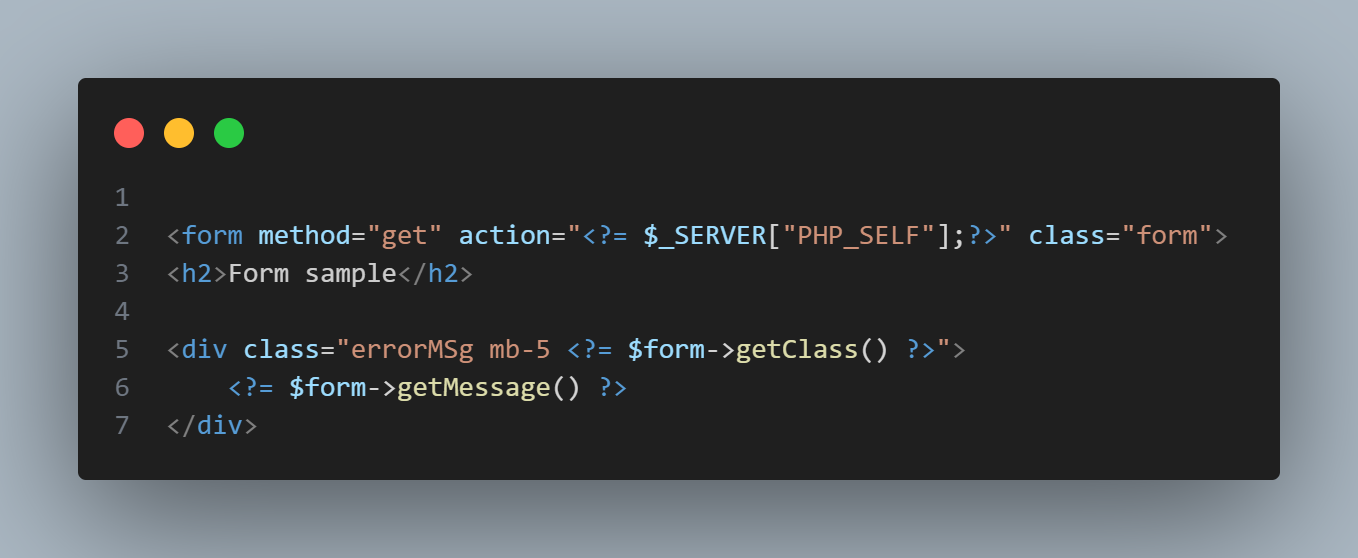
- This will create html input element with valid `csrf token`
- It's a function and you don't need to `echo`
- Use anywhere inside your HTML form
```html
csrf();
```
### Csrf Token
- This will return the `csrf token` string
```php
csrf_token();
```
## USAGE
- All Methods of usage
### Error Type
- Takes a param as `bool` Default is `false`
- You can call separately or Call Before any other method, if intend to use.
| Error | Description |
|-------|-------------------------------|
| false | `Default` Errors displayed one after another |
| true | This allow all errors to be displayed once, `as an array` |
```php
$form->errorType(false);
```
### Token
- Takes a param as `bool` Default is `false`
- Allow disability of `csrf_token` on each form request
| Error | Description |
|-------|-----------------------------------------------|
| false | `Default` Will disable `csrf_token` usage |
| true | This allow `csrf_token` per request only |
```php
$form->token(false);
```
### POST
- Set the Form Request to `POST`
- This will always override the `config_form()` settings
```php
$form->post();
```
### GET
- Set the Form Request to `GET`
```php
$form->get();
```
### All
- Will automatically detect if request type is `GET\|POST` and get it's data.
```php
$form->all()->rules([
//
])
```
### Any
- same as `all`
```php
$form->any()->rules([
//
])
```
### Rules
- By default only `DATA TYPE` and `[INPUT_NAME]` is required
- Always seperate each indicator with a 'colon' `:` or 'pipe' `|`
| DATA TYPE | INPUT_NAME | COMPARISON OPERATOR | VALUE TO COMPARE |
|-----------|--------------|---------------------|------------------|
| string | : country | : == | : 0 |
| email | : email | : | |
```php
$form->rules([
"string|country|==|0" => 'Please Select a Country',
"email:email" => 'Please enter a valid email address',
])
```
- HTML FORM Structure
```html
Select Country
Nigeria
United States of America
```
### Validate
- Takes an [optional] `closure` function as the param
```php
$form->rules([
"s:name" => 'Please enter a name',
])->validate(function($response){
$response->param; //Collection of form data
$response->getMessage(); //message property
});
```
### Save
- Expects a `closure` function as the param
- Message property will be empty string on success `$response->message`
```php
$form->rules([
"s:name" => 'Please enter a name',
])->save(function(){
//on success
});
```
### Data Types
- `Supports 9 Data Flags type`
| Data types | abbr | Description |
|------------|------|-------------------------------|
| email | e | `Email` data validation |
| bool | b | `Boolean` data validation |
| string | s | `String` data validation |
| html | - | `html` CMS/Blog content validation |
| dev | - | `dev` CMS/Blog/Dev like content validation |
| raw | - | `raw` Collect content without validation |
| str_len | sl | `String Length` validation |
| enum | en | `Enum` Forms `checkbox \| radio` or any form data that normally has no value when not checked |
| array | a | `Array` data validation |
| float | f | `Float` data validation |
| int | i | `Int` data validation |
| url | u | `Url` data validation |
### Operators
- `Supports 10 operational statement`
| sign | Description |
|------|-------------------------------|
| == | Equal to |
| === | Strictly Equal to |
| != | Not Equal To |
| !== | Not Strictly Equal To |
| > | Greater than |
| >= | Greater than or Equal to |
| < | Less than |
| <= | Less than or Equal to |
| < or > | Less than or Greater than |
| < and >| Less than and Greater than |
### noInterface
- Expects a `closure` function as the param
- have access to form data without any validation
```php
$form->noInterface(function($response){
if($response->has('amount')){
// exec code
}
});
```
### Before
- Expects a `closure` function as the param
- Will only execute code within when Request is [GET]
- CSRF Token `does'nt` apply to this method
```
$form->rules([
"s:name" => 'Please enter a name',
])->before(function($response){
// execute code
});
```
### After
- Expects a `closure` function as the param
- Will always execute no matter the request method type
- CSRF Token `does'nt` apply to this method
```
$form->after(function(){
// execute code
});
```
### Has Error
- Returns bool `true\|false`
```
$form->hasError();
```
### Is Validated
- Returns bool `true\|false`, When Form has already been validated
```
$form->isValidated();
```
## Reset Error
- Even if you're inside the `success() method`
- With this helper, you can be able to reset the class, to error class
```
->save(function($response){
$availableUserAmount = 900;
if($response->amount > $availableUserAmount){
$response->reset();
$response->message = "Your wallet balance is too low, Please recharge before you can Subscribe to Plan!";
return;
}
// perform other request before
});
```
## Only
- Takes a param as an `array`
- `keys` of data only needed, from the `form param`
```
->save(function($response){
//
$data = $response->only(['password', 'username']);
});
```
## Except
- Exact opposite of `only()` method
```
->save(function($response){
$data = $response->except(['_token']);
});
```
## Has
- Takes a param as `string` input name
- Returns boolean as `true|\false`
```
->save(function($response){
if($response->has('remeber_me')){
// execute code
}
});
```
## Old
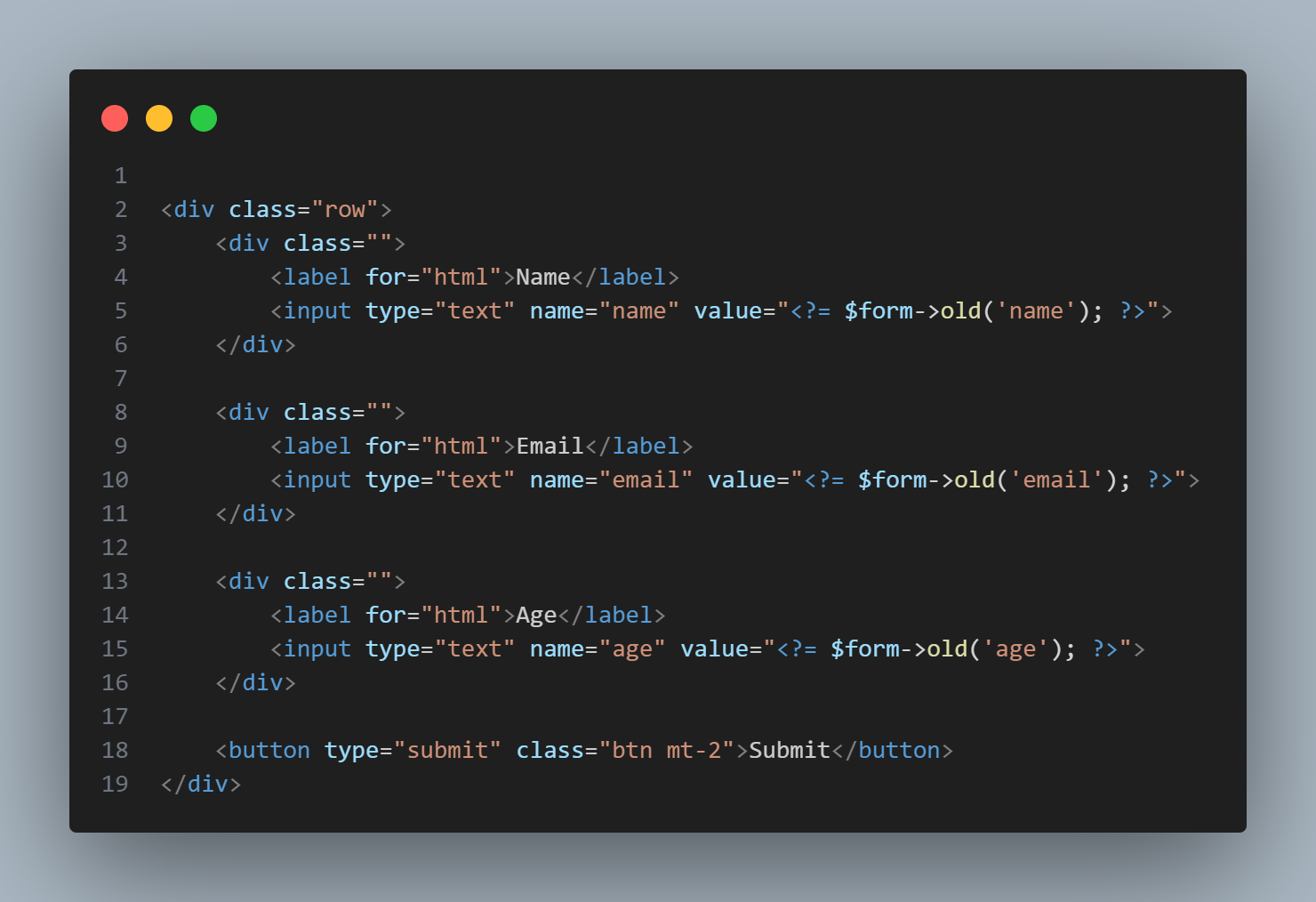
- Takes a param as `string` and return old inserted data
- Second parameter is [optional] `mixed data`.
- It's helper class can be called, using -- `old()`
```php
$form->rules([
"s:password" => 'Please enter a name',
"s:retype_pass:!==:{$form->old('password')}" => 'Password mismatch, Please enter same password',
]);
```
- or
```html
```
## GetForm
- Return all submitted form data as an `array`
```php
->save(function($response){
$data = $response->getForm();
});
```
## Merge
- Same as PHP function `array_merge`
- Merge two array data together
- Second data will always repalace any matched key data in the first array
```php
->save(function($response){
$data = [
'name' => 'Lorem Name',
'user_id' => rand(10000, 99999),
];
$param = $response->merge($data, [
'password' => md5($param['password'])
]);
});
```
## Only Data
- Return only `data passed` from set of given array elements.
| Keys | Data |
|----------|-----------------------------|
| `array` | Main data to select from |
```php
->save(function($response){
$data = $response->onlyData(['email', 'password'], [
'email' => 'mailer@mail.com',
'_token' => md5('token'),
'age' => 17,
'password' => 'test',
]);
// Only ['email', 'password'] will be returned.
});
```
## Except Data
- Exact opposite of `onlyData()` method
| Keys | Data |
|-----------------|-----------------------------|
| Keys are array | Main data to select from |
```php
->save(function($response){
$data = $response->exceptData(['_token'], [
'email' => 'mailer@mail.com',
'_token' => md5('token'),
'password' => 'test'
]);
// Return all array element, except ['_token']
});
```
## Get Message and Class
| key | Description |
|---------|----------------------------|
| message | `Message` This convert all error messages and return as a string with `
` |
| class | `Class name` Class name on error and success |
```php
$form->getMessage();
$form->getClass();
```

## Collection
- Forms `param` returns a Collection Class
- This enable us access property as an `object` or `array index`
```php
$form->rules([
"string:country:==:0" => 'Please Select a Country',
"email:email" => 'Please enter a valid email address',
])->save(function($response){
$param = $response->param;
$param->country;
$param['country']
// As you can see, we're able to access data in both ways without errors
});
```
## Collection Methods
| Methods | Description |
|-------------------|-------------------------------------|
| toArray() | `array` Convert items to array |
| toObject() | `object` Convert items to object |
| toJson() | `string` Convert items to json |
## toObject
- Takes a param as `mixed` data
- Converts to an `Object` data
```php
$form->toObject([
'food' => 'Basmati Rice'
]);
```
## toArray
- Takes a param as `mixed` data
- Converts to an `Array` data
```php
$form->toArray([
'food' => 'Basmati Rice'
]);
```
## toJson
- Takes a param as `mixed` data
- Converts to an `Json` data
```php
$form->toJson([
'food' => 'Basmati Rice'
]);
```
## Helpers
| function | Description |
|-----------|-----------------------------------|
| old() | Inherit instance of `(new Validator)` old() method |
| form() | Return instance of `(new Validator)` class |
## Useful links
- @author Fredrick Peterson (Tame Developers)
- [Lightweight - PHP Form Validator](https://github.com/tamedevelopers/validator)
- If you love this PHP Library, you can [Buy Tame Developers a coffee](https://www.buymeacoffee.com/tamedevelopers)
- Link to Youtube Video Tutorial on usage will be available soon