https://github.com/tanishkbansode/youtubezen
A distraction-free desktop app for YouTube. No recommendations, no comments, no promotions—just videos.
https://github.com/tanishkbansode/youtubezen
desktop-app go golang linux macos svelte typescript wails wails-svelte windows youtube-api-v3
Last synced: 5 months ago
JSON representation
A distraction-free desktop app for YouTube. No recommendations, no comments, no promotions—just videos.
- Host: GitHub
- URL: https://github.com/tanishkbansode/youtubezen
- Owner: TanishkBansode
- Created: 2025-01-13T07:30:03.000Z (over 1 year ago)
- Default Branch: main
- Last Pushed: 2025-01-26T17:27:52.000Z (over 1 year ago)
- Last Synced: 2025-04-03T07:23:07.407Z (about 1 year ago)
- Topics: desktop-app, go, golang, linux, macos, svelte, typescript, wails, wails-svelte, windows, youtube-api-v3
- Language: Go
- Homepage:
- Size: 18.9 MB
- Stars: 2
- Watchers: 1
- Forks: 0
- Open Issues: 0
-
Metadata Files:
- Readme: README.md
Awesome Lists containing this project
README
## YouTube Zen
It is a minimalist desktop app to view YouTube videos without the recommendations, comments, or promotions. Just a pure video-viewing experience.
## 🗑️ Abandoned: YouTube embed is worsening day-by-day, even included ads now :(
[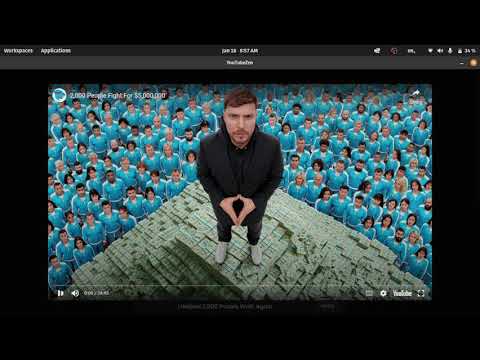](https://www.youtube.com/watch?v=2xioDUufMu0)
## Why?
- It is not an extension, so you can't disable it and accidentally see things you weren't intending to.
- It is not a website, so you can't just switch tabs instantly for something else.
- It treats shorts like videos, so you won't get trapped in doomscrolling.
## Technologies Used
- Golang
- [Wails](https://github.com/wailsapp/wails)
- Svelte 4
- TypeScript 5
- Vite 5
## Prerequisites
- Go 1.22 or higher
- Node.js 16 or higher
- Wails CLI (`go install github.com/wailsapp/wails/v2/cmd/wails@latest`)
## OAuth2 Setup (Required)
Before running the application, you need to set up OAuth2 credentials with Google:
### 1. Create a Google Cloud Project
1. Go to the [Google Cloud Console](https://console.cloud.google.com/)
2. Create a new project or select an existing one
3. Enable the **YouTube Data API v3** for your project:
- Navigate to "APIs & Services" > "Library"
- Search for "YouTube Data API v3"
- Click "Enable"
### 2. Create OAuth2 Credentials
1. Go to "APIs & Services" > "Credentials"
2. Click "Create Credentials" > "OAuth client ID"
3. Select "Web application" as the application type
4. Add authorized redirect URIs:
- `http://localhost:8090`
5. Click "Create" and download the credentials
### 3. Configure the Application
1. Rename the downloaded file to `client_secret.json`
2. Place it in the **same directory** as the executable (or project root for development)
3. Alternatively, you can copy `client_secret.json.example` and fill in your credentials
The file should have this structure:
```json
{
"web": {
"client_id": "YOUR_CLIENT_ID.apps.googleusercontent.com",
"project_id": "your-project-id",
"auth_uri": "https://accounts.google.com/o/oauth2/auth",
"token_uri": "https://oauth2.googleapis.com/token",
"auth_provider_x509_cert_url": "https://www.googleapis.com/oauth2/v1/certs",
"client_secret": "YOUR_CLIENT_SECRET",
"redirect_uris": ["http://localhost:8090"]
}
}
```
### 4. First-Time Authentication
When you run the app for the first time:
1. Your browser will automatically open to Google's OAuth consent screen
2. Sign in with your Google account
3. Grant the requested permissions (read-only access to YouTube)
4. The token will be cached in `~/.credentials/youtube-go.json`
5. Subsequent runs won't require re-authentication
## Live Development
To run in live development mode, run `wails dev` in the project directory. This will launch a Vite development server, providing very fast hot reloads for your frontend changes. If you want to develop in a browser and access your Go methods, there is also a dev server available at [http://localhost:34115](http://localhost:34115). Connect to this in your browser, and you can call your Go code from the devtools.
```bash
# Install dependencies
cd frontend
npm install
cd ..
# Run in development mode
wails dev
```
## Building
To build a redistributable, production mode package:
```bash
wails build
```
The executable will be in the `build/bin` directory.
### Platform-Specific Builds
```bash
# For Linux
wails build
# For Windows (cross-compile from Linux/Mac)
GOOS=windows GOARCH=amd64 wails build
# For macOS (on Mac only)
wails build -platform darwin/universal
```
## Usage
### Searching for Videos
1. Enter a search term in the search box
2. Click the search button or press Enter
3. Browse the results and click "Watch" on any video
### Playing a Video from URL
You can paste any YouTube URL format:
- Standard: `https://www.youtube.com/watch?v=VIDEO_ID`
- Shortened: `https://youtu.be/VIDEO_ID`
- Embed: `https://www.youtube.com/embed/VIDEO_ID`
- Shorts: `https://www.youtube.com/shorts/VIDEO_ID`
The app will automatically extract the video ID and play it.
### Keyboard Shortcuts
- `Escape` - Close video player or settings modal
- `Enter` - Submit search (when in search box)
- Click the title to reload the app
## Troubleshooting
### "Unable to read client secret file"
**Cause**: The `client_secret.json` file is missing or in the wrong location.
**Solution**:
1. Ensure `client_secret.json` is in the same directory as the executable
2. Check that the file is named exactly `client_secret.json` (not `.txt` or other extension)
3. Verify the file contains valid JSON
### Browser doesn't open for authentication
**Cause**: Platform-specific browser opening might fail.
**Solution**:
1. Check the console output for the authentication URL
2. Manually open the URL in your browser
3. Complete the authentication flow
### "Error fetching videos"
**Possible causes**:
- No internet connection
- YouTube API quota exceeded (10,000 units/day for free tier)
- Invalid OAuth token (delete `~/.credentials/youtube-go.json` and re-authenticate)
**Solution**:
1. Check your internet connection
2. Wait 24 hours if quota is exceeded
3. Delete cached credentials and re-authenticate
## API Quota Limitations
YouTube Data API has a quota of **10,000 units per day** for free tier:
- Each search costs approximately 100 units
- Each video details fetch costs 1 unit per video
- This allows roughly 100 searches per day
If you exceed the quota, you'll need to wait 24 hours or upgrade to a paid plan in Google Cloud Console.
## Privacy & Security
- OAuth tokens are stored locally in `~/.credentials/youtube-go.json`
- The app only requests **read-only** access to YouTube
- No data is sent to any third-party servers
- All API calls go directly to Google's YouTube API
## Contributing
Contributions are welcome! Please feel free to submit issues or pull requests.
## License
This project is open source and available under the MIT License.
## Disclaimer
This project is not made by Google or YouTube, and it is not an alternative to YouTube. It is simply an app for people who want to keep using YouTube without getting distracted or addicted, like I did.