https://github.com/tanknee/chatgpt-wechaty
GPTChat wechat robot based on wechaty and padlocal.
https://github.com/tanknee/chatgpt-wechaty
chatbot gpt gptchat wechaty
Last synced: 10 months ago
JSON representation
GPTChat wechat robot based on wechaty and padlocal.
- Host: GitHub
- URL: https://github.com/tanknee/chatgpt-wechaty
- Owner: TankNee
- Created: 2022-12-08T05:58:46.000Z (over 3 years ago)
- Default Branch: master
- Last Pushed: 2025-01-16T01:34:20.000Z (over 1 year ago)
- Last Synced: 2025-01-16T02:35:40.735Z (over 1 year ago)
- Topics: chatbot, gpt, gptchat, wechaty
- Language: TypeScript
- Homepage:
- Size: 230 KB
- Stars: 10
- Watchers: 1
- Forks: 3
- Open Issues: 1
-
Metadata Files:
- Readme: README-en.md
Awesome Lists containing this project
README
Yet Another GPTChat Bot
Powered By Wechaty
简体中文 | English
Based on Wechaty, GPTChat and Padlocal.
## Usage
### 1. Install
```bash
npm install
```
### 2. Configure
You need padlocal token to start the wechaty robot. And you can obtain it from [padlocal](http://pad-local.com/#/) website. All accounts can be used, and there is no limit on the web version.
What's more, you need GPTChat serviceToken to start the GPTChat robot. And you can obtain it from [GPTChat](https://chat.openai.com/chat) website. The specific steps are as follows:
1. Login https://chat.openai.com/chat
2. Use F12 to open the browser console
3. Open the Application tab and find the Cookies item
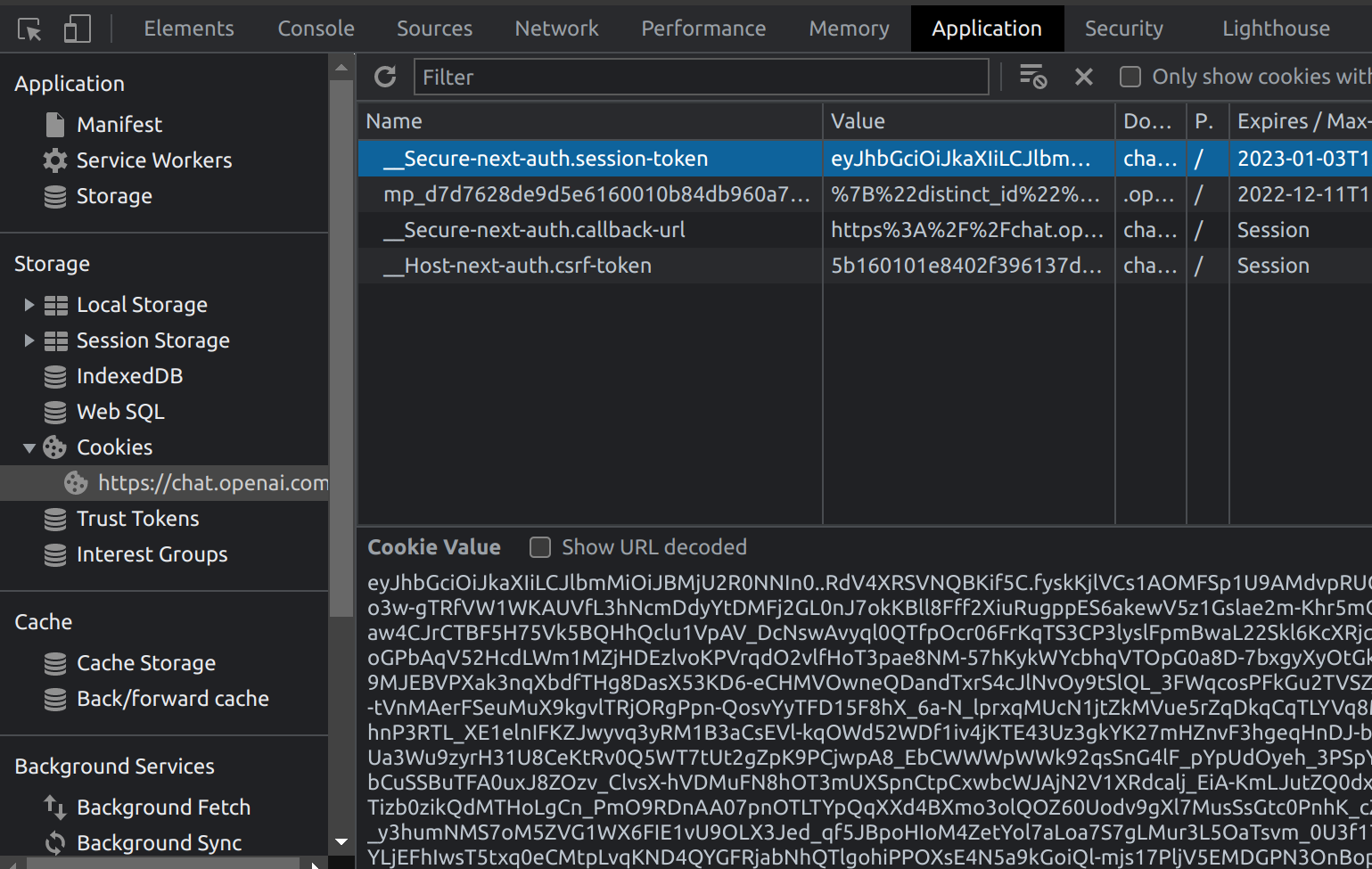
Finally, put these two items into the `.env.development.local.example` file, and then copy a copy as the `.env.development.local` file.
```bash
cp .env.development.local.example .env.development.local
```
### 3. Run
```bash
npm run dev
```
## Reference
- [Wechaty](https://wechaty.js.org/)
- [GPTChat](https://chat.openai.com/chat)
- [Padlocal](http://pad-local.com/#/)
- [ChatGPT API](https://github.com/transitive-bullshit/chatgpt-api)