https://github.com/taphill/hotwired_todo
A simple Rails SPA
https://github.com/taphill/hotwired_todo
hotwire-stimulus hotwire-turbo rails7 ruby
Last synced: 2 months ago
JSON representation
A simple Rails SPA
- Host: GitHub
- URL: https://github.com/taphill/hotwired_todo
- Owner: taphill
- Created: 2021-12-22T16:57:46.000Z (over 4 years ago)
- Default Branch: main
- Last Pushed: 2021-12-31T01:45:36.000Z (over 4 years ago)
- Last Synced: 2025-10-27T12:33:17.742Z (9 months ago)
- Topics: hotwire-stimulus, hotwire-turbo, rails7, ruby
- Language: Ruby
- Homepage:
- Size: 215 KB
- Stars: 1
- Watchers: 1
- Forks: 0
- Open Issues: 0
-
Metadata Files:
- Readme: README.md
Awesome Lists containing this project
README
# Hotwired Todo
A simple single-page application to experiment with the Hotwire tech stack which is now included by default in Rails 7.
## Turbo-Frames
Turbo-frames are the main mechanism used to create this Rails SPA. You'll notice that the URL never changes even when navigating to new content, just like one would expect with a React SPA.
This is done by using a turbo-frame that I referenced by the ID of `main-content`. All views and partials within the main section of the HTML document are wrapped by this turbo-frame.
```html
```
## Turbo-Streams
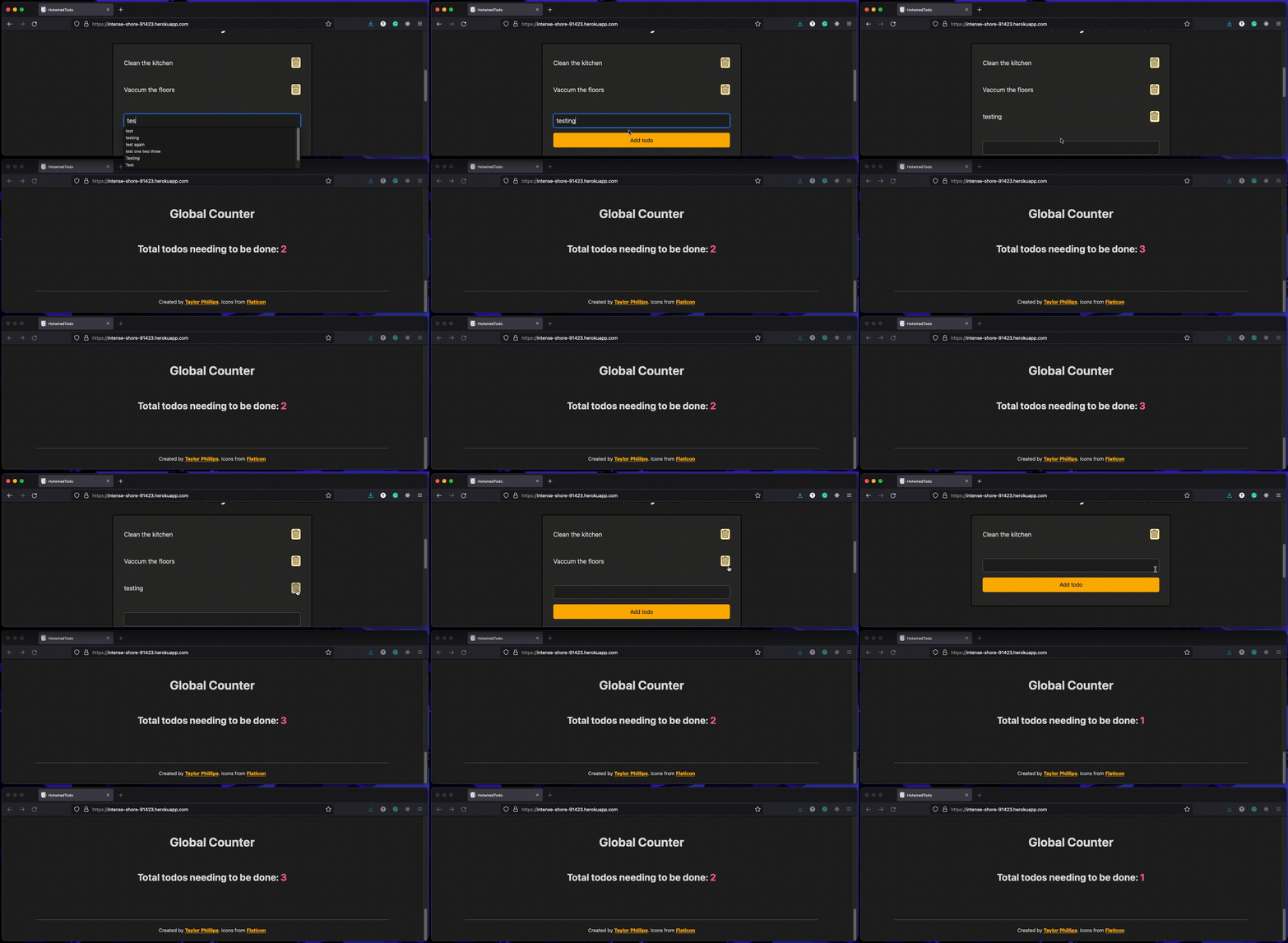
Turbo-streams allow you to send fragments of a page change over WebSockets. You can see this in action when adding and deleting a todo item. Here's what the `users/todos_controller` looks like:
```ruby
module Users
class TodosController < ApplicationController
def create
@todo = Todo.create(todo_params)
end
def destroy
todo = Todo.find(params[:id])
todo.destroy
render turbo_stream: turbo_stream.remove(todo)
end
private
def todo_params
params.permit(:user_id, :description)
end
end
end
```
The create action uses some rails magic to render the  file.
For the destroy action we explicitly tell it to render a turbo stream. Without specifying a partial it will look for one based on the file structure. So in this case it looks for . We also pass it the object so it knows which one to remove from the page based on the `dom_id` method.
### Turbo Broadcasts
Turbo stream broadcasts should be used when you need to broadcast a page update to all users at the same time. This will allow every user to see the changes as they happen. More information can be found here: https://github.com/hotwired/turbo-rails/blob/main/app/models/concerns/turbo/broadcastable.rb
To get broadcasts working in production on Heroku you also need to enable the redis gem in your rails application and then add redis to Heroku. If you're running on a hobby dev you can easily do that from the command line like this:
```
$ heroku addons:create heroku-redis:hobby-dev
```
You can see an example of turbo-streams and turbo-broadcasts working in conjunction below:
## Stimulus
I found Stimulus really simple and convenient to use for adding sprinkles of javascript where needed. The largest Stimulus controller for this application is the [password_controller](app/javascript/controllers/password_controller.js) which renders different images to provide the user feedback as to when their password meets the requirements being enforced by the [User](app/models/user.rb) model.
