https://github.com/tarasko/aiofastnet
Ultra-fast networking with Kernel TLS support for asyncio and Python
https://github.com/tarasko/aiofastnet
async-await asyncio event-loop high-performance kernel-tls networking performance protocol python python-3 python-library python-networking python3 ssl ssl-tls tls transport
Last synced: 2 months ago
JSON representation
Ultra-fast networking with Kernel TLS support for asyncio and Python
- Host: GitHub
- URL: https://github.com/tarasko/aiofastnet
- Owner: tarasko
- License: mit
- Created: 2026-03-03T12:26:03.000Z (5 months ago)
- Default Branch: master
- Last Pushed: 2026-05-27T19:19:49.000Z (2 months ago)
- Last Synced: 2026-05-27T19:23:49.015Z (2 months ago)
- Topics: async-await, asyncio, event-loop, high-performance, kernel-tls, networking, performance, protocol, python, python-3, python-library, python-networking, python3, ssl, ssl-tls, tls, transport
- Language: Cython
- Homepage:
- Size: 721 KB
- Stars: 17
- Watchers: 0
- Forks: 5
- Open Issues: 2
-
Metadata Files:
- Readme: README.md
- Changelog: HISTORY.rst
- License: LICENSE
- Security: SECURITY.md
- Agents: AGENTS.md
Awesome Lists containing this project
README
# aiofastnet
[](https://github.com/tarasko/aiofastnet/actions/workflows/run-tests.yml?query=branch%3Amaster)
[](https://pypi.org/project/aiofastnet)
[](https://pypistats.org/packages/aiofastnet)
`aiofastnet` provides drop-in, highly efficient C/Cython replacements for asyncio's:
- [`loop.create_connection()`](https://docs.python.org/3/library/asyncio-eventloop.html#asyncio.loop.create_connection)
- [`loop.open_connection()`](https://docs.python.org/3/library/asyncio-stream.html#asyncio.open_connection)
- [`loop.create_server()`](https://docs.python.org/3/library/asyncio-eventloop.html#asyncio.loop.create_server)
- [`loop.start_server()`](https://docs.python.org/3/library/asyncio-stream.html#asyncio.start_server)
- [`loop.start_tls()`](https://docs.python.org/3/library/asyncio-eventloop.html#asyncio.loop.start_tls)
- [`loop.sendfile()`](https://docs.python.org/3/library/asyncio-eventloop.html#asyncio.loop.sendfile)
If your library or application already uses the `asyncio` streams or transport/protocol
model, `aiofastnet` lets you keep the same architecture while replacing one of
the most expensive layers underneath it.
`aiofastnet` is not a different event loop. It works on top of stock `asyncio`
loops or `uvloop` by using low-level primitives such as `add_reader` and
`add_writer`. It has no background threads and does not use unscalable tricks such as
calling synchronous `recv`/`send` syscalls from another thread. Essentially, it
provides the same kind of internal implementation you would find in `asyncio`
and `uvloop`, but implemented much more efficiently.
`aiofastnet` supports [Kernel TLS](https://www.kernel.org/doc/html/latest/networking/tls.html) out of the box on Linux.
## Benchmark
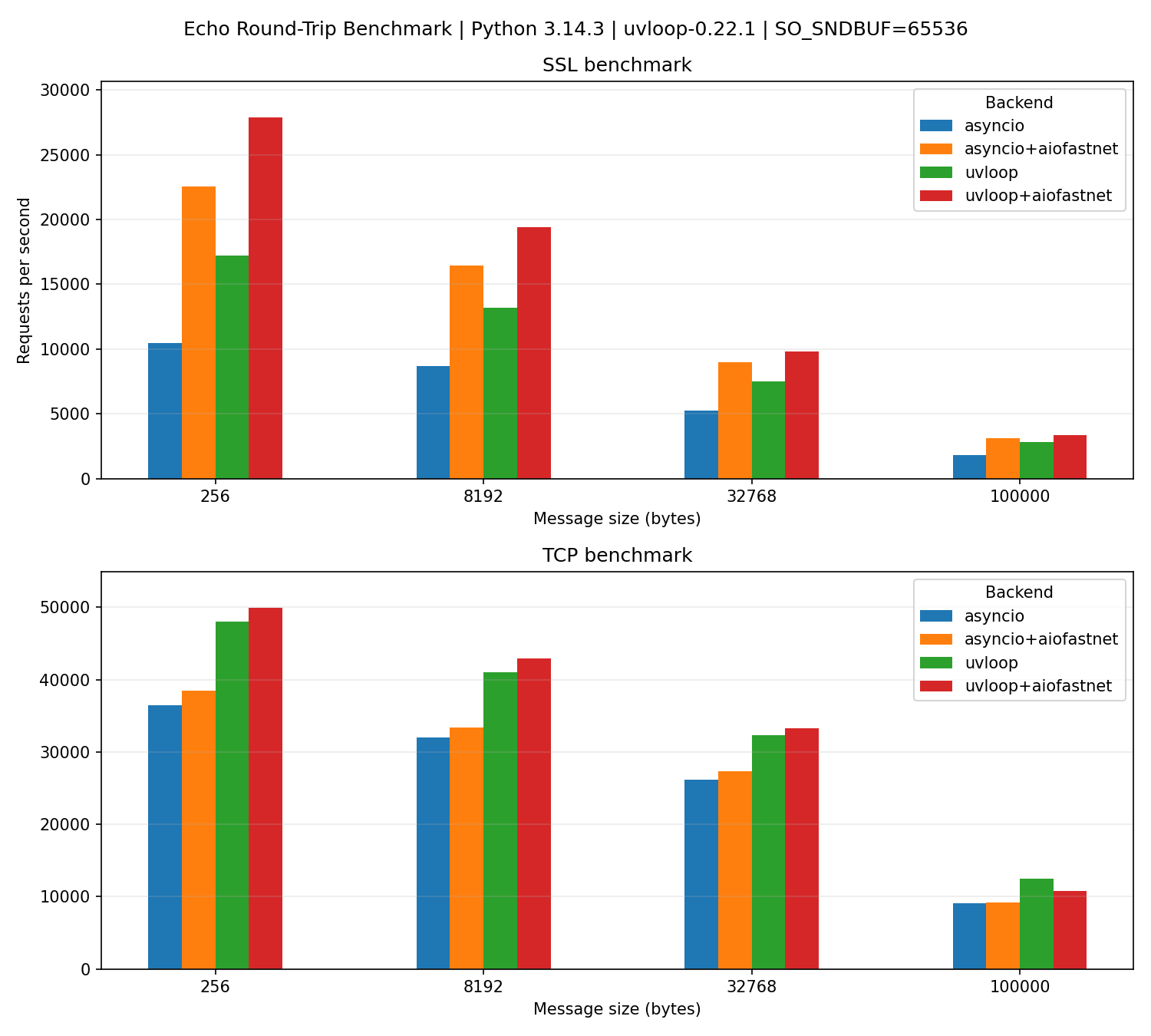
The benchmark below compares echo round-trips over loopback for TCP and SSL.
The exact gains depend on workload, message sizes, CPU, OpenSSL version, and how
much of your total runtime is spent in transport/SSL plumbing.
[](https://github.com/tarasko/aiofastnet/blob/master/examples/benchmark.png)
Source: [examples/benchmark.py](https://github.com/tarasko/aiofastnet/blob/master/examples/benchmark.py)
In these benchmarks, `aiofastnet` is up to 2.2x faster than standard
`asyncio` and up to 1.6x faster than uvloop for TLS connections.
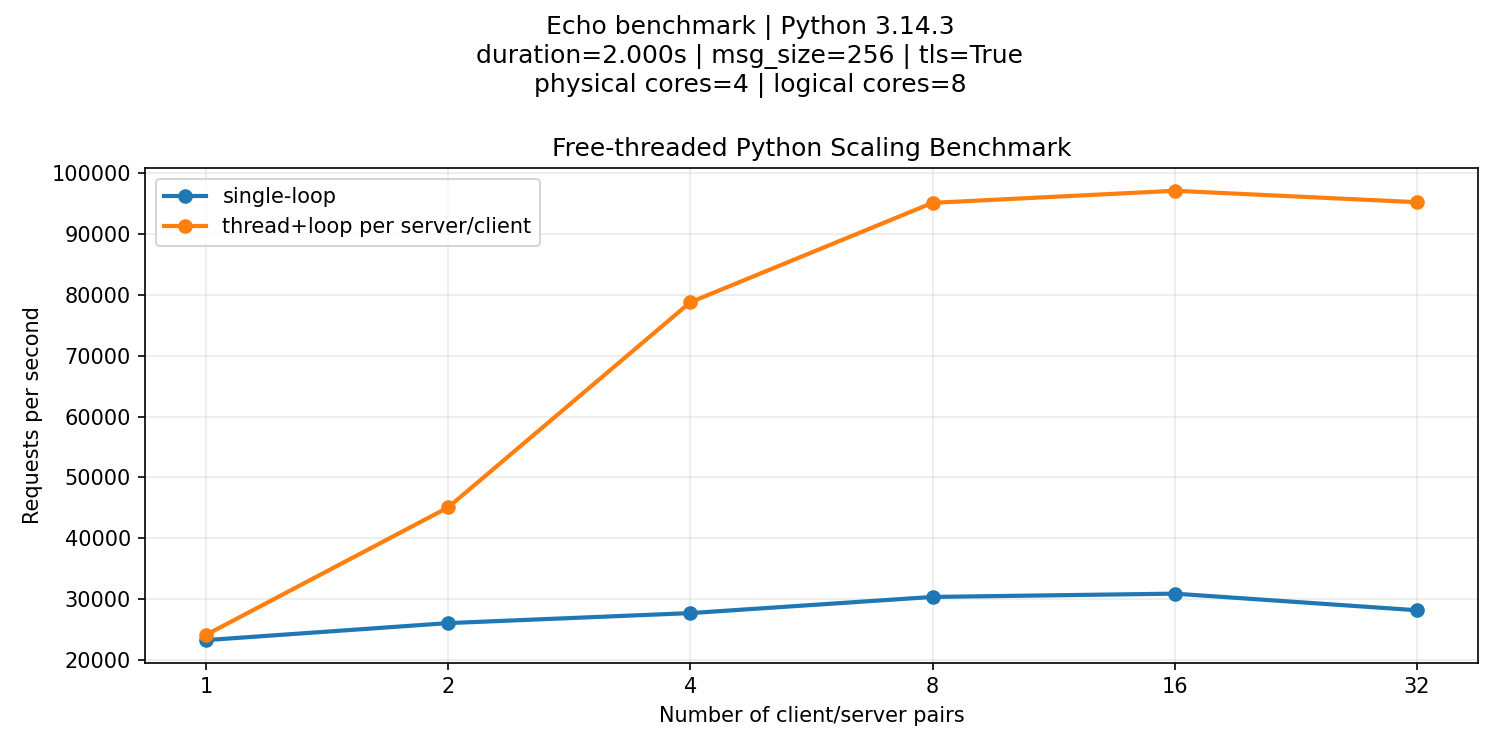
`aiofastnet` is fully compatible with free-threaded Python builds and scales
as expected when multiple event loops run in parallel across multiple threads.
[](https://github.com/tarasko/aiofastnet/blob/master/examples/benchmark_threaded.png)
Source: [examples/benchmark_threaded.py](https://github.com/tarasko/aiofastnet/blob/master/examples/benchmark_threaded.py)
## Why Use aiofastnet
- **Faster hot path**. Transport and SSL internals are reimplemented in Cython/C
to reduce overhead on long-lived connections.
- **Drop-in API**. Keep using the standard `asyncio` streams or transport/protocol model
and familiar loop-level networking operations.
- **Works with the event loop you already use**. `aiofastnet` works with
stock `asyncio` loops, `uvloop`, and `winloop`.
- **Particularly strong for SSL-heavy workloads**. `aiofastnet` uses OpenSSL
more directly and avoids extra copies in the data path.
- **Kernel TLS support on Linux**. Native `sendfile` for TLS connections through `SSL_sendfile`.
- **Safer transport write() / writelines() behavior**. If the socket cannot accept
everything immediately, only `bytes` and `memoryview` objects backed by
`bytes` are retained without copying. Other objects, including
`bytearray` and non-`bytes` exporters, are copied before being queued.
Unlike standard `asyncio` transports, this avoids sending corrupted data if
application code modifies the underlying buffer after `write()` /
`writelines()` returns.
- **Better SSL backpressure semantics**. Buffer sizes and write limits reflect
what is actually queued across the stack.
- **Works for library authors**. WebSocket, HTTP, RPC, proxy, database, broker,
and custom protocol libraries can expose the same API while giving users a
faster transport layer.
## Quickstart
Install from PyPI:
```console
$ pip install aiofastnet
```
`aiofastnet` requires Python 3.9 or greater.
For applications, the easiest way to enable `aiofastnet` is to use an event
loop factory. This patches the loop's `create_connection()`, `create_server()`,
`start_tls()`, and `sendfile()` methods while keeping the rest of the loop
unchanged:
```python
import asyncio
import aiofastnet
async def main():
...
asyncio.run(main(), loop_factory=aiofastnet.loop_factory())
```
If you use another event loop implementation, pass its loop factory:
```python
import asyncio
import uvloop
import aiofastnet
asyncio.run(main(), loop_factory=aiofastnet.loop_factory(uvloop.new_event_loop))
```
For older applications that still configure asyncio through event loop
policies, install the aiofastnet policy wrapper before creating loops:
```python
import asyncio
import aiofastnet
aiofastnet.install_policy()
asyncio.run(main())
```
Event loop policies are deprecated in Python 3.14 and are scheduled for removal
in Python 3.16, so prefer `loop_factory()` for new code.
If the event loop already exists, patch it directly:
```python
import asyncio
import aiofastnet
async def main():
aiofastnet.patch_loop()
...
asyncio.run(main())
```
Library authors should call `aiofastnet` APIs directly
instead of patching a loop owned by their users. The API mirrors stdlib
`asyncio`: pass the running loop and use your existing protocol factory.
```python
import asyncio
import aiofastnet
class EchoClientProtocol(asyncio.Protocol):
def connection_made(self, transport):
self.transport = transport
self.transport.write(b"hello")
def data_received(self, data):
print("received:", data)
self.transport.close()
async def main():
loop = asyncio.get_running_loop()
transport, protocol = await aiofastnet.create_connection(
loop,
EchoClientProtocol,
"127.0.0.1",
9000,
)
...
asyncio.run(main())
```
For servers, replace `loop.create_server(...)` with
`aiofastnet.create_server(loop, ...)` in the same way.
`aiofastnet` also exposes `start_tls` and `sendfile`:
```python
transport = await aiofastnet.start_tls(
loop,
transport,
protocol,
ssl_context,
server_side=False,
server_hostname="example.com",
)
await aiofastnet.sendfile(loop, transport, fileobj)
```
## When aiofastnet Is a Good Fit
`aiofastnet` is most attractive when you already rely on `asyncio`'s
transport/protocol APIs and one or more of these are true:
- You have long-lived TCP or TLS connections.
- You run protocol-heavy services where transport overhead is visible in CPU
profiles.
- You maintain a library and want better performance without changing your
public API.
- You care about consistent `write()` / `writelines()` buffer behavior.
- You want SSL flow control to reflect the whole buffered stack, not only part
of it.
## When Not To Use aiofastnet
`aiofastnet` is not the right default for every networking project:
- If your workload is dominated by very short-lived connections, you should
expect little or no gain. `aiofastnet` focuses on optimizing the data path
after connection establishment.
## Platform Compatibility
`aiofastnet` is built and tested on Linux, macOS, and Windows. It works with
the standard `asyncio` event loop, `uvloop`, and `winloop`.
On Windows it works with `SelectorEventLoop` and `winloop`.
With `ProactorEventLoop` it falls back to `asyncio`'s native connection and
server implementation, because the proactor loop does not provide the
`add_reader()` / `add_writer()` hooks required by `aiofastnet`'s custom
transport implementation. For transports created through `aiofastnet`, a
compatibility wrapper preserves the documented `write()` /
`writelines()` buffer-safety behavior.
## Kernel TLS Support on Linux
On Linux, `aiofastnet` can use OpenSSL's Kernel TLS support for TLS
connections. Kernel TLS is beneficial if any of the following is true:
* Static files need to be sent over TLS connection and `sendfile()` can be used.
In that case the kernel can read data directly instead of forcing the application to
copy file contents through userspace.
* Some high-end NICs support hardware TLS offload. This leads to huge CPU savings.
If you only sent regular data (not static files) and do not have high-end NIC with TLS offload,
enabling Kernel TLS will only slightly decrease performance. CPU cost-wise it doesn't matter where encryption/decryption
happens, but the kernel `tls` module has to do extra bookkeeping. Also, aiofastnet can batch data and reduce amount of
syscalls when Kernel TLS is not used.
Kernel TLS requires support from all of these layers:
- The `tls` kernel module loaded.
- OpenSSL built with KTLS support on a machine with suitable kernel headers.
- An `ssl.SSLContext` with `ssl.OP_ENABLE_KTLS` enabled.
- A TLS version and cipher suite supported by the kernel TLS implementation.
To load the kernel module:
```console
$ sudo modprobe tls
```
To enable KTLS on Python SSL contexts (available in Python 3.12+):
```python
import ssl
server_context = ssl.SSLContext(ssl.PROTOCOL_TLS_SERVER)
server_context.options |= ssl.OP_ENABLE_KTLS
client_context = ssl.create_default_context()
client_context.options |= ssl.OP_ENABLE_KTLS
```
The OpenSSL library used by Python must itself have KTLS support. Python
distributions often ship their own `libssl` and `libcrypto`, and those
libraries may have been built on older systems where KTLS was not available.
That can be true even when the host running your program has a newer kernel.
Check which OpenSSL Python is using:
```console
$ python -c "import ssl; print(ssl.OPENSSL_VERSION); print(ssl._ssl.__file__)"
```
If your Python distribution bundles an older or non-KTLS OpenSSL, one practical
option is to locate the bundled `libssl` and `libcrypto` files and replace them
with symbolic links to a newer system OpenSSL build that supports KTLS. This is
often useful with Conda Python, which commonly ships its own OpenSSL libraries
inside the environment.
KTLS support by kernel version is outline [here.](https://delthas.fr/blog/2023/kernel-tls/)
Check out [aiohttp_ktls_fileresponse.py](https://github.com/tarasko/aiofastnet/blob/master/examples/aiohttp_ktls_fileresponse.py) and [aiohttp_ws_speedup.py](https://github.com/tarasko/aiofastnet/blob/master/examples/aiohttp_ws_speedup.py)
examples showing how you can speed up aiohttp (or any other asyncio application).
Some other useful links:
* https://dev.to/ozkanpakdil/kernel-tls-nic-offload-and-socket-sharding-whats-new-and-who-uses-it-4e1f
* https://www.kernel.org/doc/html/latest/networking/tls.html
## Free-Threaded Python
`aiofastnet` is compatible with free-threaded Python builds such as
`python3.14t`. The extension modules are built to work without forcing the
legacy GIL back on, so separate event loops may run in separate threads.
The repository includes several free-threading examples:
- [examples/benchmark_threaded.py](https://github.com/tarasko/aiofastnet/blob/master/examples/benchmark_threaded.py) runs multiple echo client/server pairs in
parallel to compare single-loop and multi-threaded execution.
- [examples/echo_server_threaded.py](https://github.com/tarasko/aiofastnet/blob/master/examples/echo_server_threaded.py) starts one listening echo server per
thread on the same port with `reuse_port=True` so the kernel can distribute
incoming connections across worker threads.
- [examples/echo_client_threaded.py](https://github.com/tarasko/aiofastnet/blob/master/examples/echo_client_threaded.py) starts one echo client per thread and
drives them in parallel against the shared server port.
Transport objects remain thread-affine. Methods such as `write()`,
`writelines()`, `close()`, `pause_reading()`, and similar transport
operations must be called from the same thread that established the connection.
Calling transport methods directly from a different thread raises
`RuntimeError`.
This matches the general `asyncio` model: loops and loop-owned objects are
not meant to be used concurrently from arbitrary threads. `aiofastnet` does
not add internal transport locking for cross-thread access.
To use `aiofastnet` correctly with multithreading:
- Create a separate event loop in each worker thread.
- Create connections and servers inside the loop thread that will own them.
- Keep all direct transport interaction on that same thread.
- If another thread needs to send data or close a transport, schedule that work
onto the owning loop with `loop.call_soon_threadsafe(...)` instead of
touching the transport directly.
In other words, free-threaded Python lets multiple loops make progress in
parallel, but each individual connection is still owned by exactly one loop and
one thread.
## Building From Source
1. Clone the repository:
```console
$ git clone git@github.com:tarasko/aiofastnet.git
$ cd aiofastnet
```
2. Create and activate a virtual environment:
```console
$ python3 -m venv aiofn-dev
$ source aiofn-dev/bin/activate
```
3. Install test dependencies:
```console
$ pip install -r requirements-test.txt
```
4. Build extensions in place and run tests:
```console
$ python setup.py build_ext --inplace
$ pytest -s -v
```
5. Run the benchmark:
```console
$ python -m examples.benchmark
```
6. Run tests:
```console
$ pytest -s -v
$ pytest -s -v -k test_echo[uvloop-tcp-buffered-6291456] --asyncio-debug --log-cli-level DEBUG
```
## Contributing
Contributions are welcome!