https://github.com/tarunvishwakarma1/netspd
Network Speed test made easy
https://github.com/tarunvishwakarma1/netspd
network ratatui rust speedtest terminal tui
Last synced: about 24 hours ago
JSON representation
Network Speed test made easy
- Host: GitHub
- URL: https://github.com/tarunvishwakarma1/netspd
- Owner: TarunVishwakarma1
- License: mit
- Created: 2026-07-03T15:43:59.000Z (1 day ago)
- Default Branch: main
- Last Pushed: 2026-07-03T17:21:02.000Z (1 day ago)
- Last Synced: 2026-07-03T18:17:39.824Z (1 day ago)
- Topics: network, ratatui, rust, speedtest, terminal, tui
- Language: Rust
- Homepage:
- Size: 3.86 MB
- Stars: 0
- Watchers: 0
- Forks: 0
- Open Issues: 0
-
Metadata Files:
- Readme: README.md
- Changelog: CHANGELOG.md
- Contributing: CONTRIBUTING.md
- License: LICENSE
Awesome Lists containing this project
README
# netspd
**A beautiful, modern network speed test for your terminal — with a hypercar tachometer.**
[](https://github.com/TarunVishwakarma1/netspd/actions/workflows/ci.yml)
[](https://crates.io/crates/netspd)
[](LICENSE)
[](Cargo.toml)
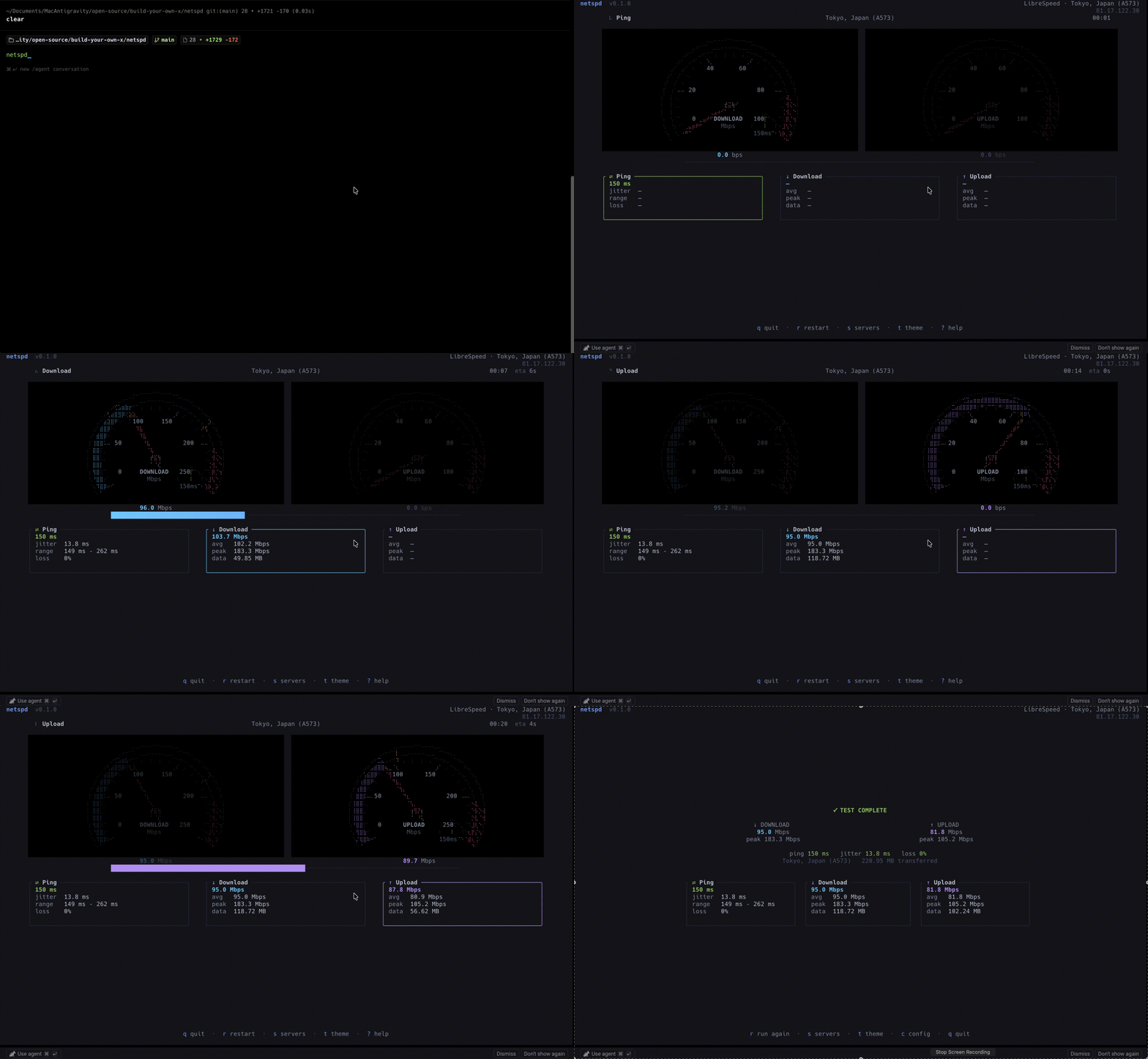
netspd measures **ping, jitter, download and upload** against LibreSpeed-compatible servers and renders them live on a braille-canvas instrument cluster: a spring-loaded needle with an ignition sweep, a heat-gradient band that reddens toward the hatched redline, a session-peak ghost notch, and a latency sub-dial — in the spirit of tools like `btop`, `gitui` and `lazygit`.
## Features
- **Hypercar tachometer** — heat-gradient value band, hatched redline, spring-physics needle with afterglow, ignition sweep before each phase, peak ghost notch, latency sub-dial; twin instrument cluster on wide terminals
- **Live metrics** — current / average / peak speed, transferred bytes, ETA, elapsed time
- **Latency analysis** — multiple samples, outlier trimming, jitter, real ICMP packet loss (graceful fallback where ICMP is unavailable)
- **Smart server discovery** — health-probes the public server list, drops dead servers, auto-selects the nearest
- **Headless mode** — `--no-tui` for scripts and cron, `--json` for machine-readable reports
- **Result history** — every run appended as JSON lines to your data directory
- **Streaming transfers** — nothing buffered in memory; parallel connections with EMA smoothing
- **Themes** — Default, Nord, Dracula, Catppuccin, Gruvbox, plus your own TOML themes without recompiling
- **Responsive layout** — adapts from 80×24 up to 4K terminals
- **Graceful everywhere** — cancellation, retries, timeouts; network failures never panic
## Installation
### Cargo
```sh
cargo install netspd
```
Compiles from [crates.io](https://crates.io/crates/netspd); requires Rust 1.88 or newer.
### Homebrew (macOS / Linux)
```sh
brew tap TarunVishwakarma1/tap
brew install netspd
```
### Prebuilt binaries
Download the archive for your platform from the [latest release](https://github.com/TarunVishwakarma1/netspd/releases/latest), unpack it and put `netspd` on your `PATH`.
### From source
```sh
git clone https://github.com/TarunVishwakarma1/netspd
cd netspd
cargo install --path .
```
Requires Rust 1.88 or newer.
## Usage
```sh
netspd # full TUI
netspd --no-tui # headless: progress on stderr, summary on stdout
netspd --json # headless: report as one JSON object on stdout
netspd --list-servers # print reachable servers, nearest first
netspd -s tokyo # pick a server by name/host substring
netspd -d 5 -c 8 # 5-second phases over 8 connections
```
The test starts automatically: ping → download → upload, then a results summary. If a server fails mid-test, netspd automatically retries with the next-nearest one (unless you pinned a server with `--server`).
### Keyboard
| Key | Action |
| --- | --- |
| `q` / `Esc` | Quit (Esc closes overlays first) |
| `r` | Restart the test |
| `g` | Result trends from your history |
| `s` | Server selection |
| `t` | Theme selector |
| `c` | View configuration |
| `?` | Help |
| `↑↓` / `jk`, `Enter` | Navigate and confirm in lists |
### Scripting
`--json` prints exactly one JSON object on stdout and nothing else, so it pipes cleanly:
```sh
netspd --json | jq .download_mbps
```
```json
{
"timestamp": 1783092092,
"server": "Tokyo, Japan (A573)",
"ping_ms": 141.2,
"jitter_ms": 1.0,
"packet_loss_pct": 0.0,
"download_mbps": 93.7,
"download_peak_mbps": 171.0,
"download_bytes": 117193129,
"upload_mbps": 66.3,
"upload_peak_mbps": 87.8,
"upload_bytes": 82837504
}
```
Exit code is `0` on a completed test and `1` on any failure. Every completed run (TUI or headless) is also appended to `/netspd/history.jsonl` (macOS: `~/Library/Application Support/netspd/`, Linux: `~/.local/share/netspd/`), one JSON object per line.
## Configuration
netspd reads the first `config.toml` found in:
1. `$XDG_CONFIG_HOME/netspd/config.toml` (macOS: `~/Library/Application Support/netspd/config.toml`)
2. `./config/config.toml`
Every key is optional; see [`config/config.toml`](config/config.toml) for the annotated reference. Highlights:
```toml
theme = "catppuccin" # default | nord | dracula | catppuccin | gruvbox
refresh_rate = 30 # UI frames per second (1..=60)
provider = "librespeed"
animation_speed = 1.0
[engine]
duration_secs = 10 # length of each transfer phase
connections = 4 # parallel connections
ping_samples = 10
[[servers]] # optional: pin your own backend
name = "My Server"
url = "https://speedtest.example.com/backend/"
```
Custom themes go in `~/.config/netspd/themes/*.toml` — copy any file from [`assets/themes/`](assets/themes) as a starting point.
## Architecture
netspd follows clean architecture with strict one-way dependencies:
```
┌──────────────────────────────────────────────┐
│ tui/ presentation (Ratatui only) │
│ theme · animation · widgets · screens │
├──────────────────────────────────────────────┤
│ app/ application │
│ events → controller → state → renderer │
├──────────────────────────────────────────────┤
│ engine/ domain (no UI imports) │
│ Engine → scheduler → providers/network │
│ metrics: EMA · sampler · throughput · │
│ latency · statistics │
├──────────────────────────────────────────────┤
│ config/ · errors/ · utils/ infrastructure │
└──────────────────────────────────────────────┘
```
- The **engine** emits strongly-typed `EngineEvent`s over a channel and never imports Ratatui — it is directly reusable from a CLI, GUI, REST API or as a library.
- **Providers** implement one trait (`Provider`); adding a new speed test network touches nothing else.
- **State** is plain data mutated only by reducers; the renderer just draws it.
- **Metrics** are pure, deterministic calculators, each independently unit-tested.
## Development
```sh
cargo test # unit + integration tests
cargo clippy # lint-clean, unwrap/expect/panic denied
cargo fmt --check
```
See [CONTRIBUTING.md](CONTRIBUTING.md) for the layering rules and PR checklist.
## Roadmap
- [x] JSON result export and `--no-tui` CLI mode
- [x] Result history (JSON lines)
- [x] Trend sparklines over the stored history (`g`)
- [x] `--server`, `--list-servers`, `--duration`, `--connections` flags
- [x] Automatic failover to the next server on failure
- [x] Packet loss via ICMP echo probing
- [x] Homebrew tap
- [ ] Ookla and Fast.com providers
- [ ] Scheduled repeat testing
## License
[MIT](LICENSE)