https://github.com/taywils/rubycryptoetf
Ruby library for crypto exchange API integration
https://github.com/taywils/rubycryptoetf
cryptocurrency gem ruby
Last synced: 12 months ago
JSON representation
Ruby library for crypto exchange API integration
- Host: GitHub
- URL: https://github.com/taywils/rubycryptoetf
- Owner: taywils
- License: apache-2.0
- Created: 2018-02-06T21:44:39.000Z (over 8 years ago)
- Default Branch: master
- Last Pushed: 2018-05-17T02:33:20.000Z (about 8 years ago)
- Last Synced: 2025-06-19T05:05:11.756Z (about 1 year ago)
- Topics: cryptocurrency, gem, ruby
- Language: Ruby
- Size: 46.9 KB
- Stars: 2
- Watchers: 2
- Forks: 0
- Open Issues: 0
-
Metadata Files:
- Readme: README.md
- Changelog: CHANGELOG.md
- License: LICENSE
Awesome Lists containing this project
README
# Proof of Concept Only
I have decided to move away from the planned Ruby version towards a different approach.
My end goal to construct a tool for crypto trading and portfolio/analysis and management did not align with the state of this project.
# RubyCryptoETF
RubyCryptoETF is a Ruby implementation of a Crypto ETF inspired by the original
Javascript version developed by [benmarten/CryptoETF].
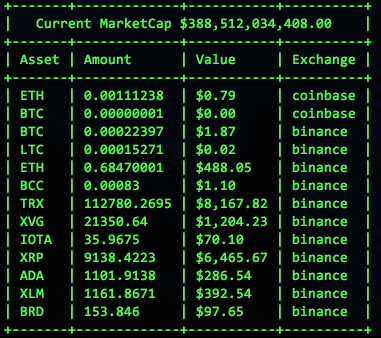
## Status
[Version 0.1.0]
### Purpose
1. To provide a modular Ruby gem that will eventually be used for a either an online account based ETF or crypto asset brokerage.
2. A command-line tool to enable rapid trading and purchasing across multiple crypto asset exchanges via their public APIs
## Integrations
Below is the current status for supported crypto asset exchange integrations
[x] Coinbase via [coinbase/coinbase-ruby]
[x] Binance via [Jakenberg/binance-ruby]
[x] CoinMarketCap
## Unit and Integration Tests (Run using bundle exec)
- Git clone this project `git clone git@github.com:taywils/RubyCryptoETF.git`
- Install dependencies with bundle `bundle install`
- Run Rspec `bundle exec rspec`
## Run on console
- Git clone this project `git clone git@github.com:taywils/RubyCryptoETF.git`
- Then build the gem locally `gem build ruby_crypto_etf.gemspec`
You should see the following in your console
```
Successfully built RubyGem
Name: ruby_crypto_etf
Version: 0.1.0
File: ruby_crypto_etf-0.1.0.gem
```
- Next install the local gem `gem install ./ruby_crypto_etf-0.1.0.gem`
You should see the following in your console
```
Successfully installed ruby_crypto_etf-0.1.0
1 gem installed
```
- Create a settings.yaml file by copying and then editing the `settings.example.yaml`
```
cp ./settings.example.yaml ./settings.yaml
```
- Copy paste your api keys and api secrets to the `settings.yaml`
- Use irb or [pry](https://github.com/pry/pry) to launch a new console
```ruby
require 'ruby_crypto_etf'
=> true
```
- Create a new `Market` object
```ruby
cm = RubyCryptoETF::CoinMarketCap.new
```
- We need to grab the live market data, first get the current Market Capitalization
```ruby
cm.fetch_total_market_cap
```
- Next we need all the tickers for each currency symbol being actively traded
```ruby
cm.fetch_tickers
```
- Create a new `Display` object, we will use the TerminalDisplay
```ruby
display = RubyCryptoETF::TerminalDisplay.new
```
- Load a new `Portfolio` with the market and display chosen
```ruby
portfolio = RubyCryptoETF::Portfolio.new({ market: cm, display: display })
```
- From the `setting.yaml` file created earlier, initialize the exchanges
```ruby
path_to_your_settings_yaml = "Replace this string with the full path to your settings.yaml"
portfolio.initialize_exchanges_from_settings(path_to_your_settings_yaml)
```
- Lastly send the `visualize` method to your portfolio
```ruby
puts portfolio.visualize
```
## License
Apache License, see LICENSE.md
[benmarten/CryptoETF]: https://github.com/benmarten/CryptoETF
[coinbase/coinbase-ruby]: https://github.com/coinbase/coinbase-ruby
[Jakenberg/binance-ruby]: https://github.com/Jakenberg/binance-ruby
[Version 0.1.0]: https://github.com/taywils/RubyCryptoETF/tree/0.1.0-branch