https://github.com/tchaik/tchaik
Music organisation and streaming system in Go
https://github.com/tchaik/tchaik
go music-library music-organisation react streaming
Last synced: about 1 year ago
JSON representation
Music organisation and streaming system in Go
- Host: GitHub
- URL: https://github.com/tchaik/tchaik
- Owner: tchaik
- License: bsd-2-clause
- Created: 2015-04-01T10:07:28.000Z (over 11 years ago)
- Default Branch: master
- Last Pushed: 2019-10-30T07:13:08.000Z (over 6 years ago)
- Last Synced: 2024-06-21T21:06:14.346Z (about 2 years ago)
- Topics: go, music-library, music-organisation, react, streaming
- Language: Go
- Size: 1.96 MB
- Stars: 343
- Watchers: 21
- Forks: 32
- Open Issues: 19
-
Metadata Files:
- Readme: README.md
- License: LICENSE
Awesome Lists containing this project
README
# Music organisation and streaming system
Tchaik is an open source music organisation and streaming system. The backend is written in [Go](http://golang.org), the frontend is built using [React](https://facebook.github.io/react/), [Flux](https://facebook.github.io/flux/) and [PostCSS](https://github.com/postcss/postcss).
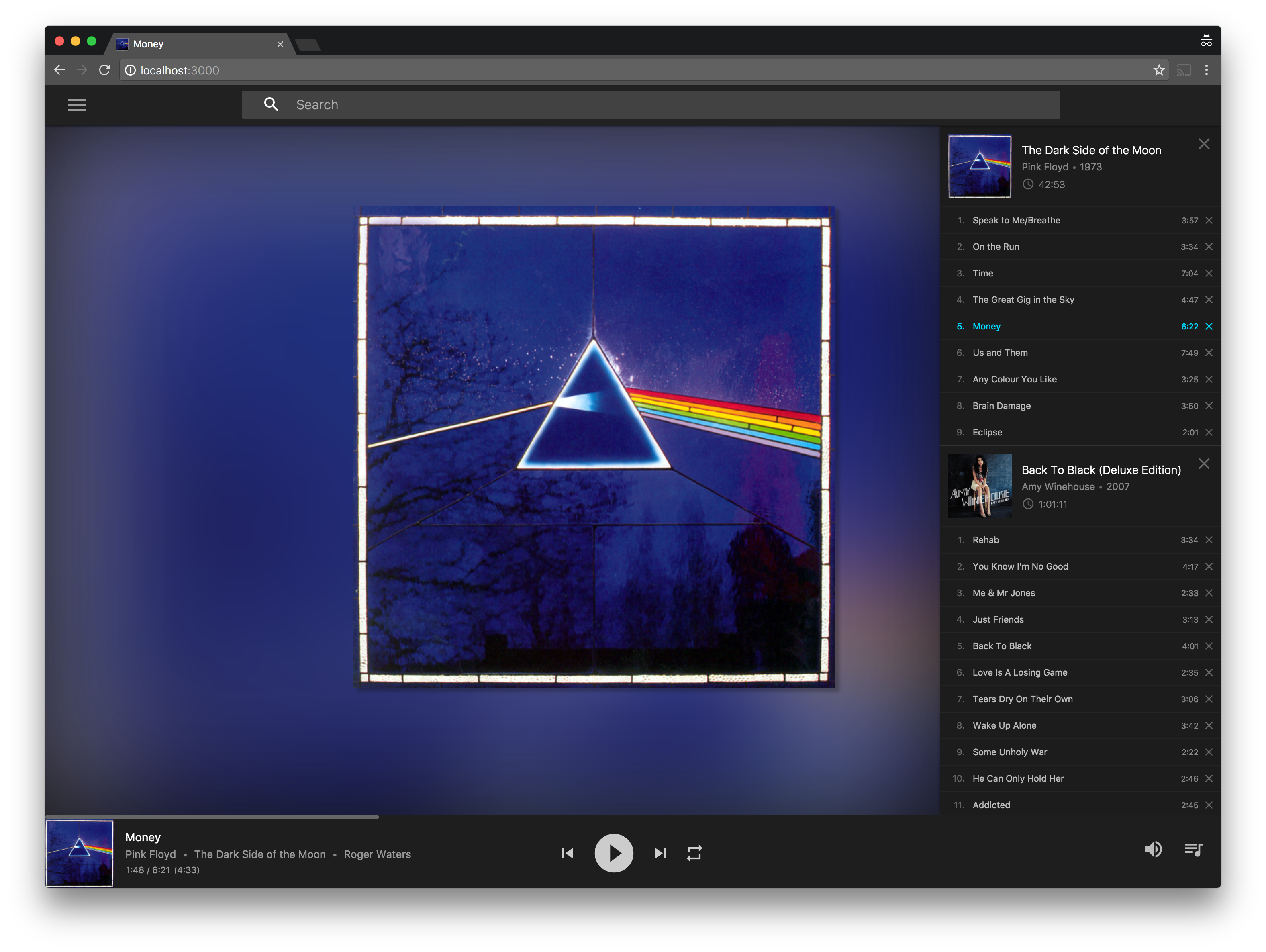
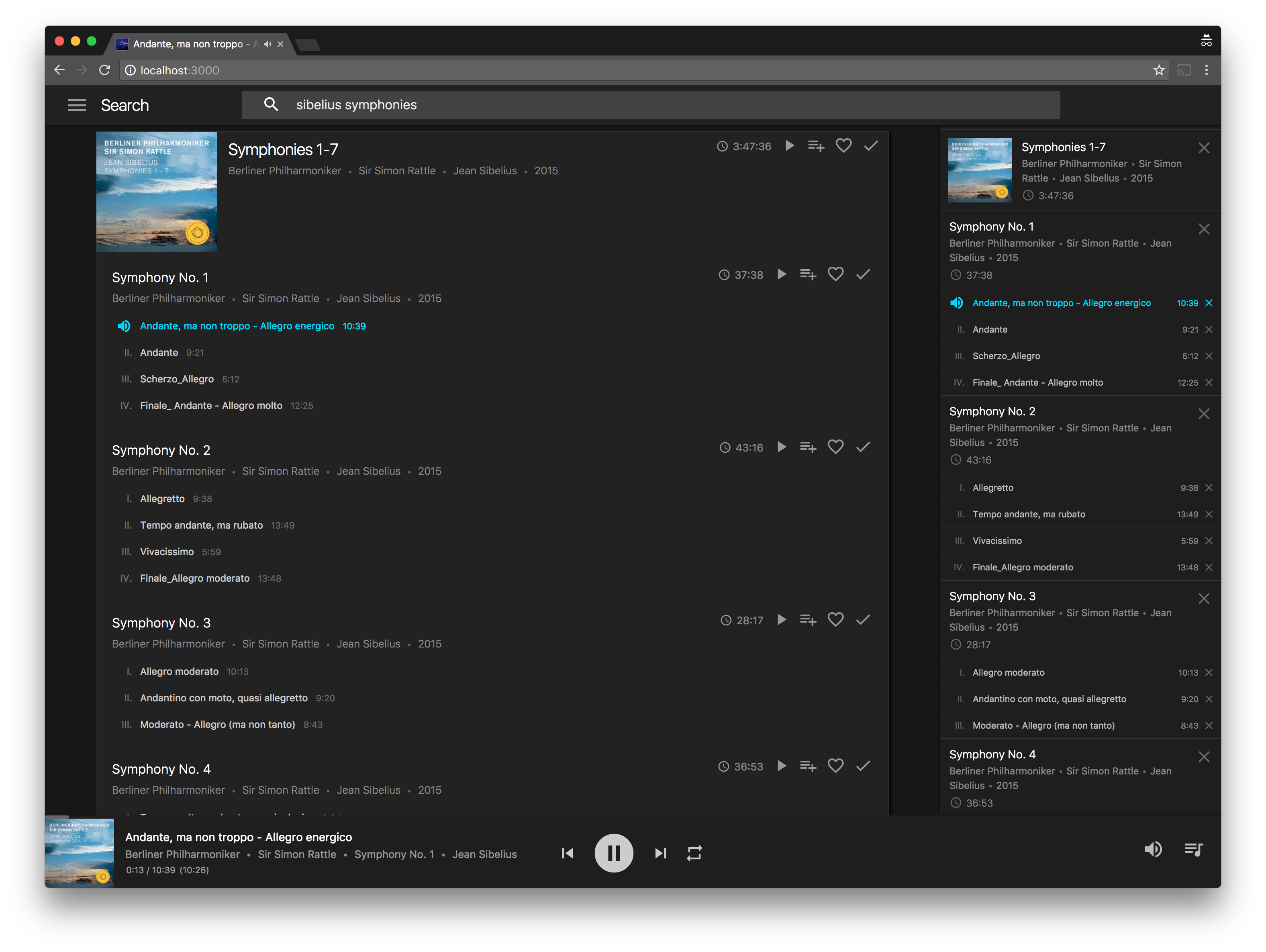
# Features
* Automatic prefix grouping and enumeration detection (ideal for classical music: properly groups big works together).
* Multiplatform web-based UI and REST-like API for controlling player.
* Multiple storage and caching options: Amazon S3, Google Cloud Storage, local and remote file stores.
* Import music library from iTunes or build from directory-tree of audio tracks.
# Requirements
* [Go 1.4+](http://golang.org/dl/) (recent changes have only been tested on 1.5).
* [NodeJS](https://nodejs.org/), [NPM](https://www.npmjs.com/) and [Gulp](http://gulpjs.com/) installed globally (for building the UI).
* Recent version of Chrome (Firefox may also work, though hasn't been fully tested).
# Building
If you haven't setup Go before, you need to first set a `GOPATH` (see [https://golang.org/doc/code.html#GOPATH](https://golang.org/doc/code.html#GOPATH)).
To fetch and build the code for Tchaik:
$ go get tchaik.com/cmd/...
This will fetch the code and build the command line tools into `$GOPATH/bin` (assumed to be in your `PATH` already).
Building the UI:
$ cd $GOPATH/src/tchaik.com/cmd/tchaik/ui
$ npm install
$ gulp
Alternatively, if you want the JS and CSS to be recompiled and have the browser refreshed as you change the source files:
$ WS_URL="ws://localhost:8080/socket" gulp serve
Then browse to `http://localhost:3000/` to use tchaik.
# Starting the UI
To start Tchaik you first need to move into the `cmd/tchaik` directory:
$ cd $GOPATH/src/tchaik.com/cmd/tchaik
## Importing an iTunes Library
The easiest way to begin is to build a Tchaik library on-the-fly and start the UI in one command:
$ tchaik -itlXML ~/path/to/iTunesLibrary.xml
You can also convert the iTunes Library into a Tchaik library using the `tchimport` tool:
$ tchimport -itlXML ~/path/to/iTunesLibrary.xml -out lib.tch
$ tchaik -lib lib.tch
NB: A Tchaik library will generally be smaller than its corresponding iTunes Library. Tchaik libraries are stored as gzipped-JSON (rather than Apple plist) and contain a subset of the metadata used by iTunes.
## Importing Audio Files
Alternatively you can build a Tchaik library on-the-fly from a directory-tree of audio files. Only files with supported metadata (see [github.com/dhowden/tag](https://github.com/dhowden/tag)) will be included in the index:
$ tchaik -path /all/my/music
To avoid rescanning your entire collection every time you restart, you can build a Tchaik library using the `tchimport` tool:
$ tchimport -path /all/my/music -out lib.tch
$ tchaik -lib lib.tch
# More Advanced Options
A full list of command line options is available from the `--help` flag:
$ tchaik --help
Usage of tchaik:
-add-path-prefix prefix
add prefix to every path
-artwork-cache path
path to local artwork cache (content addressable)
-auth-password password
password to use for HTTP authentication
-auth-user user
user to use for HTTP authentication (set to enable)
-checklist file
checklist file (default "checklist.json")
-cursors file
cursors file (default "cursors.json")
-debug
print debugging information
-favourites file
favourites file (default "favourites.json")
-itlXML file
iTunes Library XML file
-lib file
Tchaik library file
-listen address
bind address for main HTTP server (default "localhost:8080")
-local-store path
path to local media store (prefixes all paths) (default "/")
-media-cache path
path to local media cache
-path directory
directory containing music files
-play-history file
play history file (default "history.json")
-playlists file
playlists file (default "playlists.json")
-remote-store address
address for remote media store: tchstore server :, s3://:/path/to/root for S3, or gs:///path/to/root for Google Cloud Storage
-tls-cert file
certificate file, must also specify -tls-key
-tls-key file
certificate key file, must also specify -tls-cert
-trace-listen address
bind address for trace HTTP server
-trim-path-prefix prefix
remove prefix from every path
-ui-dir directory
UI asset directory (default "ui")
### -local-store
Set `-local-store` to the local path that contains your media files. You can use `trim-path-prefix` and `add-path-prefix` to rewrite paths used in the Tchaik library so that file locations can still be correctly resolved.
### -remote-store
Set `-remote-store` to the URI of a running [tchstore](http://godoc.org/tchaik.com/cmd/tchstore) server (`hostname:port`). Instead, S3 paths can be used: `s3://:/path/to/root` (set the environment variables `AWS_ACCESS_KEY_ID` and `AWS_SECRET_ACCESS_KEY` to pass credentials to the S3 client), or Google Cloud Storage paths: `gs:///path/to/root` (set environment variable `GOOGLE_APPLICATION_CREDENTIALS` to point to the JSON credentials file).
### -media-cache
Set `-media-cache` to cache all files loaded from `-remote-store` (or `-local-store` if set).
### -artwork-cache
Set `-artwork-cache` to create/use a content addressable filesystem for track artwork. An index file will be created in the path on first use. The folder should initially be empty to ensure that no other files interfere with the system.
### -trace-listen
Set `-trace-listen` to a suitable bind address (i.e. `localhost:4040`) to start an HTTP server which defines the `/debug/requests` endpoint used to inspect server requests. Currently we only support tracing for media (track/artwork/icon) requests. See [https://godoc.org/golang.org/x/net/trace](https://godoc.org/golang.org/x/net/trace) for more details.
# Windows Support
The default value for parameter `-local-store` is `/` which does not work on Windows. When all library music is organised under a common path you can set `-local-store` and `-trim-path-prefix` to get around this (for instance `-local-store C:\Path\To\Music -trim-path-prefix C:\Path\To\Music`).
# Get Involved!
Development is on-going and the codebase is changing very quickly. If you're interested in contributing then it's safest to jump into our gitter room and chat to people before getting started!
[](https://gitter.im/tchaik/tchaik?utm_source=badge&utm_medium=badge&utm_campaign=pr-badge&utm_content=badge)