https://github.com/tdimeco/QuickSound
Quickly play sounds from the macOS status bar.
https://github.com/tdimeco/QuickSound
macos macos-status play-sounds sound sound-effects soundboard
Last synced: about 1 year ago
JSON representation
Quickly play sounds from the macOS status bar.
- Host: GitHub
- URL: https://github.com/tdimeco/QuickSound
- Owner: tdimeco
- License: mit
- Created: 2016-03-18T17:34:05.000Z (over 10 years ago)
- Default Branch: main
- Last Pushed: 2025-02-18T09:49:59.000Z (over 1 year ago)
- Last Synced: 2025-02-18T10:41:05.340Z (over 1 year ago)
- Topics: macos, macos-status, play-sounds, sound, sound-effects, soundboard
- Language: Swift
- Homepage:
- Size: 4.64 MB
- Stars: 11
- Watchers: 4
- Forks: 0
- Open Issues: 4
-
Metadata Files:
- Readme: README.md
- License: LICENSE
Awesome Lists containing this project
- Mac-Menubar-Megalist - QuickSound
README
#  QuickSound
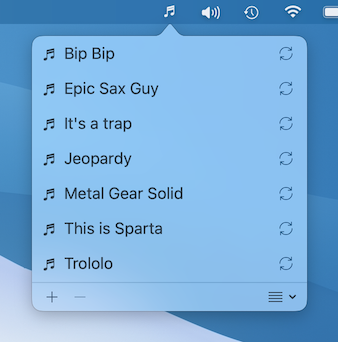
**Quickly play sounds from the macOS status bar.**
Compatible with macOS 11+
## Features
Current features are:
- Status bar integration.
- Add short sounds from your hard drive (supported formats are macOS standard ones, like AIFF, WAVE, MP3...).
- Quickly play a sound by double-clicking on it.
- You can choose sounds you want to repeat forever (double-click on it to start and stop it).
## Installation
### Homebrew
You can install the app using [Homebrew](https://brew.sh/):
```bash
brew install --cask tdimeco/apps/quicksound
```
This is the recommended way to install the app.
The app auto updates with Homebrew.
### Manual
You can download the app from the [Releases](https://github.com/tdimeco/quicksound/releases) page.
The app does not auto update in this case.
## Sound samples
Some sound samples can be found in the repository's root folder `Sounds`.
## Issues
Issues and ongoing features can be found on the [Issues](https://github.com/tdimeco/quicksound/issues) page.
Feel free to enhance the app and make pull-requests!