https://github.com/techouse/patholog
Diagnose and fix PATH problems across macOS, Linux, and Windows.
https://github.com/techouse/patholog
cli cli-tool linux macos path rust utility windows
Last synced: 12 days ago
JSON representation
Diagnose and fix PATH problems across macOS, Linux, and Windows.
- Host: GitHub
- URL: https://github.com/techouse/patholog
- Owner: techouse
- License: bsd-3-clause
- Created: 2026-04-23T06:06:04.000Z (2 months ago)
- Default Branch: main
- Last Pushed: 2026-06-06T12:54:51.000Z (20 days ago)
- Last Synced: 2026-06-06T13:08:45.672Z (20 days ago)
- Topics: cli, cli-tool, linux, macos, path, rust, utility, windows
- Language: Rust
- Homepage: https://techouse.github.io/patholog/
- Size: 2.03 MB
- Stars: 0
- Watchers: 0
- Forks: 0
- Open Issues: 0
-
Metadata Files:
- Readme: README.md
- Changelog: CHANGELOG.md
- Funding: .github/FUNDING.yml
- License: LICENSE
- Code of conduct: CODE-OF-CONDUCT.md
- Codeowners: .github/CODEOWNERS
- Security: SECURITY.md
Awesome Lists containing this project
README
# patholog
Diagnose and fix PATH problems across macOS, Linux, and Windows.
[](https://github.com/techouse/patholog/releases/latest)
[](https://crates.io/crates/patholog)
[](https://crates.io/crates/patholog)
[](https://github.com/techouse/patholog/actions/workflows/test.yml)
[](https://codecov.io/gh/techouse/patholog)
[](https://app.codacy.com/gh/techouse/patholog/dashboard?utm_source=gh&utm_medium=referral&utm_content=&utm_campaign=Badge_grade)
[](https://github.com/techouse/patholog/blob/main/LICENSE)
[](https://github.com/sponsors/techouse)
[](https://github.com/techouse/patholog/stargazers)
`patholog` explains why a command resolves to a particular executable, shows competing matches, diagnoses common PATH problems, scans shell startup files read-only, prints cleaned PATH proposals, and applies tightly scoped shell profile repairs through a managed block.
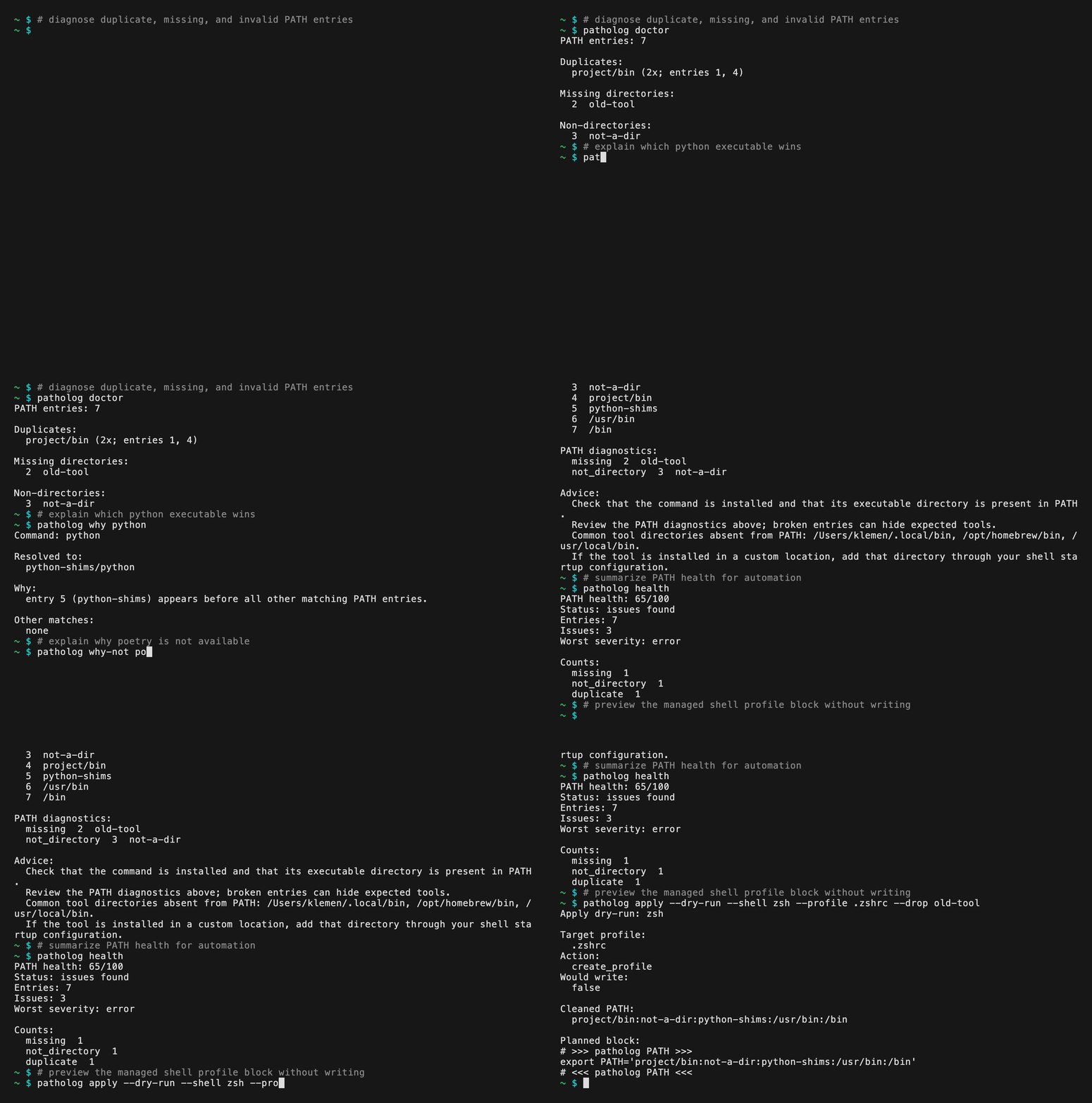
## Why It Exists
PATH problems are usually invisible until the wrong tool runs. `patholog` is built for cases like:
- `python`, `node`, or `cargo` resolving to an unexpected executable.
- duplicate PATH entries hiding the real search order.
- missing directories left behind by old installers.
- unreadable PATH entries or shadowed command candidates.
- Cargo, Homebrew, pyenv, nvm, or system directories appearing in surprising order.
- shell config drift between machines.
The goal is to explain before changing anything.
## Quick Examples
```sh
patholog doctor
patholog health --json
patholog doctor --command python
patholog why python
patholog why-not poetry
patholog conflicts cargo
patholog scan
patholog clean --stdout
patholog clean --stdout --drop /sw/bin
patholog clean --export --var manpath --shell zsh
patholog clean --export --shell zsh
patholog apply --dry-run --shell zsh
patholog apply --shell zsh --yes
patholog config check --config patholog.toml
patholog completions zsh
```
## Installation
Install the latest GitHub release on Linux or macOS:
```sh
curl -fsSL https://raw.githubusercontent.com/techouse/patholog/refs/heads/main/install.sh | sh
```
The installer downloads the matching release archive, verifies its SHA-256
checksum, installs `patholog` to `~/.local/bin`, and installs bash, zsh, and fish
completions. Set `PATHOLOG_INSTALL_DIR` to choose another install directory, set
`PATHOLOG_VERSION` to install a specific release, set `PATHOLOG_LINUX_LIBC=musl`
or `gnu` to override Linux libc detection, and set
`PATHOLOG_INSTALL_COMPLETIONS=0` to skip completions.
Install with Homebrew:
```sh
brew install techouse/patholog/patholog
```
Or tap the repository first:
```sh
brew tap techouse/patholog
brew install patholog
```
Install from crates.io:
```sh
cargo install patholog
```
Or download a release artifact from
[GitHub Releases](https://github.com/techouse/patholog/releases). Linux releases
include GNU/glibc and musl `.tar.gz` archives for x86_64 and ARM64, plus
GNU/glibc `.deb` and `.rpm` packages for x86_64 and ARM64. Windows releases
include a `.zip` archive for x86_64 MSVC. macOS releases include a signed and
notarized universal `.zip` archive for Apple Silicon and Intel Macs. Archives
include the `patholog` binary, shell completions, `README.md`, `LICENSE`, and
`THIRD-PARTY-LICENSES.md`. Verify downloads with the release `SHA256SUMS.txt`
file or the per-artifact `.sha256` sidecar.
### Shell Completions
The `install.sh` installer installs bash, zsh, and fish completions by default.
Set `PATHOLOG_INSTALL_COMPLETIONS=0` to skip completion installation.
Install shell completions manually by writing the generated script to your
shell's completion directory.
Bash:
```sh
mkdir -p ~/.local/share/bash-completion/completions
patholog completions bash > ~/.local/share/bash-completion/completions/patholog
```
Zsh:
```sh
mkdir -p ~/.zfunc
patholog completions zsh > ~/.zfunc/_patholog
```
Add this to `.zshrc` if `~/.zfunc` is not already in `fpath`:
```zsh
fpath=(~/.zfunc $fpath)
autoload -Uz compinit
compinit
```
Fish:
```fish
mkdir -p ~/.config/fish/completions
patholog completions fish > ~/.config/fish/completions/patholog.fish
```
PowerShell:
```powershell
New-Item -ItemType Directory -Force (Split-Path $PROFILE) | Out-Null
patholog completions pwsh | Add-Content $PROFILE
```
## Command Surface
```sh
patholog print [--json] [--platform auto|posix|windows] [--var path|manpath]
patholog doctor [--json] [--platform auto|posix|windows] [--var path|manpath] [--drop ] [--preset homebrew|cargo|pyenv|fink] [--fail-on=missing,duplicate,...] [--command ] [--config ]
patholog health [--json] [--platform auto|posix|windows] [--var path|manpath] [--drop ] [--preset homebrew|cargo|pyenv|fink] [--config ]
patholog why [--json] [--platform auto|posix|windows]
patholog why-not [--json] [--platform auto|posix|windows]
patholog conflicts [--json] [--platform auto|posix|windows]
patholog scan [--json] [--platform auto|posix|windows] [--home ]
patholog clean --stdout [--platform auto|posix|windows] [--var path|manpath] [--drop ] [--preset homebrew|cargo|pyenv|fink] [--config ]
patholog clean --export --shell zsh|bash|fish|pwsh [--platform auto|posix|windows] [--var path|manpath] [--drop ] [--preset homebrew|cargo|pyenv|fink] [--config ]
patholog apply --dry-run --shell zsh|bash|fish|pwsh [--json] [--platform auto|posix|windows] [--home ] [--profile ] [--drop ] [--preset homebrew|cargo|pyenv|fink] [--config ]
patholog apply --shell zsh|bash|fish|pwsh --yes [--no-backup] [--json] [--platform auto|posix|windows] [--home ] [--profile ] [--drop ] [--preset homebrew|cargo|pyenv|fink] [--config ]
patholog config check --config
patholog config print --config [--json]
patholog completions zsh|bash|fish|pwsh
```
`patholog` mutates files only for `apply --yes`. Other commands do not edit shell profiles, environment variables, or files.
## Read-Only Diagnostics
`doctor` reports duplicate, missing, non-directory, unreadable, empty, explicitly unwanted, and suspiciously ordered PATH entries. With `--command`, it also reports executable candidates shadowed by an earlier winner:
```sh
patholog doctor --command python
patholog doctor --drop /sw/bin --fail-on=unwanted
```
`health` summarizes those diagnostics as an advisory deterministic score, issue counts, worst severity, and the diagnostics used to compute the score:
```sh
patholog health --json
patholog health --var manpath
```
Example JSON excerpt:
```json
{
"score": 85,
"healthy": false,
"worst_severity": "error",
"counts": {
"missing": 1
}
}
```
Use `doctor --fail-on` when you need a CI gate; `health` always exits `0` when the summary is calculated successfully.
`--var manpath` switches `print`, `doctor`, `health`, and `clean` to `MANPATH`. Command resolution and profile planning stay PATH-only. `clean --var manpath` preserves empty MANPATH components because common man implementations use them to include the system default manpath.
`scan` reads known shell startup profiles under the home directory and reports likely PATH mutation lines. It does not source or edit those files:
```sh
patholog scan
patholog scan --home /tmp/example-home
```
## Output Modes
Human output is the default. JSON output is available for `print`, `doctor`, `health`, `why`, `why-not`, `conflicts`, `scan`, and `apply`:
```sh
patholog doctor --json
patholog health --json
patholog why python --json
patholog why-not poetry --json
patholog scan --json
```
`why-not` explains missing-command cases by combining exact PATH lookup, related executable hints, PATH health diagnostics, and safe advisory next checks. It is read-only and does not run package managers or edit shell configuration.
`clean --stdout` prints a raw PATH or MANPATH string suitable for review or manual export. `clean --export` prints a shell-ready assignment snippet for `zsh`, `bash`, `fish`, or `pwsh`:
```sh
patholog clean --export --shell zsh
patholog clean --export --var manpath --shell zsh
```
`completions` prints shell completion scripts to stdout:
```sh
patholog completions zsh
```
`apply --dry-run` plans a shell profile edit without writing files. `apply --yes` writes the same managed block, creates backups for existing profiles by default, and never rewrites arbitrary PATH lines outside the patholog block:
```sh
patholog apply --dry-run --shell zsh
patholog apply --dry-run --shell zsh --json
patholog apply --dry-run --shell zsh --drop /sw/bin
patholog apply --shell zsh --yes
patholog apply --shell zsh --yes --no-backup
```
`--preset fink` marks `/sw/bin` and `/sw/sbin` as unwanted for PATH, and `/sw/share/man` as unwanted for MANPATH. `homebrew`, `cargo`, and `pyenv` presets enable ecosystem policy checks without automatically reordering entries.
## Config Files
`--config ` lets `doctor`, `health`, `clean`, and `apply` load declarative policy defaults. CLI flags append after config values:
```toml
version = 1
[path]
drop = ["/sw/bin"]
preset = ["homebrew", "cargo"]
fail_on = ["duplicate", "unwanted"]
[manpath]
drop = ["/sw/share/man"]
preset = ["fink"]
fail_on = ["duplicate"]
```
Use `patholog config check --config patholog.toml` to validate a file, or `patholog config print --config patholog.toml --json` to inspect normalized policy. `--config auto` searches only the current working directory for `patholog.toml`, then `.patholog.toml`.
`health` uses config `drop` and `preset` policy for scoring, but `fail_on` remains specific to `doctor`.
## Exit Codes
- `0`: success
- `1`: usage or runtime error
- `2`: `doctor --fail-on` matched selected diagnostics
- `3`: command not found for `why`, `why-not`, or `conflicts`
## Platform Model
- `auto` uses host platform rules.
- `posix` uses `:` separators and case-sensitive comparison keys.
- `windows` uses `;` separators, case-insensitive comparison keys, and PATHEXT modeling.
Windows command resolution differs from POSIX lookup because file extensions and `PATHEXT` affect which executable wins. `patholog --platform windows` models that behavior for tests and cross-platform inspection.
PATH values are handled as UTF-8 strings to preserve v0.1 parity. Symlinks, inode identity, and canonical-file identity are not analyzed.
## Safety
All commands are read-only except `apply --yes`, which writes only the patholog-managed block in the selected shell
profile. When the selected target is `~/.zshrc`, `~/.bashrc`, `~/.profile`, or a PowerShell profile, `patholog` may
create, append, or replace that managed block, but it does not rewrite arbitrary profile content outside the block or
edit system environment configuration.
`clean --stdout`, `clean --export`, `apply --dry-run`, and `completions` only print generated text. Mutating `apply` requires `--yes` and backs up existing profiles unless `--no-backup` is passed.
## Development
```sh
make ci
make install-smoke
make v1-contract-check
make pre-release
```
Use `make ci` for normal local checks, `make install-smoke` to test the packaged crate in a temporary install root,
`make v1-contract-check` for the v1 contract audit, and `make pre-release` as the full gate before tagging a
release.
Golden parity fixtures are vendored in `tests/fixtures/golden`.