https://github.com/techstackspace/react-native-projects
A collection of independent React Native applications, each maintained on its own branch. This structure allows for isolated development and experimentation with various features, libraries, and architectural patterns.
https://github.com/techstackspace/react-native-projects
expo react react-native techstackspace
Last synced: 3 months ago
JSON representation
A collection of independent React Native applications, each maintained on its own branch. This structure allows for isolated development and experimentation with various features, libraries, and architectural patterns.
- Host: GitHub
- URL: https://github.com/techstackspace/react-native-projects
- Owner: techstackspace
- Created: 2025-05-09T20:17:10.000Z (about 1 year ago)
- Default Branch: main
- Last Pushed: 2025-06-10T19:39:07.000Z (about 1 year ago)
- Last Synced: 2025-06-10T20:39:29.670Z (about 1 year ago)
- Topics: expo, react, react-native, techstackspace
- Language: TypeScript
- Homepage:
- Size: 4.32 MB
- Stars: 0
- Watchers: 1
- Forks: 0
- Open Issues: 0
-
Metadata Files:
- Readme: README.md
- Funding: .github/FUNDING.yml
Awesome Lists containing this project
README
# Movie Collection App Setup
[](https://www.youtube.com/@techstackmedia)
A complete setup guide including Brewfile, Git, shell configuration (e.g., `.zshrc`), package managers (npm/bun), and environment variables for Mac.
---
## 1. Switch to `zsh` Shell (Optional but Recommended)
To confirm the default shell:
```bash
echo $SHELL
```
List all available shells:
```bash
cat /etc/shells
```
To switch to `zsh` (if not already using it):
```bash
chsh -s /bin/zsh
```
You may need to restart your terminal session for changes to take effect.
---
## 2. Download Project ZIP Files from GitHub
Download the movie app and API project ZIP files to the `Documents` directory:
### Movie App
```bash
cd ~/Documents
curl -L -o react-native-projects.zip https://github.com/techstackspace/react-native-projects/archive/refs/heads/feature/01-movie-collection-app.zip
unzip react-native-projects.zip
cd ~/Documents/react-native-projects-feature-01-movie-collection-app
```
### API
The backend code is available in the [feature/01-movie-collection-api](https://github.com/techstackspace/express-projects/tree/feature/01-movie-collection-api) branch.
```bash
cd ~/Documents
curl -L -o express-projects.zip https://github.com/techstackspace/express-projects/archive/refs/heads/feature/01-movie-collection-api.zip
unzip express-projects.zip
cd ~/Documents/express-projects-feature-01-movie-collection-api
```
---
## 3. Install Homebrew (If Not Installed)
Install Homebrew:
```bash
/bin/bash -c "$(curl -fsSL https://raw.githubusercontent.com/Homebrew/install/HEAD/install.sh)"
```
---
## 4. Brewfile Installation
### If `Brewfile` is in the same directory:
```bash
brew bundle
```
### If `Brewfile` is in another directory:
```bash
brew bundle --file=~/Documents/react-native-projects-feature-01-movie-collection-app/Brewfile
```
Feel free to modify the `Brewfile` to add or remove dependencies as needed.
---
## 5. Install Dependencies
### Using Bun (preferred):
```bash
bun install
```
### Or using npm:
```bash
npm install
```
> Delete `bun.lockb` if switching to `npm` via `nvm`.
---
## 6. Set Up Git (If Not Already Configured)
Check Git configuration:
```bash
git config --list
```
If needed, configure Git globally:
```bash
git config --global user.name "Your Name"
git config --global user.email "your.email@example.com"
```
---
## 7. Uninstall Brewfile Apps
To remove all installed apps not in the Brewfile:
```bash
brew bundle cleanup --force
```
Alternatively, delete unwanted apps manually or remove entries from the `Brewfile` and rerun the command above.
---
## 8. Install `nvm` or `bum`
### Install `nvm`:
```bash
curl -o- https://raw.githubusercontent.com/nvm-sh/nvm/v0.40.3/install.sh | bash
```
> Replace `v0.40.3` with the [latest release version](https://github.com/nvm-sh/nvm/releases).
### Install `bum`:
```bash
curl -fsSL https://github.com/owenizedd/bum/raw/main/install.sh | bash
```
---
## 9. Environment Variable Configuration for Android and `nvm`
Edit your `~/.zprofile` and add the following between **Amazon Q pre block** and **Amazon Q post block**:
```bash
# Amazon Q pre block
# Brew environment variable
# Android SDK Setup
export ANDROID_HOME=$HOME/Library/Android/sdk
export PATH=$PATH:$ANDROID_HOME/emulator
export PATH=$PATH:$ANDROID_HOME/platform-tools
# nvm Setup
export NVM_DIR="$HOME/.nvm"
[ -s "$NVM_DIR/nvm.sh" ] && \. "$NVM_DIR/nvm.sh" # Loads nvm
[ -s "$NVM_DIR/bash_completion" ] && \. "$NVM_DIR/bash_completion" # Loads bash_completion for nvm
# bum Setup (Bun Version Manager)
export BUM_DIR="$HOME/.bum"
export PATH="$BUM_DIR/bin:$PATH"
# Load bum-managed Bun version (if any)
if [ -f "$BUM_DIR/version" ]; then
BUN_VERSION=$(cat "$BUM_DIR/version")
export PATH="$BUM_DIR/versions/$BUN_VERSION/bin:$PATH"
fi
# Amazon Q post block
```
Then apply the changes:
```bash
source ~/.zprofile
```
---
## 10. Running the React Native Project
To start the React Native project, use:
```bash
bun start
```
For iOS:
```bash
i
```
For Android:
```bash
a
```
To run on a physical device, scan the QR code displayed in the terminal using the Expo app or your iPhone camera (recommended for accurate testing).
---
## 11. Resources:
Here are the core resources of this project:
- [React Native Docs](https://reactnative.dev/docs/getting-started) – Official documentation for setting up and building apps with React Native.
- [Bun Documentation](https://bun.sh/docs) – Learn how to use Bun, an all-in-one JavaScript runtime and toolkit.
- [Bum GitHub Repo](https://github.com/owenizedd/bum) – Documentation for Bum, a fast Bun version manager written in Rust.
- [Node.js Documentation](https://nodejs.org/docs/latest/api/) – Official API documentation for Node.js.
- [nvm GitHub Repo](https://github.com/nvm-sh/nvm) – Node Version Manager for managing multiple Node.js versions.
- [Homebrew](https://brew.sh) – Package manager for macOS and Linux, useful for installing dependencies like Watchman, Git, Android Studio, etc.
- [Expo Documentation](https://docs.expo.dev/) – Comprehensive docs for using Expo CLI, managed workflows, development builds, and more.
- [Android Studio](https://developer.android.com/studio) – Official IDE for Android development, required for building and testing React Native apps on Android.
- [Figma Help Center](https://help.figma.com/hc/en-us) – Comprehensive guides and tutorials for using Figma effectively.
---
## 12. Feedback & Suggestions
Your feedback is incredibly valuable and helps improve these resources for the entire community.
Whether you've followed a tutorial, read the documentation, watched a video, or used a script—I'd love to hear your thoughts!
### What you can share:
- What worked well for you?
- What was unclear or confusing?
- Suggestions for improvement or new topics?
- Bugs or outdated instructions?
### Submit your feedback here:
[Submit Feedback Form](https://techstackspace.com/feedback)
Your input helps shape better content for developers like you. Thank you!
---
## 13. Social Media
Follow us on social media:
- [](https://instagram.com/techstackmedia)
- [](https://www.threads.net/@techstackmedia)
- [](https://www.facebook.com/techstackmedia)
- [](https://www.tiktok.com/@techstackmedia)
- [](https://www.youtube.com/@techstackmedia)
- [](https://x.com/techstackmedia)
---
## 15. Figma Design Reference
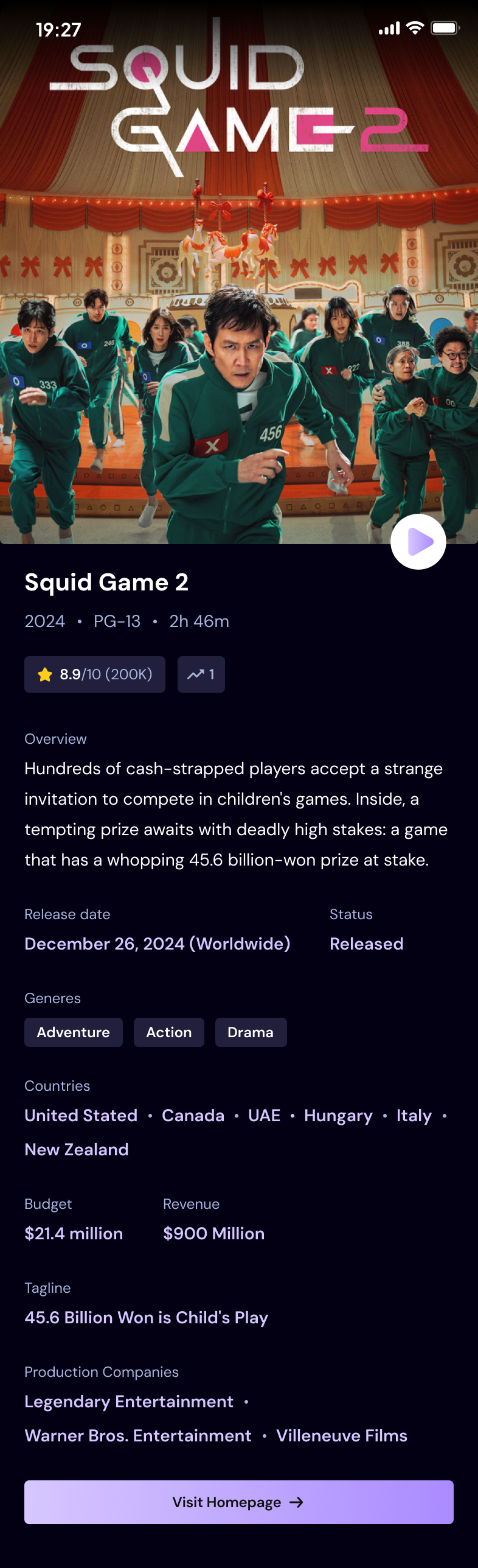
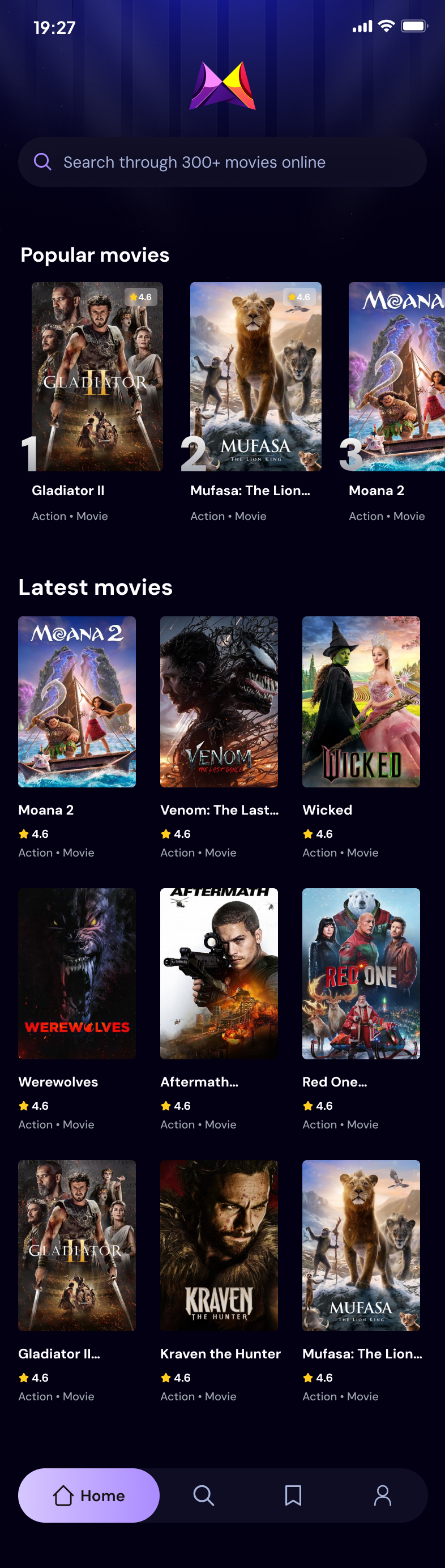
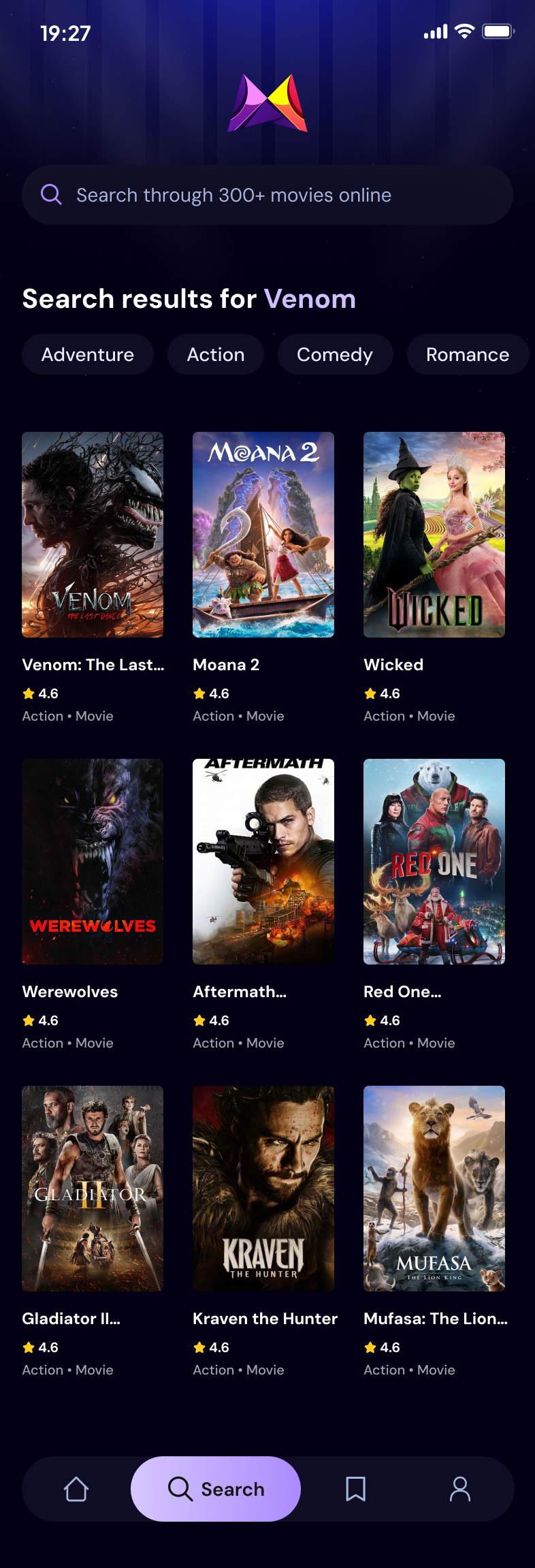
You can explore the official Figma design for this project using the link below. This design provides a clear visual reference for the UI layout and styling used throughout the app.
🔗 [View the Figma Design for the Movie App](https://www.figma.com/design/c6NHYQem8G59odVSijIjl2/Movie-App-w--React-Native?node-id=2-2&p=f&t=JfR5tnQWWcgYwXHd-0)
Here is the Figma design:
### Home Screen
### Search Screen
### Detail Screen