https://github.com/temidaradev/rusic
Another music player but written in rust using dioxus (local files and jellyfin supported)
https://github.com/temidaradev/rusic
dioxus jellyfin music music-player rust
Last synced: 4 months ago
JSON representation
Another music player but written in rust using dioxus (local files and jellyfin supported)
- Host: GitHub
- URL: https://github.com/temidaradev/rusic
- Owner: temidaradev
- Created: 2025-10-06T19:13:18.000Z (9 months ago)
- Default Branch: master
- Last Pushed: 2026-03-05T03:56:49.000Z (4 months ago)
- Last Synced: 2026-03-05T08:51:24.437Z (4 months ago)
- Topics: dioxus, jellyfin, music, music-player, rust
- Language: Rust
- Homepage:
- Size: 24.7 MB
- Stars: 92
- Watchers: 0
- Forks: 5
- Open Issues: 7
-
Metadata Files:
- Readme: README.md
- Funding: .github/FUNDING.yml
Awesome Lists containing this project
README
# Rusic
Rusic is a modern, lightweight, music player application built with Rust and the Dioxus framework. It provides a clean and responsive interface for managing and enjoying your local music collection.
[](https://discord.gg/K6Bmzw2E4M)


## Overview
Rusic allows you to scan your local directories for audio files, or you jellyfin library, automatically organizing them into a browsable library. You can navigate by artists, albums, or explore your custom playlists. The application is built for performance and desktop integration, utilizing the power of Rust.
## Features
- **Theming**: Includes dynamic theming support to customize the visual appearance.
- **Native Integration**: Integrates with system media controls (MPRIS) and "Now Playing" displays.
- **Discord RPC**: Embedded RPC included!!!
- **Double Option**: Yes, you can also use your jellyfin server to listen to your music coming from your server!
## Installation
### NixOS / Nix
Run directly without installing:
```bash
nix run github:temidaradev/rusic/nix
```
Install to your profile:
```bash
nix profile install github:temidaradev/rusic/nix
```
Or add to your NixOS flake inputs:
```nix
# flake.nix
{
inputs.rusic.url = "github:temidaradev/rusic/nix";
}
```
### Flatpak (Recommended)
Rusic is soon available on Flathub. To install from source manifest:
```bash
git clone https://github.com/temidaradev/rusic
cd rusic
flatpak-builder --user --install --force-clean build-dir com.temidaradev.rusic.json
flatpak run com.temidaradev.rusic
```
You can also click on the file and open it with an app provider, for example KDE discover
### Build from Source
```bash
git clone https://github.com/temidaradev/rusic
cd rusic
npm install
dx serve --package rusic
```
### MacOS Quarantine
Because Apple hates open-source software, they have made it harder for users to install them since they don't explicitly "trust" them. Though the source code can be verified by yours truly. However, in the meantime, after downloading the `.dmg` and dragging the app to your /Applications, use:
```bash
xattr -d com.apple.quarantine /Applications/Rusic.app
```
### Where does Rusic keep its files?
On **macOS** everything lives under your Library folders:
- `~/Library/Application Support/com.temidaradev.rusic/config.json` — your settings
- `~/Library/Caches/com.temidaradev.rusic/library.json` — the scanned library
- `~/Library/Caches/com.temidaradev.rusic/playlists.json` — your playlists
- `~/Library/Caches/com.temidaradev.rusic/covers/` — cached album art
On **Linux** it follows the XDG spec like you'd expect:
- `~/.config/rusic/config.json` — your settings
- `~/.cache/rusic/library.json` — the scanned library
- `~/.cache/rusic/playlists.json` — your playlists
- `~/.cache/rusic/covers/` — cached album art
If covers aren't showing or the library looks off, just delete the cache folder and hit rescan.
### Scrobbling functionality
Scrobbling functionality is only available through MusicBrainz (for now). To enable it, you need to provide a valid MusicBrainz token in the configuration file. The scrobbling also is only available for your local musics. It's highly recommended to use [jellyfin-plugin-listenbrainz](https://github.com/lyarenei/jellyfin-plugin-listenbrainz), because if you also use other music apps for your jellyfin server, you can scrobble your music from anywhere.
## Tech Stack
- **Dioxus**: UI Framework
- **Rodio**: Audio playback library
- **Lofty**: Metadata parsing
- **TailwindCSS**: Styling framework based on CSS
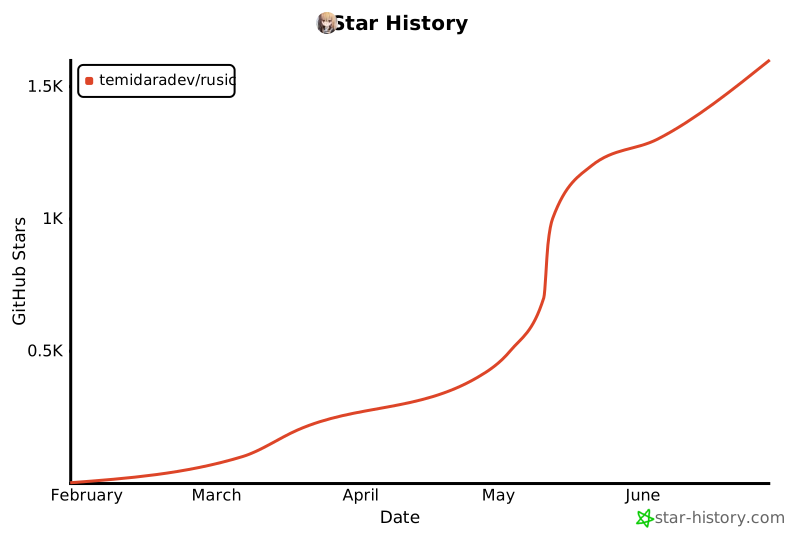
## Star History
[](https://www.star-history.com/#temidaradev/rusic&type=date&legend=top-left)