https://github.com/tencent-rtc/obs-trtc
Demo for using OBS WHIP to publish a stream to the TRTC(Tencent Real-Time Communication) service.
https://github.com/tencent-rtc/obs-trtc
Last synced: 5 months ago
JSON representation
Demo for using OBS WHIP to publish a stream to the TRTC(Tencent Real-Time Communication) service.
- Host: GitHub
- URL: https://github.com/tencent-rtc/obs-trtc
- Owner: Tencent-RTC
- License: mit
- Created: 2023-06-12T10:38:54.000Z (about 3 years ago)
- Default Branch: main
- Last Pushed: 2024-05-29T08:28:17.000Z (about 2 years ago)
- Last Synced: 2024-12-26T03:25:02.370Z (over 1 year ago)
- Language: HTML
- Homepage: https://tencent-rtc.github.io/obs-trtc/
- Size: 600 KB
- Stars: 11
- Watchers: 4
- Forks: 1
- Open Issues: 0
-
Metadata Files:
- Readme: README.md
- License: LICENSE
Awesome Lists containing this project
README
# OBS-TRTC
[](https://twitter.com/TencentRTC)
[](https://www.youtube.com/@TencentRTC)
[](https://discord.gg/vDHty6ddrZ)
Demo for using OBS WHIP to publish a stream to the TRTC(Tencent Real-Time Communication) service.
## Overview
OBS includes WHIP support, which allows you to do many interesting things by combining
the powers of both OBS and WHIP.
WHIP is a standard protocol that lets you use HTML5 and different clients to publish
and play live streams. Plus, you can use open-source tools to build your own live
streaming platform.
You can also use [TRTC (Tencent Real-Time Communication)](https://trtc.tencentcloud.com/?utm_source=community&utm_medium=github&utm_campaign=OBS-WHIP-TRTC&_channel_track_key=5pdHDh2F)
cloud services with OBS WHIP support for a streaming platform. This is a great option
if you don't want to build your own platform or need a more reliable and stable
platform with dedicated support.
Additionally, TRTC (Tencent Real-Time Communication) provides a free trial that includes
a specific amount of streaming time, making it super easy for you to try out.
If you need help or run into any problems, don't hesitate to contact us on
[Discord](https://discord.gg/vDHty6ddrZ).
## Prerequisites
Before you move forward, double-check that you've got these necessary items ready:
- OBS with WHIP support, please download from [OBS](https://github.com/obsproject/obs-studio/releases/tag/30.0.0)
- TRTC(Tencent Real-Time Communication) account, please register at [here](https://www.tencentcloud.com/account/login?s_url=https%253A%252F%252Fconsole.tencentcloud.com%252Ftrtc&utm_source=community&utm_medium=github&utm_campaign=OBS-WHIP-TRTC&_channel_track_key=6vGiu0P3)
> Note: Currently, OBS WHIP has been merged into the master branch but has not been released yet.
> You can login GitHub and download OBS 30+ from [here](https://github.com/obsproject/obs-studio/releases/tag/30.0.0).
Next, you need to create a TRTC application and generate a Bearer Token for WHIP.
## Step 1: Create a TRTC application
Please follow the steps below to create a TRTC application:
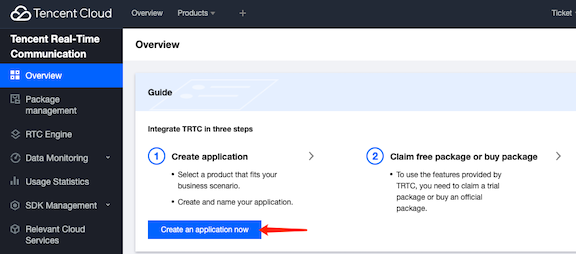
1. Log in to the [TRTC console](https://console.cloud.tencent.com/trtc?utm_source=community&utm_medium=github&utm_campaign=OBS-WHIP-TRTC&_channel_track_key=kgdTyhux) and click **Application Management** on the left sidebar.
1. Click **Create Application** and enter the application name.
1. Click **Create** to create the application.
After the application is created, you can view the SDKAppID and SDKSecretKey on the application details page.
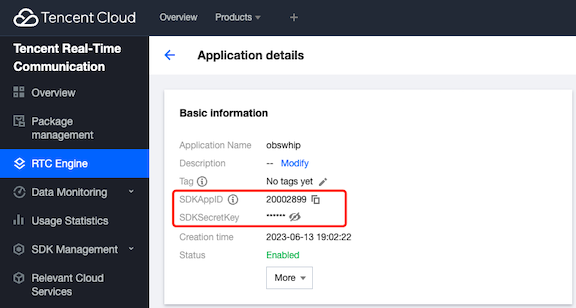
* SDKAppID: `2000xxxx`
* SDKSecretKey: `yyyyyy`
Following that, you must generate a Bearer Token for WHIP, which will be
utilized in OBS.
## Step 2: Create a Bearer Token for WHIP
You can directly visit [https://tencent-rtc.github.io/obs-trtc/bearer.html](https://tencent-rtc.github.io/obs-trtc/bearer.html)
to create a WHIP Bearer Token. Ensure that use the appid with your own `SDKAppID` and
secret with your own `SDKSecretKey`, then click the `Generate Bearer Token` button.
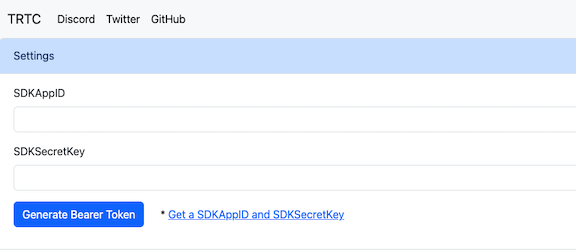
> Note: You can also access the url `https://tencent-rtc.github.io/obs-trtc/bearer.html?appid=2000xxx&secret=yyyyyy` to setup the parameters.
Next, use the generated WHIP Bearer Token to configure OBS.
## Step 3: Configure OBS
In the `OBS WHIP` section, you will find the generated WHIP `Server` and `Bearer Token` for configuring OBS.
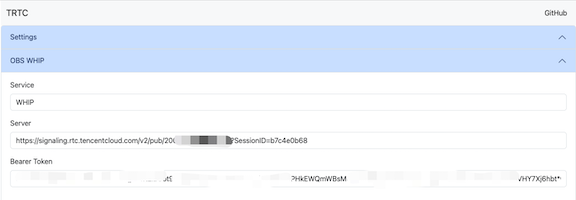
Please follow the steps below to configure OBS:
1. Open OBS and click **Settings**.
1. Click **Stream** on the left sidebar.
1. Select `WHIP` for **Service**.
1. Make sure to input the `Server` and `Bearer Token` accurately.
1. Click **OK** to save the settings.
1. Click **Start Streaming** to start streaming.
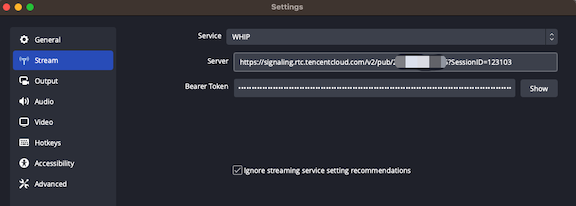
At this point, the stream is streaming to the TRTC service.
## Step 4: Play the stream
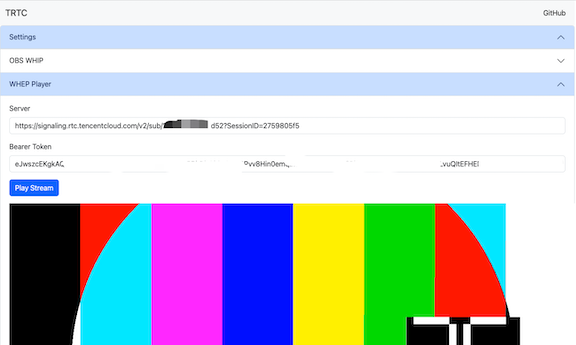
Open the previous webpage, go to the `WHEP Player` section,
and click **Play Stream** to play the stream via WHEP.
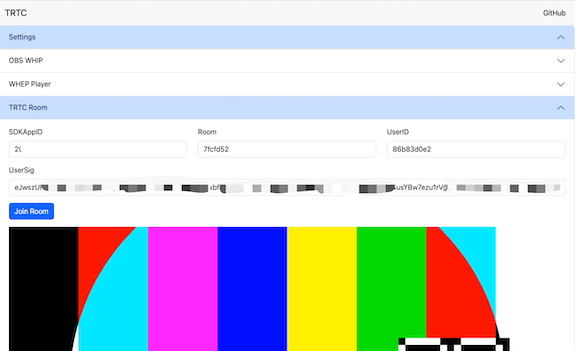
Another option is go to the `TRTC Room` section, and click **Join Room** to access the TRTC room
and watch the stream via TRTC, or you can utilize the TRTC mobile SDK to join the room and view
the stream.
Since both WHIP and WHEP are standard protocols, you can utilize any client that supmv ports
them to play the stream.
## Conclusion
We looked into using TRTC (Tencent Real-Time Communication) cloud services to make a stronger
streaming platform and the steps needed to create a TRTC app with OBS WHIP. These tools make it
easier to provide real-time live streaming experiences for different situations, with the
power of OBS.
If you require assistance or encounter any difficulties, please feel free to reach out
to us via [Discord](https://discord.gg/vDHty6ddrZ).
In the future, we will further investigate specific use cases and technologies associated
with OBS WHIP and TRTC integration.
## (Optional) Annex A: Deploy the WHIP Bearer Token Server
We deploy this tool on the server [https://tencent-rtc.github.io/obs-trtc/bearer.html](https://tencent-rtc.github.io/obs-trtc/bearer.html)
for your convenience.
Alternatively, you can operate your own server to produce the token by utilizing
the following command line to generate a WHIP Bearer Token.
```bash
git clone https://github.com/Tencent-RTC/obs-trtc.git
cd obs-trtc
open index.html
```
The other steps are the same as the previous section.
## (Optional) Annex B: Configure OBS in Real-Time Mode
If you want to configur1e OBS in real-time mode, please follow the steps below:
1. Open OBS and click **Settings**.
1. Click **Output** on the left sidebar.
1. Select `Advanced` for **Output Mode**.
1. Set **Keyframe Interval** to `1 s`.
1. Select `veryfast` for **CPU Usage Preset**.
1. Select `baseline` for **Profile**.
1. Select `zerolatency` for **Tune**.
1. Click **OK** to save the settings.
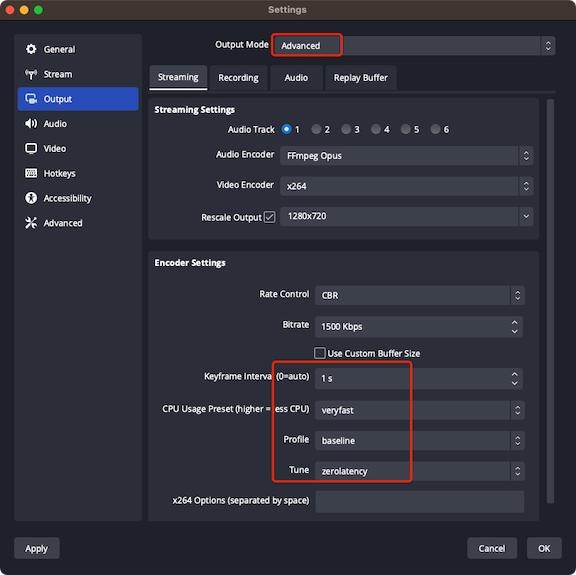
The other steps are the same as the previous section.
## (Optional) Annex C: Create a Bearer Token for Real-World Use
If you need to create a Bearer Token in a real-world setting, check out the
[UserSig](https://www.tencentcloud.com/document/product/647/35166) link for
more information.
If you require assistance or encounter any difficulties, please feel free to reach out
to us via [Discord](https://discord.gg/vDHty6ddrZ).