https://github.com/tencent-rtc/tls-sig-api-v2-cpp
This C++ project implements Tencent-RTC's UserSig authentication
https://github.com/tencent-rtc/tls-sig-api-v2-cpp
Last synced: about 1 year ago
JSON representation
This C++ project implements Tencent-RTC's UserSig authentication
- Host: GitHub
- URL: https://github.com/tencent-rtc/tls-sig-api-v2-cpp
- Owner: Tencent-RTC
- License: mit
- Created: 2024-10-31T07:14:11.000Z (over 1 year ago)
- Default Branch: main
- Last Pushed: 2024-10-31T10:26:40.000Z (over 1 year ago)
- Last Synced: 2024-12-26T03:24:30.028Z (over 1 year ago)
- Language: C
- Homepage: https://trtc.io
- Size: 660 KB
- Stars: 0
- Watchers: 3
- Forks: 0
- Open Issues: 0
-
Metadata Files:
- Readme: README.md
- License: LICENSE
Awesome Lists containing this project
README
## Note
This C++ project implements Tencent-RTC's UserSig authentication, providing a secure server-side method for generating signatures to protect the keys from leakage.
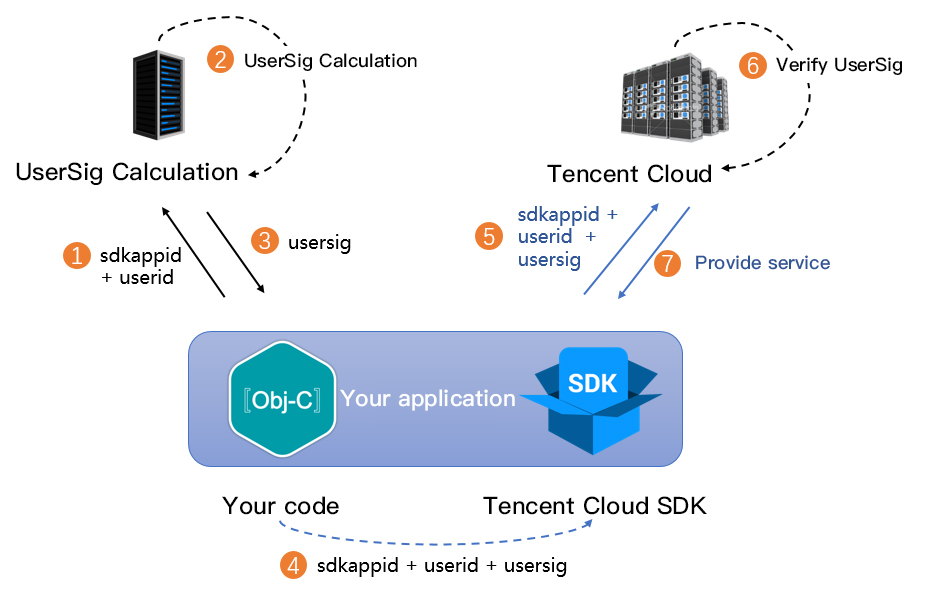
## Download code and sync dependencies
```shell
git clone https://github.com/tencentcloud/tls-sig-api-v2-cpp.git
cd tls-sig-api-v2-cpp
git submodule update --init --recursive
```
If the above code sync fails, download the source code [here](https://github.com/tencentcloud/tls-sig-api-v2-cpp/releases).
## Build
### Unix-like system
`CMake` 、 `Make` and `GCC` are required for project building. Ensure that they have been installed.
```shell
cmake CMakeLists.txt
cmake --build .
```
If you need to manually specify the OpenSSL path, add the following commands when running the `cmake CMakeLists.txt` command:
```shell
cmake -DOPENSSL_ROOT_DIR=your_openssl_root_dir CMakeLists.txt
cmake --build .
```
The header file path is as follows:
```
src/tls_sig_api_v2.h
```
The library file path is as follows:
```
./libtlssigapi_v2.a
```
In addition to linking `libtlssigapi_v2.a`, you need to introduce `zlib` and `openssl` when building a project. They usually come with Unix-like systems, and you only need to add the following command:
```
-lz -lcrypto
```
### Windows
Project building in Windows depends on `CMake` and `Visual Studio`. Ensure that they have been installed.
```
.\build.bat
```
The header file path is as follows:
```
src/tls_sig_api_v2.h
```
The library file paths are as follows (including Win32 and x64 as well as Debug and Release versions):
```
tls-sig-api_xx/xxxx/tlssigapi_v2.lib
tls-sig-api_xx/xxxx/zlibstatic.lib
tls-sig-api_xx/xxxx/mbedcrypto.lib
```
zlib of the Debug version is named zlibstaticd.lib.
When building a project, you only need to reference the header file `src/tls_sig_api_v2.h` and the three library files above.
## Usage
### API usage
```C
#include "tls_sig_api_v2.h"
#include
#include
std::string key = "5bd2850fff3ecb11d7c805251c51ee463a25727bddc2385f3fa8bfee1bb93b5e";
std::string sig;
std::sgring errmsg;
int ret = genUserSig(140000000, "xiaojun", key, 180*86400, sig, errmsg);
if (0 != ret) {
std::cout << "genUserSig failed " << ret << " " << errmsg << std::endl;
} else {
std::cout << "genUserSig " << sig << std::endl;
}
```
### Multi-thread support
Because Unix-like systems use OpenSSL by default, you need to call the following function during multi-thread program initialization. This issue does not exist in the Windows version.
```C
thread_setup();
```
Call the following function when the program ends:
```C
thread_cleanup();
```