https://github.com/tencentarc/umt
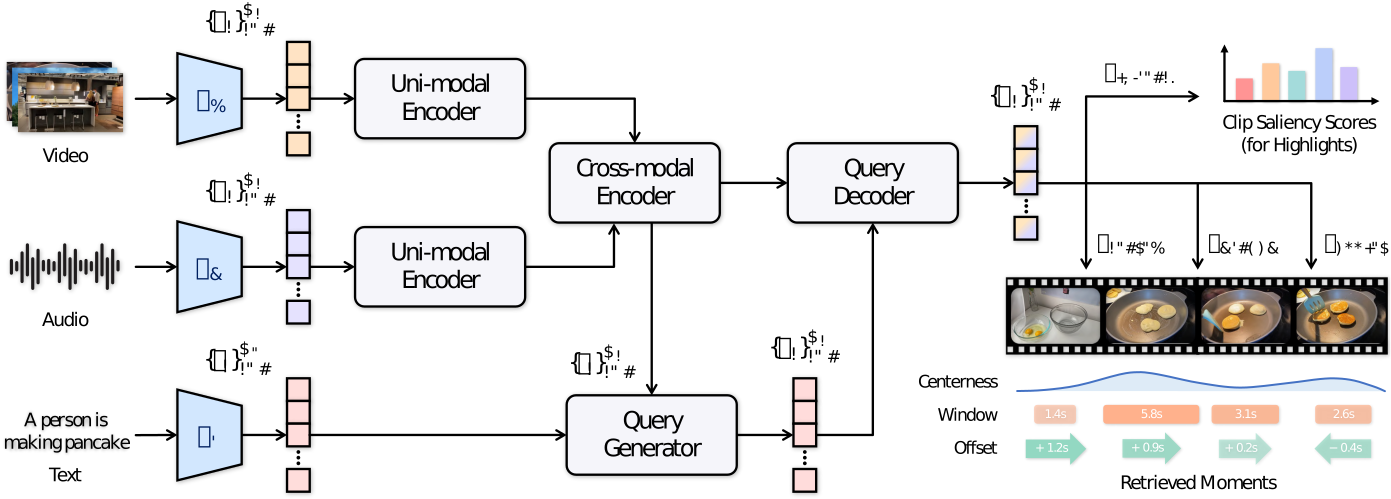
UMT is a unified and flexible framework which can handle different input modality combinations, and output video moment retrieval and/or highlight detection results.
https://github.com/tencentarc/umt
Last synced: 12 months ago
JSON representation
UMT is a unified and flexible framework which can handle different input modality combinations, and output video moment retrieval and/or highlight detection results.
- Host: GitHub
- URL: https://github.com/tencentarc/umt
- Owner: TencentARC
- License: other
- Created: 2022-03-14T09:10:03.000Z (over 4 years ago)
- Default Branch: main
- Last Pushed: 2024-04-15T13:20:31.000Z (about 2 years ago)
- Last Synced: 2025-05-07T21:36:11.293Z (about 1 year ago)
- Language: Python
- Size: 1.13 MB
- Stars: 212
- Watchers: 6
- Forks: 19
- Open Issues: 2
-
Metadata Files:
- Readme: README.md
- License: LICENSE
Awesome Lists containing this project
README
# Unified Multi-modal Transformers
[](https://doi.org/10.1109/CVPR52688.2022.00305)
[](https://arxiv.org/abs/2203.12745)
[](https://github.com/TencentARC/UMT/blob/main/LICENSE)
This repository maintains the official implementation of the paper **UMT: Unified Multi-modal Transformers for Joint Video Moment Retrieval and Highlight Detection** by [Ye Liu](https://yeliu.dev/), Siyuan Li, [Yang Wu](https://scholar.google.com/citations?user=vwOQ-UIAAAAJ), [Chang Wen Chen](https://web.comp.polyu.edu.hk/chencw/), [Ying Shan](https://scholar.google.com/citations?user=4oXBp9UAAAAJ), and [Xiaohu Qie](https://scholar.google.com/citations?user=mk-F69UAAAAJ), which has been accepted by [CVPR 2022](https://cvpr2022.thecvf.com/).
## Installation
Please refer to the following environmental settings that we use. You may install these packages by yourself if you meet any problem during automatic installation.
- CUDA 11.5.0
- CUDNN 8.3.2.44
- Python 3.10.0
- PyTorch 1.11.0
- [NNCore](https://github.com/yeliudev/nncore) 0.3.6
### Install from source
1. Clone the repository from GitHub.
```
git clone https://github.com/TencentARC/UMT.git
cd UMT
```
2. Install dependencies.
```
pip install -r requirements.txt
```
## Getting Started
### Download and prepare the datasets
1. Download and extract the datasets.
- [QVHighlights](https://huggingface.co/yeliudev/UMT/resolve/main/datasets/qvhighlights-a8559488.zip)
- [Charades-STA](https://huggingface.co/yeliudev/UMT/resolve/main/datasets/charades-2c9f7bab.zip)
- [YouTube Highlights](https://huggingface.co/yeliudev/UMT/resolve/main/datasets/youtube-8a12ff08.zip)
- [TVSum](https://huggingface.co/yeliudev/UMT/resolve/main/datasets/tvsum-ec05ad4e.zip)
2. Prepare the files in the following structure.
```
UMT
├── configs
├── datasets
├── models
├── tools
├── data
│ ├── qvhighlights
│ │ ├── *features
│ │ ├── highlight_{train,val,test}_release.jsonl
│ │ └── subs_train.jsonl
│ ├── charades
│ │ ├── *features
│ │ └── charades_sta_{train,test}.txt
│ ├── youtube
│ │ ├── *features
│ │ └── youtube_anno.json
│ └── tvsum
│ ├── *features
│ └── tvsum_anno.json
├── README.md
├── setup.cfg
└── ···
```
### Train a model
Run the following command to train a model using a specified config.
```shell
# Single GPU
python tools/launch.py ${path-to-config}
# Multiple GPUs
torchrun --nproc_per_node=${num-gpus} tools/launch.py ${path-to-config}
```
### Test a model and evaluate results
Run the following command to test a model and evaluate results.
```
python tools/launch.py ${path-to-config} --checkpoint ${path-to-checkpoint} --eval
```
### Pre-train with ASR captions on QVHighlights
Run the following command to pre-train a model using ASR captions on QVHighlights.
```
torchrun --nproc_per_node=4 tools/launch.py configs/qvhighlights/umt_base_pretrain_100e_asr.py
```
## Model Zoo
We provide multiple pre-trained models and training logs here. All the models are trained with a single NVIDIA Tesla V100-FHHL-16GB GPU and are evaluated using the default metrics of the datasets.
Dataset
Model
Type
MR mAP
HD mAP
Download
R1@0.5
R1@0.7
R5@0.5
R5@0.7
QVHighlights
UMT-B
—
38.59
39.85
model |
metrics
UMT-B
w/ PT
39.26
40.10
model |
metrics
Charades-STA
UMT-B
V + A
48.31
29.25
88.79
56.08
model |
metrics
UMT-B
V + O
49.35
26.16
89.41
54.95
model |
metrics
YouTube
Highlights
UMT-S
Dog
—
65.93
model |
metrics
UMT-S
Gymnastics
—
75.20
model |
metrics
UMT-S
Parkour
—
81.64
model |
metrics
UMT-S
Skating
—
71.81
model |
metrics
UMT-S
Skiing
—
72.27
model |
metrics
UMT-S
Surfing
—
82.71
model |
metrics
TVSum
UMT-S
VT
—
87.54
model |
metrics
UMT-S
VU
—
81.51
model |
metrics
UMT-S
GA
—
88.22
model |
metrics
UMT-S
MS
—
78.81
model |
metrics
UMT-S
PK
—
81.42
model |
metrics
UMT-S
PR
—
86.96
model |
metrics
UMT-S
FM
—
75.96
model |
metrics
UMT-S
BK
—
86.89
model |
metrics
UMT-S
BT
—
84.42
model |
metrics
UMT-S
DS
—
79.63
model |
metrics
Here, `w/ PT` means initializing the model using pre-trained [weights](https://huggingface.co/yeliudev/UMT/resolve/main/checkpoints/umt_base_pretrain_100e_asr-ebae4090.pth) on ASR captions. `V`, `A`, and `O` indicate video, audio, and optical flow, respectively.
## Citation
If you find this project useful for your research, please kindly cite our paper.
```bibtex
@inproceedings{liu2022umt,
title={UMT: Unified Multi-modal Transformers for Joint Video Moment Retrieval and Highlight Detection},
author={Liu, Ye and Li, Siyuan and Wu, Yang and Chen, Chang Wen and Shan, Ying and Qie, Xiaohu},
booktitle={Proceedings of the IEEE/CVF Conference on Computer Vision and Pattern Recognition (CVPR)},
pages={3042--3051},
year={2022}
}
```