https://github.com/tencentcloud/chat-demo-react-native
Build In-App Chat & Audio/Video Call & Live Streaming in minutes with UIKit components for React Native.
https://github.com/tencentcloud/chat-demo-react-native
android chat chat-app components im ios react-native uikit
Last synced: 10 months ago
JSON representation
Build In-App Chat & Audio/Video Call & Live Streaming in minutes with UIKit components for React Native.
- Host: GitHub
- URL: https://github.com/tencentcloud/chat-demo-react-native
- Owner: TencentCloud
- Created: 2023-04-07T09:14:28.000Z (over 3 years ago)
- Default Branch: main
- Last Pushed: 2025-03-03T09:14:15.000Z (over 1 year ago)
- Last Synced: 2025-08-22T18:53:15.090Z (11 months ago)
- Topics: android, chat, chat-app, components, im, ios, react-native, uikit
- Language: TypeScript
- Homepage:
- Size: 9.25 MB
- Stars: 27
- Watchers: 3
- Forks: 9
- Open Issues: 0
-
Metadata Files:
- Readme: README.md
- License: LICENSE
Awesome Lists containing this project
README
# Quick Run Demo
## About chat-uikit-react-native
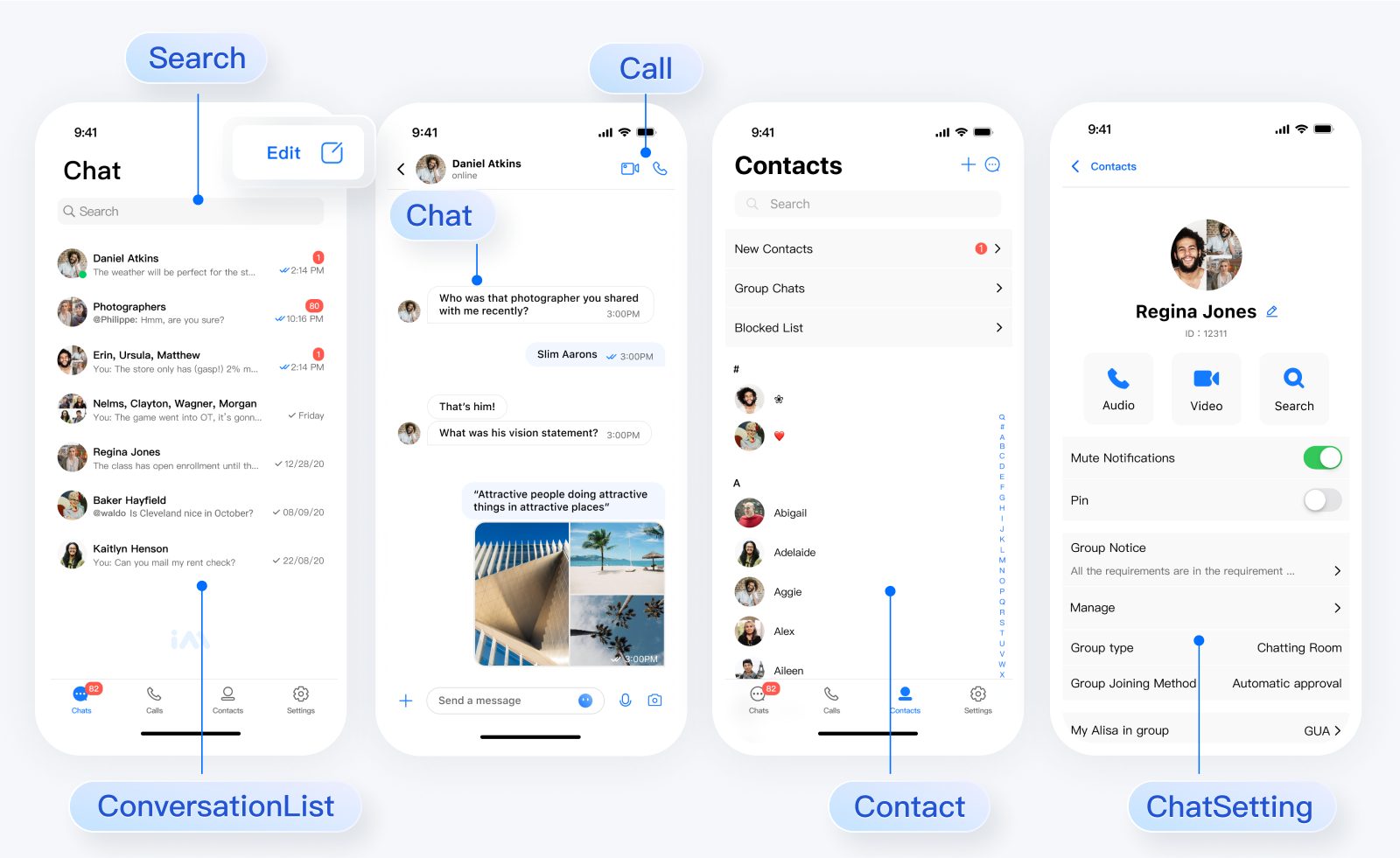
[chat-uikit-react-native](https://www.npmjs.com/package/@tencentcloud/chat-uikit-react-native) is a React Native UI component library based on Tencent Cloud Chat SDK. It provides universally used UI components that include ConversationList, Chat, and Group components. Leveraging these meticulously crafted UI components, you can quickly construct an elegant, reliable, and scalable Chat application.
> [!IMPORTANT]
> In respect for the copyright of the emoji design, the Chat Demo/UIKit project does not include the cutouts of large emoji elements. Please replace them with your own designed or copyrighted emoji packs before the official launch for commercial use. The default small yellow face emoji pack is copyrighted by Tencent Cloud and can be authorized for a fee. If you wish to obtain authorization, please submit a ticket to contact us.
>
> submit a ticket url:https://console.tencentcloud.com/workorder/category?level1_id=29&level2_id=40&source=14&data_title=Chat&step=1
#### 👉🏻 Try Online Demo
### Integrating chat-uikit-react-native
In this tutorial, you can build a free chatting application in just 10 minutes by integrating chat uikit using react native
[ ](https://www.youtube.com/watch?v=A76yF_7ReQE)
### Quick Run Demo
#### Step 1:Configuring the development environment
If this is your first time developing a React Native project, refer to the React Native official steps [set-up-your-environment](https://reactnative.dev/docs/0.75/set-up-your-environment) to configure the development environment.
If you encounter environment problems when creating or compiling the project, you can run `npx react-native doctor` for environment diagnostics.
#### Step 2:Install Demo Source Code
```shell
git clone https://github.com/TencentCloud/chat-demo-react-native.git
```
```shell
cd chat-demo-react-native/Demo
```
#### use yarn
```shell
yarn install
```
#### use npm
```shell
npm i --legacy-peer-deps
```
#### Step 3:Secure SDKAppID and secretKey
Set the relevant parameters `SDKAppID` and `SECRETKEY` in the example code of the `debug/GenerateTestUserSig.js` file:
SDKAppID and SecretKey can be accessed by the [Chat Console](https://console.trtc.io/app):

### Step 4:Run Demo
To compile and run the project, you need to use a real device or an emulator. It is recommended to use a real device. You can refer to the React Native official website [running-on-device](https://reactnative.dev/docs/running-on-device) for connecting a real device for debugging.
#### Android
- Enable Developer Mode on the phone and turn on the USB Debugging switch.
- Connect the phone with a USB cable, it is recommended to choose the Transfering File option, do not choose the Charge Only option.
- After confirming the phone is successfully connected, execute npm run android to compile and run the project.
```javascript
npm run android
```
#### iOS
- Connect the phone with a USB cable and open the project ios directory with Xcode.
- Configure the signing information according to the [running-on-device](https://reactnative.dev/docs/running-on-device?platform=ios) section on the React Native official website.
- Go to the ios directory and install dependencies.
```javascript
cd ios
pod install
```
- Go back to the root directory and execute npm run ios to compile and run the project.
```javascript
cd ../
npm run ios
```
## FAQs
1、When running npm run android and an error occurs as shown in the image, please reset the environment variables in the project root directory.

```javascript
export ANDROID_HOME=$HOME/Library/Android/sdk
export PATH=$PATH:$ANDROID_HOME/emulator
export PATH=$PATH:$ANDROID_HOME/platform-tools
```
2、If executing the Build command in Xcode prompts an issue with the node environment variables, please proceed as follows:

```javascript
cd ios
echo export NODE_BINARY=$(command -v node) > .xcode.env
```
## Documentation
- [Home page](https://trtc.io/document/66036?platform=react%20native&product=chat&menulabel=uikit)
- [@tencentcloud/chat-uikit-react-native npm](https://www.npmjs.com/package/@tencentcloud/chat-uikit-react-native)
- [Chat SDK](https://trtc.io/document/34309?platform=web&product=chat)
## Contact Us
Join a Tencent Cloud Chat developer group for Reliable technical support & Product details & Constant exchange of ideas.
- Telegram group (EN): [join](https://t.me/+1doS9AUBmndhNGNl)
- WhatsApp group (EN): [join](https://chat.whatsapp.com/Gfbxk7rQBqc8Rz4pzzP27A)
- Telegram group (ZH): [join](https://t.me/tencent_imsdk)
- WhatsApp group (ZH): [join](https://chat.whatsapp.com/IVa11ZkVmKTEwSWsAzSyik)